

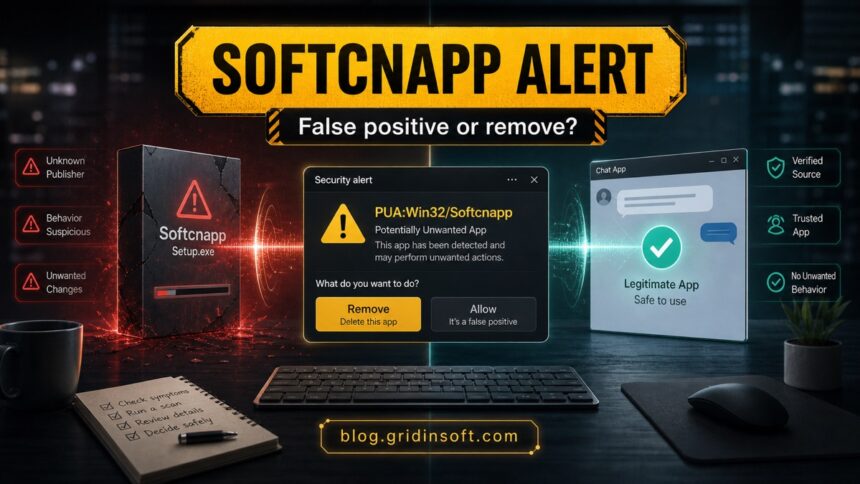
PUA:Win32/Softcnapp is a Microsoft Defender potentially unwanted app alert. It is often discussed as a false positive for legitimate software such as Viber, NZXT CAM, AnyDesk, Miro, or SUPERAntiSpyware updates, but you should not allow it blindly. Check the detected file name, where it came from, whether other security tools agree, and whether the alert returns after reboot. If the file is unknown, bundled with another installer, or browser/startup settings changed, remove it and scan the PC for leftovers.
Best first move: open Windows Security, copy the affected item name and path from Protection History, update Microsoft Defender security intelligence, and scan again. Allow the app only when you recognize it, downloaded it from the developer’s official site, and the alert does not return after cleanup.
What Is PUA:Win32/Softcnapp?
PUA:Win32/Softcnapp is a Defender detection name for a potentially unwanted application, not a single fixed virus family. Microsoft lists the detection in its threat encyclopedia, and Microsoft Defender’s PUA protection is designed to block apps that may install unwanted software, change the browsing experience, show intrusive advertising, or behave in a way users did not clearly agree to.
That generic nature is the reason Softcnapp searches are confusing. One user may see it on a Viber installer, another on a hardware utility, and another on a temporary file left by a downloader. The right decision depends less on the name alone and more on the file path, publisher, download source, and whether symptoms keep returning.
Is Softcnapp a False Positive?
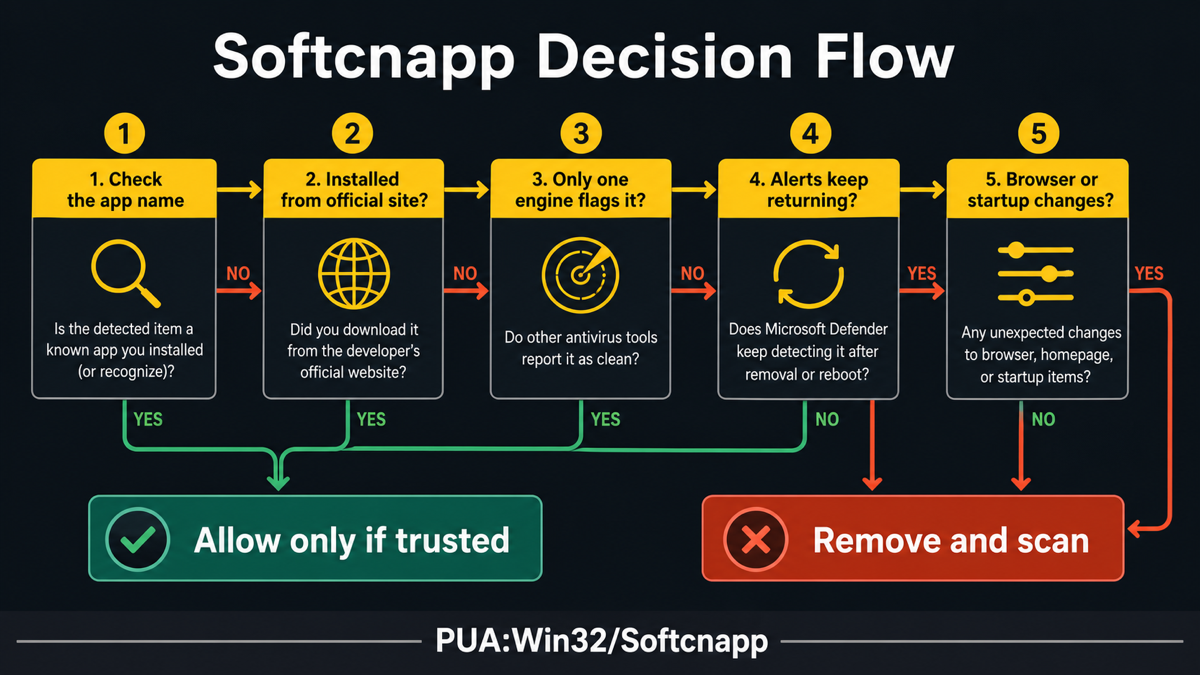
It can be. The most common safe-looking cases are known apps downloaded directly from the vendor, signed installers, and one-time detections that disappear after Defender updates. The riskiest cases are cracked installers, third-party download wrappers, unknown publishers, browser changes, or repeated detections after you remove the item.
| Situation | What to do |
|---|---|
| You know the app, downloaded it from the official website, and only Defender reports it. | Update Defender security intelligence, rescan, and wait before allowing. If the alert disappears, it was likely a temporary false positive. |
| The app is Viber, NZXT CAM, AnyDesk, Miro, or another legitimate utility, but the alert appears during an update. | Remove the blocked installer, download a fresh copy from the developer, and scan it before restoring or allowing anything from quarantine. |
| The path points to Downloads, Temp, AppData, a third-party installer wrapper, or a file you do not recognize. | Do not allow it. Remove the item, uninstall related bundled apps, and scan for scheduled tasks, startup entries, extensions, and leftover files. |
| The alert returns after reboot or after you uninstall the visible app. | Treat it as incomplete cleanup. A companion app, updater, scheduled task, or browser component may be recreating the detection. |
Known App Reports: Viber, NZXT CAM, AnyDesk, Miro
Softcnapp became widely discussed after Defender alerts appeared around the Viber desktop installer. Similar user reports mention NZXT CAM, AnyDesk, Miro, and SUPERAntiSpyware updates. These names do not automatically make every Softcnapp alert safe; they only show why the detection often needs a false-positive check before removal or allowlisting.
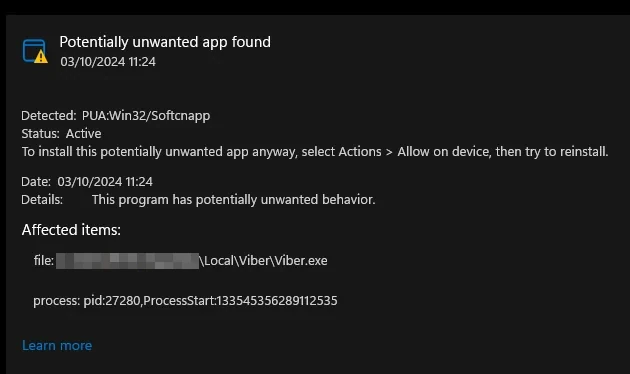
If the affected item is a familiar app, compare three details before allowing it:
- Source: was it downloaded from the developer’s official website or an app store, not a mirror, ad, bundle site, or cracked package?
- Publisher and path: does the file name, publisher, and folder match the app you intentionally installed?
- Repeat behavior: does the alert stop after an update and rescan, or does it return after reboot?
How to Remove PUA:Win32/Softcnapp Safely
If you do not recognize the item, or if it keeps returning, remove it instead of allowlisting it. Defender can quarantine the visible file, but a bundled updater, scheduled task, browser change, or startup entry can remain and trigger the same warning again.
- Open Protection History. Go to Windows Security -> Virus & threat protection -> Protection history and expand the Softcnapp entry. Note the affected item name, path, date, and action status.
- Update Defender and rescan. Install the latest security intelligence updates, then run a full scan. A stale false positive often disappears after this step.
- Remove the suspicious app or installer. Uninstall the related program if it came from a third-party bundle, cracked installer, fake update, or unknown publisher. Delete the original installer from Downloads or Temp if Defender only blocked the installer.
- Check browser and startup persistence. Review browser extensions, homepage/search settings, Startup Apps, Task Scheduler, and recent apps under
%LOCALAPPDATA%,%APPDATA%, and%TEMP%. - Reboot and scan again. If the alert returns after reboot, the visible file was not the only component.
When Softcnapp returns, or when the detected item came from a bundle, fake update, or unknown installer, run a full Gridinsoft Anti-Malware scan. It can check for detections, hidden files, scheduled tasks, startup entries, browser changes, bundled apps, and persistence that may remain after Defender removes the obvious item.
Defender can quarantine the visible file, but repeated alerts may mean a loader, scheduled task, service, browser change, or bundled component is recreating it. Scan the PC before trusting the cleanup.
Scan for Softcnapp leftoversWhen Is It Safe to Allow Softcnapp?
Only allow a Softcnapp detection when the evidence points to a false positive. That means the file is from the official developer, the app is expected on your PC, the publisher and path make sense, no browser or startup changes appeared, and a repeat scan after Defender updates is clean or no longer flags the file. If you are not sure, do not restore the item just to make the warning disappear.
How to Prevent Repeat Softcnapp Alerts
- Download installers directly from vendor websites or trusted stores, not ad results or mirror sites.
- Avoid cracked apps, repacks, driver updaters, and “recommended downloader” wrappers.
- Keep Microsoft Defender security intelligence current before deciding that an alert is stale.
- Review optional offers during installation and decline unrelated VPNs, toolbars, search helpers, or browser add-ons.
- Use the Microsoft Defender detection names guide when another alert appears with a different family or suffix.
- If the warning comes with redirects, search changes, or suspicious extensions, follow the PUA and browser hijacker cleanup guide.
Related PUA and Defender detections
Softcnapp sits in the same decision lane as other Microsoft Defender PUA alerts where the user has to decide whether a detection is a false positive, a bundled installer, or a recurring unwanted app. If the alert name changes, compare it with these nearby guides instead of allowing the file only because the family name is different:
- PUA:Win32/Vigua.A for bundled-app and unwanted-install behavior.
- PUA:Win32/Presenoker for adware-style PUA cleanup and false-positive checks.
- PUADlManager:Win32/OfferCore for downloader and optional-offer installers.
- PUA:Win32/GameHack when the warning follows cheats, trainers, or game mod tools.
Use the exact alert name, file path, publisher, and whether the warning returns after reboot to decide between allowing, removing, or doing a full cleanup scan.
FAQ
Is PUA:Win32/Softcnapp a virus?
Not always. It is a potentially unwanted app detection, which can include adware, bundled installers, unwanted browser behavior, or a false positive on a legitimate app. Treat unknown or recurring detections as a cleanup case.
Why does Defender show Softcnapp for Viber or NZXT CAM?
Defender may flag installer behavior, bundled offers, updater behavior, or reputation signals. If the app came from the official site and the alert disappears after updates and rescanning, it is more likely a false positive.
Should I click Allow in Windows Security?
Click Allow only when you recognize the app, trust the download source, and have confirmed that no other security tool or symptom points to unwanted behavior. If the file is unknown or the warning returns, remove it and scan.
What if Softcnapp keeps coming back?
Repeated alerts usually mean the original source remains: an updater, scheduled task, bundled app, browser extension, or downloaded installer. Remove the related app, check startup and browser settings, reboot, and scan again.
References
- Microsoft Security Intelligence. “PUA:Win32/Softcnapp.” Microsoft malware encyclopedia, accessed June 15, 2026. https://www.microsoft.com/en-us/wdsi/threats/malware-encyclopedia-description?Name=PUA%3AWin32%2FSoftcnapp&ThreatID=227565
- Microsoft Learn. “Detect and block potentially unwanted applications.” Microsoft Defender for Endpoint documentation, updated 2025, accessed June 15, 2026. https://learn.microsoft.com/en-us/defender-endpoint/detect-block-potentially-unwanted-apps-microsoft-defender-antivirus


It’s a windows defender false positive. In my computer (windows 11) defender marked *the shortcut* to viber as a threat, without having an updated version of Viber!
Additionally, today I got a report for an html file of mine (static, minimal scripting, more than a year old) containing PUA:Win32/Softcnapp. NO WAY!