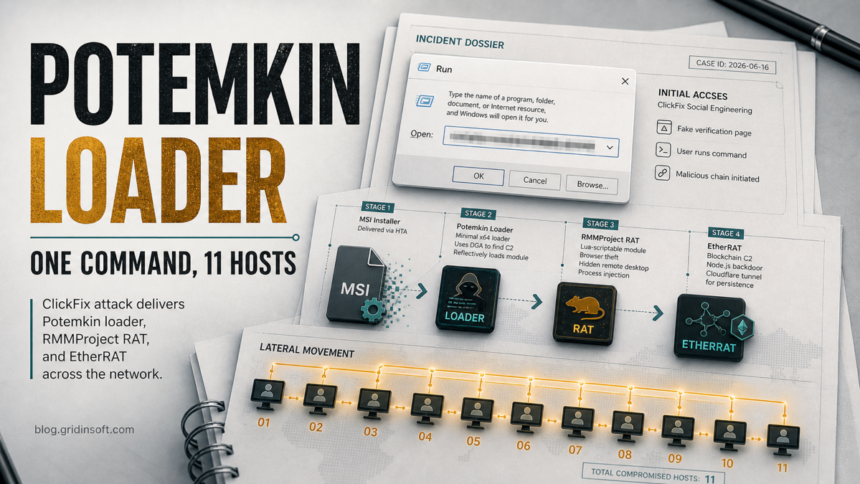
A recent ClickFix intrusion began with a fake verification prompt and ended with Potemkin Loader, RMMProject, and EtherRAT activity across more than 11 hosts. The important part is not the prompt itself; it is what happened after the user pasted a command into the Windows Run dialog. The first system became a loader foothold, the attacker fought Windows Defender, and the campaign moved from one endpoint into hands-on-keyboard lateral movement.
That makes this a practical warning for Windows users and small teams: if a website told someone to press Win+R, paste a command, and run it, treat the device as exposed until startup entries, scheduled tasks, browser data theft, and related hosts have been checked.
Who is affected
The documented case centers on a business network where the initial endpoint was not monitored when the ClickFix command ran. Home users are less likely to see domain-wide lateral movement, but the first-stage risk is the same: a fake CAPTCHA or verification page can lead to a local loader, credential theft, and persistence in the user profile.
Admins should pay special attention if a user reports a fake verification page, if Defender shows sudden exclusions or service changes, or if the same account appears on multiple hosts after the first alert. The report describes RMMProject collecting browser credentials and cookies, EtherRAT persistence through a per-user Run key, and tools such as Chisel, WMIExec, SMBExec, and a renamed Cloudflare tunnel during the later intrusion.
A separate RMM-server incident adds another reason to verify tunnel provenance: after attackers exploited N-central CVE-2026-18577, Cloudflare tunnels were registered as services on managed endpoints. Check a newly found tunnel against authorized deployment records, remote-session logs, and its local creation time.
Observed artifacts and what they mean
| Artifact or behavior | Why it matters |
|---|---|
Fake ClickFix prompt leading to Windows Run, pcalua.exe, mshta.exe, and a remote HTA |
This is the initial social-engineering step. Do not rerun or share the full command; preserve browser history, downloads, and security alerts for triage. |
%LOCALAPPDATA%\Microsoft\RunSearch\RunSearch.exe and HKCU\Software\Microsoft\Windows\CurrentVersion\Run\RunSearch |
This matches Potemkin Loader persistence. It can fetch and reflectively load the RMMProject module. |
%LOCALAPPDATA%\hyper-v.ver and %TEMP%\dll_debug.log |
Local state and logging clues can help responders distinguish a live loader from a one-time failed download. |
avast_update.bin with SHA-256 3b7ae925e2d64522b4f69b56285b05aeca8c5aab5ab46a9c02c4fafb69d881ce |
The recovered RMMProject DLL used browser credential and cookie theft, a hidden desktop module, and scripted tasks. |
WindowsHost under HKCU\Software\Microsoft\Windows\CurrentVersion\Run |
EtherRAT can relaunch a Node.js-based loader without a visible console window. Clearing the Run key alone may not be enough if the process and files remain. |
Scheduled tasks named msiInstall2 or ekShell2, files under C:\ProgramData\p\, and Defender service tampering |
These are signs the attacker moved beyond the first loader into persistence, reverse shell activity, and attempts to suppress protection. |
Renamed cloudflared, Chisel tunnels, WMIExec, or SMBExec activity |
These are network-level escalation clues. Check neighboring hosts, not only the machine where the ClickFix prompt appeared. |
What to do now
- Do not paste the command again. If the user only saw the fake page and did not run anything, close the tab, clear the download queue, and review browser notifications. If the command ran, continue with endpoint triage.
- Isolate the first machine. Disconnect it from the network or move it to a containment VLAN before checking other systems. Preserve Defender history and EDR alerts if available.
- Check user-level persistence. Review the Run keys for
RunSearchandWindowsHost, inspect%LOCALAPPDATA%,%TEMP%, andC:\ProgramData\p\, and look for unusual Node.js, mshta, msiexec, pcalua, PowerShell, or conhost launches. - Review Defender tampering. Alerts involving bulk exclusions, disabled services, or policy changes deserve immediate escalation. A visible quarantine can remove one payload while a loader, scheduled task, service change, or browser data theft remains.
- Scan before trusting the device again. After removing obvious startup entries and suspicious files, run a full security scan. Gridinsoft Anti-Malware can help check for dropped files, startup items, scheduled tasks, bundled modules, and related detections on Windows.
If the page or email made you download an invoice, coupon, tracking app, browser extension, or support tool, scan the PC before opening it again or logging into sensitive accounts.
Scan this Windows PC- Rotate passwords from a clean device. Because RMMProject targeted browser credentials and cookies, prioritize email, Microsoft/Google accounts, VPN, banking, password manager, and admin portals. Revoke active sessions where the service allows it.
- For managed networks, search laterally. Look for the same Run keys, scheduled tasks, renamed tunneling tools, remote execution artifacts, and unusual login paths on every host the affected account could reach.
For background on the broader trick, see our Fake CAPTCHA ClickFix malware guide and Verify You Are Human scam warning. If credentials or browser sessions may have been stolen, the infostealer response checklist is the safer next read.
FAQ
Is Potemkin Loader the same thing as ClickFix?
No. ClickFix is the social-engineering method: the page convinces the user to run a command. Potemkin Loader is the malware component observed after that command delivered an MSI.
What if I only opened the fake verification page?
Seeing the page is not the same as running the command. The higher-risk case starts when the user opens Run, Terminal, CMD, or PowerShell and executes what the page supplied.
Should home users worry about the 11-host detail?
The 11-host spread came from a business network, but home users should still treat a completed ClickFix command as a real infection risk. The same loader chain can steal browser data or create persistence on a single PC.
Can I remove only the Run key?
Not safely. The public report notes persistence and running processes that can rewrite entries. Kill suspicious processes, remove files, delete related tasks and Run values, scan the system, then reboot and check again.
References
- Anna Pham and Zach Rogers. “Someone’s Hands Are on Your Keyboard Then Your Whole Network. Courtesy of ClickFix, Potemkin, RMMProject and EtherRAT.” Published June 16, 2026, accessed June 17, 2026. Report.
- Microsoft Security. “Think before you ClickFix: Analyzing the ClickFix social engineering technique.” Microsoft, published August 21, 2025, accessed June 17, 2026. Analysis.