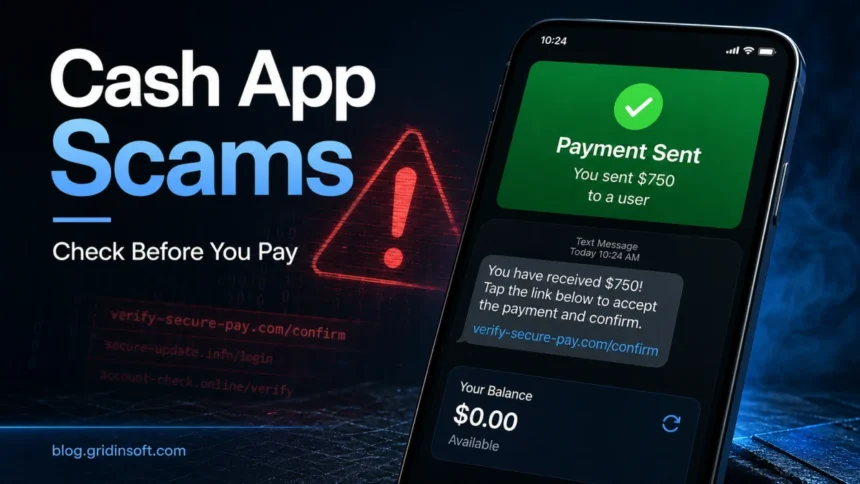
Cash App scams in 2026 usually do not start with a hacked app. They start with a fake text, a fake payment screenshot, a fake support number, a giveaway message, or someone pressuring you to send money before you verify the payment inside the real Cash App. If a message asks you to click a link, call a number, share a sign-in code or PIN, download remote-access software, pay a fee to receive money, or send a “refund” as a new payment, treat it as a scam.
The safest first move is simple: open Cash App yourself, check the Activity tab and your actual balance, and contact support only from inside the app or the official Cash App site. Do not trust screenshots, forwarded emails, social media DMs, or payment notices that are not visible inside your account.
Why This Page Was Updated for 2026
The old “top 10” version of this article was too general for the way people search now. Current search results reward pages that answer narrower problems: Cash App scam texts, fake payment notifications, fake support numbers, accidental-payment tricks, refund pressure, and what to do after sending money. Cash App also now publishes its own scam-education pages, and the CFPB ordered Block, Cash App’s operator, to pay $175 million and fix fraud-handling failures in 2025 [3]. That makes a practical, evidence-based update necessary.
Fast Check: Is This Cash App Message a Scam?
| What you see | What to do |
|---|---|
| A text says your account is locked, compromised, or has a pending payment. | Do not click the link or call the number. Open Cash App directly and check Activity, Security, and Support. |
| A buyer sends a screenshot that says payment is pending until you provide tracking, pay a fee, or upgrade your account. | Assume the screenshot is fake until the money appears in your Cash App balance. Never ship or refund based on a screenshot. |
| Someone says they sent money by accident and asks you to send it back. | Do not create a new payment. If the payment is real, use Cash App’s refund flow or ask the sender to cancel it. |
| Support asks for your PIN, sign-in code, full card number, remote access, or a test transaction. | End the conversation. Real support does not need those details to help you. |
| A giveaway, blessing, grant, or investment asks for a small fee first. | It is a scam. Cash App’s own scam guidance warns that pay-to-claim prizes and fake giveaways are common traps [1]. |
The Latest Cash App Scams to Watch
1. Cash App scam text messages
These messages usually claim that your account is suspended, a payment is waiting, a transaction was blocked, or your identity must be verified. The goal is to make you click a phishing link or call a scam support number. The link may lead to a fake Cash App login page; the phone number may lead to someone who asks for a sign-in code, PIN, or remote access.
Do not answer the text. If you did not request a login code or make the transaction mentioned in the message, open Cash App directly and review your account. If you clicked and entered credentials, change your PIN/password, secure the email or phone number tied to the account, and report the transaction through the app.
2. Fake Cash App payment notifications and screenshots
This is one of the strongest long-tail search intents for this topic. Sellers on OfferUp, Facebook Marketplace, Instagram, Craigslist, Discord, or TikTok may receive a screenshot showing that a payment was “sent” or “pending.” The scammer then asks the seller to ship an item, provide tracking, pay a release fee, or refund an overpayment.
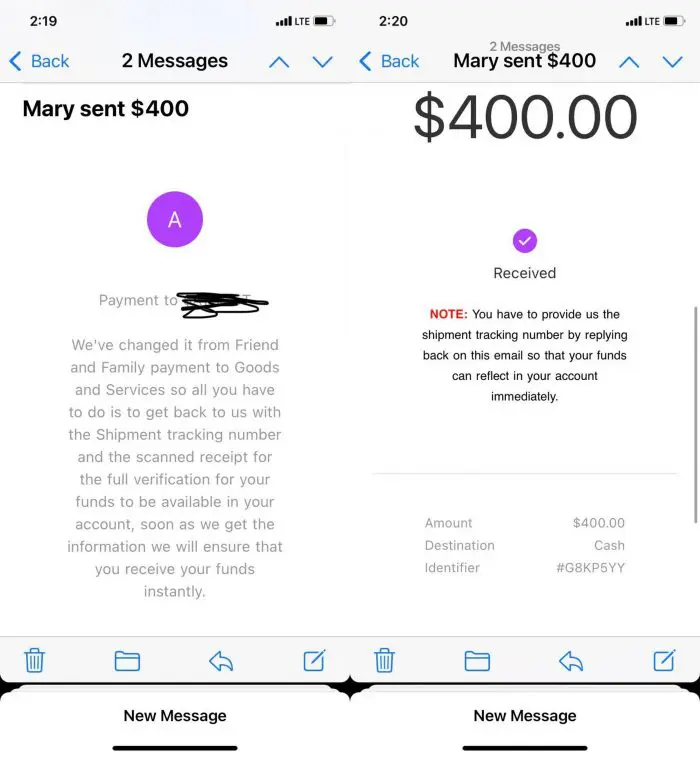
A real payment must be visible in your Cash App Activity and balance. A screenshot, email, or text message is not proof. If the buyer pressures you to ship quickly, refuses another verification method, or says you must pay to unlock the money, stop the deal.
3. Fake Cash App support numbers
Scammers place fake phone numbers in search results, PDFs, forums, social media replies, and AI-generated snippets. They pretend to be support and may ask you to install AnyDesk, TeamViewer, or another remote-access tool. Once they can see or control your phone or computer, they can steal codes, reset account access, or move money.
Use support paths you reach from inside Cash App or from the official website. If someone contacts you first about your balance, a refund, a security hold, or an account issue, treat that contact as suspicious.
4. Accidental payment and refund scams
The scammer says they sent you money by mistake and asks you to send it back. Sometimes no money arrived at all. Sometimes they used a stolen card or compromised account, then dispute the original payment after you send your own money back. Cash App’s own common-scam guide warns about this pattern and recommends not sending a new payment back to a stranger [1].
If you see a real unexpected payment, do not spend it and do not create a separate refund payment. Contact Cash App support through the app and use the official refund flow if needed.
5. Cash flipping, blessing, and investment scams
Cash flipping promises that a small payment will turn into a larger payout. The pitch may use phrases such as “blessing,” “money glitch,” “guaranteed return,” “mentor,” “grant,” or “limited slot.” The scammer may show edited screenshots and fake testimonials. The result is almost always the same: you send money first, then the scammer asks for another fee or disappears.
Cash App payments are fast and may be hard to reverse. Never send a payment to qualify for a reward, unlock a payout, or prove that your account is active.
6. Fake Cash App giveaways
Real giveaways are announced through official Cash App channels. Fake giveaways often arrive through DMs, lookalike accounts, typo domains, or posts that ask for a fee, PIN, sign-in code, Social Security number, or bank details. Cash App’s giveaway guidance says real giveaways do not require sensitive account information or payment to claim a prize [1].
7. Marketplace deposit and rental scams
Scammers use Cash App to collect deposits for concert tickets, pets, electronics, apartments, vehicles, shipping fees, and rental applications. The item may not exist. The listing may use stolen photos. The scammer may move the conversation off the marketplace to avoid platform protections.
For expensive goods or rentals, verify the seller, inspect the item or property, and use a payment method with buyer protection. Cash App is best for people you know and trust, not for blind purchases from strangers.
8. Crypto and Bitcoin scams through Cash App
Cash App supports Bitcoin, so scammers use it in fake investment groups, romance scams, recovery scams, and celebrity-promo traps. A stranger who promises guaranteed profit, asks you to buy Bitcoin and send it to a wallet, or says you must pay a tax/withdrawal fee is steering you into an irreversible payment.
If the pitch involves crypto recovery, guaranteed returns, or a celebrity investment code, compare it with our guides to common cryptocurrency scams and crypto recovery scams.
9. Romance, job, and task scams
Cash App is often the payment rail, not the whole scam. A fake romantic partner, recruiter, customer, landlord, buyer, or “task manager” builds trust first, then asks for money. The reason can sound personal or urgent: medical bills, account problems, shipping, equipment, background checks, taxes, or a temporary loan.
Pause when a person you have never met asks for payment through a fast transfer app. For broader recovery steps, see our guide on what to do if you were scammed.
What to Do If You Already Paid
- Stop sending money. A second fee, refund, tax, unlock payment, or verification transfer is part of the same scam.
- Open Cash App directly. Review Activity and dispute/report the transaction through the app if the option is available.
- Contact your linked bank or card issuer. If the payment used a linked debit card, credit card, or bank account, report the fraud quickly.
- Change account credentials. Change your Cash App PIN/password, secure your email, and remove unknown devices or sessions.
- If you installed remote-access software, disconnect and clean the device. Uninstall the tool, change passwords from a different trusted device, and scan for malware. Gridinsoft Anti-Malware can help check for suspicious remote-access tools, stealers, and other unwanted software.
- Report the scam. The FTC recommends reporting mobile-payment scams at ReportFraud.ftc.gov [2]. Keep screenshots, usernames, phone numbers, email headers, transaction IDs, and wallet addresses.
How to Prevent Cash App Scams
- Verify inside the app, not in the message. A real payment should show in Activity and your balance.
- Do not share sign-in codes, PINs, or full card details. No legitimate helper needs them.
- Turn on Security Lock and notifications. Use biometric/PIN confirmation for payments and monitor every alert.
- Block payment requests from people outside your contacts. This reduces random request and accidental-payment scams.
- Keep only the money you need in your balance. Move unused funds back to a bank or credit union account when practical.
- Check suspicious links before visiting them. If a message points to a strange domain, scan the URL with the Gridinsoft Website Reputation Checker before opening it.
- Use strong, unique passwords on your email and phone account. A compromised email or SIM-swap attempt can lead to Cash App takeover.
FAQ
Can someone fake a Cash App payment screenshot?
Yes. Screenshots, emails, and text notifications can be edited or generated. Only the Activity tab and your real Cash App balance prove that a payment arrived.
Is a Cash App text with a link real?
Treat any unexpected Cash App text with a link, phone number, account-lock warning, prize, or payment-release instruction as suspicious. Open Cash App directly instead of using the link.
Can Cash App refund scam payments?
Sometimes, but it depends on the transaction and how quickly you report it. Report the payment in Cash App, contact your linked bank or card issuer, and save all evidence.
What if someone sent me money by mistake?
Do not send a new payment back to them. If the payment is real, use Cash App’s official refund flow or ask support what to do. A new payment can leave you responsible if the original transfer is later reversed.
Does Cash App support ask for my PIN or sign-in code?
No legitimate support process should require your PIN, sign-in code, remote access, or a test payment. Anyone asking for those is trying to take control of your account or money.
References
- Cash App. “Avoid These 9 Common Scams” and related Outsmart Scams guidance. Cash App, accessed June 5, 2026. https://cash.app/outsmart-scams/common-scams
- Federal Trade Commission. “Mobile Payment Apps: How To Avoid a Scam When You Use One.” FTC Consumer Advice, accessed June 5, 2026. https://consumer.ftc.gov/articles/mobile-payment-apps-how-avoid-scam-when-you-use-one
- Consumer Financial Protection Bureau. “CFPB Orders Operator of Cash App to Pay $175 Million and Fix Its Failures on Fraud.” CFPB, January 16, 2025, accessed June 5, 2026. https://www.consumerfinance.gov/about-us/newsroom/cfpb-orders-operator-of-cash-app-to-pay-175-million-and-fix-its-failures-on-fraud/