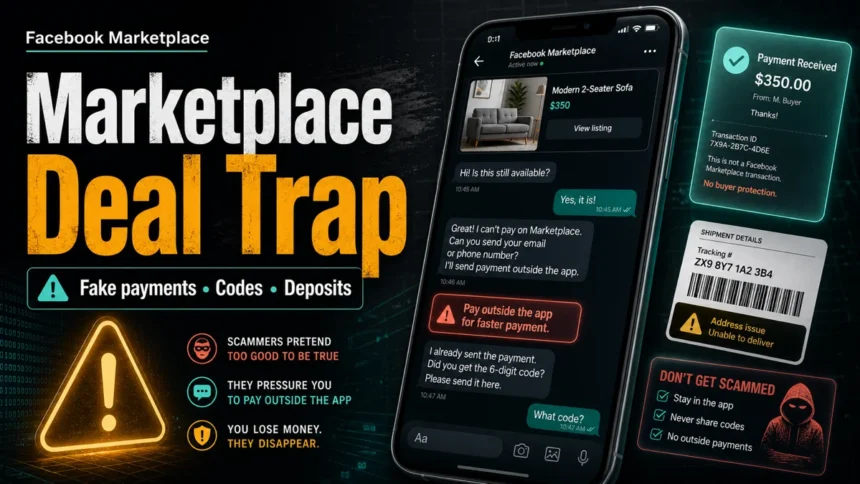
Facebook Marketplace scams usually start when the other person tries to remove proof, payment protection, or inspection time. Stop the deal if a buyer or seller asks for a verification code, sends a payment or shipping link, wants Zelle, Cash App, Venmo, PayPal friends-and-family, gift cards, wire transfer, crypto, or asks for a deposit before you inspect the item. Keep the conversation in Facebook or Messenger, verify payment inside the real payment account, and do not send money or release an item because of a screenshot.
The safest rule is simple: if the deal gets faster, less traceable, or harder to reverse, pause it. Meta warns Marketplace users to watch for suspicious payment, shipping, and off-platform behavior, while the FTC advises buyers and sellers to avoid payment methods that remove marketplace protections or rely only on screenshots and messages [1] [2] [3].
Fast Facebook Marketplace Scam Checklist
- They ask for a code. Never share a login, Google Voice, Facebook, email, bank, or payment-app verification code.
- They send a link. Do not sign in, pay, ship, or “verify” through a link sent in chat, text, or email. Open Facebook, Messenger, PayPal, your bank, or the shipping carrier yourself.
- They want payment outside the normal flow. Zelle, Cash App, Venmo, PayPal friends-and-family, gift cards, wire transfer, crypto, and checks can be difficult to reverse.
- They need a deposit first. Do not pay a holding fee, delivery fee, rental deposit, vehicle deposit, or courier charge before you inspect the item or verify the listing.
- They show a payment screenshot. Treat screenshots, emails, and “pending release” notices as untrusted until the money appears in your real account.
- The price is unreal. A cheap console, phone, sofa, apartment, vehicle, or ticket can be a copied-photo listing, empty-box trick, fake rental, or deposit scam.
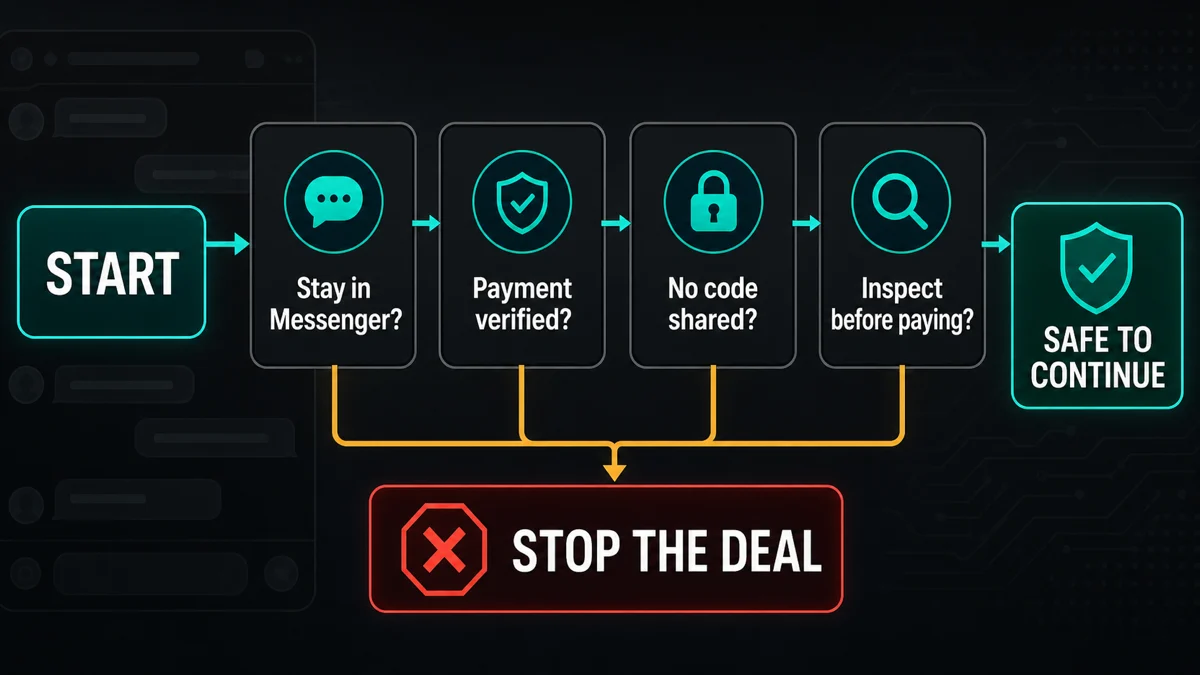
Buyer vs Seller Red Flags
| Situation | Risk and safer move |
|---|---|
| You are buying and the seller asks for a deposit | High risk. Inspect local items first. For shipped items, use a protected marketplace or payment flow, not a private transfer. |
| You are buying and the seller sends a payment or shipping link | Open the real app or typed website yourself. Scam links can steal Facebook, email, bank, or card details. |
| You are selling and the buyer asks for your phone number or code | Likely verification-code theft. A real buyer does not need a one-time code from your phone or email. |
| You are selling and the buyer says payment is pending | Do not ship or hand over the item until the money appears in your account, not only in a screenshot or email. |
| Either side wants to move to WhatsApp, Telegram, email, or text immediately | Pause. Off-platform chat removes evidence and often comes before phishing, fake payment, or pressure tactics. |
Common Facebook Marketplace Scams in 2026
Fake payment screenshots and pending-payment emails
A buyer may claim they paid and send a screenshot, email, or “business account” notice that says the funds are pending until you ship, provide tracking, refund an overpayment, or pay a release fee. Do not rely on the message. Check your PayPal, bank, Cash App, Venmo, or other account directly. If the payment is not visible there, treat the deal as unpaid.
This is the same payment-pressure pattern covered in our Cash App scams guide, but on Marketplace it often targets sellers of phones, laptops, consoles, furniture, and tickets.
Verification-code scams
In this scam, a buyer says they need to prove you are real and asks you to read back a code sent to your phone or email. That code may be for Google Voice, Facebook, email, a payment app, or a password reset. If you share it, the scammer can pass a login challenge or attach an account to your number. Never send one-time codes to another user.
Off-platform payment and fake checkout links
Scammers often say Marketplace payment is broken, fees are too high, or delivery is cheaper through another service. Then they push Zelle, Cash App, Venmo, PayPal friends-and-family, crypto, gift cards, bank transfer, or a fake checkout page. Once the transaction leaves a protected flow, recovery becomes much harder.
If a link was sent in chat, run it through the Gridinsoft Website Reputation Checker before entering credentials or payment details. A copied login page can look convincing even when the domain is not Facebook, Meta, PayPal, or a real carrier.
Deposit, rental, and vehicle scams
Deposits are common in fake apartment, furniture delivery, vehicle, ticket, and high-demand item scams. The seller may say many people are interested, the item is in storage, the landlord is traveling, or a courier will bring it after a small payment. Do not pay before inspection, identity verification, and a clear transaction record. For dealership-specific cases, our fake car dealership website investigation shows how to verify the dealer, VIN, inspection, and payment recipient separately.
Too-good-to-be-true listings and copied photos
Very low prices create urgency. Watch for stock photos, copied descriptions, brand-new seller accounts, no local inspection option, vague pickup locations, and wording such as “box only” or “photo” hidden in the description. Ask for fresh photos from specific angles and compare the price against normal resale value before meeting or paying.
Shipping, courier, and label tricks
A scammer may send a fake shipping label, fake escrow page, fake delivery confirmation, or “address issue” message that leads to a payment page. For sellers, do not ship until payment is settled. For buyers, do not pay a private courier or insurance fee outside the platform just because the seller sends a tracking-looking page.
Overpayment and refund pressure
A buyer may send a fake overpayment notice and ask you to return the difference. Another version says you must refund through a different method because the original payment is locked. Do not refund money that has not cleared in your real account. If a real overpayment appears, work through the payment provider’s official dispute or refund process.
Phishing links and fake support messages
Marketplace scams can turn into account theft. A scammer may send a “Meta support,” “payment verification,” “delivery issue,” or “account restriction” link. Open Facebook or Meta support pages yourself, not through the link. If the message came through Messenger and looks suspicious, our Facebook Messenger virus and scam link guide explains the same account-safety workflow.
How to Buy Safely on Facebook Marketplace
- Keep the conversation in Facebook or Messenger until the transaction is complete.
- Open payment, shipping, and account pages yourself instead of using links from the other person.
- Check the seller profile, listing history, photos, pickup location, and price against normal resale value.
- Ask for fresh item photos when the item is expensive, commonly counterfeited, or easy to hide damage on.
- For local deals, meet in a public place, inspect the item first, and avoid deposits.
- For shipped deals, use a payment method with a clear dispute path and never pay through gift cards, crypto, wire transfer, or friends-and-family transfers.
How to Sell Safely on Facebook Marketplace
- Do not share phone, email, Facebook, Google Voice, payment-app, or bank verification codes.
- Do not ship or release an item based on a screenshot, email, or “pending payment” message.
- Check the payment inside the real payment account, not through a link from the buyer.
- Avoid checks, gift cards, wire transfers, cryptocurrency, and overpayment/refund stories.
- Keep screenshots, profile links, payment records, and shipping receipts if the deal starts to look suspicious.
- If the buyer sends a file, label, invoice, or document, do not open it on your main device until you verify the source.
What to Do If You Already Got Scammed
- Stop sending money, codes, or items. A second payment to “unlock” shipping, refund, or account recovery is usually another stage of the scam.
- Save evidence. Keep listing URLs, usernames, profile links, chat screenshots, payment receipts, email headers, phone numbers, domains, and shipping numbers.
- Report the account and listing in Facebook. Use Facebook’s reporting flow from the real app or website.
- Contact the payment provider quickly. Card and debit disputes have deadlines. Bank transfers, crypto, gift cards, and friends-and-family payments are harder to recover.
- Secure accounts if you shared a code or clicked a link. Change your Facebook and email passwords, revoke unknown sessions, enable two-factor authentication, and check recovery email/phone settings.
- Scan your device if you downloaded or opened anything. Marketplace scams sometimes use fake shipping documents, invoices, browser extensions, or remote-support tools. Use a trusted scanner such as Gridinsoft Anti-Malware if the device shows popups, unknown processes, or browser redirects.
For broader scam recovery, use our what to do after getting scammed checklist. For non-Facebook marketplace patterns, compare this page with the OfferUp scams guide, eBay scams guide, and online shopping scams guide.
FAQ
Is Facebook Marketplace itself a scam?
No. Facebook Marketplace is a real platform, but scammers use it to contact buyers and sellers. The danger usually appears when someone pushes you into codes, links, deposits, private shipping, or payment methods that remove proof and protection.
Why does a Facebook Marketplace buyer ask for my phone number?
Sometimes it is normal logistics, but it is risky when the buyer immediately asks for a phone number and then asks for a verification code. Keep the chat in Messenger when possible and never send one-time codes.
Is Zelle, Cash App, Venmo, or PayPal safe for Facebook Marketplace?
It depends on the transaction and payment setting, but it is risky with strangers when the payment is irreversible, marked friends-and-family, or verified only by screenshot. For shipped items, use a method with a clear buyer/seller dispute path.
Should I pay a deposit for a Facebook Marketplace item?
Usually no. Deposits are a common scam for rentals, vehicles, furniture delivery, tickets, and high-demand electronics. Inspect local items first and avoid private courier or holding fees from strangers.
What if I already sent a verification code?
Change the password for the account connected to that code, review active sessions, remove unknown devices, enable two-factor authentication, and check recovery email and phone settings. If the code was for Google Voice, email, Facebook, or a payment app, secure that service immediately.
References
- [1] Facebook Help Center. “About scams on Facebook Marketplace.” Meta, accessed June 11, 2026. https://www.facebook.com/help/2374002556073992
- [2] Federal Trade Commission. “Buying From an Online Marketplace.” FTC Consumer Advice, November 2024, accessed June 11, 2026. https://consumer.ftc.gov/articles/buying-online-marketplace
- [3] Alvaro Puig. “Selling stuff online? Here’s how to avoid a scam.” FTC Consumer Advice, July 27, 2022, accessed June 11, 2026. https://consumer.ftc.gov/consumer-alerts/2022/07/selling-stuff-online-heres-how-avoid-scam
After uninstalling the suspicious app or deleting the visible threat, use Gridinsoft Anti-Malware to check hidden files, startup entries, scheduled tasks, bundled apps, browser changes, and other persistence points that can restore malware.
Download Anti-Malware