

If you have been scammed online, stop contact with the scammer and call the bank, card issuer, payment app, or exchange immediately using a number from its official app, website, or the back of your card. Secure your email and financial accounts from a trusted device, disconnect any computer or phone the scammer accessed, save the evidence, and file reports. Do not pay a “recovery expert” who promises to get the money back. Fast action cannot guarantee a refund, but it gives payment providers and investigators the best chance to limit the loss.
If you are still unsure whether the situation was fraud, use the “did I get scammed?” warning-sign checklist. If money, credentials, personal information, or device access has already been exposed, continue with the recovery steps below.
What to do in the first hour after being scammed
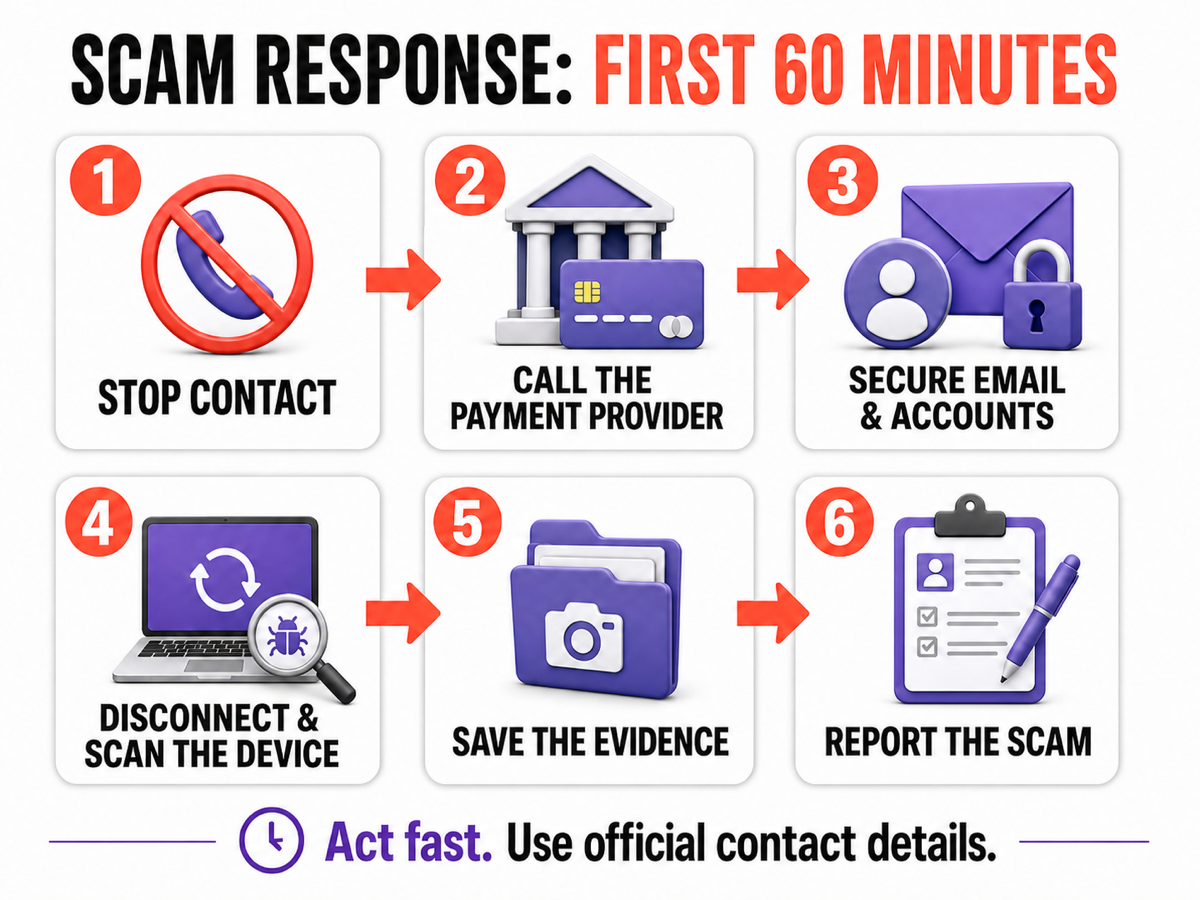
- Stop contact without deleting the conversation. Do not argue, threaten the scammer, send another payment, or follow a new “verification” link. Capture the messages and transaction details, then block the account or number.
- Call the payment provider now. Use official contact details, not a phone number, QR code, or support link supplied by the scammer. Ask the fraud team to stop, recall, dispute, or flag the transaction and secure the account.
- Protect your email first. Email is often the reset key for banking, shopping, social media, and cloud accounts. From a clean device, change the email password, sign out other sessions, check forwarding rules and recovery details, and enable multi-factor authentication.
- Disconnect a device the scammer controlled. Turn off Wi-Fi or unplug the network cable. Do not log in to banking, email, a password manager, or a crypto wallet on that device until it has been checked.
- Save evidence. Keep receipts, order numbers, transaction IDs, email headers, chat exports, usernames, phone numbers, website addresses, wallet addresses, and the exact time of each event.
- Report the scam. Notify the platform where contact happened and the appropriate fraud or cybercrime agency. In the United States, the FTC and FBI’s Internet Crime Complaint Center are the main starting points.[1][2]
- Warn connected people and organizations. Tell an employer if a work account or device was involved. Tell contacts if the scammer could impersonate you. If an identity document was exposed, follow the issuer’s replacement guidance.
Can you get your money back after an online scam?
Sometimes, but the outcome depends on the payment method, whether the payment was authorized, the provider’s rules, local law, and how quickly you report it. Never describe a knowingly sent payment as an unauthorized card transaction. Tell the fraud team exactly what happened: you were deceived, what you expected to receive, when you realized it was a scam, and what evidence you have.
| How you paid | What to do immediately |
|---|---|
| Credit or debit card | Call the issuer, lock or replace the card if details were exposed, and ask how to dispute the charge. Explain whether the charge was unauthorized or whether goods or services were not delivered as promised. |
| Bank or wire transfer | Ask the bank’s fraud team for an urgent recall and for the recipient account to be flagged. A completed transfer can be difficult to recover, but rapid reporting still matters. |
| Payment app | Report the recipient and transaction inside the official app, then contact the linked bank or card issuer. Refund rules vary, so do not assume either that recovery is guaranteed or that it is impossible. |
| PayPal or marketplace checkout | Open a dispute through the official Resolution Center or order page. Keep the case inside the platform and upload proof that the item, service, or seller was not as represented. |
| Gift card | Contact the issuer, keep the card and receipt, and provide the card number only through the issuer’s official fraud channel. Ask whether the balance can be frozen or refunded. |
| Cryptocurrency | Contact the exchange or wallet provider used to send the funds and provide the transaction hash and destination address. Blockchain transfers are generally not reversible, but an exchange may be able to flag an account or preserve records for investigators. |
| Cash or mailed package | Contact the carrier immediately and ask whether delivery can be intercepted. If the handoff already happened, preserve tracking and recipient details for the police report. |
The FTC’s payment-method guidance likewise recommends contacting the company that handled the payment and asking whether it can be reversed.[1] A bank, app, exchange, or police report number may also help establish a timeline, but none of these steps guarantees recovery.
If you shared a password, card number, or identity information
Work from a device the scammer did not control. Secure the main email account first, then banking, payment apps, password managers, shopping accounts, social media, and cloud storage.
- Change every exposed or reused password to a unique one.
- Sign out other sessions and remove unknown devices, app passwords, passkeys, and recovery addresses.
- Turn on multi-factor authentication, preferably with an authenticator app or security key where available.
- Check email forwarding rules, filters, mailbox delegates, and deleted messages for changes you did not make.
- Replace exposed cards and review recent transactions and account-profile changes.
- If a Social Security number or other identity document was exposed, create a recovery plan and consider a fraud alert or credit freeze through the official IdentityTheft.gov process.[3]
- If a phone number was taken over, contact the mobile carrier, recover the number, add an account PIN, and then reset important passwords.
Do not change sensitive passwords on a computer that still has an active remote-access session, an unknown browser extension, or a file you ran for the scammer. The new credentials could be captured again.
If you downloaded a file or gave the scammer remote access
Disconnect the affected Windows PC from the internet, but leave it powered on if you need to note the remote-access program, open windows, or file names. Use another trusted device to contact the bank and change critical passwords. When the financial accounts are contained, return to the offline PC and record any remote-support software, new extensions, unknown applications, or files the scammer asked you to run.
Uninstalling the visible remote-access app or deleting one download may not remove everything created during the session. A loader, scheduled task, service, startup entry, browser change, or bundled module can remain and recreate symptoms after reboot. Run a full Gridinsoft Anti-Malware scan, remove detections, reboot, and scan again if pop-ups, redirects, blocked connections, unknown logins, or security warnings return. The scan can check hidden files, startup entries, scheduled tasks, browser changes, and persistence; it cannot reverse a payment, restore a stolen password, or prove that no data was viewed.
If the page or email made you download an invoice, coupon, tracking app, browser extension, or support tool, scan the PC before opening it again or logging into sensitive accounts.
Scan the device after a scam downloadIf the scammer had administrator access, disabled security controls, accessed a password manager or crypto wallet, or activity continues after cleanup, treat the device as high risk. Back up personal documents carefully and consider a clean Windows reset or help from a trusted local technician. For a known remote-support tool, the unexpected ScreenConnect cleanup guide shows the kind of access and persistence checks to perform.
What evidence should you save?
Create one folder and a short timeline. Keep copies rather than forwarding original messages to strangers who offer help.
- the scammer’s display name, username, phone number, email address, and profile URL;
- website URLs, order pages, advertisements, and the page that requested payment;
- screenshots or exports of the full conversation, including dates and times;
- receipts, bank references, transaction IDs, crypto transaction hashes, and destination wallet addresses;
- the names of downloaded files, installed apps, browser extensions, and remote-access tools;
- support case numbers from the bank, app, marketplace, exchange, police, and reporting agencies.
Do not upload identity documents, bank statements, seed phrases, passwords, or unredacted payment details to public forums. Give sensitive evidence only to the verified organization handling the case.
Where should you report an online scam?
- Payment provider: first priority when money moved or payment credentials were exposed.
- Platform or marketplace: report the account, listing, advertisement, page, and transaction.
- United States: report consumer fraud to the FTC and internet-enabled crime to IC3.[1][2]
- Outside the United States: use the national cybercrime reporting center, consumer-protection agency, financial regulator, or local police service for your country.
- Police or emergency services: contact them promptly when there are threats, stalking, blackmail, identity-document theft, a large transfer, or immediate physical danger.
- Employer or school: report the incident when their device, account, data, or payment process may be affected.
Reporting does not automatically produce a refund, but it creates a record and gives platforms, financial institutions, and investigators information that can connect related cases. IC3 notes that rapid reporting can support efforts to recover lost funds.[2]
Do not get scammed twice by a recovery service
Victims are often contacted by people claiming to be hackers, investigators, law firms, government agents, or “fund recovery departments.” Treat an unsolicited promise to recover everything for an upfront fee, tax, wallet activation, remote-access session, or seed phrase as another scam.
Use only contact information you independently verify on the bank, platform, regulator, police, or government website. A real organization may ask for evidence through its official case system; it will not need your password, authentication code, full crypto seed phrase, or another payment to “unlock” recovered money. For crypto cases, the crypto scam guide explains common wallet, investment, and recovery traps.
FAQ
Can I get my money back if I was scammed online?
Possibly. Card disputes and payments that have not settled may offer better recovery options than cash, wire, gift card, or crypto payments, but every case depends on the provider and local law. Contact the payment provider immediately and describe the transaction accurately.
Can the police do anything about an online scam?
Police and cybercrime agencies can record the crime, connect reports, request records, and investigate cases. They cannot promise a refund, but a prompt report is especially important for threats, identity theft, large transfers, and internet-enabled financial crime.
What if I clicked a scam link but entered nothing?
Close the page. If nothing downloaded, no extension or app was installed, no browser permission was accepted, and no credentials were entered, the risk is lower. Review downloads and extensions, clear unwanted notification permissions, and scan the device if anything ran or the browser behaves differently.
Should I reset my computer after a remote-access scam?
Not every case requires a reset. Disconnect first, remove the remote-access tool, scan the system, and change passwords from a clean device. A clean reset becomes the safer option when the scammer had administrator access, security settings were changed, malware persists, or you cannot establish what happened.
How do I know whether I was actually scammed?
Missing money or goods, a fake identity, an impossible return, pressure to use gift cards or crypto, a request for remote access, and demands for more money are strong indicators. Use the linked scam-sign checklist if the loss or exposure is not yet clear.
References
- Federal Trade Commission. “What To Do if You Were Scammed.” Consumer Advice, July 2022, accessed July 22, 2026. consumer.ftc.gov/articles/what-do-if-you-were-scammed
- Federal Bureau of Investigation, Internet Crime Complaint Center. “Internet Crime Complaint Center (IC3).” Accessed July 22, 2026. ic3.gov
- Federal Trade Commission. “IdentityTheft.gov: Report Identity Theft and Get a Recovery Plan.” Accessed July 22, 2026. identitytheft.gov



I got scammed for $82.01 for an order that said I placed using my info. got on it right away, and my credit card was refunded. this happened in January 2024. now my credit card has put the charge through again April 8. saying that I have to get refund through merchant because it looks like I placed the order. the merchant does not exist and I am OUT THE MONEY.
What else can I do