The current official LDPlayer 14 bootstrap installer is not broadly detected as malware, but that conclusion applies to one exact file—not every download carrying the name. On July 23, 2026, the official download produced SHA-256 55b61915f530bd597b380abed9b7bb59947291e8af4a507516136f42c5f89a1f, a 3,363,304-byte executable with a valid signature from JUST OKAY LIMITED. A fresh VirusTotal analysis showed two K7 “Unwanted-Program” labels out of 70 engines; Microsoft, Malwarebytes, Google, and Gridinsoft did not flag that file.[1]
That is a limited safety snapshot, not a permanent certificate. If the source, hash, size, or signer differs, stop and investigate the file as a different installer. The result also does not cover third-party repacks, future LDPlayer releases, or every component the small bootstrap program may download later.
What the exact LDPlayer 14 check found
We followed the LDPlayer 14 button on ldplayer.net to the vendor download host and downloaded the installer without running it. The file matched the hash already associated with the reviewed LDPlayer 14 beta build.
| Check | Observed result |
|---|---|
| Official download host | setup.ldrescdn.com |
| SHA-256 | 55b61915f530bd597b380abed9b7bb59947291e8af4a507516136f42c5f89a1f |
| File size | 3,363,304 bytes (3.21 MB) |
| Digital signature | Valid; signer: JUST OKAY LIMITED |
| VirusTotal snapshot | 2/70, both K7 “Unwanted-Program” labels |
| Gridinsoft result | Undetected in the same snapshot |
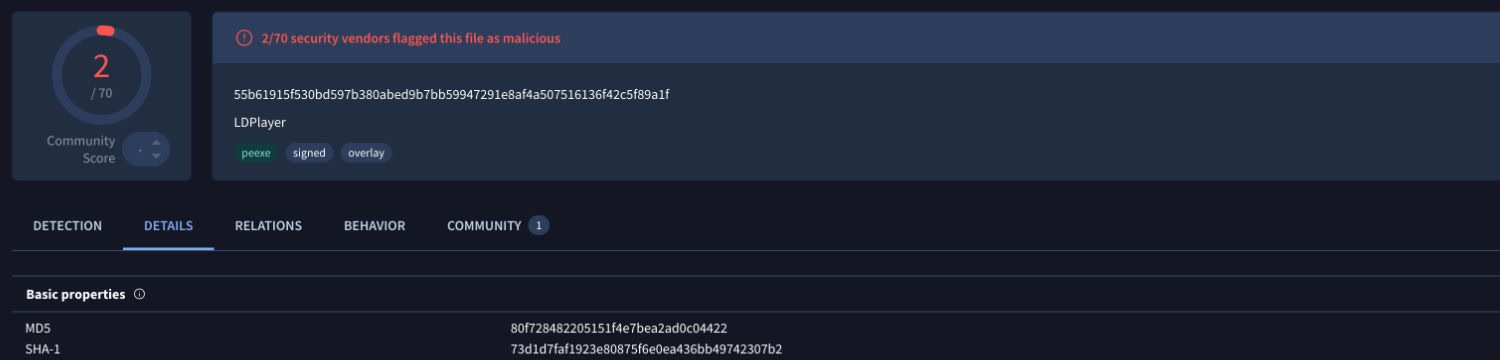
The report should be read as evidence about this hash at that analysis time. It is reasonable to treat two related PUA-style labels differently from a file detected as a trojan by many independent engines, but “only two detections” is not a universal false-positive rule. Source, signature, behavior, and whether the file changed all matter.
Why can LDPlayer trigger a PUA warning?
An Android emulator installs a virtualization environment, runs background components, creates a virtual device, downloads apps, and can consume substantial CPU, memory, and storage. Those capabilities are expected for an emulator, but they also resemble behaviors security products monitor closely. A warning may therefore be a potentially unwanted application classification rather than a claim that the file is a password stealer or ransomware.
Microsoft also maintains a generic PUA:Win32/LDPlayer entry. Its page is broad and does not publish file-specific technical details, so it cannot establish that this current signed hash is malicious—or that every older package was harmless.[2] If Microsoft Defender or another security tool flags a different file, use the affected path and hash from that alert instead of assuming it is the installer checked here.
How to verify your LDPlayer 14 installer
- Check the source before opening the file. Start at
ldplayer.net, not a search ad, mirror, software-download portal, torrent, or link sent in a message. The reviewed button resolved tohttps://setup.ldrescdn.com/download/LDPlayer14.exe. - Confirm the SHA-256. In PowerShell, replace the path with your actual downloaded file:
Get-FileHash -Algorithm SHA256 "$env:USERPROFILE\Downloads\LDPlayer14.exe"
The output for the checked file was:
55b61915f530bd597b380abed9b7bb59947291e8af4a507516136f42c5f89a1f
- Inspect the signature. A valid signature is not proof that software is desirable, but a missing, invalid, or unexpected signer is a strong reason to stop.
Get-AuthenticodeSignature "$env:USERPROFILE\Downloads\LDPlayer14.exe" |
  Select-Object Status, StatusMessage, SignerCertificate
- Compare the exact file. If your hash does not match, do not allow it based on this article. A vendor can update the installer legitimately, but the new file needs its own review.
- Read the antivirus label. “Potentially unwanted” is not the same conclusion as “trojan,” “stealer,” or “backdoor.” Keep the file blocked while you verify the path, signer, and hash.
What should you do with the result?
| Situation | Risk and what to do |
|---|---|
| Official host, matching hash, valid JUST OKAY LIMITED signature | The checked bootstrap file is not broadly detected as malware. Continue only if you want the emulator and accept its permissions, resource use, advertising, and privacy tradeoffs. |
| Official host, new hash, valid signer | It may be a legitimate update, but it is a different file. Re-scan and verify its release context before running it. |
| Different host, missing signature, or unexpected signer | Delete it and download again from the official site. Do not “allow” it to make the warning disappear. |
| Trojan/stealer labels from several unrelated engines | Treat it as high risk. Keep it quarantined and investigate the source; do not install it. |
| The file already ran and the PC now shows pop-ups, unknown apps, browser changes, or account alerts | Disconnect suspicious sessions, scan the whole PC, and secure important accounts from a clean device. |
Account and privacy precautions
Even legitimate emulators create another environment where you sign in to apps and games. Use a secondary Google account when practical, enable multi-factor authentication, and avoid storing banking, primary email, password-manager, or recovery data inside a gaming emulator. A new-device sign-in alert can be expected when Google sees the virtual Android device, but you should still compare its time and location with your own activity.
LDPlayer’s current privacy policy says the app may collect contact information, purchase and usage information, IP address, browser and operating-system data, app activity, location, demographic information, and inferred interests. It also describes sharing with service providers, partners, advertising-related companies, and legal recipients in specified situations.[3] Those disclosures do not prove malicious behavior, but they are a reason to separate gaming from sensitive accounts and to review settings before signing in.
The Gridinsoft website report for ldplayer.net showed a 95/100 score and no provider warnings when last checked on June 27, 2026. That supports the official domain’s current reputation; it does not automatically certify every downloadable file or similarly named domain.
What to do if a suspicious LDPlayer installer already ran
- Stop the installation and delete the original download if it came from a mirror, torrent, crack bundle, advertisement, or message link.
- Open Windows Security and review Protection History for the exact affected path and detection label. Do not restore the file before verifying it.
- Check Settings → Apps → Installed apps for programs installed at the same time. Remove software you did not intentionally choose.
- Inspect browser extensions, homepage, search engine, and notification permissions if ads or redirects started after installation.
- Run a full system scan. If you entered passwords after suspicious software ran, change them from a known-clean device and revoke unfamiliar sessions.
A single installer verdict cannot rule out a modified repack or another bundled program. A Gridinsoft Anti-Malware scan can check for detections, bundled apps, startup entries, scheduled tasks, browser changes, and other persistence after you remove the visible installer.
For another emulator-related detection decision, see PUABundler:Win32/MemuPlay. The older NoxPlayer supply-chain incident also shows why a legitimate product name and an official-looking update are not substitutes for checking the exact file.
How to uninstall LDPlayer 14 and check leftovers
- Close LDPlayer and its multi-instance manager.
- Open Settings → Apps → Installed apps, find LDPlayer, and choose Uninstall.
- Restart Windows so locked emulator and virtualization components can unload.
- Search your own
%PROGRAMFILES%,%APPDATA%, and%LOCALAPPDATA%locations for folders clearly named LDPlayer. Delete only confirmed leftovers after preserving any game data you need; never delete broad Windows or virtualization folders by name alone. - Check Task Manager after restart. If unknown LDPlayer-named processes remain, open their file location and verify the signer before deleting anything.
- Run another scan if the original warning, pop-ups, redirects, or unknown startup activity returns.
FAQ
Is LDPlayer 14 a virus?
The exact official installer checked on July 23, 2026 was not broadly detected as malware. It had two K7 unwanted-program labels out of 70 engines, a valid JUST OKAY LIMITED signature, and the SHA-256 shown above. A different hash or third-party package needs a separate verdict.
Should I ignore a PUA warning for LDPlayer?
No. Keep the file blocked until you confirm its source, hash, and signature. A PUA label can describe unwanted installation or advertising behavior rather than a trojan, but it should not be dismissed automatically.
Why does my LDPlayer hash not match?
The vendor may have updated the bootstrap installer, your browser may have downloaded a regional variant, or you may have a different file. Do not assume any mismatch is malicious, but do not use this article’s verdict for it either.
Is it safe to use my main Google account in LDPlayer?
A secondary gaming account reduces the impact of emulator, app, or account problems. If you use a main account, enable multi-factor authentication, review the new-device alert, and avoid storing sensitive recovery or payment data in the emulator.
Does uninstalling LDPlayer remove everything?
The uninstaller should remove the application, but game data, downloads, logs, or configuration folders may remain. Restart, inspect only clearly named leftovers in your user and program folders, and scan again if security alerts or unwanted behavior continue.
References
- VirusTotal. “File analysis report for SHA-256 55b61915f530bd597b380abed9b7bb59947291e8af4a507516136f42c5f89a1f.” Google Cloud Security, last analyzed July 24, 2026; accessed July 23, 2026. VirusTotal file report.
- Microsoft Security Intelligence. “PUA:Win32/LDPlayer.” Microsoft, published August 21, 2023; accessed July 23, 2026. Microsoft threat description.
- FunEase Network Technology Limited Company. “Privacy Policy — LDPlayer.” LDPlayer, accessed July 23, 2026. LDPlayer privacy policy.