
Acermovies.fun should not be treated as safe for downloads, logins, payments, browser permissions, or instructions to disable security protection. Gridinsoft’s current report gives the domain a 1/100 trust score and records 14 provider warnings. That does not prove every file is infected, and merely opening a page does not prove malware was installed. Your next step depends on whether you only visited, followed a redirect, downloaded, extracted, or ran something.
This guide does not provide links to the movie site or its mirrors. No verified relationship between AcerMovies and Acer Inc. was established; a similar-looking name is not evidence of affiliation.
Is Acermovies.fun safe right now?
The current Gridinsoft Acermovies.fun safety report, last checked July 18, 2026, classifies the domain as suspicious. It shows a 1/100 trust score, 14 provider warnings, and several malware- or phishing-related blacklist detections. The domain is also relatively new.
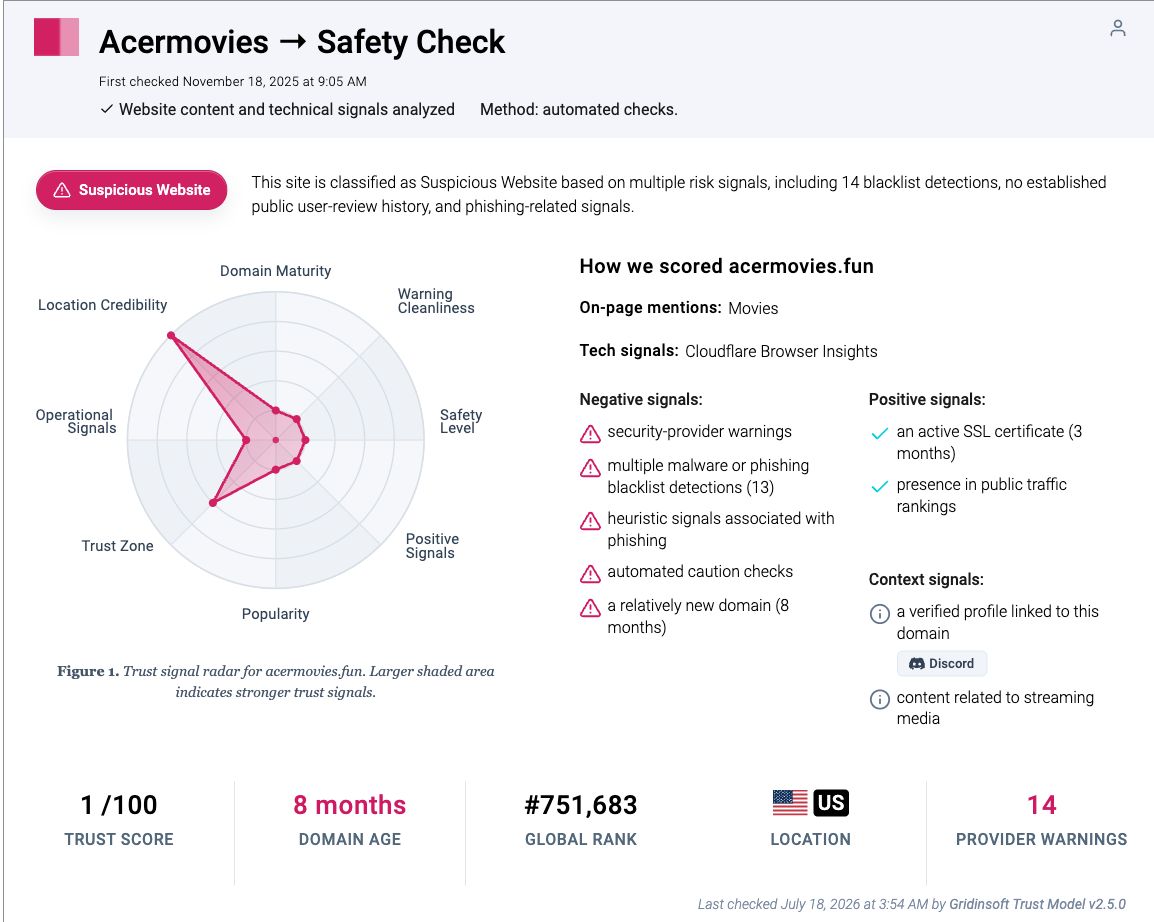
Those signals justify avoiding downloads, accounts, payments, and browser permissions. They do not identify one specific malicious file, and automated reputation checks can change as new evidence appears. The report is evidence about the domain at a point in time—not proof that every visitor was infected.
What happened? Use the right Acermovies cleanup path
- Visited only: A visit alone is not proof of infection. Close the site, do not return through history, and check whether anything downloaded or a permission was granted.
- Redirect or alert: Close the destination with the browser tab control. Do not press its Scan, Allow, Update, or Continue buttons. Revoke any permission from the domain shown as the notification source.
- Downloaded: Delete or quarantine it without launching it. Show the real extension and scan the file. An unopened download is a lower-risk incident than execution.
- Extracted: Extraction creates files but usually does not run them by itself. Do not open shortcuts, scripts, installers, or executables inside the archive; remove the extracted folder and archive.
- Ran a file: Treat the device as potentially exposed. Quarantine the item, run a full scan, check persistence and browser changes, then secure accounts if the file could access sessions or passwords.
The action matters more than the movie title or file icon. A working video page, HTTPS padlock, community link, or familiar poster does not validate the download chain.
Why an Acermovies download can be dangerous
Free-movie pages can route people through deceptive Play buttons, advertising destinations, fake player updates, archive downloads, and look-alike verification pages. The Federal Trade Commission warns that pirated streaming apps and add-ons can carry malware and expose credentials or financial information.[1]
A movie should normally be a media file such as .mp4, .mkv, .avi, or .mov. It should not require an .exe, .msi, .scr, .lnk, .js, .bat, browser extension, unknown player, or APK from the download page.
Windows can hide known extensions, so Movie.mp4.exe may appear as Movie.mp4. In File Explorer, use View → Show → File name extensions before deciding what a download really is. Microsoft documents that the extension is the part after the final period and identifies the file type.[2] Our MP4 malware guide explains the difference between a real media file, a malformed file, and an executable disguised with a video name.
What if Defender found a Trojan?
A recent public user report associated a Trojan alert with an Acermovies download, but it did not identify the file, hash, detection name, redirect, or delivery path. Do not turn that report into a claim that one named Trojan family comes from every Acermovies download.
Use the exact alert on your own device. Open Windows Security directly, record the detection name and affected path, and keep the item quarantined while you investigate. Microsoft explains that quarantine blocks the item from running, while Allow puts it on an allowed list; only allow a file when you trust both the software and its publisher.[3]
- Do not disable Defender or add an exclusion to retry the download.
- Do not restore the file merely to learn whether the alert returns.
- Run a full scan after security intelligence is updated.
- Reboot and check Protection history again.
- If the alert returns, note the new path and time; recurrence may reveal a scheduled task, loader, or second component.
If you only visited, clicked, or were redirected
- Close the destination using the real tab control. A large X or Close button inside the page may be another advertisement.
- Check the browser download list. Remove unexpected archives, installers, shortcuts, scripts, or APKs without opening them.
- Review notification permissions. Use the source shown on the unwanted notification; it may be an advertising domain, not Acermovies.fun. Follow our browser-specific steps to remove unwanted push notifications.
- Inspect new extensions and apps. Remove anything installed during the visit, particularly a video helper, codec, search tool, VPN, or security update offered by the page.
- Watch for recurrence. Tabs that reopen after restart, changed search or proxy settings, and extensions that return after removal are stronger signs than a one-time redirect.
If nothing downloaded, no permission was granted, and the browser behaves normally after the tab closes, the redirect does not by itself establish a malware infection.
If the file downloaded but you did not open it
Delete or quarantine the file, expose its full extension, and scan it without running it. Clear it from the browser’s download list only after you have recorded the filename and path if an antivirus alert needs investigation. Our unopened-download checklist explains why the risk is much lower when the file never executed.
Do not double-click an unknown file to “test” it. If it is an executable, the EXE safety guide shows how to check publisher, signature, source, and reputation before any decision to run it.
If you extracted a ZIP or RAR archive
Extraction and execution are different steps. Simply extracting a normal archive usually creates its contents without launching them, but the new folder can contain shortcuts, scripts, installers, or double-extension files designed to be opened next. Delete the archive and extracted folder if the source cannot be trusted.
Do not trust an archive because it also contains a real-looking poster, subtitle, or video. Read the ZIP and RAR safety guide for the difference between opening an archive, extracting it, previewing files, and running a payload.
If you ran an Acermovies file or installer
Execution is the higher-risk branch. Stop sensitive banking, work, and password-manager activity on the affected Windows PC while you investigate. Deleting the movie archive or visible installer does not remove components already installed elsewhere.
- Download and install Gridinsoft Anti-Malware, then update its malware database.
- Run a Full Scan to check for malware, unwanted apps, and persistence left by a fake player or installer.
- Review the findings and apply the recommended quarantine or removal actions.
- Restart Windows and recheck. If alerts or redirects return, scan again and investigate the exact recurring component.
If symptoms remain, use targeted manual checks of recently installed apps, browser extensions, startup entries, scheduled tasks, proxy settings, and unexpected security exclusions. Review changed browser settings or a new managed-policy message where relevant. These are optional follow-up checks, not prerequisites for the Full Scan. A scan can detect malware leftovers and unwanted components, but cannot prove that credentials were never exposed.
A fake movie player or executable from an archive can leave unwanted apps and persistence after the download is deleted. Run a Full Scan on this Windows PC, review the findings, and apply cleanup actions.
Scan this Windows PCShould you change passwords or reinstall Windows?
Do not change every password because you only visited the page. Change important passwords from a different clean device when a suspicious file ran, a browser extension or remote-access tool was installed, a scan found an information stealer, credentials were entered into a redirected page, or accounts show unfamiliar activity. Secure the email account first when it can reset other services, enable multi-factor authentication, and revoke active sessions.
A clean Windows reinstall is an escalation step, not the default response to one redirect or quarantined unopened file. Consider it when a confirmed remote-access or credential-stealing infection ran, security tools remain disabled, persistence returns after repeated cleanup, system files are damaged, or you cannot establish what changed. Back up documents—not unknown installers, scripts, or the suspicious archive—before reinstalling.
How to avoid the same movie-download trap
- Use legal streaming sources and do not install codecs, players, APKs, extensions, or browser updates offered by a movie page.
- Keep the browser, operating system, archive utility, and security software updated.
- Show full file extensions and distrust double extensions or shortcuts disguised as media.
- Do not disable security warnings because a download page says they are false positives.
- Do not enter card or account details after a redirect or “free verification” prompt.
- Use the broader free movie streaming scam guide to recognize fake Play buttons, verification traps, and download funnels.
FAQ
Can Acermovies.fun give a computer a virus?
A suspicious download, fake player, script, extension, or redirect destination can expose a device to malware. A page visit alone does not prove infection; the strongest evidence is what downloaded or ran and what the security alert identified.
Is Acermovies.fun safe if the video page works?
No. A working player, HTTPS padlock, movie list, or community link does not validate advertisements, redirects, downloads, account forms, or files. The current domain report contains multiple provider warnings.
What should I do if Defender quarantined the Acermovies download?
Keep it quarantined, record the exact detection name and path, update security intelligence, and run a full scan. Do not restore or exclude the file unless a trusted publisher and independent evidence establish that the alert is wrong.
Am I safe if I downloaded a file but did not open it?
The risk is much lower when the file never ran. Delete or quarantine it, show the full extension, scan it without opening it, and check that no extension, app, or permission was installed separately.
Does extracting an Acermovies archive infect Windows?
Normal extraction usually creates files without running them, but the extracted folder may contain executable shortcuts, scripts, or installers. Do not launch those contents; remove the archive and folder if the source is untrusted.
References
- Federal Trade Commission. “Malware from illegal video streaming apps: What to know.” Consumer Advice, May 2, 2019; accessed July 18, 2026. FTC consumer guidance.
- Microsoft Support. “Common file name extensions in Windows.” Microsoft, accessed July 18, 2026. Windows file extension documentation.
- Microsoft Support. “Antivirus and antimalware software: FAQ.” Microsoft, accessed July 18, 2026. Microsoft quarantine and alert guidance.