Vanta Stealer malware is an information thief that can put browser sessions, saved credentials, gaming and messaging accounts, VPN data, documents, and crypto-wallet access at risk. If the suspected file ran, disconnect the computer, clean and verify the device, then revoke sessions and change important passwords from a separate clean device. Finding a file or seeing a detection does not by itself prove that data was stolen, but executing the file warrants a full device-and-account response.
Act in this order
- Disconnect the suspected computer from the network and stop signing in on it.
- Record the file name, download source, path, and security-tool result before cleanup.
- Remove the threat and check for persistence, bundled software, and browser changes.
- From a clean device, revoke sessions before resetting email, password-manager, gaming, messaging, and financial accounts.
What Is Vanta Stealer?
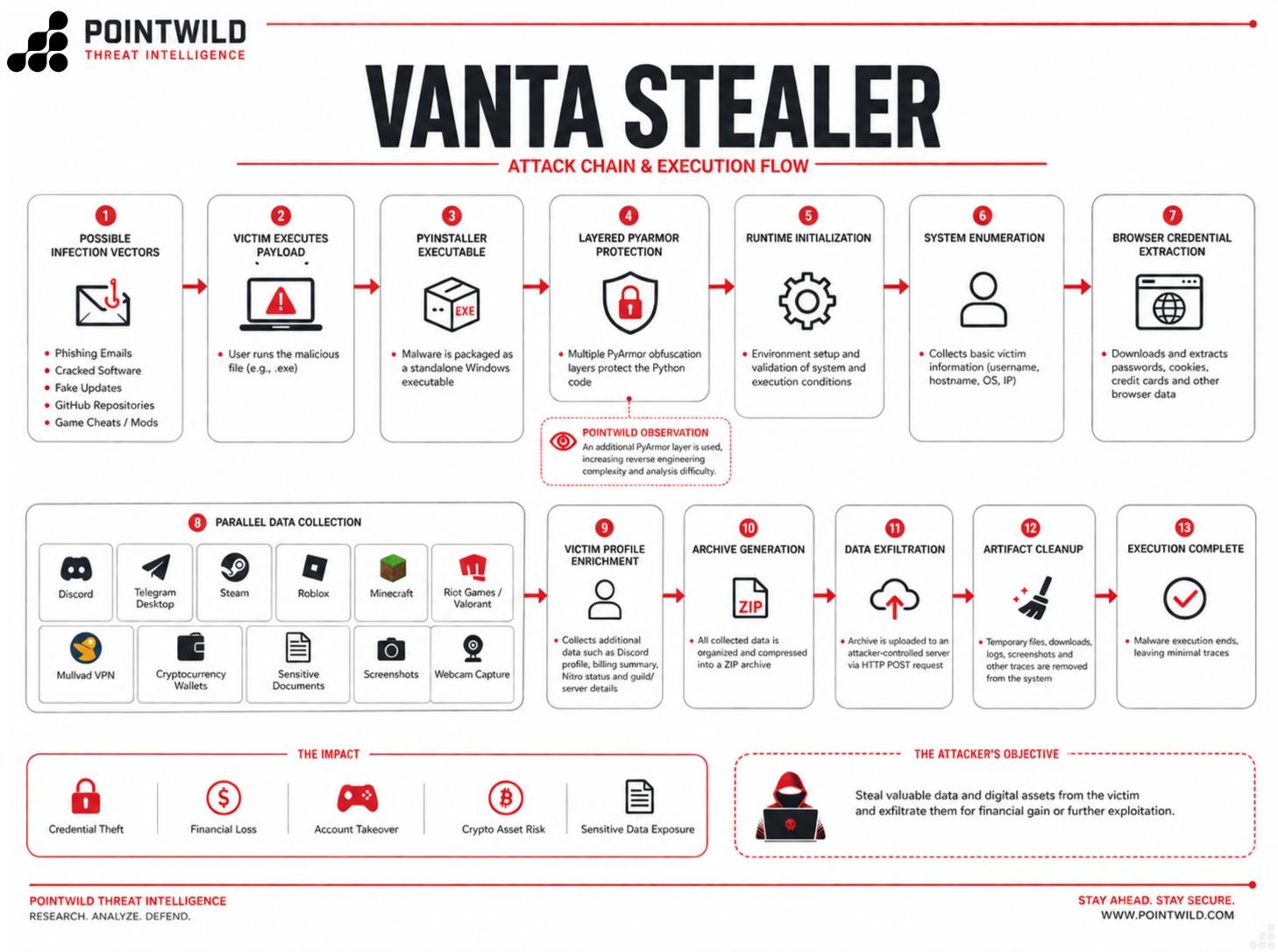
Vanta Stealer is the name Point Wild’s Lat61 Threat Intelligence team gave to a Python-based information-stealing sample it analyzed in July 2026. The public report describes a PyInstaller-packaged 64-bit Windows executable protected by multiple PyArmor layers. Its collection targets included Chromium browser data, Discord, Telegram Desktop, Steam, Riot Games, Roblox, Minecraft, Mullvad VPN configuration, cryptocurrency-wallet files, screenshots, webcam captures, and selected local documents.
The scope needs care. Point Wild’s headline calls the malware cross-platform, but the detailed public evidence describes a Windows PE sample. Do not assume a Mac, Linux, phone, console, or every named app was compromised merely because the family can target many data types. Base the response on what ran, on which device, and which accounts were used there.
Does a Vanta Stealer Detection Mean My Accounts Were Stolen?
Not automatically. Exposure depends on whether the file executed and whether it could reach the data stored on that device. Use the strongest known signal instead of treating every detection as the same incident.
| What happened | Risk and what to do |
|---|---|
| The file was downloaded but never opened | Delete or quarantine it, scan the download location, and verify the source. The risk is lower than after execution. Our guide for a suspicious file that was not opened explains when account resets are unnecessary. |
| A security tool blocked it before execution | Keep it quarantined and run a full scan. Do not restore the file merely to test it. Investigate only if the alert shows it ran, reappears, or came with other suspicious activity. |
| The file ran, even briefly | Treat browser sessions and accounts used on that PC as exposed. Isolate and clean the device, then revoke sessions and reset important accounts from a clean device. |
| There are login alerts, Discord spam, trades, wallet activity, or changed recovery details | Treat this as an active account-compromise incident. Secure email first, preserve evidence, contact the affected provider or exchange, and review transactions. |
The research report lists possible delivery routes such as phishing, trojanized software, cracks, game cheats, fake updates, and malicious repositories, but it does not establish one confirmed delivery method for every sample. Do not blame a specific app or website without evidence from the download history, file path, browser history, or security logs.
What Data and Accounts Need Attention?
Prioritize accounts by their ability to unlock other accounts or move money. A browser cookie or messaging token may keep an attacker signed in even after a password changes, while an email inbox can reset many other services.
| Data surface | Recovery priority |
|---|---|
| Email and password manager | Secure first from a clean device. Change the password, review recovery methods and forwarding rules, enable MFA, and sign out other sessions. |
| Browser accounts and saved data | Review Google, Microsoft, Apple, and browser-sync sessions. Rotate reused passwords and remove unknown extensions or connected apps. |
| Discord and Telegram | Revoke sessions, review authorized apps and devices, warn contacts if spam was sent, and use official account-recovery support if locked out. |
| Steam, Riot, Roblox, and Minecraft | Check sign-ins, trades, inventory, purchases, linked email, API keys, and security settings. Secure the linked email before the game account. |
| Cryptocurrency wallets and exchanges | Assume high risk if a wallet seed, private key, browser wallet, exchange session, or recovery document was present. Escalate immediately from a clean device. |
| VPN and sensitive documents | Replace exposed VPN credentials or configuration, review remote access, and identify documents containing account recovery details, payment data, or identity information. |
How to Remove Vanta Stealer and Recover Safely
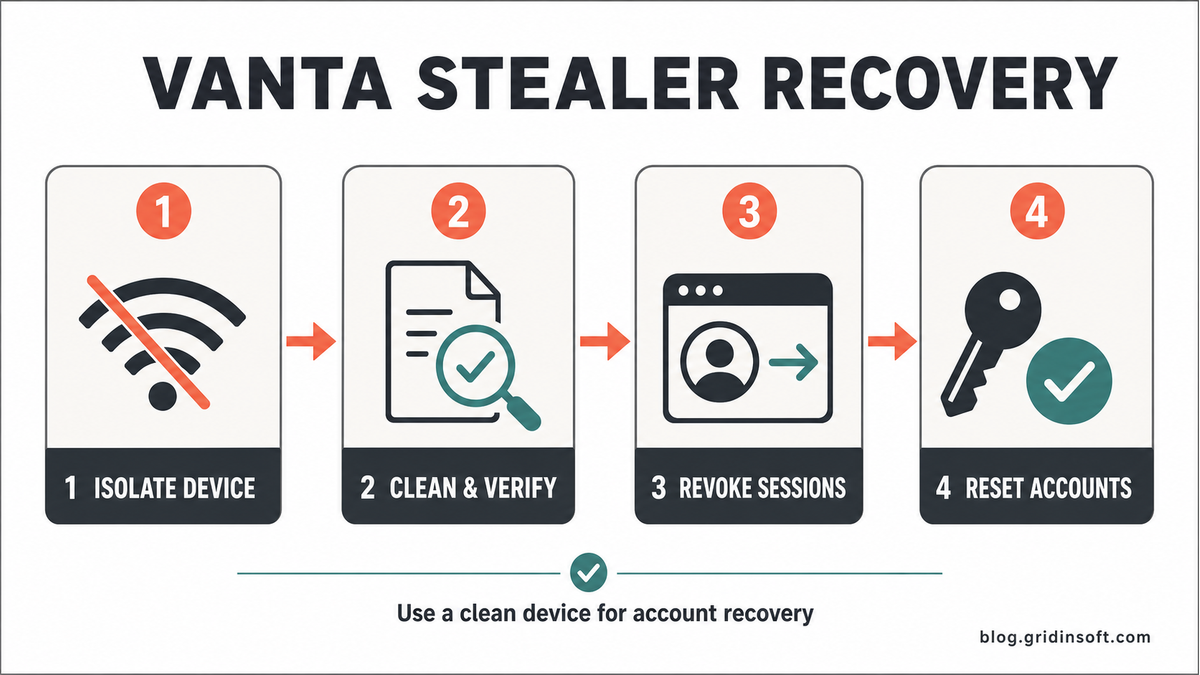
1. Isolate the Suspected Device
Disconnect Wi-Fi or Ethernet. Do not use the computer for email, banking, crypto, password resets, or support chats. If the system belongs to an organization, contact the security or IT team before deleting evidence or wiping the device.
Write down the suspicious file name and path, how it arrived, when it ran, the security-tool detection name, and any account alerts. Do not upload a private document or live malware sample to a public forum.
2. Remove the File and Check What Could Relaunch It
Keep the suspicious file quarantined. Remove the source archive or installer, then review recently installed apps, browser extensions, Startup Apps, scheduled tasks, and unexpected security exclusions. A single deleted executable is not a complete cleanup if another loader, task, or bundled module can recreate it.
Run a full Gridinsoft Anti-Malware scan to check for detected files, startup entries, scheduled tasks, bundled apps, browser changes, and other persistence. Remove confirmed detections, reboot, and scan again. The scan can help find leftovers; it cannot restore stolen passwords or prove that no data left the computer.
If a token stealer ran here, logging back in can hand the attacker your new Discord session, email cookie, Steam token, or wallet access. Scan this Windows PC first, then reset passwords from a clean device.
Scan before resetting accountsFor a broader verification sequence, follow our Windows security audit after malware. If the suspected file came from a game, mod, launcher, or crack, use the more specific game and mod infostealer recovery checklist.
3. Revoke Sessions From a Clean Device
Use a different trusted phone or computer. Start with the primary email account and password manager, then sign out all sessions for browser accounts, messaging services, gaming platforms, exchanges, marketplaces, and financial services. Remove unknown devices, OAuth connections, authorized apps, browser extensions, and recovery methods.
Revocation matters because a stolen cookie or token may represent an existing login. A password change alone may not invalidate every active session. If an account is already behaving strangely, follow the ordered steps in My Account Was Hacked: What to Do First.
4. Reset Passwords and Enable MFA
Change the email and password-manager passwords first. Then rotate banking, crypto, Discord, Telegram, Steam, Riot, Roblox, Microsoft, Google, and other accounts used on the affected device. Replace every reused password with a unique one and enable app-based MFA or a security key where available.
Do not type new credentials on the suspect computer until scans are clean and the suspicious behavior has stopped. If a high-value account cannot be recovered, contact its official support through a known-good URL rather than a link from an unsolicited message.
Crypto-Wallet Steps After Possible Vanta Stealer Exposure
A wallet seed phrase or private key cannot be made safe by changing a website password. If that secret was stored in a targeted browser profile, local document, screenshot, clipboard history, or wallet file on a computer where the malware ran, treat the wallet as potentially exposed.
- Use a clean device and obtain the wallet or hardware-wallet instructions from the official vendor site.
- Create a new wallet with a new recovery phrase when exposure is credible; never type the old phrase into a website or support chat.
- Move assets carefully, beginning with a small test transaction when the situation allows.
- Revoke suspicious token approvals, connected dApps, API keys, and exchange sessions.
- Contact an exchange immediately if withdrawals, API activity, or account details changed.
Be alert for a second scam. Anyone who promises to recover stolen crypto, asks for the seed phrase, or requests an advance fee can make the loss worse.
How to Confirm the Cleanup
There is no single “all clear” signal after an information stealer. Confirm both the device and account sides of the incident:
- Repeated scans are clean after a reboot.
- No suspicious startup item, task, extension, app, or exclusion returns.
- Browser settings and installed software remain stable.
- Unknown sessions and connected apps have been removed.
- Recovery email, phone, MFA methods, forwarding rules, and API keys are correct.
- There are no new login, trade, payment, wallet, or messaging anomalies.
If detections or unauthorized activity return, stop using the computer and consider a clean Windows installation from trusted USB media. Organizations, businesses, creators with monetized accounts, and anyone facing financial theft should consider professional incident-response or legal guidance.
FAQ
Is Vanta Stealer cross-platform?
The public Point Wild report calls it cross-platform, but the detailed sample evidence describes a 64-bit Windows executable. Treat other operating systems as affected only when platform-specific evidence exists.
Does finding Vanta Stealer prove my passwords were stolen?
No. A downloaded or quarantined file is not proof of theft. If the file executed, however, respond as though sessions and accounts used on that device may be exposed.
Should I change every password?
Prioritize email, password manager, financial and crypto accounts, messaging, gaming, and any reused password. Change them from a clean device after isolating and cleaning the suspected computer.
Is changing a password enough after a stealer?
Not always. Revoke active sessions, cookies, connected apps, OAuth grants, API keys, and unknown devices because some stolen tokens can outlive a password change.
Can antivirus recover stolen wallet funds or passwords?
No. Security software can help find malware and persistence, but account recovery, session revocation, wallet migration, and provider or exchange support are separate steps.
References
- Shingare, P.; Pandit, K. S.; Lat61 Threat Intelligence Team. “Point Wild Exclusive: Dissecting Vanta Stealer, a Python-Based Cross-Platform Information Theft Malware.” Point Wild, July 28, 2026; accessed August 8, 2026. Research report.