Microsoft has published a detailed analysis of DeadLock ransomware, an active Windows encryptor that can deliberately keep a computer responsive while it locks files. That behavior removes a comforting warning sign: low CPU use or a desktop that still reacts does not mean encryption has stopped. Microsoft says DeadLock has been observed across multiple sectors and that its leak site listed more than 80 claimed victims by July 2026.
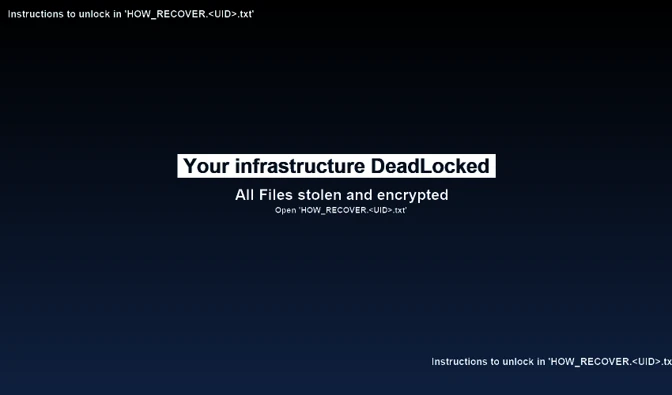
The practical response is to isolate a suspected system before checking whether it still “works.” Look for files ending in .dlock, victim-specific recovery notes, changed wallpaper, disabled recovery services, and unusual event-log gaps. Do not test the recovery chat on a trusted production network.
What Microsoft found in DeadLock
The analyzed sample is written in Rust and uses a resource-aware dispatcher. Before sending another file to an encryption worker, it checks memory and CPU load and pauses new work when the host is busy. Existing file operations continue. The result can look less dramatic than a typical ransomware event while encryption is still progressing in the background.
| Artifact or behavior | What it tells you |
|---|---|
{filename}.{UID}.dlock |
DeadLock renames targeted files with a victim identifier and the .dlock suffix. |
HOW_RECOVER.{UID}.txt |
A text ransom note dropped into encrypted directories during a later processing pass. |
RECOVERY_CHAT.{UID}.html |
A local interactive page that can contact external Polygon, proxy, Session, and storage infrastructure. |
C:\ProgramData\{UID}.bmp |
The wallpaper generated after encryption to point the victim to the recovery note. |
| Quiet CPU and memory use | Not a safety signal. The sample throttles new encryption work when resource use rises. |
Who is affected
Microsoft says DeadLock has affected organizations in IT, mining, transportation and logistics, manufacturing, hospitality, consumer goods, and other sectors across several continents. More than half of the claimed victims on the operation’s leak site were in Europe. The public report does not establish one universal initial-access method, so responders should not reduce the incident to a single exploit or email lure.
One analyzed configuration exits when the system UI or default language matches Ukrainian, Russian, Belarusian, and several other languages. That is not a protection guarantee. It applies to the sample Microsoft analyzed, can change in another build, and does not protect Ukrainian organizations whose servers or endpoints use another configured language.
How the encryption and recovery system works
DeadLock generates a separate XChaCha20 key for each file and wraps the key material through a Curve25519-based exchange. Large files may be encrypted in distributed chunks, which reduces the time needed to make databases, virtual machines, and backups unusable. Microsoft found no practical cryptographic shortcut in the analyzed design without the attacker’s private key.
Before encryption, the sample can empty the Recycle Bin, stop backup and security services, terminate processes, and clear or disable event-log channels. Afterward, it creates a self-contained recovery page. That page reads changing infrastructure information from Polygon smart contracts, relays messages through the Session network, and can expose stolen data hosted in Wasabi-compatible storage. A local HTML file is therefore not harmless merely because it is opened from disk.
What to do if you see .dlock files
- Isolate the host and affected network segment. Disconnect network shares, management channels, VPN access, and backup repositories. If encryption appears active, contain first and investigate second.
- Preserve the exact artifacts. Photograph the wallpaper, copy the ransom notes and a few encrypted files, record the victim UID, and preserve volatile evidence when incident responders can do so safely.
- Do not open the recovery chat on a trusted network. Preserve
RECOVERY_CHAT.{UID}.htmlas evidence. It contains code that reaches external services; do not treat it like a static text note. - Protect clean backups. Keep offline or immutable copies disconnected from credentials and systems that may be compromised. Restore only into a clean, segmented environment.
- Hunt beyond the encryptor. Review new administrator accounts, remote-management tools, suspicious service changes, disabled logging, credential access, and data-exfiltration evidence. Deleting one ransomware binary does not restore trust.
- Rotate exposed credentials from a clean device. Prioritize privileged, service, backup, VPN, cloud, and remote-access accounts, then invalidate active sessions where possible.
For a standalone Windows workstation, a full Gridinsoft Anti-Malware scan can help find active malware and persistence after the machine is isolated. It cannot decrypt .dlock files, recover stolen data, or prove that the wider network is clean. Follow with a structured Windows security audit and keep encrypted originals untouched for future recovery options.
The Settra investigation illustrates why remaining logs still deserve examination: a misspelled Defender channel name caused one cleanup attempt to fail. Verify what survived instead of assuming every requested deletion succeeded.
False assumptions to avoid
- “The PC is responsive, so encryption is over.” DeadLock explicitly throttles work to avoid exhausting system resources.
- “Ukrainian language settings make us safe.” The exclusion is sample-specific and does not cover differently configured hosts or future variants.
- “Removing the malware restores the files.” Cleanup stops active code; it does not reverse sound file encryption.
- “The local recovery page is offline.” The HTML application is designed to contact external decentralized services.
- “A clean restore closes the incident.” DeadLock uses double extortion, so credential and data exposure require a separate response.
Organizations should compare this sequence with other fast network-encryption cases such as Spirals ransomware. The common lesson is to isolate on precursor evidence rather than waiting for a ransom note or visible system failure.
References
- Microsoft Threat Intelligence. “DeadLock ransomware: Breaking down a Rust-based encryptor with decentralized recovery infrastructure.” Microsoft Security Blog, August 10, 2026. technical analysis and indicators.
- Cybersecurity and Infrastructure Security Agency. “#StopRansomware Guide.” CISA, accessed August 10, 2026. ransomware response guidance.