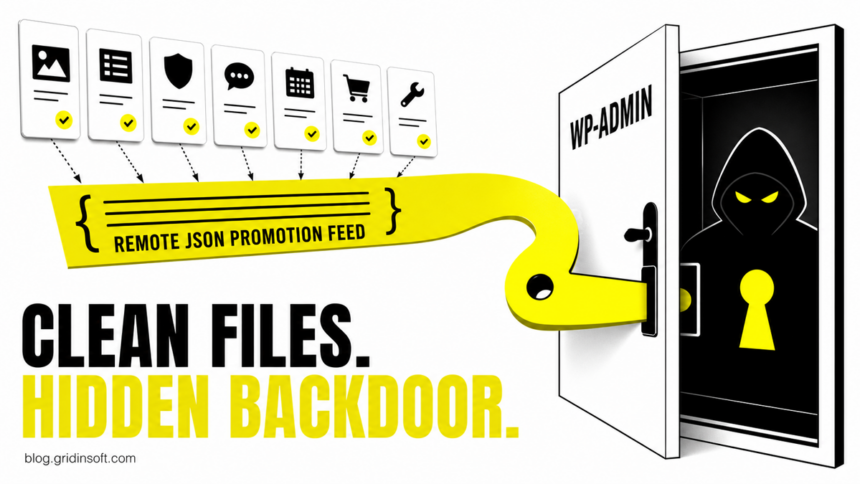
Seven BdThemes WordPress plugins were turned into a supply-chain entry point even though their files in the official plugin repository were not modified. Attackers poisoned a remote JSON feed used for promotional notices in wp-admin. When an administrator opened the dashboard, the injected script could create a rogue admin account, upload a webshell, and install hidden must-use plugins for persistence.
Wordfence says the activity was observed in the wild on August 7, 2026. The vendor feed was clean again by August 8, but that does not remove accounts, webshells, or persistence already installed on an exposed site. Administrators who used one of the affected plugins should audit the database and server from outside the normal WordPress dashboard.
Which BdThemes plugins are affected?
The compromised feed was fetched by the shared Biggopti promotional-banner component. Wordfence identified these seven plugin slugs:
| Plugin | Directory slug |
|---|---|
| Element Pack Addons for Elementor | bdthemes-element-pack-lite |
| Prime Slider Addons for Elementor | bdthemes-prime-slider-lite |
| Pixel Gallery Addons for Elementor | pixel-gallery |
| Ultimate Post Kit Addons for Elementor | ultimate-post-kit |
| Ultimate Store Kit | ultimate-store-kit |
| Live Copy Paste for Elementor | live-copy-paste |
| Smart Admin Assistant | smart-admin-assistant |
A site is not confirmed compromised merely because one of these plugins was installed. The dangerous path required the poisoned response to reach a logged-in administrator’s browser. The earliest possible campaign date in the source timeline is June 23; the poisoned endpoints were captured on August 6-7 and returned clean JSON by August 8.
How a clean plugin loaded a hidden backdoor
- A BdThemes plugin loaded promotional JSON from the vendor’s remote Sigmative storage.
- An unescaped
display_idvalue let the poisoned response inject JavaScript into an authenticatedwp-adminpage. - The script used the administrator’s active session and WordPress nonce to create a rogue administrator.
- It uploaded a fake plugin containing
emer-run.php, then wrote must-use plugins that enabled magic-login access and hid attacker-created users from the normal dashboard. - Results were sent to attacker infrastructure. One alternate payload generated predictable credentials from the victim site’s hostname.
This is why a file-integrity check alone can miss the original entry point. A similar lesson applied to the earlier OptinMonster CDN backdoor incident: code loaded into an administrator context can change the site even when the expected plugin package looks legitimate.
What should administrators check now?
| Situation | Risk and next action |
|---|---|
| None of the seven plugin slugs was ever installed | This incident does not match your site. Keep normal WordPress patching and account monitoring in place. |
An affected plugin was installed, but no administrator used wp-admin during the suspected window |
Risk is lower, not zero. Disable the plugin pending a verified clean release and review server, access, and database records. |
An administrator opened wp-admin while an affected plugin was active |
Treat the site as potentially exposed. Audit from the hosting panel, SSH, or a known-clean recovery environment rather than trusting only the WordPress user list. |
| Any indicator below is present | Treat it as a compromise. Preserve evidence, isolate the site, remove persistence, restore clean code and data, and rotate credentials. |
Search for the following source-confirmed indicators. Filenames may change, so absence of one exact name does not prove the site is clean.
- Administrator usernames beginning with
bd_followed by six alphanumeric characters, or unexpected accounts using@wordpress.orgor@developer.wordpress.orgemail addresses. - A fake plugin such as
wp-smart-thumbnailsand the webshell fileemer-run.php. - Unexpected files in
wp-content/mu-plugins/, includingclass-wp-token-validate.php,class-wp-query-*.php, orwp-cache-optimizer.php. - Database options named
fz_emer_login_tokensorfz_emer_done_v1. - Requests to
ia-cdn[.]com/fz/or unexpected traffic to the poisoned Sigmative API paths.
Do not rely only on Users → All Users. The reported persistence hooked WordPress database queries to hide rogue accounts and alter displayed user counts. Compare the underlying user and usermeta tables with a known-good administrator inventory, and inspect must-use plugins directly on disk.
What to do if you find an indicator
- Limit further access. Put the site behind maintenance controls or restrict administrative access. Preserve web-server, CDN, authentication, and database logs before cleanup.
- Make a forensic copy. Save the database and filesystem in their current state. Do not delete the first suspicious file before recording its path, timestamps, hash, and related requests.
- Remove the attacker outside the dashboard. Review administrators in the database, inspect
wp-content/plugins/andwp-content/mu-plugins/, remove unauthorized code and accounts, and restore WordPress, themes, and plugins from trusted packages or a verified pre-incident backup. - Rotate every credential the site could expose. Change WordPress administrator passwords, salts, hosting-panel, SFTP/SSH, database, CDN, SMTP, payment, and API credentials. Use a clean workstation.
- Check for recurrence. Review new users, scheduled tasks, modified server configuration, outbound requests, and file changes after restoration. Keep the affected BdThemes plugins disabled until a verified clean release and incident guidance are available.
Keep WordPress core current as a separate control; the recent wp2shell response guide explains how to verify a core security release. For plugin-driven administrator takeover, the Burst Statistics incident checklist provides additional account and log checks. Neither update replaces the BdThemes compromise audit above.
Clean files do not mean a clean site
The official plugin repository was not the malicious payload source in this incident. The trusted plugin code fetched remote promotional data, and the compromised data exploited a browser-side escaping flaw. Once that script ran with an administrator’s privileges, it could make durable server and database changes.
A fresh plugin download can therefore be clean while the existing site remains compromised. Recovery must answer two different questions: has the poisoned feed been removed, and did it already create persistence on this specific site? Only a database, account, filesystem, and log review can answer the second question.
References
- Wordfence Threat Intelligence. “PSA: Supply Chain Compromise in BdThemes Ecosystem via Poisoned API Response.” Wordfence, August 8, 2026. Technical report and indicators.
- WordPress.org Documentation. “FAQ My Site Was Hacked.” WordPress.org, accessed August 10, 2026. Official recovery guidance.