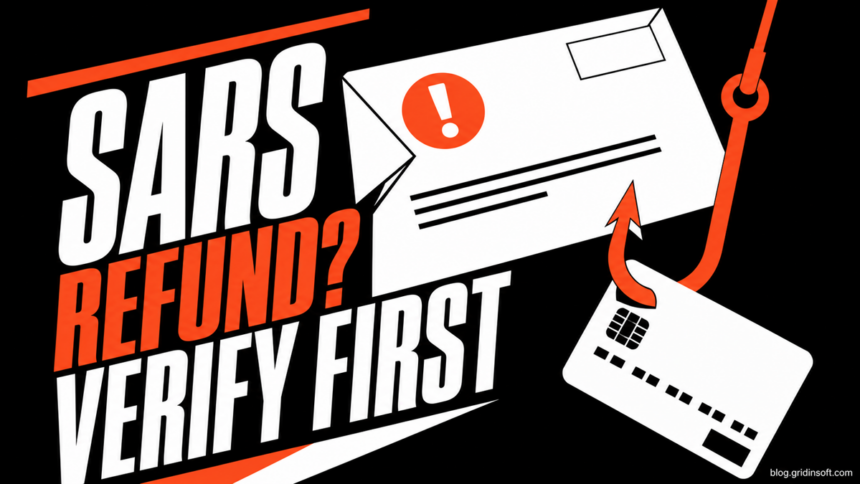
A SARS Tax Refund Email Scam claims that the South African Revenue Service owes you money, then asks you to click a link, enter card details, or sign in to release the refund. Treat that request as phishing. SARS says it does not ask for card details, banking PINs, OTPs, passwords, or eFiling credentials through email or SMS. Verify the claim by typing the official SARS or eFiling address yourself and checking your account or the refund-status options listed there.
Do not decide from the display name, logo, refund amount, or urgency. The important question is what the message asks you to do and whether the same information appears after you reach SARS through an independent route.
Choose the action that matches what happened
| Situation | What to do now |
|---|---|
| You only read the email | Do not reply or use its button. Verify the refund independently, report the message, then delete it. |
| You clicked but entered nothing | Close the page, check whether the browser downloaded anything, and do not approve a later OTP or banking prompt. |
| You entered card details | Stop or freeze the card and call the issuer through its official app, website, or the number on the card. Review recent transactions and dispute anything you did not authorize. |
| You entered eFiling credentials | Open eFiling by typing its address yourself, reset the password, check contact and banking details, and secure any email account that reused the password. |
| You downloaded or opened a file | Stop using that file, inspect the Downloads folder, and scan the device. If a program ran, disconnect it from sensitive work or banking until the check is complete. |
How to recognize a fake SARS refund email
A real-looking sender name is not enough. Attackers can place “SARS” in the display name while using an unrelated address. They also create pages that copy government colors and wording, but the form is designed to collect information rather than pay a refund.
- The message asks for a card number, expiry date, CVV, PIN, OTP, password, or eFiling login. SARS explicitly warns that it does not request these secrets through email, SMS, social media, or telephone.
- A fee or card payment supposedly unlocks the refund. A refund does not need a card payment to be released.
- The button opens a non-SARS page. Do not trust the visible button label; previewing or copying the destination may reveal an unrelated host.
- The email creates a short deadline. “Today,” “final notice,” or “within 24 hours” is pressure, not proof.
- The sender discourages independent verification. Genuine support does not need you to stay inside one unexpected email thread.
For a broader sender, link, attachment, and pressure check, use our guide to spot a phishing email. It explains why the visible name and button text should never be the only evidence.
Verify a SARS refund without the email button
- Leave the message. Open a new browser tab or the official SARS app rather than following the email link.
- Type the address yourself. Start from
sars.gov.zaor the eFiling address you already use. Do not rely on a sponsored result, shortened link, or address copied from the message. - Check the official account or refund-status channel. SARS publishes current refund-status options on its own site. If the claim is real, the status should be available outside the email.
- Compare the request, not only the amount. A message can quote a plausible refund and still be fake. Requests for card data, credentials, or a release payment remain decisive warning signs.
- Contact SARS through a number or reporting channel on its official site. Do not call a number printed only inside the suspicious message.
This independent check matters because not every SARS communication is fraudulent. The goal is to avoid trusting a message before the same claim is confirmed in an official channel you reached yourself.
Example
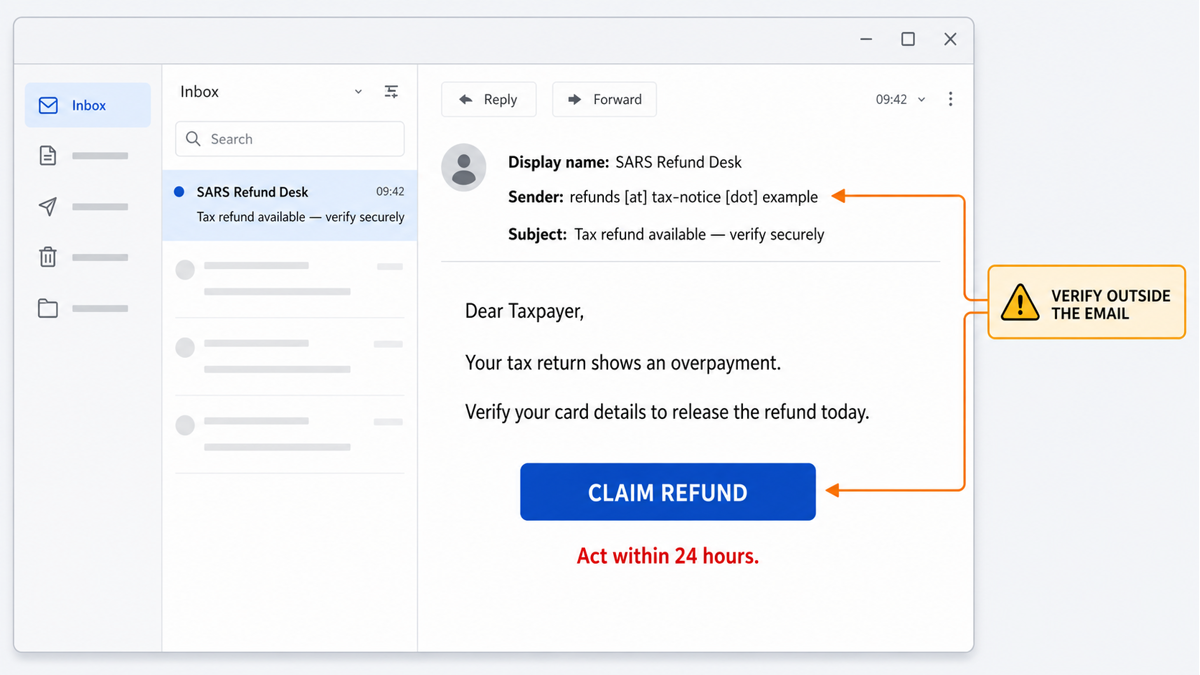
The wording varies, but the pattern stays consistent: an official display name, a promised overpayment, a request for card details, and a deadline that pushes the reader toward one button.
Subject: Tax refund available — verify securely
Display name: SARS Refund Desk
Sender: refunds [at] tax-notice [dot] example
Dear Taxpayer,
Your tax return shows an overpayment.
Verify your card details to release the refund today.
Button: CLAIM REFUND
Deadline: Act within 24 hours.
The reserved .example sender is intentionally non-operational, so the sample cannot direct readers to a real domain. A real lure may use different wording, an amount in rand, or a cloned login page.
What to do after entering card details
Contact the card issuer immediately using a trusted channel. Ask it to stop or replace the card, explain that the details were entered on a phishing page, and review pending and completed transactions. Do not wait for the first charge: criminals may test the card with a small payment or attempt to add it to a digital wallet.
Reject any OTP, app approval, or follow-up call related to the refund. A caller who already knows your name or part of the card number can still be the same scammer. Monitor the account and follow the bank’s dispute process for transactions you did not authorize.
If other personal information was exposed, review our checklist for protecting personal data from scams and account takeover. If money has already moved, use the prioritized actions in what to do after an online scam.
What to do after entering eFiling credentials
- Open the official eFiling site independently and change the password.
- Check the registered phone number, email address, banking details, tax practitioner access, and recent correspondence for changes you did not make.
- Change the password on your main email account if it was reused, and enable its available multi-factor protection.
- Report the phishing attempt through the current channel on the SARS Scams and Phishing page.
- Watch for follow-up calls or messages that refer to the same refund. Exposed information can be reused to make the next contact sound convincing.
When should you scan the device?
Opening the email or viewing a normal web page does not by itself prove malware infection. A device scan becomes important if the page downloaded a file, asked you to install an app or browser extension, opened a remote-support tool, or if you ran anything after the click. Check the browser download history and remove an unopened suspicious file without launching it.
If a file or installer ran, the visible phishing page may not be the only risk. A downloader, browser change, scheduled task, or bundled component can remain after the page is closed. Run an updated security scan before returning to sensitive work or banking.
If the page or email made you download an invoice, coupon, tracking app, browser extension, or support tool, scan the PC before opening it again or logging into sensitive accounts.
Scan after a suspicious downloadHow to report the message
Preserve the sender address, subject, time, and message headers before deleting the email. Report it through the phishing contact listed on the official SARS Scams and Phishing page. If card or bank information was exposed, report that separately to the bank or card issuer; sending the email to SARS does not stop a compromised card.
The broader tax-season scam guide explains other refund, identity-theft, and fake-tax-service patterns. This page covers the narrower South African decision: verify the SARS claim outside the message and protect card and eFiling access according to what you entered.
FAQ
Does SARS send genuine refund emails?
SARS can communicate with taxpayers, so the display name alone does not prove a scam. Verify the refund in an official account or refund-status channel reached independently. A request for card details, OTPs, passwords, banking PINs, or eFiling credentials through the email is not legitimate.
Does SARS charge a fee to release a refund?
No card payment or processing fee should be required to release a SARS refund. Do not enter card details to receive money. Confirm the refund status through the official SARS site or app instead.
I clicked the link but entered nothing. Is my card at risk?
The click alone does not expose card details you never entered. Close the page, check whether anything downloaded, and ignore later OTP or approval prompts. If you supplied other information, follow the response path for that data.
Can opening the email infect my computer?
Simply reading the message usually does not execute the observed card-theft flow. Risk increases if you open an attachment, download or run a file, install an extension, or grant remote access. Scan the device when one of those actions occurred.
Can scammers use card details without the PIN?
Card number, expiry date, and CVV can be enough for some online transactions or wallet-registration attempts. Stop or replace the card and contact the issuer immediately rather than waiting for an unauthorized charge.
References
- South African Revenue Service. “Scams and Phishing.” SARS, updated August 4, 2026; accessed August 10, 2026. https://www.sars.gov.za/targeting-tax-crime/scams-and-phishing/
- South African Revenue Service. “How to check your tax refund status.” SARS, July 28, 2025; accessed August 10, 2026. https://www.sars.gov.za/latest-news/how-to-check-your-tax-refund-status/
- South African Banking Risk Information Centre. “How to Stay Safe.” SABRIC, accessed August 10, 2026. https://www.sabric.co.za/how-to-stay-safe/