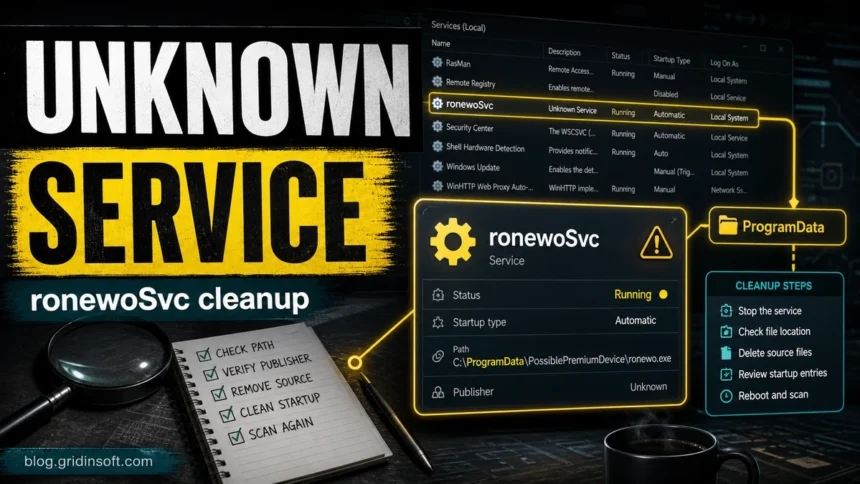
ronewoSvc is not a normal Windows service name. If you see ronewoSvc, ronewo.exe, or a path such as C:\ProgramData\PossiblePremiumDevice\ronewo.exe, treat it as an unknown startup service until you verify the file, publisher, and app that installed it. Do not delete random driver-looking files by name alone. First record the path and creation time, stop the service if it is suspicious, remove the source app or bundle, check startup locations, reboot, and scan again.
What to do first
- Open the service properties and copy the exact path to
ronewo.exe. - Be cautious with
ProgramDatapaths, especially folders with generic names such asPossiblePremiumDevice. - Check the publisher and install date before removing anything.
- Uninstall the same-day source app if a driver updater, optimizer, browser offer, or survey app appeared with it.
- Scan after reboot because startup services can return when the source package is still present.
| Item | What it usually means |
ronewoSvc |
A Windows service or startup entry using a non-standard name. |
ronewo.exe |
The executable launched by that service or startup entry. |
C:\ProgramData\PossiblePremiumDevice\ronewo.exe |
A suspicious-looking ProgramData path that should be verified before trust or removal. |
| Security-tool or PUA alert nearby | Use the exact detection name from the alert, but clean the service and its source app as separate evidence. |
What is ronewoSvc?
ronewoSvc appears in public startup-entry databases as an autostart item linked to ronewo.exe [1]. That public record is enough to show that the name exists in Windows startup/service contexts, but it is not enough to prove a single universal malware family, vendor, or safe application.
That is why the file path matters more than the name alone. A signed vendor service under C:\Program Files is a different case from an unsigned executable in C:\ProgramData\PossiblePremiumDevice, %TEMP%, a random bundle folder, or a folder created the same day as unwanted apps. Microsoft Sysinternals Autoruns is useful here because it shows many autostart locations, including logon entries, services, scheduled tasks, browser helpers, Winsock providers, and more [2].
Is ronewo.exe dangerous?
Treat ronewo.exe as suspicious until proven otherwise. A random service name, unknown publisher, ProgramData location, or same-day bundle install is enough reason to stop and verify. It is not enough, by itself, to say every file with this name is malware.
| What you find | Risk and action |
Unsigned ronewo.exe in ProgramData, Temp, or a newly created folder |
High suspicion. Stop the service, quarantine or remove the file, and remove the source app. |
| Service appears after a driver updater, optimizer, browser offer, or survey app | Likely unwanted bundle behavior. Uninstall the source app and check for scheduled tasks and startup entries. |
| Security tool also reports a PUA or adware detection | Keep the exact detection name for support, but still clean the service, executable, and parent installer. |
| Known vendor signature, expected install path, and clear app owner | Pause before deleting. Verify through the vendor’s official installer and file properties. |
Check these details before removing it
- Open Services, Task Manager, or Autoruns and find
ronewoSvc. - Open the item properties and record the full path, publisher, service description, startup type, and creation time.
- Right-click
ronewo.exe, open Properties, and check Digital Signatures. No signature or an unfamiliar publisher is a warning sign. - Check Apps & features for programs installed on the same day. Pay attention to driver updaters, PC optimizers, browser companion apps, survey software, and installer wrappers.
- Review Task Scheduler, Startup Apps, browser extensions, and notification permissions for the same vendor, folder, or install time.
How to remove ronewoSvc and ronewo.exe
- Disconnect from risky downloads or installer pages that may be reinstalling the app.
- Create a restore point if the machine is stable enough to do so.
- Stop
ronewoSvcin Services. If it immediately restarts, boot into Safe Mode and continue from there. - Uninstall the same-day unwanted app from Windows Settings when you can identify it.
- Delete or quarantine the folder that contains
ronewo.exe, such asC:\ProgramData\PossiblePremiumDevice\, only after recording the path and confirming it is not a trusted vendor folder. - Remove leftover startup entries from Autoruns, Task Scheduler, Startup Apps, and browser extension lists.
- Restart Windows, update your security tool, and run a full scan.
If ronewoSvc returns after reboot, the visible service was only one part of the install. A scheduled task, updater, bundled app, browser component, or leftover installer may still be restoring it. Run a full Gridinsoft Anti-Malware scan to check for hidden files, startup entries, scheduled tasks, bundled apps, browser changes, and persistence that can recreate the service.
If your security tool also says PUA or Packunwan
Do not rename the alert. If Windows Security or another scanner reports a PUA family near ronewoSvc, keep the exact detection name, affected path, and detection time. For example, a broad PUA detection can cover many different bundles, so the cleanup decision should still start with the concrete file path and source app. If your alert specifically says PUA:Win32/Packunwan, use that page for the Defender-family context, then return here for the service/startup cleanup flow.
Microsoft notes that potentially unwanted applications can slow a machine, display unexpected ads, or install other software, and Windows Security may detect already downloaded or installed PUA when protection is enabled [3]. That matches the practical reason to remove the source package, not only the one executable that appears in a scan result.
Related cleanup paths
- If the service appeared with a fake driver updater, use the fake driver updater cleanup guide.
- If you see Web Companion prompts or browser-offer leftovers, use the Web Companion removal guide.
- If the suspicious item is an Alsulics service, follow the AlsulicsApplication cleanup guide.
- If survey/adware software appears on the same day, check the PremierOpinion removal guide.
What not to do
- Do not allow-list
ronewo.exejust because only one scanner complains. - Do not delete Windows services at random without recording the path and publisher first.
- Do not keep the same installer, archive, or optimizer that created the service.
- Do not clear Protection History or browser downloads before saving the path evidence.
FAQ
Is ronewoSvc a Windows service?
No public Windows documentation identifies ronewoSvc as a normal Microsoft service. Treat it as a third-party or unwanted service until the file path and publisher prove otherwise.
Should I delete ronewo.exe?
Delete or quarantine it when it is unsigned, in a suspicious folder, or tied to an unwanted app. If it has a trusted vendor signature and expected install path, verify before removing.
Why does ronewoSvc come back after reboot?
A scheduled task, updater, startup entry, browser component, or source package may be reinstalling it. Remove the source app and scan for leftovers, not only the visible service.
Is PossiblePremiumDevice safe?
The folder name is not enough to prove safety. A ProgramData folder with an unknown executable should be checked by creation time, publisher, parent installer, and security scan results.
References
- Glarysoft. “ronewoSvc ronewo.exe.” Glarysoft Startup Programs database, accessed July 6, 2026. https://www.glarysoft.com/startups/ronewosvc/ronewoexe/639194
- Microsoft Learn. “Autoruns for Windows.” Microsoft Sysinternals, accessed July 6, 2026. https://learn.microsoft.com/en-us/sysinternals/downloads/autoruns
- Microsoft Support. “Protect your PC from potentially unwanted applications.” Microsoft, accessed July 6, 2026. https://support.microsoft.com/en-us/security/protect-your-pc-from-potentially-unwanted-applications