Trojan:Win32/Suweezy is a Microsoft Defender malware detection, not a component of CrystalDiskMark. If the alert returns after quarantine or reboot, keep the detected item blocked and treat the PC as not yet clean. Microsoft documents Suweezy behavior that can add antivirus exclusions and install a service capable of downloading or running more malware. A remaining loader, exclusion, service, scheduled task, or a repeated download can make the same warning appear again.
Recent user reports connect recurring alerts with fake CrystalDiskMark or “CrystalMarkDrive” downloads, but those reports do not prove one shared domain, hash, miner, or stealer campaign. The safe response is to verify the source, remove the detection, check what could recreate it, and confirm the result after a reboot.
What Trojan:Win32/Suweezy means
Microsoft describes Suweezy as a malware family that tries to place folders on antivirus exclusion lists. Its documented behavior also includes creating a Windows service that may download and execute additional malware.[1] That combination explains why deleting only the file shown in one alert may be insufficient.
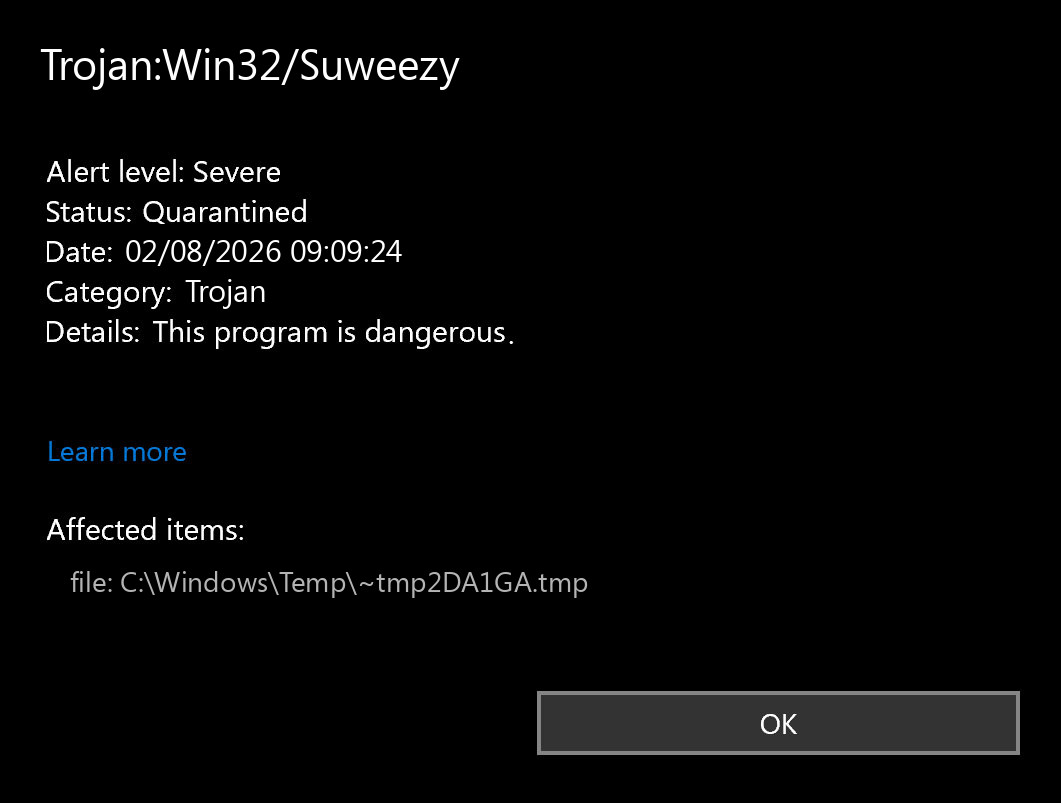
The exact path in Protection History matters. An alert for a temporary file under C:\Windows\Temp\{random}.tmp suggests a different cleanup route than an alert for a file you deliberately downloaded. Record the affected path, detection time, and Defender action before removing the item; this helps you tell a new detection from the same stale notification.
Why Suweezy can keep coming back
- A hidden component recreates it. Microsoft notes that recurring malware can be reinstalled by another component, often after restart.
- An antivirus exclusion remains. Suweezy’s documented family behavior includes attempts to exclude folders from scanning. A whole-drive or unexpected user-folder exclusion is a serious warning.
- A service or scheduled task still starts. Quarantining the detected payload does not automatically prove its launch mechanism is gone.
- The same download is opened again. A browser download, archive, installer, or synchronized folder can reintroduce the file.
- Protection History shows an unfinished action. “Remediation incomplete” or “Action needed” requires a follow-up; a quarantined item should not be restored merely to test it.
Was CrystalDiskMark itself infected?
The legitimate CrystalDiskMark project is a disk benchmark published by Crystal Dew World. Its official product and download pages are under crystalmark.info, and current signed binaries use the signer CrystalMark Inc.[3] A similar domain name, a sponsored result, or a file called “CrystalMarkDrive” is not proof that it came from that project.
| Check | What it means |
|---|---|
| Download source | crystalmark.info is the official project route. A lookalike domain or direct EXE/ZIP mirror needs independent verification. |
| Digital signature | A current official binary should show CrystalMark Inc. in Properties → Digital Signatures. A missing or different signer is a reason not to run it. |
| Defender path | A detection in an unrelated Temp, AppData, or extracted archive path may point to the delivery chain rather than the benchmark application. |
| Other changes | New exclusions, services, tasks, browser settings, or additional detections make a harmless false positive less likely. |
Do not search for a replacement EXE on another download site. Return to the official project page and compare the domain and signature before installing anything. The broader EXE safety checklist explains how to verify a file before running it.
Remove Trojan:Win32/Suweezy and stop it returning
- Disconnect the PC if suspicious activity is ongoing. Turn off Wi-Fi or unplug Ethernet if you see new downloads, browser redirects, account prompts, or unknown processes. Do not sign in to sensitive accounts from this PC yet.
- Keep the detection quarantined. Open Windows Security → Virus & threat protection → Protection history. Expand the Suweezy event, note the affected path and status, then choose Remove when offered. Do not choose Allow or Restore for an unverified installer.
- Remove the source package. Delete the suspicious installer and its archive from Downloads, the browser download list, and any synchronized folder. Empty the Recycle Bin only after you have recorded the filename and source domain.
- Review Defender exclusions. Open Virus & threat protection settings → Manage settings → Add or remove exclusions. Remove exclusions you did not create or cannot justify. Be especially cautious with an exclusion for an entire drive, Downloads, Temp, AppData, or a broad user-profile folder. On a managed work PC, ask the administrator before changing policy-controlled entries.
- Check common launch points. Review installed apps, Task Manager → Startup apps, Task Scheduler Library, and
services.mscfor an entry created around the infection time. Do not delete an unfamiliar service only by name; verify its file path, signer, and installation context first. - Update Defender and run a full scan. If the scan finishes in only seconds or checks very few files, use the full-scan troubleshooting steps before trusting the result.
- Run Microsoft Defender Offline when the alert returns. Microsoft specifically recommends its offline scan for malware that keeps reinfecting a PC because it runs outside the normal Windows session.[2] If the PC fails to restart into the scan or no result appears, follow the Defender Offline repair guide.
- Scan for leftovers after the manual checks. A security tool may quarantine the visible file while an exclusion, service, scheduled task, browser change, or bundled loader remains. Run a full Gridinsoft Anti-Malware scan, remove confirmed detections, reboot, and scan again if Suweezy or related activity returns.
Defender can quarantine the visible file, but repeated alerts may mean a loader, scheduled task, service, browser change, or bundled component is recreating it. Scan the PC before trusting the cleanup.
Scan for Suweezy leftoversAfter reboot, confirm that real-time protection and SmartScreen/App & browser control are on, the suspicious exclusions have not returned, and Protection History does not show a new Suweezy event. If an unexplained service, task, or exclusion recreates itself, stop manual experimentation and plan a clean Windows reinstall from trusted media.
Could Trojan:Win32/Suweezy be a false positive?
A false positive is possible with any detection, but recurrence after running an unsigned or unofficial installer is not a strong false-positive pattern. Do not restore the file while deciding. First confirm all of the following:
- the download came through the official Crystal Dew World route;
- the file is digitally signed by the expected current signer;
- the affected path matches the file you intended to install;
- there are no unexpected exclusions, services, tasks, browser changes, or companion detections;
- a second scanner or official Microsoft file submission does not confirm malicious behavior.
If one of these checks fails, leave the file quarantined. An official signed file with a clean source and no other suspicious changes can be submitted to Microsoft for analysis rather than restored blindly.
Do you need to wipe a secondary drive or reinstall Windows?
A secondary HDD or SSD does not need to be erased merely because it was connected. Scan it before opening executables, scripts, shortcuts, or archives from it. Documents and media can be backed up cautiously, but do not carry over installers, cracks, unknown archives, or executable files from the infected system.
A clean reinstall becomes the safer choice when the alert returns after offline scanning, security settings or exclusions keep changing, unknown administrator accounts appear, ransomware or credential theft is suspected, or you cannot identify the persistence source. Create the installer on a clean device, preserve only necessary non-executable data, and reinstall applications from their official publishers.
Change passwords if the fake installer ran
If you only downloaded the file and never opened it, account exposure is less likely. If the installer ran, requested administrator access, opened additional windows, or produced other detections, change important passwords from a clean device after the PC is contained. Start with email, password manager, banking, Microsoft, social, gaming, and work accounts; sign out other sessions and enable multifactor authentication. A malware scan can remove local components, but it cannot revoke a stolen session or recover a password already captured.
Prevent another fake-download infection
- Bookmark the official publisher page instead of choosing the first sponsored or lookalike result.
- Check the full domain, not only the page title or favicon.
- Verify the digital signature before approving a new installer.
- Do not disable SmartScreen or antivirus protection to make a download run.
- Keep browser, Windows, and security intelligence updates current.
- Treat a password-protected archive or instructions to turn off security tools as a stop signal.
Fake software pages often borrow a legitimate product’s name while delivering an unrelated installer. The fake software download campaign guide shows how that delivery pattern can lead to remote-access malware without implying that every lookalike domain belongs to the same operation.
FAQ
Is Trojan:Win32/Suweezy part of CrystalDiskMark?
No. Suweezy is a Microsoft Defender malware detection. CrystalDiskMark is a legitimate disk benchmark from Crystal Dew World; the risk here is an unofficial or impersonating download, not the product name itself.
Why does Defender detect Suweezy again after quarantine?
The same file may be downloaded or extracted again, or a remaining loader, service, scheduled task, or antivirus exclusion may recreate it. Compare the new event time and path, then run an offline scan if it returns after reboot.
Should I restore the file to test whether it is safe?
No. Leave it quarantined while you verify the source, signer, path, and other system changes. Submit a clean-source signed file to Microsoft for analysis if a false positive remains plausible.
Will a malware scan recover stolen passwords?
No. A scan can find local detections and persistence, but it cannot undo credential or session theft. Change passwords from a clean device and revoke active sessions if the untrusted installer ran.
References
- Microsoft Security Intelligence. “Trojan:Win32/Suweezy threat description.” Microsoft, published July 7, 2016; updated September 15, 2017; accessed August 2, 2026. Microsoft threat entry.
- Microsoft Support. “Troubleshoot problems with detecting and removing malware.” Microsoft, accessed August 2, 2026. Microsoft recurring-malware guidance.
- Crystal Dew World. “CrystalDiskMark” and “Digital Signature.” Crystal Dew World, current version 9.0.3 dated May 24, 2026; accessed August 2, 2026. official CrystalDiskMark project page.