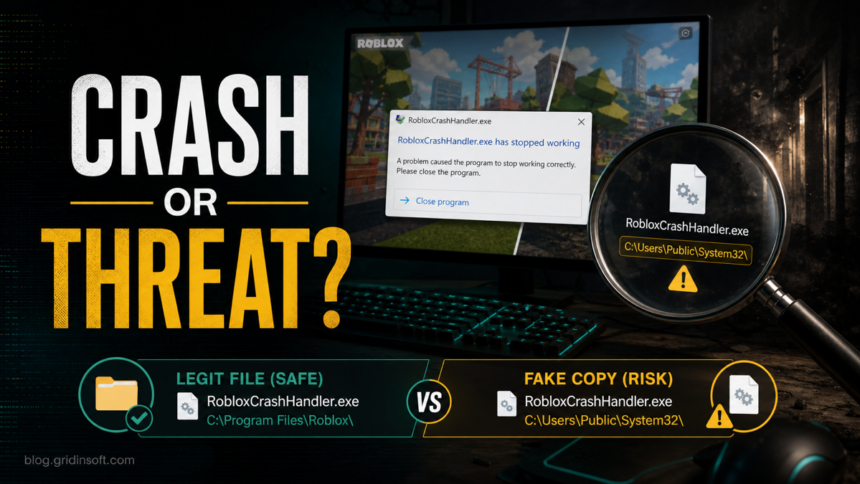
RobloxCrashHandler.exe is usually a legitimate Roblox crash-reporting component when it lives inside the normal Roblox or trusted Roblox-bootstrapper folders. Do not delete it just because the name sounds technical. Treat it as suspicious when the same filename appears in an unknown folder, runs at Windows startup, has no expected publisher or signature, returns after removal, or appeared after a Roblox executor, mod, crack, fake update, Discord file, or unofficial launcher.
The safest answer is a decision check, not a one-word verdict. Roblox support says Roblox files are normally stored under C:\Users\(Your Windows Username)\AppData\Local\Roblox and explains that antivirus tools can sometimes flag Roblox incorrectly [1]. Bloxstrap and similar launchers can also keep Roblox files under their own AppData\Local folders. A fake copy of RobloxCrashHandler.exe outside that context is a different problem.
Quick answer
- Likely normal: the file is inside
%LOCALAPPDATA%\Roblox\Versions\...or a trusted launcher folder such as%LOCALAPPDATA%\Bloxstrap\Roblox\Player\..., appears only during a crash/update, and the rest of the system is clean. - Likely broken install: Bloxstrap, Fishstrap, or Roblox says
Access to the path 'RobloxCrashHandler.exe' is deniedwhile installing or updating. - Likely risky: the file is in
Downloads,Temp,AppData\Roaming,ProgramData,C:\Users\Public, a startup folder, or a random game/mod folder. - Best first action: check location, signature, and behavior. If the file came from an unofficial download or runs outside a Roblox crash/update, scan before logging back in.
| Question | Practical answer |
| Is RobloxCrashHandler.exe a virus? | Usually no, but the filename can be copied by malware. The folder and behavior decide the risk. |
| Should I delete it? | Do not delete the normal Roblox copy first. Reinstall Roblox or the launcher if the install is broken. |
| What if it is access denied? | Close Roblox and bootstrapper processes, reboot, update/reinstall the launcher, then scan if the error keeps returning. |
| When should I scan? | Scan when the path is unknown, the file starts with Windows, the alert returns, or it followed a mod/executor/crack/fake download. |
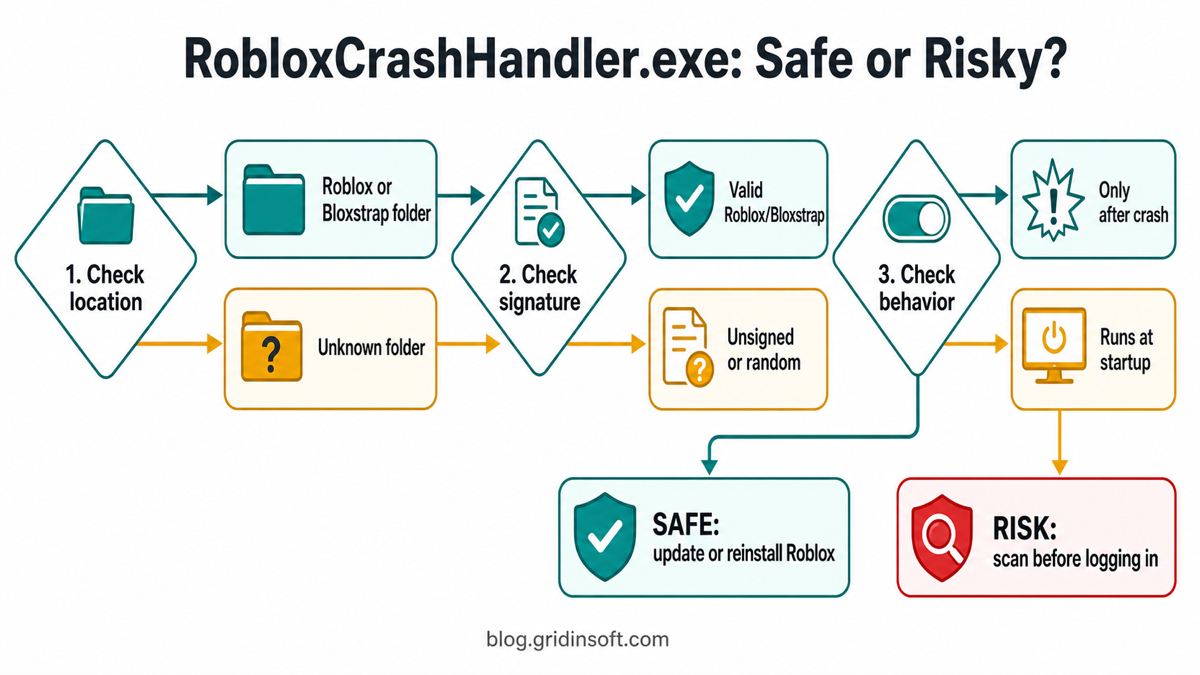
RobloxCrashHandler.exe decision map
What RobloxCrashHandler.exe does
RobloxCrashHandler.exe is meant to support crash handling. If Roblox closes, freezes, or updates, a crash handler can collect or process crash information so the client or launcher can recover. That is why the file may appear when Roblox crashes or when a bootstrapper replaces Roblox files during an update.
The name alone does not prove safety. Malware often borrows familiar game, launcher, browser, or updater names because users are more likely to allow them. Use the same logic as with Roblox Account Manager safety checks: the official or expected build is different from a repacked copy found through a mirror, video description, Discord link, or fake support page.
Normal locations to check first
Open Task Manager, right-click RobloxCrashHandler.exe, choose Open file location, and compare the folder with the source you actually use.
| Location | What it means |
|---|---|
%LOCALAPPDATA%\Roblox\Versions\... |
Expected for standard Roblox installs and updates. |
%LOCALAPPDATA%\Bloxstrap\Roblox\Player\... |
Expected when Roblox is launched through Bloxstrap. |
%LOCALAPPDATA%\Fishstrap\Roblox\Player\... |
Expected when Roblox is launched through Fishstrap or a similar Roblox bootstrapper. |
Downloads, Temp, AppData\Roaming, ProgramData, C:\Users\Public, or a random mod/executor folder |
Suspicious. Stop running it and scan before signing back in. |
Bloxstrap’s official GitHub page says Bloxstrap is a third-party replacement for the standard Roblox bootstrapper, supports Windows, and warns that the only official Bloxstrap download sources are its GitHub repository and bloxstraplabs.com [3]. That is important because a safe bootstrapper path is not the same as a random Bloxstrap-looking installer from a mirror.
If Bloxstrap says access to RobloxCrashHandler.exe is denied
The message System.UnauthorizedAccessException: Access to the path 'RobloxCrashHandler.exe' is denied usually points to a locked file, permission problem, failed update, or another Roblox/bootstrapper process holding the file. A Bloxstrap issue log shows this exact error while the bootstrapper was installing Roblox, after it loaded from %UserProfile%\AppData\Local\Bloxstrap\Bloxstrap.exe and tried to update Roblox files [4].
- Close Roblox, Bloxstrap/Fishstrap, and related processes. Check Task Manager for
RobloxPlayerBeta.exe,RobloxCrashHandler.exe,Bloxstrap.exe, andFishstrap.exe. - Reboot once. A restart clears many locked-file cases without risky manual deletion.
- Update the bootstrapper from its official source. Do not download a random “fixed Bloxstrap” or “Roblox crash handler repair” EXE.
- Reinstall Roblox if the normal client is corrupted. Roblox’s reinstall guidance says reinstalling can overwrite deleted or broken files, and its uninstall guidance says deleting the local Roblox folder can help with persistent problems [2].
- Scan if the error keeps returning from an odd path. A locked file inside the expected Roblox folder is usually a repair problem; a locked file in a startup or unknown folder is a security problem.
Check signature and behavior
After confirming the folder, check the file’s digital signature and behavior. Right-click the file, open Properties, and look at Digital Signatures if present. A legitimate Roblox component should fit the Roblox install context. A Bloxstrap-managed Roblox copy should fit the Bloxstrap install context. An unsigned file with the same name in a random folder deserves caution.
- Normal behavior: appears during a Roblox crash, update, or launch; does not stay running forever; does not add itself to Startup.
- Suspicious behavior: starts with Windows, recreates itself after deletion, launches PowerShell or script files, contacts unknown domains, changes browser settings, or appears after an executor/mod/crack.
- Account-risk behavior: Discord spam, Roblox session problems, browser logouts, password reset emails, new extensions, or security alerts after the file ran.
Safe cleanup order
- Do not log back into Roblox yet if the file came from an unofficial mod, executor, fake FPS booster, fake shader, or Discord/YouTube download.
- Save the path and timestamp. You need the exact folder to decide whether this is Roblox, Bloxstrap, Fishstrap, or a fake copy.
- Delete the source package. Remove the ZIP/RAR, installer, executor, patcher, fake update, or mirror download that introduced the file.
- Uninstall suspicious launchers or add-ons. Keep only Roblox and the bootstrapper you intentionally installed from an official source.
- Reinstall Roblox from the normal route. If the expected Roblox folder is corrupted, reinstall rather than hand-patching single EXE files.
- Scan the PC before restoring trust. Check for hidden files, startup entries, scheduled tasks, browser changes, bundled apps, and persistence.
Scan before logging back in
If RobloxCrashHandler.exe is outside the expected folder, runs at startup, returns after removal, or appeared after a Roblox executor, mod, crack, fake shader, or unofficial launcher, treat it as a possible malware incident. A full Gridinsoft Anti-Malware scan can check for detections, hidden files, startup entries, scheduled tasks, bundled apps, browser changes, and persistence that a simple reinstall will not remove.
If the process path is wrong, the name imitates a Windows component, or high CPU started after an unknown installer, scan for hidden miners, services, startup entries, and bundled components.
Scan this Roblox fileIf you already ran an unknown game file and then saw Roblox, Discord, Steam, email, or browser session problems, use the infostealer after downloading a game or mod checklist. For a broader “nothing happened after I opened it” case, see whether malware can activate later.
What not to do
- Do not download a separate
RobloxCrashHandler.exefrom a file site to replace the original. - If Roblox names a different DLL, driver, or
.infpath in an incompatible-software crash, use the Roblox incompatible software path fix before deleting system files. - Do not add a whole
Downloads,Temp, or game-mod folder to antivirus exclusions. - Do not assume every Bloxstrap/Fishstrap path is safe if the launcher came from an unofficial mirror.
- Do not change Roblox or email passwords on the same PC before cleanup when the file may have been a stealer.
- Do not delete random files from
AppDatawithout checking which program owns them.
FAQ
Is RobloxCrashHandler.exe part of Roblox?
Usually yes when it is inside the normal Roblox install folder or a trusted Roblox bootstrapper folder. The same filename in an unknown location can still be malware.
Why does RobloxCrashHandler.exe show access denied?
Most access-denied cases happen when Roblox or a bootstrapper is trying to replace a file that is locked by another process or blocked by permissions. Reboot, close all related processes, update the launcher, and reinstall from official sources before deleting files manually.
Can Bloxstrap make RobloxCrashHandler.exe appear?
Yes. Bloxstrap manages a Roblox player install under its own local folder, so Roblox files can appear under %LOCALAPPDATA%\Bloxstrap\Roblox\Player. Verify the bootstrapper source before trusting that path.
Should I allow RobloxCrashHandler.exe in my antivirus?
Only after the folder, signature, source, and behavior match a legitimate Roblox install. Do not allow a copy from Downloads, Temp, a mod/executor folder, or an unknown mirror.
Do I need to change my Roblox password?
Change it from a clean device if the file came from an unofficial download, ran before cleanup, or you also saw account alerts, Discord spam, browser session changes, or unknown extensions.
References
- Roblox Support. “What to Do If Your Anti-virus Has Flagged Roblox.” Roblox, accessed June 23, 2026. https://en.help.roblox.com/hc/en-us/articles/203313030-What-to-Do-If-Your-Anti-virus-Has-Flagged-Roblox.
- Roblox Support. “How Do I Reinstall the Roblox Software” and “How to Uninstall Roblox.” Roblox, accessed June 23, 2026. https://en.help.roblox.com/hc/en-us/articles/203312910-How-Do-I-Reinstall-the-Roblox-Software.
- Bloxstrap Labs. “bloxstraplabs/bloxstrap.” GitHub repository, accessed June 23, 2026. https://github.com/bloxstraplabs/bloxstrap.
- Bloxstrap Labs. “System.UnauthorizedAccessException: Access to the path ‘RobloxCrashHandler.exe’ is denied.” GitHub issue #3376, opened October 21, 2024, accessed June 23, 2026. https://github.com/bloxstraplabs/bloxstrap/issues/3376.