Gridinsoft Anti-Malware is worth considering if you want a focused Windows malware scanner and cleanup tool rather than a heavy all-in-one security bundle. Its strongest use case is practical: scan a suspicious PC, remove adware, trojans, unwanted programs and browser hijackers, then use tools such as quarantine, browser reset and system repair to finish the cleanup. It is not trying to be a VPN, password manager or parental-control suite, which is exactly why many users choose it as a second-opinion or dedicated anti-malware layer.
This review updates our older “15 reasons” article for 2026. Instead of a simple feature list, it now answers the questions people usually have before installing a security tool: is it safe, what does it do well, where is it limited, how does the interface look, and is it worth trying before paying?
Quick Verdict
| Best fit | Windows users who need malware removal, adware cleanup, browser-hijacker recovery, quarantine and a second-opinion scanner. |
| Not the best fit | Users looking for a full consumer security suite with VPN, identity monitoring, password manager and parental controls in one subscription. |
| Main advantage | A focused cleanup workflow: scan, review detections, quarantine threats, reset damaged browser settings and repair system changes. |
| Try first? | Yes. Use the trial/demo path to confirm detection, performance and interface fit before buying a license. |
Who Should Choose Gridinsoft Anti-Malware?
Gridinsoft Anti-Malware makes the most sense for people who are already dealing with a suspicious Windows system: popups, redirects, browser settings that keep changing, strange startup entries, unwanted apps, repeated antivirus alerts, or files that other scanners disagree about. It also fits users who prefer a leaner security tool and do not want to pay for bundled extras they will never use.
- You want a malware cleanup tool: the product is built around finding and removing threats rather than selling unrelated add-ons.
- You need a second opinion: it can be used to check a system when Microsoft Defender or another antivirus leaves you unsure.
- You see browser-hijacker symptoms: the browser reset and cleanup tools are useful after adware or redirect malware has changed Chrome, Edge, Firefox or other browser settings.
- You want readable decisions: scan results, quarantine and logs are easier to understand than many enterprise-style security dashboards.
15 Reasons to Try Gridinsoft Anti-Malware
1. Focused Malware Detection
The core job is threat detection and cleanup. Gridinsoft Anti-Malware targets common Windows malware families, adware, trojans, suspicious scripts, browser hijackers, potentially unwanted programs and riskware. That focus matters because a cleanup tool should spend its energy on the infection path, not on unrelated subscription extras.
2. Multiple Detection Layers
The product combines signature-based detection, heuristic rules and behavior-oriented analysis. This layered approach is useful when a file is new, packed, renamed or installed through a suspicious chain rather than arriving as a well-known sample.
3. Useful as a Second-Opinion Scanner
Many users arrive at this article after one scanner says a file is clean while another flags it. Gridinsoft Anti-Malware is useful in that situation because it can inspect the machine from a different detection perspective and help confirm whether the alert was a real infection, a potentially unwanted app, or a false positive that needs more review.
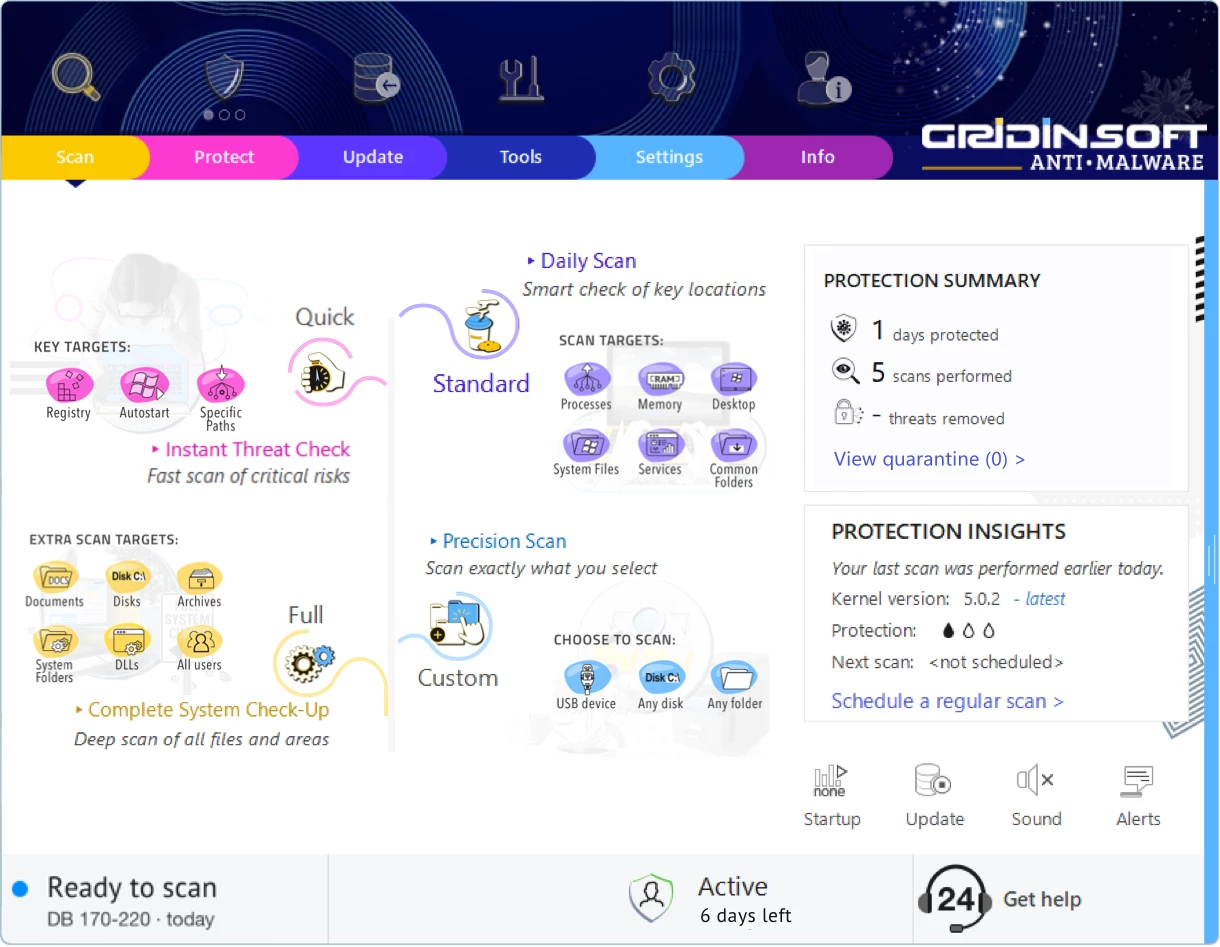
4. Quick, Full and Custom Scans
Different incidents need different scan depth. A quick scan is useful for common startup and malware locations, a full scan is better after a clear infection, and a custom scan helps when you want to inspect a specific download folder, USB drive, archive extraction folder or suspicious installer location.
5. Clear Interface
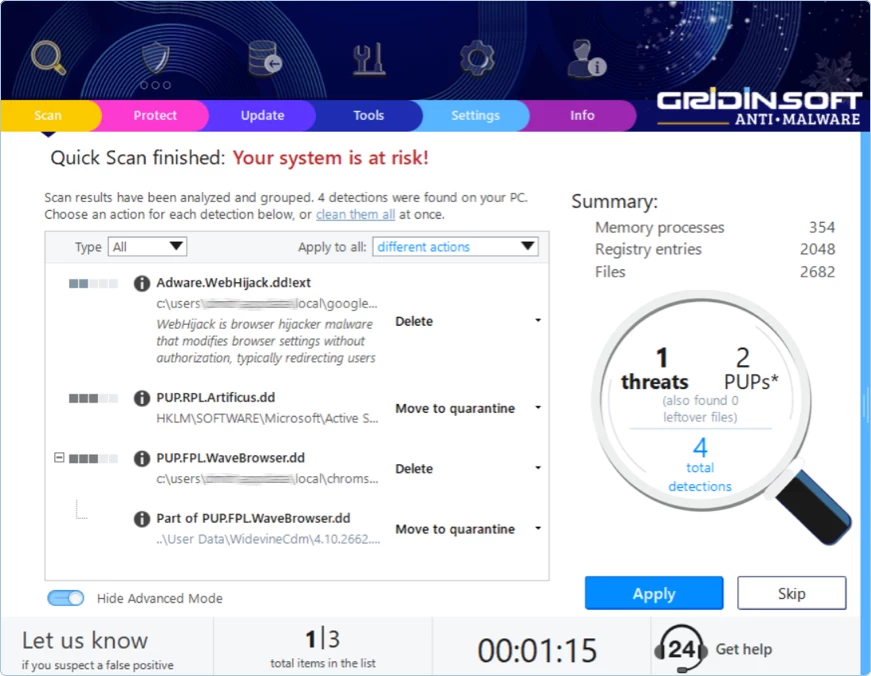
Security software often loses users in menus. Gridinsoft Anti-Malware keeps the main flow simple: scan, review, quarantine, update and use tools when cleanup leaves damaged settings behind. That makes it approachable for home users while still leaving enough control for more technical troubleshooting.
6. Quarantine Instead of Blind Deletion
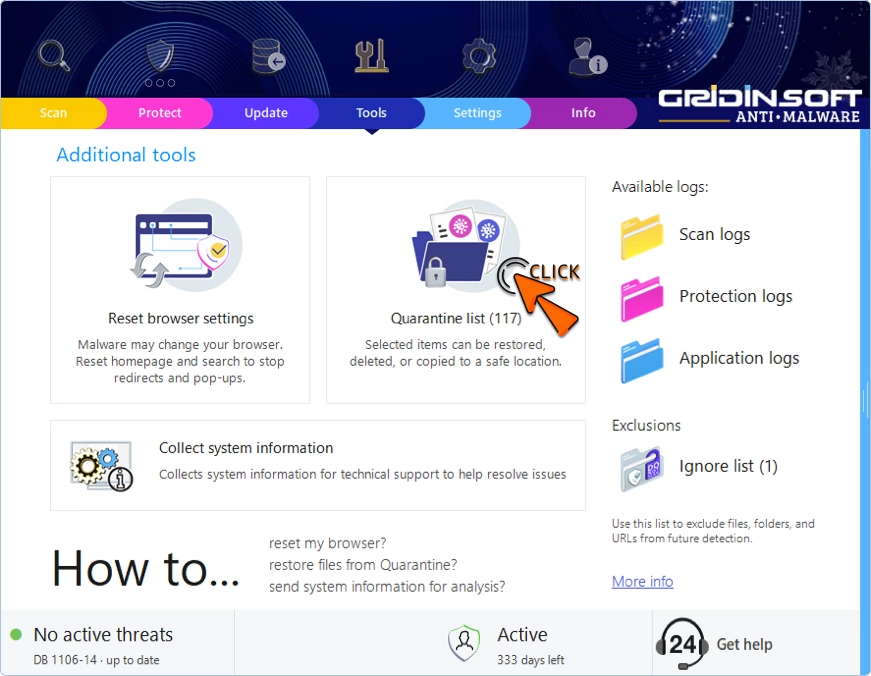
Quarantine is important because some suspicious files need a second look. Rather than deleting every detection immediately, the program can isolate items so they cannot run while you decide whether to remove, restore or submit them for additional review.
7. Browser Reset After Adware
Adware and browser hijackers often leave behind changed search providers, notification permissions, startup pages and proxy-like behavior. Malware removal alone may not undo those settings. Gridinsoft Anti-Malware includes browser reset tools that help return affected browsers to a clean state after the malicious component is removed.
8. System Repair Tools
Some malware changes Windows policies, disables utilities, edits networking settings or damages normal system behavior. A good cleanup workflow should include repair steps after removal, and Gridinsoft Anti-Malware includes tools for restoring common settings affected by malware.
9. Real-Time Protection Options
For users who want more than an on-demand scan, real-time protection can watch file and process activity while Windows is running. This is especially useful on machines that frequently handle installers, archives, USB drives or downloaded files from less predictable sources.
10. Frequent Database Updates
Malware changes quickly, so detection data needs to move quickly too. Frequent updates help the scanner recognize newer threats, fresh PUA installers and recently observed malicious scripts that older definitions might miss.
11. Lightweight Product Scope
Gridinsoft Anti-Malware does not try to be a full lifestyle security suite. There is no reason to install a bulky bundle if your immediate need is malware scanning, removal, quarantine and cleanup. Users who already have separate VPN, backup or password tools may prefer that narrower scope.
12. Works Alongside Existing Security
Many Windows users keep Microsoft Defender enabled and use an additional malware scanner for checks and cleanup. Gridinsoft Anti-Malware fits that workflow as a focused second layer, especially when you want a separate view of suspicious files or recurring symptoms.
13. Trial and Demo Options
Security software should earn trust before purchase. The trial/demo path lets you test the scan workflow, see whether it detects anything meaningful on your PC, and decide whether the cleanup features are worth licensing for your case.
14. Practical Support Route
Malware cleanup can get messy: damaged browsers, blocked tools, recurring detections, or uncertainty about whether a file is safe. Product support matters most in those edge cases, especially for non-technical users who need help interpreting results and deciding the next step.
15. Good Fit for Cleanup-First Users
The biggest reason to choose Gridinsoft Anti-Malware is not a single feature. It is the cleanup-first workflow: scan the machine, separate unsafe items, restore changed settings and use the system normally again. If that is the problem you are trying to solve, the product is a natural fit.
Where Gridinsoft Anti-Malware Is Not the Right Fit
A fair review should also say when not to choose it. If you want one subscription that bundles VPN, parental controls, identity monitoring, cloud backup and password management, Gridinsoft Anti-Malware is not positioned as that kind of suite. If you manage a large business network, you may need central policy controls, device inventory and reporting that belong to endpoint-management products. And if a PC is already severely compromised, no scanner should replace backups, password rotation from a clean device, and a clean Windows reinstall when the situation demands it.
How to Try It Safely
- Download Gridinsoft Anti-Malware from the official Gridinsoft download page.
- Run an initial scan and review the detection names, paths and categories before removing anything important.
- Use quarantine for files you are unsure about, especially business documents, custom scripts or software from a trusted developer.
- If browser redirects or popups were the original symptom, use the browser reset tools after the malicious items are removed.
- After cleanup, change passwords that may have been exposed, especially browser-saved, email, banking and gaming account passwords.
Bottom Line
Gridinsoft Anti-Malware deserves a place on the shortlist when the goal is Windows malware cleanup, second-opinion scanning and recovery from adware or browser hijackers. The updated reason to choose it in 2026 is not just “15 features.” It is that the product keeps its scope clear: find threats, help remove them, isolate uncertain files, repair common damage and keep the interface understandable while doing it.
FAQ
Is Gridinsoft Anti-Malware safe?
Yes, when downloaded from the official Gridinsoft website. Avoid third-party download pages that bundle installers or modify software packages.
Can Gridinsoft Anti-Malware replace Microsoft Defender?
For many users it works best as a dedicated anti-malware and cleanup layer alongside their existing Windows protection. Whether it should be your primary protection depends on how you use the PC and which real-time modules you enable.
Does Gridinsoft Anti-Malware remove browser hijackers?
It can help remove malicious and unwanted components associated with browser hijackers, and its browser reset tools can help restore changed browser settings after cleanup.
Should I buy it before scanning?
No. Start with the trial/demo path, run a scan, review what it finds, and buy only if the detection and cleanup workflow solves the problem you actually have.
Product and Helpdesk Pages Used for This Review
- Gridinsoft. “Gridinsoft Anti-Malware.” Gridinsoft, accessed June 1, 2026. https://gridinsoft.com/antimalware/
- Gridinsoft Helpdesk. “Gridinsoft Anti-Malware Knowledge Base.” Gridinsoft, accessed June 1, 2026. https://support.gridinsoft.com/portal/en/kb/anti-malware