A fake domain renewal email can quote your real name and domain while having no authority to renew it. Treat the notice as fraudulent when the sender is not your known registrar and its payment button opens an unrelated domain. Do not use the email link. Open your registrar account from a saved bookmark or a new browser tab and check the domain there.
In a redacted message reviewed by Gridinsoft, the sender claimed an overdue invoice had suspended a former domain. The email came from domivax[.]org, while its payment button pointed to databaseguardsecure[.]com. The named domain no longer resolved and was not present in the relevant registry lookup. A payment to an unrelated site could not renew it.
What a fake domain renewal email looks like
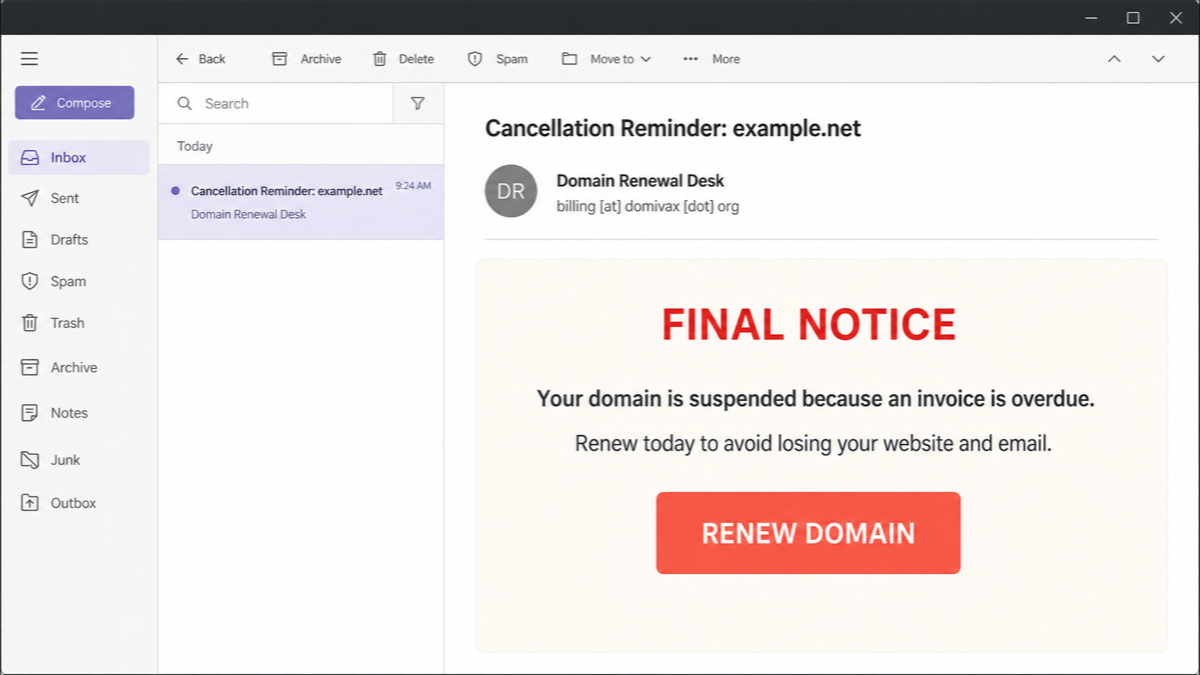
The exact branding changes, but the pressure pattern is stable: an overdue invoice, a suspension or cancellation threat, a short deadline, and a button that bypasses the registrar account. The illustration below recreates the recognizable parts of the reviewed message without exposing the recipient, former domain, headers, or unique invoice token.
Example
Subject: Cancellation Reminder: example.net
From: Domain Renewal Desk <billing [at] domivax [dot] org>
FINAL NOTICE
Your domain is suspended because an invoice is overdue. Renew today to avoid losing your website, email, and search visibility.
Button: RENEW DOMAIN
A real domain and owner name do not authenticate this message. The important question is whether the company that controls your registration sent it and whether the requested action exists inside your registrar account.
Five checks that expose a fake renewal notice
- Read the full sender address. A display name such as “Domain Renewal Desk” is easy to invent. Compare the domain after
@with the registrar or reseller you actually use. - Inspect the button destination without opening it. On a computer, hover over the button. On a phone, press and hold only if the mail app shows a safe preview without loading the page. A destination unrelated to your registrar is a stop sign.
- Open the registrar directly. Use a bookmark, password-manager entry, or address you type yourself. Check the domain list, expiration date, auto-renew setting, billing history, and any real alert inside the account.
- Check the registry record. If you are unsure who the registrar is, use ICANN Lookup or the registry’s RDAP service. Confirm that the exact domain is registered and note the sponsoring registrar. DNS results alone are not enough because a registered domain can temporarily have no working website.
- Compare the claim with the domain state. A notice cannot be legitimate if it demands renewal for a domain you never owned, a similar misspelling, or a former domain that is no longer in your account or the registry. If a domain is in an expiration or redemption period, work only with the sponsoring registrar.
You can paste a suspicious destination into the Gridinsoft Website Reputation Checker instead of visiting it. A clean-looking report still does not make the sender your registrar; the account and registry checks remain decisive.
Why SPF or DKIM can pass on a scam email
Email authentication answers a narrower question than “Is this invoice real?” SPF checks whether the sending server is permitted to send for the envelope domain. DKIM checks whether a domain signed the message and whether signed content changed in transit. DMARC checks alignment with the visible From domain and the sender’s policy.
A scammer who owns domivax.org can configure its mail server correctly and pass those tests for domivax.org. That does not prove the sender is your registrar, owns your domain, has an unpaid invoice, or can renew anything. Authentication can expose forged identity, but it does not certify the truth of a message sent from a domain the attacker controls.
The same principle applies to familiar logos, a real owner name, and an accurate domain spelling. Use the broader phishing email checklist for header and link checks, but verify the renewal itself only in the registrar account.
How scammers know your name and domain
Personalization does not necessarily mean the registrar was breached. Domain names, company names, old contact details, certificate records, archived pages, business directories, prior data leaks, and marketing lists can all be collected and reused. Even after a domain expires or is abandoned, a lead list may continue linking it to a former owner.
The reviewed message illustrates that gap: it used a real former-domain relationship while making a current suspension and debt claim that did not match the registry state. The correct inference is that the sender had old or externally collected data, not that it controlled the registration.
Payment scam, credential phishing, or domain slamming?
- Fake payment collection asks for money or card details but provides no renewal. The page may show a convincing confirmation even though the registrar record never changes.
- Credential phishing imitates a registrar login and steals the account password, one-time code, or authorization code. That can put the real domain, DNS, hosting, and business email at risk.
- Domain slamming disguises a transfer or new service as a routine renewal. Fine print may call the notice a solicitation, but paying or signing can authorize an unwanted provider change.
A single campaign may combine these outcomes. The safe response is the same: do not use its button, do not enter an authorization code, and ask the real registrar about any unexpected transfer or billing event. For a focused credential-theft example, see the domain account authentication phishing guide.
What to do after interacting with the email
- You only received or opened the email: Report it as phishing or spam, delete it, and verify the domain in the registrar account. Opening an ordinary message is not the same as paying or installing malware.
- You opened the linked page: Close it. Do not return to test it. Check browser downloads and remove any notification permission the site received. If you entered nothing and installed nothing, focus on account and payment checks rather than assuming infection.
- You submitted contact or business data: Expect follow-up calls and invoices that reuse those details. Warn staff, verify future contacts independently, and monitor for identity or business-email impersonation.
- You entered card or bank details: Call the issuer using the number on the card or official banking app, explain that the details were entered on a fraudulent site, and follow its advice on blocking or replacing the card. Monitor for small test charges and dispute unauthorized payments promptly.
- You shared a registrar password, one-time code, or transfer code: Use a clean device to change the registrar password and the email password that can reset it. Revoke sessions, enable MFA, apply a registrar lock, inspect DNS and contact changes, and tell the registrar that the account may be compromised.
- You downloaded or installed something: Disconnect from sensitive accounts, remove any unknown extension, application, or remote-support tool, and run a full Gridinsoft Anti-Malware scan. A scan is relevant here because software ran; it cannot reverse a card payment or invalidate stolen credentials.
If the message behaved like an unsolicited bill, the fake invoice email recovery guide covers payment approval, bank contact, and workplace escalation in more detail.
How businesses can prevent fake renewal payments
- Keep a domain inventory with the exact registrar, account owner, renewal date, billing method, and recovery contact.
- Enable registrar MFA, registrar lock, and domain privacy where supported. Keep the recovery mailbox protected and current.
- Require finance staff to match every renewal invoice to an approved vendor and a visible charge inside the registrar account.
- Use two-person approval for new payees, transfer codes, DNS changes, and urgent domain invoices.
- Route registrar notices to a shared operational mailbox instead of relying on one former employee or domain owner.
- Train staff that a valid domain, owner name, or SPF/DKIM result does not prove a payment request is authorized.
FAQ
Do legitimate registrars send renewal emails?
Yes. The safe test is whether the notice comes from the registrar you use and the same renewal status appears after you open that registrar account directly. Do not treat email alone as the source of truth.
Can a fake notice use my correct name and domain?
Yes. Current or old domain and business details can come from public records, archives, directories, marketing data, or prior leaks. Correct personalization proves the sender has data, not that it can manage the domain.
Does an SPF, DKIM, or DMARC pass make the invoice real?
No. Those checks can show that a message was authorized by the domain in its email identity. They do not prove that domain is your registrar or that the invoice, debt, suspension, and renewal claims are true.
Can I renew an expired domain from an email payment page?
Use only the sponsoring registrar shown in your account or registry record. Expired domains may pass through grace and redemption stages, and a random payment page cannot restore or renew a domain it does not control.
References
- Piscitello, Dave. “Be Careful What You Click: Alert of New Fraudulent Domain Renewal Emails.” ICANN, September 29, 2014, accessed July 17, 2026. https://www.icann.org/en/blogs/details/be-careful-what-you-click-alert-of-new-fraudulent-domain-renewal-emails-29-9-2014-en
- ICANN. “Important Tips to Help Keep Your Domain Name Secure.” ICANN Communications, September 2020, accessed July 17, 2026. https://www.icann.org/en/system/files/files/help-keep-domain-name-secure-30sep20-en.pdf
- Dasic, Stefan. “Fake Domain Renewal Emails Trick Website Owners into Paying Scammers.” Malwarebytes Labs, June 25, 2026, accessed July 17, 2026. https://www.malwarebytes.com/blog/threat-intel/2026/06/fake-domain-renewal-emails-trick-website-owners-into-paying-scammers