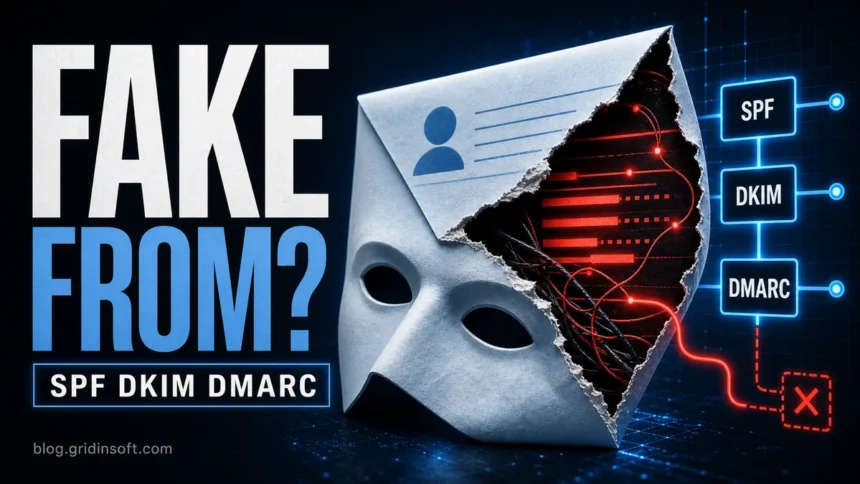
Email spoofing means a message is made to look as if it came from a trusted address even when it did not. If people are receiving strange mail “from” you, your mailbox is not always hacked; attackers can forge the visible sender name or address from outside your account. The durable fix is different for each case: victims should secure the mailbox and report the forged mail, while domain owners should align SPF, DKIM, and DMARC so receiving services can reject messages that only pretend to use the domain.
If you are investigating one suspicious message rather than configuring DNS, start with the Office365alerts Costco/BT email scam guide to separate sender spoofing, abused alert notifications, and brand-lure phishing.
Email Spoofing vs a Hacked Mailbox
Before changing DNS records or resetting every password, separate spoofing from account compromise. The symptoms overlap, but the response is not the same.
- Likely spoofing: you receive bounce messages for mail you never sent, recipients show you spam that is not in your Sent folder, and sign-in history looks normal.
- Possible hacked mailbox: messages appear in Sent, forwarding rules were added, recovery details changed, login alerts show unfamiliar devices, or contacts received messages from a real conversation thread.
- Lookalike-domain spoofing: the message uses a similar domain, such as a changed top-level domain, extra word, or one-letter typo.
- Display-name spoofing: the email address is different, but the sender name looks like a boss, coworker, bank, delivery service, or support team.
- Reply-To trick: the visible From address looks familiar, but replies go to an attacker-controlled address.
If the message asks for a password reset, invoice payment, gift card, remote access, crypto transfer, domain-contact verification, or document login, treat it as a phishing email even when the sender name looks correct. A registrar-themed example is the Authenticate Your Domain Account email scam, which uses ICANN wording to push users toward a password page. Spoofing is often the delivery trick; phishing or business email compromise is the damage path.
Why Am I Getting Bounce-Back Emails I Didn’t Send?
A sudden wave of delivery failures for messages you never wrote usually means a spammer forged your address as the envelope sender. When some of that mail cannot be delivered, the receiving systems send the notices back to the forged address. This is called backscatter. It does not automatically mean your mailbox was hacked, but the number of bounces alone cannot prove that your account is safe.
- Preserve one complete notice. Keep the non-delivery report, error code, original message details, and full headers. Do not use links or attachments inside an unexpected bounce.
- Check Sent and Deleted items. Matching outbound messages are strong compromise evidence; if malware may have exposed the mailbox, use the Microsoft account recovery after malware checklist. An empty Sent folder is reassuring but not conclusive because an attacker or malicious app may delete mail.
- Review account evidence. Look for unfamiliar sign-ins, forwarding rules, inbox rules, recovery changes, app passwords, connected apps, and replies inside real conversation threads.
- For a work or school domain, ask the mail administrator to run a message trace. No matching outbound event points toward forged sender data; matching submissions, rate-limit blocks, unknown connectors, or suspicious rules require account containment.
- Respond to the evidence. If the mailbox was used, follow the hacked-account recovery order: change its password from a trusted device, revoke sessions and unknown app access, enable MFA, and check the endpoint that accessed the account. If the evidence supports spoofing only, report the bounces as spam and strengthen the domain’s SPF, DKIM, and DMARC alignment.
Do not mass-delete the notices before an administrator preserves a representative sample. The headers and error code can distinguish forged backscatter from mail that actually left your provider.
What To Do If Someone Is Spoofing Your Email Address
If you are a normal Gmail, Outlook, Yahoo, or iCloud user and you do not own the domain, you cannot directly stop every forged message on the internet. Google notes that forged messages can be created outside Gmail, so Gmail cannot stop someone from putting your address in a fake From field before the mail reaches other systems.1 You can still reduce damage:
- Check whether your account was actually used. Review Sent, deleted items, login history, forwarding rules, app passwords, connected apps, and recovery settings.
- Change the password and enable MFA if there is any sign of account access, forwarding, or unknown devices.
- Warn close contacts with a clean new message. Tell them not to open unexpected attachments or links that claim to come from you.
- Report the forged message as spam or phishing in the mailbox where it arrived.
- Scan devices if a click or attachment happened. If you opened a file, enabled macros, installed a browser extension, or signed in on a fake page, use a trusted security scan and then secure the affected account.
For a deeper recovery path, use the Gridinsoft guide on what to do if a scammer has your email address. That page covers mailbox rules, account takeover signs, and what to change first.
How SPF, DKIM, and DMARC Stop Domain Spoofing
SPF, DKIM, and DMARC are DNS-based controls that help receiving mail services decide whether a message really has permission to use your domain. They work best together. Google requires SPF or DKIM for all senders to Gmail and requires SPF, DKIM, and DMARC for senders above 5,000 daily messages to personal Gmail accounts.2 Microsoft also emphasizes that DMARC fixes a key weakness of SPF and DKIM by checking alignment with the visible From domain.3
| Control | What It Proves |
|---|---|
| SPF | The sending server is allowed to send mail for the envelope sender domain. |
| DKIM | The message was signed by a domain key and was not changed after signing. |
| DMARC | The visible From domain aligns with a passing SPF or DKIM result, and the domain owner has published what to do with failures. |
That alignment point is why a page about email spoofing should not stop at SPF. A message can pass SPF for one domain while displaying a different From domain. DMARC is the layer that tells receivers whether the domain shown to the user is actually aligned with the authenticated sender.
Why SPF Passed but DMARC Failed in a Phishing Email
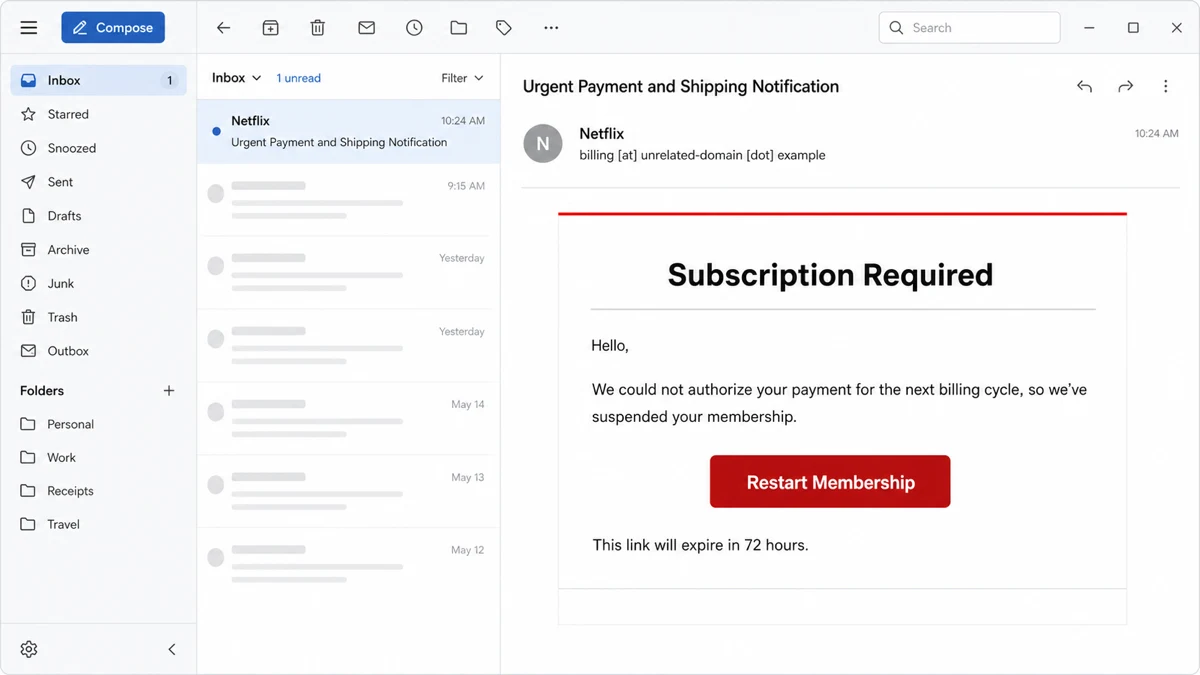
In one Netflix-themed phishing message reviewed by Gridinsoft, the final receiving hop reported spf=pass for an SRS-rewritten forwarding address while reporting dmarc=fail for the domain in the visible From field. SPF authenticated the forwarding envelope domain; it did not authenticate Netflix, the payment claim, or the button destination. DMARC failed because the authenticated identity did not align with the visible sender domain.
Example:
Subject: Urgent Payment and Shipping Notification
Display name: Netflix
Sender: billing [at] unrelated-domain [dot] example
Heading: Subscription Required
Message: We could not authorize your payment for the next billing cycle, so we’ve suspended your membership.
Button: Restart Membership
Deadline: This link will expire in 72 hours.
Observed destination: mudworks[.]co, not netflix.com
- The subject mentions payment and shipping, but the body claims to be a Netflix subscription notice.
- The visible sender and malformed address do not use a Netflix-controlled domain.
- The membership button points to an unrelated third-party domain.
- The 72-hour deadline creates pressure without providing independent account evidence.
- The SPF pass belongs to the rewritten forwarding route, not to the brand shown in the message.
This is why authentication results must be read with their domains. A pass for an unrelated or rewritten envelope sender is not a safety verdict. For a billing notice, open the service manually and compare the claim with the real account. The Netflix scam email guide covers the safe verification and post-click response paths.
Step 1: Inventory Every Real Sender
Before publishing a strict SPF or DMARC policy, list every system that sends mail for your domain:
- Google Workspace, Microsoft 365, or another mailbox host;
- website forms, WordPress notifications, CRM, help desk, billing tools, newsletter platforms, and transactional mail providers;
- cloud servers, monitoring systems, scanners, and legacy apps;
- subdomains used for marketing or automated mail, such as
mail.example.comornews.example.com.
This is where many spoofing-prevention projects break: the main mailbox is authenticated, but a forgotten invoice system or website form still sends unauthenticated mail. If you run a public site, the Gridinsoft Email Security Checker can help spot missing SPF, DKIM, and DMARC signals before attackers abuse the gap.
Step 2: Publish a Clean SPF Record
SPF is a TXT record at the sending domain. It lists the mail services allowed to send for that domain. A simple Google Workspace example looks like this:
v=spf1 include:_spf.google.com ~all
A simple Microsoft 365 example looks like this:
v=spf1 include:spf.protection.outlook.com ~all
Use only one SPF TXT record per domain. If you already have one, merge new senders into the existing record instead of adding a second SPF record. Start with ~all while you are still discovering legitimate senders, then consider -all only when you are confident that every real sender is included and monitored.
Step 3: Turn On DKIM Signing
DKIM adds a cryptographic signature to outgoing messages. In Google Workspace, DKIM is configured in the Admin console under Gmail authentication. In Microsoft 365, DKIM is enabled for the domain in Defender / Email authentication settings and usually requires publishing CNAME records.
Use 2048-bit DKIM keys where supported. Google states that sending to personal Gmail accounts requires a DKIM key of at least 1024 bits and recommends 2048-bit keys when the domain provider supports them.2
After enabling DKIM, send a test message to Gmail or Outlook and inspect the message details. You want to see dkim=pass and the DKIM signing domain aligned with the domain users see in the From address.
Step 4: Roll Out DMARC Without Breaking Good Mail
DMARC is also a TXT record. Start with monitoring, read reports, fix legitimate senders, and then move to enforcement.
v=DMARC1; p=none; rua=mailto:[email protected]; adkim=s; aspf=s
A safe rollout usually looks like this:
- p=none: collect reports and identify real senders, forwarding problems, and lookalike abuse.
- p=quarantine: ask receivers to treat failing mail as suspicious once the legitimate sender list is clean.
- p=reject: ask receivers to reject mail that fails DMARC alignment.
For a domain that sends important account, billing, or business mail, do not jump straight to p=reject without reports. Forwarding, SaaS senders, and older systems can fail alignment until you configure them correctly.
Step 5: Check Gmail and Outlook Results
After DNS changes propagate, send test messages to Gmail and Microsoft 365 mailboxes. Open the original message headers and look for these results:
spf=passfor the expected sending service;dkim=passwith your domain or an approved sending subdomain;dmarc=passwith the visible From domain aligned;- no unexpected forwarding, relay, or third-party sender in the path.
If SPF passes but DMARC fails, the envelope sender domain probably does not align with the visible From domain. If DKIM passes but DMARC fails, the DKIM signing domain may be a vendor domain instead of your domain. Configure custom DKIM or a custom return-path with the provider instead of accepting a generic vendor identity.
Common Mistakes That Keep Spoofing Possible
- Only SPF is configured. SPF alone does not authenticate the visible From address that users trust.
- DMARC stays at p=none forever. Monitoring is a first step, not the final state for a domain that sends sensitive mail.
- Marketing platforms are not aligned. A newsletter may pass authentication for the provider but fail alignment for your brand domain.
- Unused subdomains are ignored. Attackers can abuse weak or unprotected subdomains if the parent domain policy does not cover them properly.
- Display-name spoofing is treated as solved. SPF, DKIM, and DMARC help with domain authentication, but users still need to inspect sender addresses, links, attachments, and unusual requests.
If your domain is already protected, keep it that way by reviewing DNS records after every new mail tool, CRM, website migration, or newsletter change. If you are only a recipient, focus on the practical signs: mismatched sender domains, strange Reply-To addresses, urgent payment or login requests, unexpected attachments, and links that do not match the claimed sender.
Organizations using external mail gateways should also review Ghost-Sender Exchange Online spoofing, because SPF, DKIM, and DMARC records alone may not stop direct-to-tenant forged mail.
A different failure appears in the newly disclosed iCloud sender-spoofing research: message transformations allowed a forged mailbox identity to pass domain authentication. Those flaws were fixed in December 2025. The case explains why even aligned results do not remove the need to verify an unusual request independently.
FAQ
Can someone spoof my email without hacking my account?
Yes. Attackers can forge the visible From address or display name without logging in to your mailbox. Check Sent mail, forwarding rules, login history, and recovery settings to decide whether it is only spoofing or a real account compromise.
Does SPF stop email spoofing by itself?
No. SPF checks whether the sending server is allowed for the envelope sender domain. DMARC is needed to check whether that authenticated domain aligns with the visible From address that users see.
Should DMARC be p=none, quarantine, or reject?
Start with p=none to collect reports and fix legitimate senders. Move to quarantine and then reject when SPF, DKIM, and alignment are stable. Jumping to reject too early can block real mail from SaaS tools or forwarding paths.
Why do spoofed emails still reach Outlook or Gmail?
Some messages pass partial authentication, use lookalike domains, abuse display names, or arrive from compromised legitimate accounts. Gmail and Microsoft also combine authentication with reputation and behavioral signals, so user checks still matter.
What should I tell contacts who received spam from my address?
Tell them not to click links or open attachments, ask them to report the message as spam/phishing, and explain whether you found signs of a real mailbox compromise. If your account was accessed, change the password, enable MFA, and remove unknown forwarding rules.
References
- Google. “Someone is sending emails from a spoofed address.” Gmail Help, accessed June 7, 2026. https://support.google.com/mail/answer/50200
- Google. “Email sender guidelines.” Google Workspace Admin Help, updated guidance page, accessed June 7, 2026. https://support.google.com/a/answer/81126
- Microsoft. “Email authentication in Microsoft Defender for Office 365.” Microsoft Learn, accessed June 7, 2026. https://learn.microsoft.com/en-us/defender-office-365/email-authentication-about