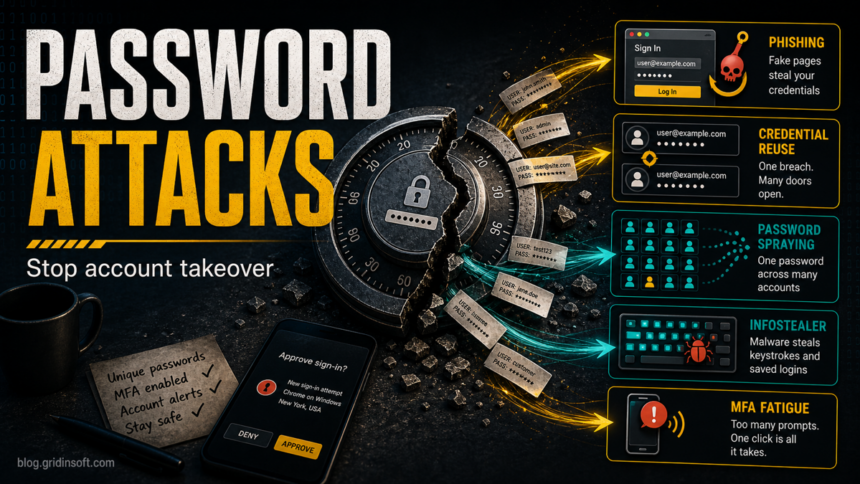
Password attacks are attempts to break into an account by guessing, stealing, reusing, intercepting, or tricking a user into giving up a password. The attack may be credential stuffing, password spraying, phishing, brute force, keylogging, infostealer theft, or MFA fatigue. If you see unknown sign-ins, account lockouts, password-reset emails, or unexpected MFA prompts, treat it as an active account-takeover risk: change reused passwords from a clean device, revoke sessions, check recovery options, enable MFA or passkeys, and scan the original device before trusting it again.
How do you stop password attacks?
- Use unique passwords everywhere. A properly secured password manager should generate a different password for every account, especially email, banking, social media, and work logins.
- Turn on MFA or passkeys. Prefer app-based MFA, hardware keys, or passkeys over SMS when the account supports it.
- Do not approve unexpected prompts. Repeated push notifications can be an MFA fatigue attack, not a harmless login glitch.
- Revoke sessions after compromise. Changing the password is not enough if an attacker already has an active session token.
- Scan for infostealers and keyloggers. If saved browser passwords or typed passwords may have been stolen, clean the device before rotating every password.
For routine prevention, start with a clean password setup: store passwords securely, use a manager, and keep recovery codes offline. For current length, reuse, and recovery rules, see the Gridinsoft guide to strong passwords in 2026.
| Most common root cause | Password reuse across sites, followed by phishing and malware theft. |
| Highest-risk first account | Email, because it controls password resets for other services. |
| Fastest safety move | Change critical passwords from a clean device, then revoke active sessions. |
| When to scan the PC | Unknown browser extensions, cracked apps, fake updates, stolen saved passwords, or repeated login theft after password changes. |
Common password attack types
| Attack type | How it works | Warning sign | First response |
|---|---|---|---|
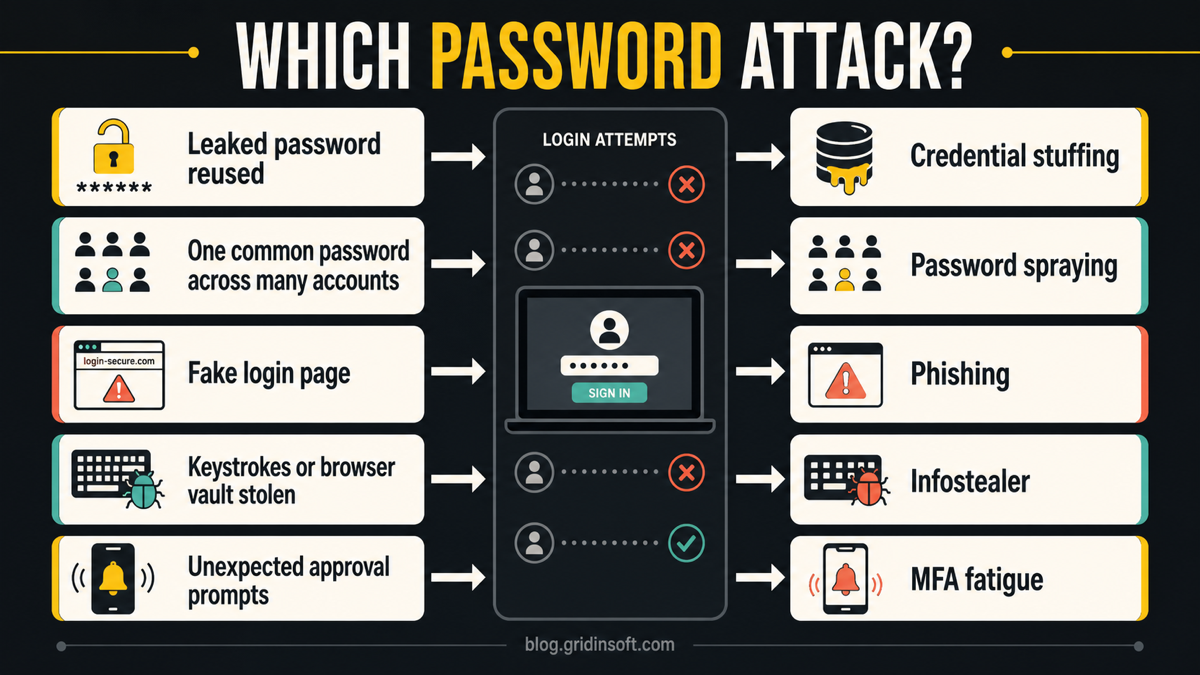
| Credential stuffing | Attackers try leaked username/password pairs from one breach on other sites. | Successful login from an unfamiliar location on an account that reused an old password. | Change every reused password and check breach alerts. |
| Password spraying | Attackers try one or a few common passwords against many accounts to avoid lockouts. | Many failed sign-ins across work, email, VPN, or Microsoft 365 accounts. | Review sign-in logs, block risky sources, and enforce MFA. See the focused password spraying attack guide. |
| Brute force or dictionary attack | Automated guesses target one account or an exposed login form. | Account lockouts, repeated reset emails, or a login portal under heavy failed attempts. | Use long unique passwords, rate limits, lockout protection, and MFA. |
| Phishing | A fake login page steals the password and may also proxy the MFA step. | You entered credentials after an email, ad, QR code, or message link. | Change the password from the real site, revoke sessions, and compare the message with phishing email red flags. |
| Keylogger or infostealer | Malware captures keystrokes, cookies, browser vault data, or saved credentials. | Passwords keep getting changed, browser sessions are hijacked, or saved passwords were exposed after installing cracked software. | Use a clean device for account recovery, then scan the original PC. See password stealer malware response steps. |
| MFA fatigue | Attackers spam approval prompts until the victim accepts one by mistake. | Repeated sign-in approval prompts when you are not logging in. | Deny the prompt, change the password, revoke sessions, and switch to number matching, passkeys, or hardware keys where possible. |
Which password attack is this?
Warning signs of a password attack
- You receive password-reset emails you did not request.
- Your account shows unfamiliar sign-ins, devices, IP addresses, or locations.
- You are locked out after many failed login attempts.
- You see MFA prompts when you are not signing in.
- Emails, social posts, purchases, or cloud files appear without your action.
- Passwords keep getting stolen again after you change them from the same computer.
- A browser extension, cracked app, fake update, or game mod appeared shortly before the problem started.
Online vs offline password attacks
Online password attacks happen against a live login page, such as email, Microsoft 365, a VPN, an online store, or a social account. The service can detect failed attempts, lock accounts, require MFA, or block suspicious IP ranges.
Offline password attacks happen after attackers steal password hashes or encrypted vault data. They can guess passwords away from the live service, so long, unique passwords and slow, modern hashing matter. For a normal user, the practical response is the same: do not reuse passwords, protect the email account first, and rotate exposed passwords after a breach notice.
What to do if your password was attacked
- Move to a clean device first. If you suspect malware, do not rotate every password from the infected PC.
- Secure your email account. Change the email password first because email controls reset links for other accounts.
- Revoke active sessions. Sign out other devices, remove unknown trusted devices, and review connected apps.
- Check recovery methods. Remove unknown recovery emails, phone numbers, passkeys, forwarding rules, and app passwords.
- Change reused passwords everywhere. Start with banking, work, cloud storage, social media, shopping, and password-manager master access.
- Enable MFA or passkeys. Use stronger MFA on email and financial accounts even if less important accounts still use passwords.
- Scan the original computer. Look for infostealers, keyloggers, browser hijackers, malicious extensions, and cracked installers.

After uninstalling the suspicious app or deleting the visible threat, use Gridinsoft Anti-Malware to check hidden files, startup entries, scheduled tasks, bundled apps, browser changes, and other persistence points that can restore malware.
Download Anti-MalwareIf a password keeps being stolen after you change it, the password is probably not the only problem. A hidden infostealer, malicious browser extension, session-cookie theft, or fake login page can keep the compromise alive. Run a full security scan and remove suspicious startup entries, browser extensions, and recently installed software before trusting the device again.
How to prevent password attacks
- Use a password manager. It removes reuse and makes phishing easier to notice because the manager will not autofill on the wrong domain.
- Make the master password long and unique. A short complex-looking password is weaker than a long passphrase you do not reuse.
- Prefer passkeys where available. Passkeys are tied to the real site or app, which reduces phishing risk.
- Turn on account alerts. Sign-in alerts, new-device alerts, and recovery-change alerts give you a chance to react early.
- Keep browser and OS updates current. Attackers often combine password theft with fake updates, malicious extensions, and exploit chains.
- For business accounts, block weak login paths. Disable legacy authentication where possible, monitor risky sign-ins, protect service accounts, and require MFA or passkeys for administrators.
Mistakes that keep password attacks alive
- Changing only one reused password. If the old password was reused, attackers will try it elsewhere.
- Approving MFA just to stop the prompts. That approval may be the step attackers need.
- Ignoring active sessions. A stolen session can survive a password change on some services until you sign out other devices.
- Trusting the same infected browser. If malware stole browser cookies or saved passwords, password rotation from that browser can expose the new credentials too.
- Leaving recovery methods unchecked. Attackers often add backup emails, app passwords, or forwarding rules to regain access later.
FAQ
What is the most common password attack?
For everyday users, credential stuffing and phishing are the most common practical risks because attackers can reuse breached passwords or trick a user into entering credentials on a fake page. For business tenants, password spraying is also common because it tests weak passwords across many accounts.
Is password spraying the same as brute force?
No. Brute force usually targets one account with many guesses. Password spraying usually tries one common password across many accounts, waits, and then tries another common password to avoid obvious lockouts.
Can MFA stop password attacks?
MFA reduces the damage from stolen or guessed passwords, but it is not magic. Phishing proxies, session theft, and MFA fatigue can still bypass weak MFA habits. Deny unexpected prompts and use passkeys or hardware keys when available.
Should I change passwords from the infected computer?
No. If you suspect a keylogger, infostealer, malicious extension, or cracked-app infection, recover critical accounts from a clean phone or computer first. Then scan and clean the original device.
Is a password manager safe after a breach?
A password manager is still one of the safest ways to avoid password reuse. If the manager account itself is at risk, change its master password from a clean device, check recovery options, enable MFA, and rotate high-value stored passwords.
References
- CISA. “Use Strong Passwords.” Cybersecurity and Infrastructure Security Agency, accessed June 11, 2026. https://www.cisa.gov/secure-our-world/use-strong-passwords
- Federal Trade Commission. “How To Recognize and Avoid Phishing Scams.” Consumer Advice, accessed June 11, 2026. https://consumer.ftc.gov/articles/how-recognize-and-avoid-phishing-scams
- Microsoft. “Password spray investigation.” Microsoft Learn, accessed June 11, 2026. https://learn.microsoft.com/en-us/security/operations/incident-response-playbook-password-spray