The PAXOS Token Launch at paxolaunch[.]live is a cryptocurrency scam, not an official Paxos offer. The page promotes an invented $PAXOS token to PAX Gold holders and uses a Connect Wallet prompt. Paxos’s published asset list includes PAXG (PAX Gold), but it does not list a token named $PAXOS. Do not connect, sign, approve token access, or enter a recovery phrase on the site.
If you already interacted, do not assume that every click had the same effect. Opening the page, connecting a wallet, signing a message, approving a token allowance, and exposing a seed phrase are different events. The recovery section below starts with the action you actually took.
PAXOS Token Launch scam: fast check
- Fake asset: the lure calls $PAXOS a new flagship token, while Paxos identifies its gold-backed asset as PAXG.
- Wrong domain: paxolaunch[.]live is not a paxos.com address.
- Eligibility hook: the page claims PAX Gold holders qualify for a launch allocation.
- Danger point: the wallet selector and Connect Wallet button can lead to a signature, transaction, or approval request.
- Never required: an official token claim does not need your seed phrase or private key.
Is $PAXOS an official Paxos token?
No official $PAXOS token appears in Paxos’s supported-cryptocurrency documentation. The company lists assets such as USDP, PYUSD, BUSD, and PAXG. PAXG is the symbol for PAX Gold; it is not proof of a separate $PAXOS launch.
This distinction matters because the scam borrows two real ideas—the Paxos name and PAX Gold ownership—then adds a token and an eligibility claim that look plausible at a glance. A real brand name inside a page does not authenticate its domain, contract, or wallet request.
| Claim on the lure | Safety check |
|---|---|
| “$PAXOS” is a new flagship token | Paxos’s asset list does not show a token by that name. |
| PAX Gold holders qualify | Check announcements by typing paxos.com yourself; wallet holdings do not authenticate a third-party page. |
| Connect one of 530+ wallets | A long wallet list shows compatibility, not legitimacy. Read every request before signing. |
| A secure connection means the site is safe | HTTPS encrypts traffic; it does not prove who owns the offer. |
Why paxolaunch.live is unsafe
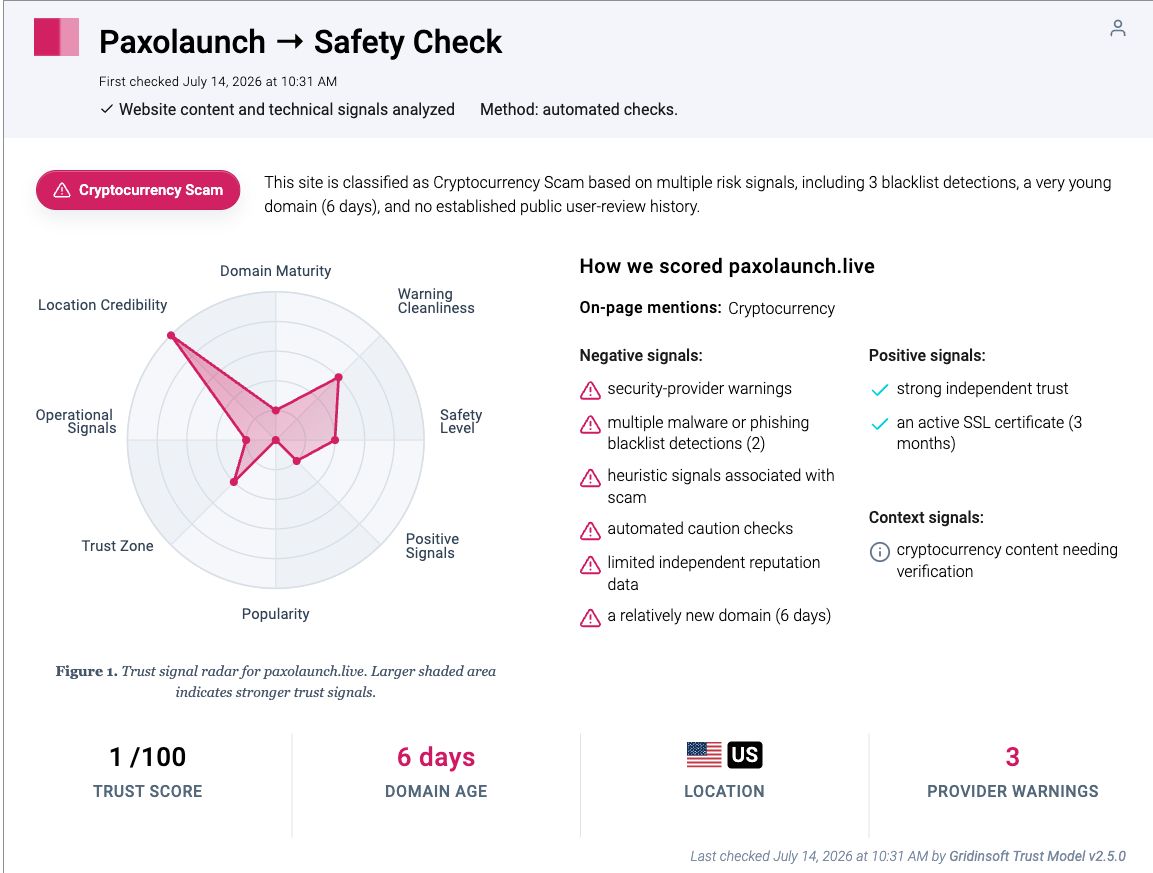
Gridinsoft’s Website Reputation Checker report for paxolaunch.live classified the domain as a cryptocurrency scam on July 14, 2026. At that check, the report showed a 1/100 trust score, a domain age of six days, and three provider warnings. Those signals support the brand-and-asset mismatch; they do not replace the need to inspect what a wallet request asks you to authorize.
The observed page offered wallet choices including WalletConnect, Trust Wallet, MetaMask, and Uniswap Wallet. Those names do not mean the wallet providers endorsed the site. A scam page can display familiar options and still send a dangerous request after connection.
What happens after Connect Wallet?
Connecting a wallet normally reveals the public address and lets a site propose actions. A connection alone does not automatically transfer funds. The serious risk begins when a user signs an unclear message or transaction, grants a token allowance, or discloses wallet secrets.
- Signature request: may be harmless login proof, but it can also authorize an operation or support a phishing flow. Reject anything you cannot explain.
- Token approval or permit: can allow a contract to move a specified token up to the approved amount. Unlimited approval creates a wider risk.
- Transaction: can transfer assets, interact with a malicious contract, or change permissions on-chain.
- Seed phrase or private key: gives direct control of the wallet. No revocation can make those secrets private again.
For the broader mechanics, see our guide to crypto draining attacks. If the lure arrived as a “validation” request, compare it with the crypto wallet validation scam.
What to do after visiting paxolaunch.live
| What you did | What to do now |
|---|---|
| Opened the page only | Close it. Do not return through an ad, direct message, or bookmark. No wallet action is needed if you entered nothing and approved nothing. |
| Connected, but signed nothing | Disconnect the site in the wallet, then review recent activity. Disconnecting limits future prompts, but verify that no approval or transaction was also signed. |
| Signed a message or transaction | Open the wallet’s activity and the correct network explorer from a trusted bookmark. Identify the contract, assets, amount, and permissions before taking another action. |
| Granted token approval | Revoke the suspicious allowance through your wallet’s trusted approval interface or the network explorer. Revocation is an on-chain transaction and normally requires gas. |
| Entered a seed phrase or private key | Create a new wallet on a clean device, move remaining assets, and retire the compromised wallet. Do not reuse its recovery phrase. |
| Assets already moved | Save addresses, transaction hashes, token names, amounts, times, and screenshots. Report the scam to the wallet provider, relevant exchange, and local cybercrime authority. Do not pay a “recovery hacker.” |
1. Check approvals, not just connected sites
Disconnecting a dapp and revoking an approval are different actions. A disconnected site may no longer see or prompt the wallet, while an on-chain allowance can remain until it is revoked. Review approvals on every network you used, including any chain the page asked you to switch to.
2. Move funds only when the wallet secret is exposed
If you typed the recovery phrase or private key, treat the wallet itself as lost. Use a separate, trusted device to create a new wallet and transfer what remains. If a sweeper bot appears to be watching the account, do not deposit more assets just to fund gas without specialist guidance; that can give the attacker more to take.
3. Scan the device if the page made you install something
A normal wallet connection does not require a desktop installer, browser extension from an unofficial store, support tool, or downloaded “verification” file. If you installed one, stop using that device for wallet actions, remove the unknown software, and run a full Gridinsoft Anti-Malware scan. A scan can find malicious files, browser changes, startup entries, and persistence, but it cannot revoke on-chain permissions or restore stolen crypto.
If the page or email made you download an invoice, coupon, tracking app, browser extension, or support tool, scan the PC before opening it again or logging into sensitive accounts.
Scan the device before using wallets againHow to verify a Paxos announcement safely
- Type paxos.com yourself instead of following the claim link.
- Check the official supported-assets documentation for the exact token symbol.
- Look for an announcement that names the contract and supported networks; compare it with more than one official Paxos channel.
- Never use a contract address copied from a reply, ad, Telegram group, or direct message.
- Read the wallet request. Reject unlimited approvals, unexpected chain switches, blind signatures, and any request for recovery words.
General “free token” warning signs are covered in our crypto scams guide. The important habit is to verify the asset and contract before the wallet is involved, not after a prompt appears.
FAQ
Does holding PAXG qualify me for a $PAXOS token launch?
No verified Paxos documentation supports that claim. PAXG is Paxos’s gold-backed token; it does not authenticate a separate $PAXOS offer at paxolaunch[.]live.
Can a wallet be drained by connecting only?
A basic connection does not automatically move funds, but it lets the site request signatures and transactions. Check wallet activity because users often approve a second prompt without recognizing it as a separate action.
Is disconnecting the scam site enough?
Not if you also granted an on-chain token approval. Disconnect the site, then inspect and revoke suspicious allowances on each network you used.
Can stolen cryptocurrency be reversed?
Blockchain transactions are generally irreversible. Preserve transaction evidence and report quickly, but avoid anyone promising guaranteed recovery for an upfront payment.
References
- Paxos. “Supported Cryptocurrencies.” Paxos Help Center, updated August 20, 2025; accessed July 14, 2026. https://help.paxos.com/hc/en-us/articles/360042296951-Supported-Cryptocurrencies
- MetaMask. “How to Revoke Smart Contract Allowances/Token Approvals.” MetaMask Help Center, accessed July 14, 2026. https://support.metamask.io/more-web3/learn/how-to-revoke-smart-contract-allowances-token-approvals/
- MetaMask. “I’ve Been Hacked or Scammed (Unauthorized Transactions on My Account).” MetaMask Help Center, accessed July 14, 2026. https://support.metamask.io/stay-safe/protect-yourself/ive-been-hacked-scammed-unauthorized-transactions-on-my-account