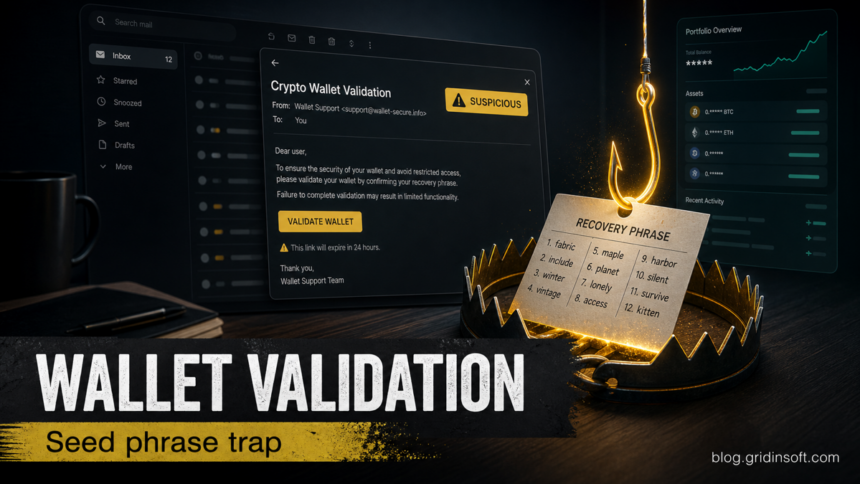
The Crypto Wallet Validation email is a recovery-phrase phishing scam, not a real wallet security check. The message claims that validating your wallet will unlock higher limits, rewards, fraud protection, or future airdrops, then pushes you toward wallet-brand buttons and a page that asks for a 12-word recovery phrase. Do not click the buttons, do not enter a seed phrase, and do not install any extension or app linked from the email.
A current Phantom Wallet Identity Confirmation version uses a different trap: it invents a restricted crypto balance, requests identity documents, and demands an up-front “liquidity check” transfer. That message is also a scam.
This lure works because it sounds like a routine account check while mixing several crypto brands in one message. Real wallet providers do not need your recovery phrase to validate an account, unlock rewards, or prevent fraud. A recovery phrase is the master key to a self-custody wallet; anyone who gets it can move the funds.
Fast check
- Subject: usually close to “Crypto Wallet Validation Required” or “Wallet Validation Required”.
- Sender: a generic “CryptoWallet Team” display name, often with an unrelated or lookalike domain.
- Hook: higher limits, rewards, fraud protection, future airdrops, or urgent validation.
- Buttons: many wallet names on the same page, such as Coinbase, MetaMask, Trust Wallet, Exodus, Phantom, Binance, Kraken, Robinhood, or similar labels.
- Danger point: any site that asks for a seed phrase, Secret Recovery Phrase, private key, or wallet password.
What is the Crypto Wallet Validation email scam?
The scam is an email lure that pretends to be a neutral wallet-validation service. Instead of sending you to one official wallet app or exchange, it presents a list of wallet-provider buttons and asks you to “validate” ownership. That is a red flag by itself: a legitimate exchange may verify identity or wallet ownership through its own signed-in portal, but it will not ask you to submit a wallet recovery phrase through a generic email link.
The phrase “wallet validation” is also intentionally vague. It can sound like address verification, KYC, anti-fraud review, or a security update. In this scam, the real goal is simpler: make you type the recovery phrase into a phishing site while you believe you are protecting your wallet. A different email variation may start with a wallet connection instead of a seed-phrase form, as the Polymarket UFC 329 email scam demonstrates; the signature or approval is then the danger point.
Crypto Wallet Validation email example
The exact wording can change, but the lure normally follows this pattern:
Subject: Crypto Wallet Validation Required
From: CryptoWallet Team <validation [at] walletcrypto [dot] com>
Dear wallet holder,
Validate your wallet to unlock higher limits, rewards, fraud protection, and future airdrops.
Choose your wallet provider below and complete validation within 24 hours.
You will be asked to confirm your 12-word recovery phrase to finish verification.
Button labels: Coinbase, MetaMask, Trust Wallet, Exodus, Phantom, Binance
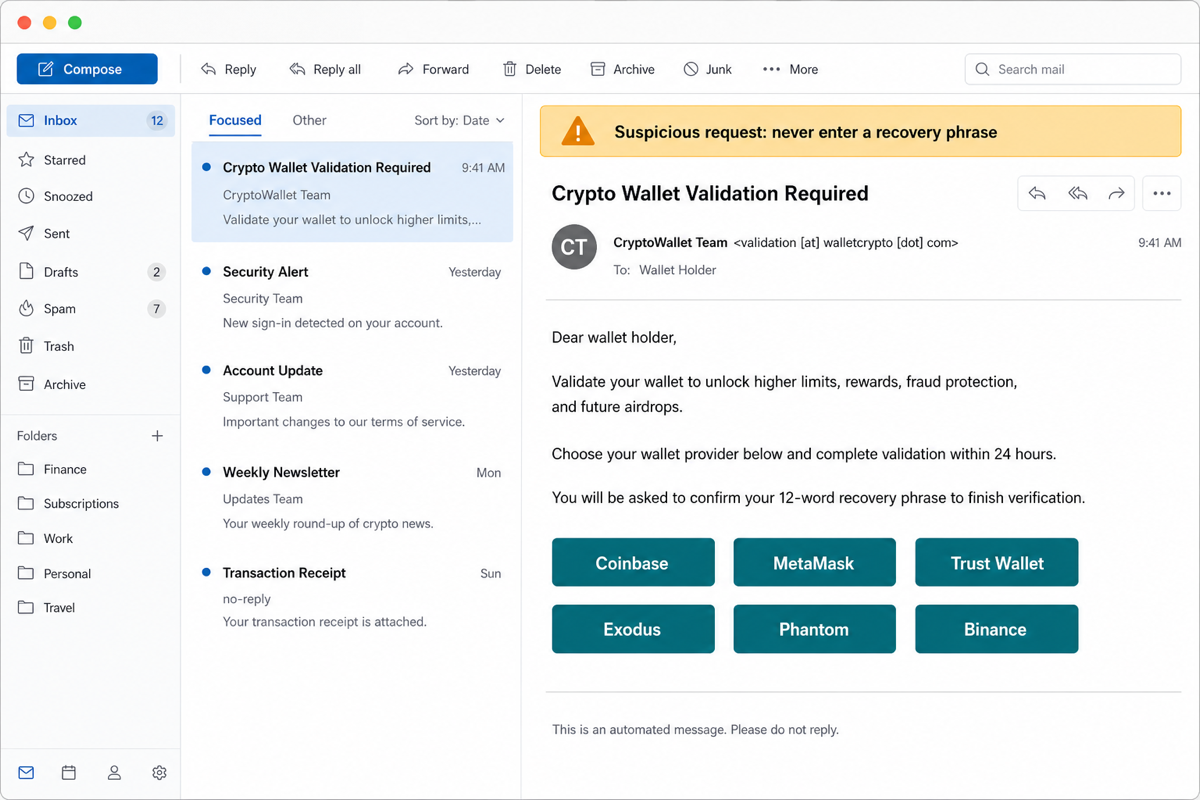
The scammer may also swap the promise. Instead of higher limits, the message may mention fraud monitoring, suspicious activity, wallet migration, a compliance deadline, or an airdrop. Treat all of those variants the same way if the email link leads to a recovery-phrase request.
Trezor and BitBox entropy-warning emails
In September 2026, a hardware-security warning replaced the usual rewards pitch. Trezor reported that an attacker used its Brevo newsletter account on September 9 to send a link to an app that requested a wallet backup. Its September 17 update confirmed that 347,149 newsletter contacts had been exported. This was a newsletter-provider incident, separate from the August ShipMonk shipping-data exposure described below; Trezor said its wallet and product systems were unaffected. [4]
BitBox also warned on September 9 that a message claiming a random-number-generator bug was phishing and said its newsletter provider had been compromised. A genuine-looking sender therefore does not settle whether the requested wallet action is safe. [5]
Example
- Trezor subject: “Critical Security Alert: STM32 Entropy Vulnerability.”
- BitBox subject: “Critical Security Alert: Microcontroller Entropy Bug Identified.”
- The switch to recognize: a technical warning becomes a request to check a wallet through the email’s link. In Trezor’s account, the linked app then asked for the wallet backup.
Read that sequence as three separate checks: the sender may belong to the real brand; the claim still needs independent confirmation; the requested disclosure remains unsafe. Open the installed wallet app or the vendor’s website yourself to check the notice. Do not download a checking tool from the message or enter recovery words to test the supposed bug. The word “entropy,” which refers to randomness used in key generation, does not make the request legitimate.
Choose the response by what happened: receiving the email alone is not a reason to reset a hardware wallet. If you only opened the link, stop there. A downloaded but unopened file is different from an installed app; do not run it. If software ran, stop using that computer for wallet activity and follow the device-cleanup branch below. If recovery words were exposed, use the recovery-phrase response; a local scan cannot revoke those words or recover transferred funds. BitBox’s response guide also distinguishes device connection from transaction approval. [6]
Phantom Wallet Identity Confirmation: fake balance and liquidity check
One Phantom-branded variation calls itself a notice from a “Blockchain Phantom Wallet” compliance team. That is not an official Phantom product name or a legitimate account-review route. The message invents a restricted balance—one observed example used $1,200,820.21—then asks for a government-issued ID, a recent bank statement, and a crypto transfer equal to 1% of the supposed funds.
The exact amount can change. The decisive red flag is the same: no wallet provider needs an up-front crypto transfer to prove that you can access money already credited to an account. Calling the payment a “liquidity check,” saying it is “not a fee or tax,” or promising that it will be added to the balance does not make it refundable.
Example
Subject: URGENT ACTION REQUIRED
From: Blockchain Phantom Compliance & Support Team (unverified address)
Your wallet contains restricted funds. Reply with a government-issued ID and recent bank statement, then send 1% of the displayed balance in cryptocurrency to complete a liquidity check.
The transfer is not a fee and will be added to your available balance after verification.
Phantom’s current safety guidance says its support does not initiate unsolicited email or ask users to send funds. If you did not open a support ticket, do not treat an identity-confirmation message as an account notice. Open Phantom through the installed app or a bookmarked official address instead of replying or following the email instructions.
What to do depends on what you shared
- You only read the email: do not reply, send documents, or transfer funds. Report it as phishing and delete it.
- You sent an ID or bank statement: contact the bank using a known number, ask about monitoring or replacement account details, and follow the steps in our identity-theft response guide. Watch for follow-up attempts that reuse your real name or document details.
- You sent cryptocurrency: contact the sending exchange or payment provider immediately with the transaction hash and destination address. Preserve the email, headers, wallet addresses, screenshots, and timestamps for an IC3 or local law-enforcement report. Phantom cannot reverse a self-custodial blockchain transfer.
- You connected the wallet or approved a request: disconnect unknown apps, revoke suspicious token approvals, and move trusted remaining assets to a new wallet if compromise is possible. Disconnecting alone does not cancel an approval that can still move tokens.
- You exposed a recovery phrase or private key: stop using that wallet. Create a new wallet from a clean device and move trusted remaining assets; changing an app password does not invalidate an exposed recovery phrase.
After any payment or document loss, ignore people who promise guaranteed crypto recovery for another fee. They often target the same victim with a second advance-fee scam; use the crypto recovery scam guide before trusting an unsolicited helper.
Red flags in the message
- One email claims to represent many wallets. Coinbase, MetaMask, Trust Wallet, Exodus, Phantom, Binance, Kraken, and other services do not share one generic validation portal.
- The reward is unrelated to security. Higher limits, future airdrops, or rewards are bait. They are not reasons to reveal a recovery phrase.
- The request happens outside the official app. If an account needs attention, open the official wallet app or type the official website yourself. Do not use the email button.
- The page asks for a seed phrase. That is the hard stop. A recovery phrase is not a login code, and it is not needed for account validation.
- The deadline is short. A 24-hour countdown is meant to stop you from checking the link carefully.
What to do if you clicked the link
- Close the page without entering anything. Do not test the form with partial words or an old phrase.
- Check the destination domain. If you still have the email, copy the link without opening it and check it with a URL reputation service such as the Gridinsoft Website Reputation Checker.
- Open the wallet app manually. Type the official domain yourself or use the installed app. Do not continue from the email path.
- Report the email. Use your mail provider’s phishing report flow and forward the message to the wallet provider if it has an official abuse channel.
- Run a local scan if anything was installed. If the page pushed a wallet extension, browser add-on, remote support tool, or “security update,” disconnect from the site, remove the extension or app, and scan the computer with Gridinsoft Anti-Malware before using the wallet again.
What to do if you entered a recovery phrase
If you typed the real recovery phrase into a page from the email, treat the wallet as compromised. Changing the wallet password is not enough because the phrase can restore the wallet elsewhere.
- Create a new wallet from a clean device. Use the official wallet app or hardware wallet workflow. Write down the new recovery phrase offline.
- Move remaining funds to the new wallet. Do this quickly, but avoid rushing into another site sent by email or chat.
- Revoke risky token approvals where possible. If you connected the wallet or signed approvals, review permissions through the official wallet tools or a trusted block explorer workflow.
- Secure related accounts. Change the email and exchange passwords, enable multi-factor authentication, and review sign-in sessions.
- Preserve evidence. Save the email headers, phishing URL, transaction hashes, wallet addresses, screenshots, and timestamps.
- Report the theft attempt. In the United States, IC3 accepts cryptocurrency scam reports. Also notify the exchange or wallet provider involved.
- Ignore recovery-service DMs. Messages promising guaranteed recovery for an upfront fee are usually a second scam. Use our crypto recovery scam guide before paying anyone.
How real wallet verification differs
Real wallet verification happens inside a known account, an official app, or a compliance flow you started yourself. It may involve logging into an exchange, confirming a small deposit, signing a message, or completing identity verification. It should not require a recovery phrase on a website reached from an unsolicited email.
For broader patterns, compare this lure with our crypto scam red flags. If the message arrived as email, use the phishing email checklist to inspect the sender, reply-to, and link destination. If the email is tied to an airdrop or seed-phrase claim page, the Ethereum Genesis Airdrop scam shows the same recovery-phrase theft logic in a domain-specific campaign.
Targeted messages can become more convincing after customer contact data is exposed. The August 2026 Trezor shipping-provider breach is a current example: leaked names, phone numbers, and addresses do not compromise a wallet by themselves, but they give seed-theft lures believable context.
How to avoid wallet-validation phishing
- Never type a recovery phrase into a website opened from email, social media, search ads, QR codes, or direct messages.
- Keep one low-balance wallet for unknown dApps, mints, games, and airdrops. Do not expose your savings wallet to experiments.
- Bookmark official wallet and exchange URLs instead of using email buttons.
- Use hardware-wallet confirmation screens carefully; do not approve transactions you do not understand.
- Keep screenshots of suspicious emails for reporting, but do not forward them to friends without warning them not to click.
- Use the Gridinsoft Email Checker when you need a second look at a suspicious message before interacting with it.
FAQ
Is Crypto Wallet Validation a real wallet service?
The email should be treated as a scam when it arrives unexpectedly and pushes wallet-provider buttons or a recovery-phrase request. Open your wallet or exchange directly if you need to check account status.
Can a wallet provider ask for my recovery phrase?
No legitimate support agent, email, or website should ask for your recovery phrase. The phrase is used to restore the wallet under your control; sharing it gives someone else control.
What if I clicked the button but did not type the phrase?
Close the site, do not return through the email, and check whether the page asked for downloads, browser permissions, or wallet connection approvals. If you installed anything, remove it and scan the device before using the wallet again.
Can I recover funds after entering my seed phrase?
Sometimes fast reporting helps, especially if funds move through a cooperating exchange, but crypto transfers are often irreversible. Move remaining assets to a new wallet and preserve evidence for the provider and law enforcement.
Should I reply to the email?
No. Reporting through your mail provider or the impersonated wallet brand is safer than replying. A reply can confirm that your address is active.
References
- Phantom. “Phantom will never DM, email, or ask you to send funds.” Phantom Help Center, updated January 27, 2026, accessed August 11, 2026. https://help.phantom.com/hc/en-us/articles/40411433367187-Phantom-will-never-DM-email-or-ask-you-to-send-funds
- Coinbase Help. “Base wallet recovery phrase.” Coinbase, accessed June 19, 2026. https://help.coinbase.com/wallet/managing-account/wallet-recovery-phrase
- Federal Bureau of Investigation, Internet Crime Complaint Center. “FBI Guidance for Cryptocurrency Scam Victims.” IC3 Public Service Announcement, June 3, 2025, accessed June 19, 2026. https://www.ic3.gov/PSA/2025/PSA250603
- Trezor Team. “Security incident at Brevo, our third-party email provider.” September 10, 2026, updated September 17, 2026. Trezor incident notice
- BitBox. “A phishing email is going around that looks like it’s from us.” Facebook, September 9, 2026. BitBox phishing warning
- BitBox. “What to do after interacting with a phishing attempt.” BitBox Support Hub, updated August 31, 2026, accessed September 22, 2026. BitBox phishing response guide