The Polymarket Holloway vs McGregor email offering access to UFC 329 and a $100 trading bonus is a wallet-drainer lure when it sends you to polymarket-ufc-329[.]vercel[.]app. That host is not the official Polymarket web domain. Do not use the Open Polymarket button, connect a wallet, sign a message, approve token access, or enter a recovery phrase. If you already interacted, the correct response depends on whether you only connected, signed a message, granted an approval, or exposed the wallet’s secret words.
The real UFC 329 matchup does not authenticate the email. Scammers often borrow a current event, a familiar company name, and a plausible bonus so the unsafe destination feels like a normal campaign. A polished message, legitimate email delivery service, or page hosted on Vercel only shows who delivered or hosted the content; it does not prove that Polymarket created it.
Is the UFC 329 Polymarket Invitation Real?
UFC’s official event page confirms that UFC 329 featured Conor McGregor and Max Holloway on July 11, 2026. Polymarket also has real prediction-market pages, and its Help Center lists https://polymarket.com as the official web channel. The scam combines those real facts with an unrelated Vercel subdomain and a wallet prompt.
That distinction matters because search results around the matchup contain legitimate event reports and bonus promotions. Do not decide that the email is safe only because the fight, the platform, or a similar promotion is real. Verify the destination itself. If a message received after July 11 still says the event is “almost here,” its stale timing is another warning sign.
| What the message shows | Why it is unsafe |
|---|---|
| UFC 329: Max Holloway vs Conor McGregor | A real event name can be copied into a fraudulent email and landing page. |
| $100 trading bonus | An unexpected reward creates urgency; the amount does not authenticate the sender. |
| Open Polymarket button | The button sends the reader away from the known Polymarket domain. |
polymarket-ufc-329[.]vercel[.]app |
A Vercel subdomain is not polymarket.com. Hosting on a legitimate platform does not make the page official. |
| Connect Wallet and many wallet-provider choices | The connection is used to move the reader toward a signature or token approval. |
| Invitation expires in seven days | A short deadline discourages independent verification. |
If you want to check a real market, open the Polymarket address from a trusted bookmark or type the known domain yourself. Do not copy a destination from the email. For the wider pattern, see how crypto-draining attacks turn wallet permissions into asset theft and how online betting scams use event urgency and familiar sports branding.
Example
The message may be professionally formatted and contain few obvious spelling errors. The phrases and decision pressure are more important than bad grammar:
Subject: Your Polymarket Invitation: UFC 329
Display name: Polymarket Events
Sender: events [at] invites [dot] mail

Hello,

You have been invited to UFC 329: Max Holloway vs Conor McGregor.
Your exclusive invitation is ready.

Bonus: $100 TRADING BONUS
Button: OPEN POLYMARKET
Deadline: Invitation expires in 7 days
Destination: polymarket-ufc-329[.]vercel[.]app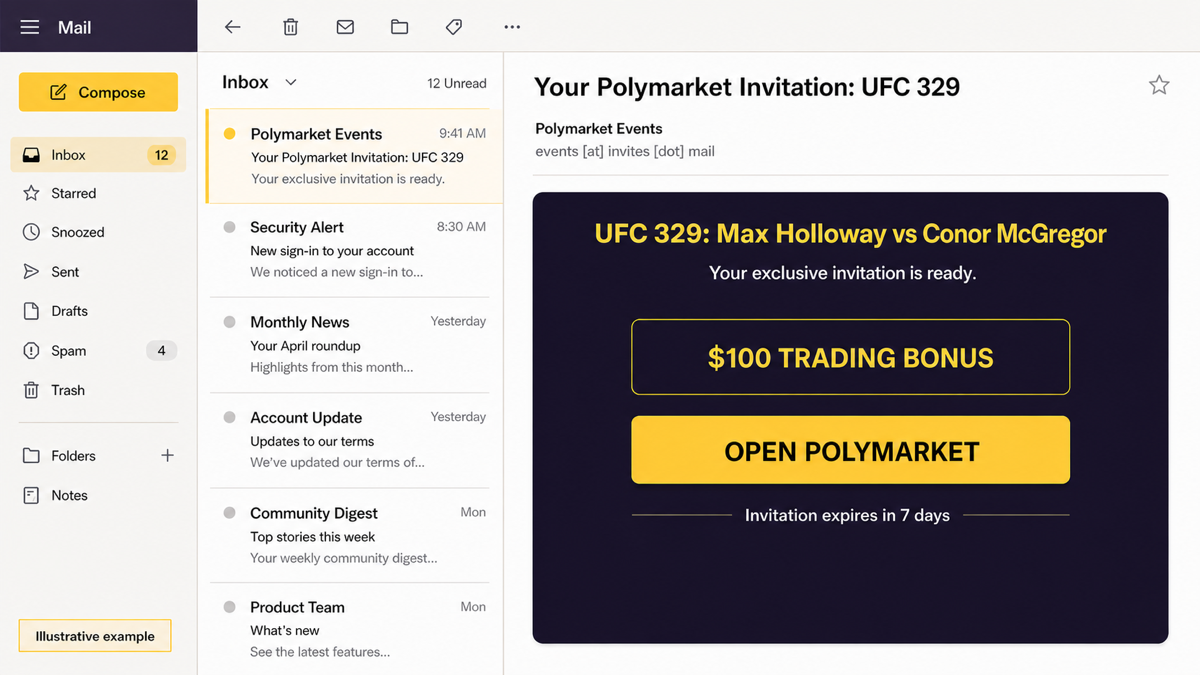
This is an illustrative reconstruction, not a real customer message. It uses a generic mail interface and a deweaponized domain so the example cannot open the destination.
Connecting, Signing, and Approving Are Different
“Connect wallet” is often only the first step. Treat each prompt separately rather than assuming that closing the tab reversed everything.
| Action | Risk and response |
|---|---|
| You only opened the email or page | Close it. Do not return through the same link. Report the message as phishing and delete it. |
| You connected a wallet but rejected every signature and transaction | Disconnect the site in the wallet and review recent activity. Risk is lower, but verify that no approval or transaction was accepted. |
| You signed a message | Review exactly what was signed. A login-style signature is not the same as a token transfer, but unclear typed-data or permit signatures can authorize broader actions. |
| You approved token spending or NFT access | Use the wallet’s trusted approval controls or the appropriate official block explorer to revoke the suspicious permission. Disconnecting alone does not cancel an on-chain approval. |
| You entered a seed phrase or private key | Treat the wallet as fully compromised. From a clean device, create a fresh wallet and move remaining assets. Never reuse the exposed secret. |
| Assets already moved without permission | Preserve transaction hashes, contact the relevant exchange if funds reached one, and report the address and site. Anyone promising guaranteed recovery for an upfront fee is likely running a second scam. |
A common mistake is to disconnect the dapp and stop there. Ethereum.org explains that token approvals can remain active after the visible connection is removed. Review approvals on every network the wallet used, especially unlimited allowances and “approve all” NFT permissions. Our cryptocurrency scam guide covers additional giveaway, impersonation, and recovery-fraud warning signs.
What to Do After Using the Fake Page
- Stop interacting with the page. Do not accept a second prompt that claims to cancel, verify, or secure the first one.
- Open your wallet from its normal app or saved bookmark. Do not use a recovery link sent by email, direct message, or search ad.
- Check recent transactions and signatures. Record transaction hashes and the network before changing anything.
- Disconnect the suspicious dapp. This removes the visible connection but is not the same as revoking token permissions.
- Revoke suspicious approvals. Use the wallet’s own trusted controls or a known block explorer opened manually. Expect a normal network fee for an on-chain revocation.
- Move remaining valuable assets when compromise is plausible. Use a fresh wallet created on a clean device if a seed phrase, private key, broad permit, or unauthorized transfer was involved.
- Secure connected accounts. Change exchange passwords, revoke unknown sessions, and enable multi-factor authentication if the same browser or credentials were exposed.
- Save evidence and report the campaign. Keep the sender, headers, deweaponized URL, screenshots, wallet addresses, and transaction hashes. Report the email provider, hosting platform, wallet provider, and relevant fraud authority.
If the page asked for a seed phrase rather than a wallet signature, compare it with the Crypto Wallet Validation email scam. No legitimate wallet service needs secret recovery words in a web form.
If the Page Installed a File or Extension
A wallet approval is an on-chain permission problem, not proof that Windows is infected. A separate device scan becomes important if the page made you download a “wallet helper,” browser extension, mobile app, update, or installer, or if redirects and prompts keep returning. The visible page can be closed while a bundled app, extension, startup entry, or scheduled task remains on the device.
Remove the unknown download or extension, restart the browser, and review installed apps and browser permissions. Then run a full Gridinsoft Anti-Malware scan to check for the downloaded component and persistence. A scan can help find local malware; it cannot revoke blockchain permissions or reverse a completed transaction.
If the page or email made you download an invoice, coupon, tracking app, browser extension, or support tool, scan the PC before opening it again or logging into sensitive accounts.
Scan after a scam downloadHow to Verify the Next Event Invitation
- Expand the sender address and inspect the full destination before opening any button.
- Open the known company site independently instead of following an unsolicited promotion.
- Treat a real event name as context, not proof that the message is authorized.
- Reject wallet prompts that are broader than the visible action, especially unlimited token spending or unclear typed-data signatures.
- Keep high-value assets in a wallet that is not used for experimental dapps and promotions.
- Never enter a seed phrase, private key, or wallet password into a page reached from email.
FAQ
Can connecting a wallet by itself drain funds?
A connection normally exposes the public address and lets the site request actions. The dangerous step is usually a signature, transaction, token approval, permit, or recovery-phrase entry. Still disconnect the site and confirm that no request was accepted.
Is a Vercel page automatically malicious?
No. Vercel is a legitimate hosting platform. The problem is that polymarket-ufc-329[.]vercel[.]app is not the official Polymarket domain, and legitimate hosting does not authenticate the page owner.
Should I revoke approvals if I clicked Connect but rejected every prompt?
First review the wallet’s recent activity and approval list. If no approval or transaction was accepted, there may be nothing to revoke. Disconnect the site and keep the evidence in case an unexpected request appears later.
Can stolen crypto be recovered?
Blockchain transactions generally cannot be reversed. Fast reporting may help if funds reach a centralized exchange, but no service can guarantee recovery. Avoid anyone demanding an upfront fee or seed phrase to “recover” assets.
References
- Polymarket Help Center. “Does Polymarket Have a Token?” Polymarket, updated June 2026, accessed July 13, 2026. https://help.polymarket.com/en/articles/13364250-does-polymarket-have-a-token
- Ultimate Fighting Championship. “UFC 329: McGregor vs Holloway 2.” UFC, July 11, 2026, accessed July 13, 2026. https://www.ufc.com/event/ufc-329
- ethereum.org. “I Was Scammed or Lost Funds.” ethereum.org, updated June 6, 2026, accessed July 13, 2026. https://ethereum.org/community/support/scams/