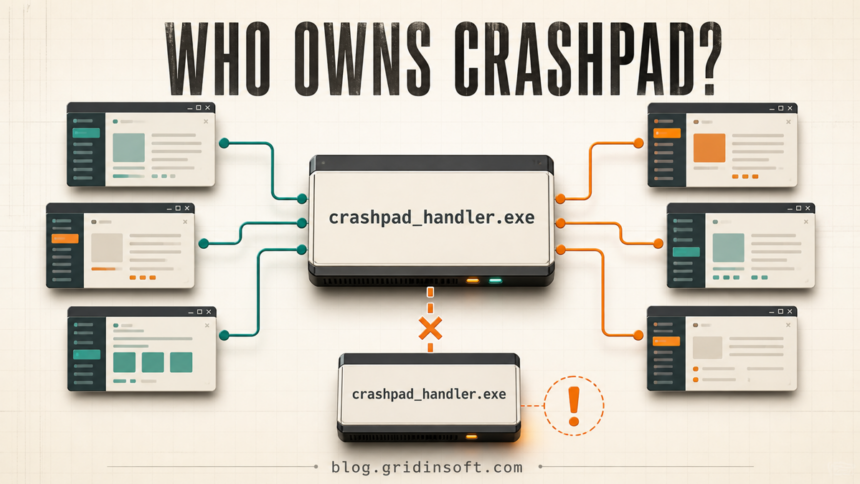
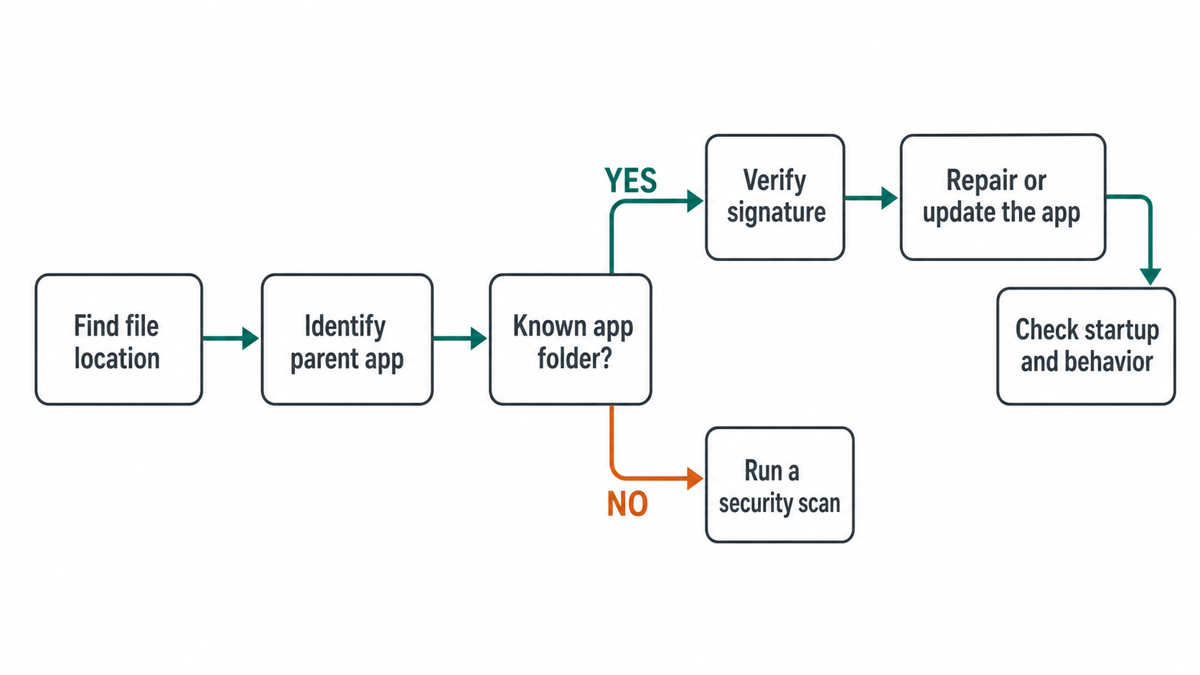
crashpad_handler.exe is normally a crash-reporting helper installed with a Chromium- or Electron-based application, not a Windows system process. Chrome, desktop apps, game launchers, and games can each ship their own copy, so seeing several handlers is not automatically suspicious. The safe decision comes from the file location, parent application, command line, signature, and behavior. Repair the application that owns a broken copy; do not download a replacement EXE from a file library.
What should you do?
- Several copies inside recognizable app folders: usually normal; identify the owner of each one before ending anything.
- An Application Error from a known app: close, update, repair, or reinstall that parent app from its official source.
- High CPU or dozens of handlers: find the app that is repeatedly relaunching them and repair its crash loop.
- A copy in Temp, Downloads, Startup, or an unrelated folder: stop and investigate the path, signer, parent, and persistence.
- No valid signature or no recognizable owner: scan the file and the computer rather than deleting only the visible process.
What is crashpad_handler.exe?
Crashpad is a crash-reporting system. When a supported application fails, its handler can collect exception details, loaded modules, and stack information into a small crash report so the developer can diagnose the failure. Chromium documents Crashpad as Chrome’s crash-reporting system, while Electron documents that its desktop-app crash reporter also uses Crashpad.[1][2]
The filename is shared because developers integrate the same crash-reporting component into many unrelated products. It is common to encounter it beside Chrome or another Chromium build, an Electron desktop app such as a chat client, Google Drive or another desktop utility, and some Steam games or launchers. Those products do not all use one central Windows copy. Each package may carry a different build in its own directory.
That is why a single path, file size, hash, or signer copied from a process database cannot prove that every other copy is safe. The useful question is not merely “Is this filename legitimate?” but “Which installed application launched this particular file?”
Why are multiple crashpad_handler.exe processes running?
Several copies can be expected when several applications use Crashpad at the same time. One browser, one desktop chat app, and one game can each launch a handler. An application may also relaunch its handler after an update or crash. The count alone is therefore a weak malware signal.
A similar pattern appears with other Chromium-based helpers. For example, multiple Adobe CEF Helper processes can represent separate app components rather than separate infections. With Crashpad, compare every instance instead of assuming all same-name entries belong to the same parent.
Investigate when the count grows continuously, old handlers remain after every related app is closed, CPU or disk activity stays high, or a copy runs from a directory that has no matching application files. Hundreds of handlers usually indicate an application crash loop or failed shutdown, but a suspicious launcher can also reuse a familiar filename.
How to identify which app owns the process
- Open Task Manager and select Details. Right-click the column header and enable Command line when available. The arguments often name a crash database, product, or user-data directory.
- Open the file location. Right-click each instance and choose Open file location. Do this for more than one copy; their folders may differ.
- Read the neighboring files and parent folder. A handler beside a recognizable app executable, resources, DLLs, and version folder is more credible than an isolated file in a random directory.
- Check the parent process. Microsoft Process Explorer can show process relationships, loaded DLLs, and handles when Task Manager does not provide enough context.[3] The parent should make sense for the installed application.
- Check Properties → Digital Signatures. A valid signature from the application vendor adds confidence. A missing signature is not automatic proof of malware because some legitimate app builds are unsigned, but it increases the need to verify the source and parent.
- Compare behavior. A handler that appears only with its app and exits after the app closes is different from one launched at sign-in by an unknown task, script, service, or updater.
For a broader checklist, use our guide to checking whether an EXE file is safe. It explains how path, signature, hash, source, and behavior work together rather than treating one signal as a verdict.
Which paths are normal or suspicious?
There is no universal safe path. A legitimate copy normally lives inside the application that installed it, often under C:\Program Files\Vendor\App\, C:\Program Files (x86)\, or a clearly named application folder under %LOCALAPPDATA%. Version-number subfolders are common because applications update the handler with the rest of the package.
| Location or context | Risk and what to do |
|---|---|
| Known app folder with matching files and parent | Usually expected. Verify the signer and repair the parent app if errors occur. |
| Several different known app folders | Usually multiple legitimate bundled copies. Do not compare them by hash alone. |
%LOCALAPPDATA%\Vendor\App\ |
Can be legitimate for a per-user install. Confirm the vendor, updater, and signature. |
%TEMP%, Downloads, a random Startup folder, or an unrelated app directory |
Suspicious until explained. Record the parent and startup source, then scan. |
C:\Windows\System32\crashpad_handler.exe |
Crashpad is not a Windows component. A copy presented as a core Windows file needs investigation. |
Do not whitelist an entire folder or disable antivirus protection just to stop an error. If the parent application is legitimate but security software blocks one file, verify the installer and signature first, then use the vendor’s repair flow or submit the exact file for review.
Is crashpad_handler.exe malware?
The legitimate component is not malware, but attackers can rename another executable to match a familiar process. The filename alone cannot distinguish the two. Treat the following combination as stronger evidence than any single sign:
- the file is outside a recognizable application directory;
- the parent is a script host, unknown updater, random executable, or unexplained scheduled task;
- the signature is absent, invalid, or belongs to an unrelated publisher;
- the command line points to Temp, Downloads, a random user folder, or an unexpected network location;
- the process returns after deletion because a service, task, startup entry, or bundled app recreates it;
- it produces unrelated browser changes, blocked connections, account alerts, or sustained resource use.
A clean result for one known hash does not automatically clear a different copy. If you need a sample-specific check, use the Gridinsoft Online Virus Scanner and compare the exact file you found. Do not upload private crash dumps or documents; the executable is the relevant object.
How to fix crashpad_handler.exe Application Error
An Application Error normally means the handler or the application that launched it is damaged, outdated, blocked, or crashing during startup. Repair the owner, not Windows as a whole:
- Identify the owning app first. Record the file path, command line, parent process, and the app that was opening when the message appeared.
- Close the app cleanly. Save work, exit the parent application, then end only an orphaned handler that remains. Reboot if the app cannot shut down.
- Install the app’s current update. Use its built-in updater, official store, game launcher, or vendor site. An older handler beside newer app DLLs can fail after a partial update.
- Repair or verify the installation. Use Windows Installed apps → Modify/Repair when offered. For a game, use the launcher’s file-verification feature. For Chrome or another browser, use its official reinstall path if normal updates do not fix the crash.
- Check Event Viewer. In Windows Logs → Application, match the error time and read the faulting application and faulting module. A third-party overlay or DLL may be crashing the parent rather than Crashpad itself.
- Reinstall only the owning app if repair fails. Preserve profiles, saves, or synced data first, uninstall the app normally, reboot, and install a fresh official package.
Do not download a loose `crashpad_handler.exe` from an executable library. The replacement may be the wrong architecture or version, may lack the app’s matching DLLs, and may be unsafe. Reinstalling the parent package restores the component that belongs with that exact build.
Fix high CPU, many copies, or a process that will not close
- Close the suspected parent apps one at a time and watch which handler exits.
- If one app keeps relaunching handlers, reboot and test it before starting other apps.
- Disable only that app’s optional launch-at-login setting for one test. Do not disable Windows services or apply a system-wide block.
- Update or repair the app. For a game, verify files and temporarily disable nonessential overlays to isolate a conflict.
- If handlers remain with no parent, end the orphaned instances and inspect the next launch with Process Explorer.
- If the process returns from an unknown task or service, switch from performance troubleshooting to security triage.
Ending the handler is a temporary diagnostic, not a permanent fix. The app can create it again because crash reporting is part of its normal startup. Deleting the file may simply break the app’s next launch or update.
Can you disable or remove crashpad_handler.exe?
You should not remove a verified copy by itself. Some applications can operate without uploading crash reports, but the handler is managed by the application and may return after every update. Privacy controls for crash reporting belong in that app’s settings when available.
If you no longer need the parent application, uninstall the application normally. If you still need it, use its repair or reinstall option. Renaming the handler, blocking it with permissions, or creating broad antivirus exclusions can turn a recoverable app problem into a broken installation.
What to do if crashpad_handler.exe looks suspicious
- Disconnect the PC from sensitive work if the copy already ran from an unknown location or produced account/network symptoms.
- Record the full path, signer, hash, command line, parent process, and startup trigger before deleting anything.
- End the suspicious instance. Leave verified copies inside known applications alone.
- Run a full security scan and check the launcher, scheduled tasks, services, Startup folders, and bundled applications that could recreate the file.
- Remove confirmed detections, reboot, and scan again if the process or alert returns.
- If passwords, browser sessions, or payment accounts were exposed after an unknown installer ran, change credentials from a clean device and sign out active sessions.
Deleting the visible file does not remove an unknown loader, scheduled task, service, browser change, or bundled module that can restore it. Gridinsoft Anti-Malware can check detected files, hidden components, startup entries, tasks, services, bundled apps, and other persistence associated with a suspicious process copy.
If the process path is wrong, the name imitates a Windows component, or high CPU started after an unknown installer, scan for hidden miners, services, startup entries, and bundled components.
Scan a suspicious Crashpad copyFor another example of why the parent process matters, see our dllhost.exe high-CPU and malware-lookalike guide.
FAQ
Is crashpad_handler.exe part of Windows?
No. It is a crash-reporting component bundled by applications. A legitimate copy can run on Windows, but Windows does not require a universal copy in System32.
Why does Discord or another desktop app run crashpad_handler.exe?
Many desktop apps use Electron or another Chromium-based framework. Electron uses Crashpad to monitor and collect crash information, so the app may ship its own handler.
Why does Steam show crashpad_handler.exe?
A game or launcher distributed through Steam may bundle Crashpad. Open the file location and identify the game or launcher folder; do not assume that Steam itself owns every copy.
Can I end crashpad_handler.exe in Task Manager?
You can end an orphaned handler after saving work and closing its parent app. The application may relaunch it. Repeatedly ending it does not repair a crash loop or remove a suspicious launcher.
Does an unsigned crashpad_handler.exe mean it is malware?
Not by itself. Some legitimate application builds may be unsigned. An unknown folder, unrelated parent, invalid signer, suspicious startup trigger, and unwanted behavior together are stronger reasons to scan and investigate.
References
- The Chromium Projects. “Crash Reports.” Chromium, accessed August 4, 2026. Chromium Crashpad documentation.
- OpenJS Foundation and Electron contributors. “crashReporter.” Electron documentation, accessed August 4, 2026. Electron crashReporter documentation.
- Mark Russinovich. “Process Explorer v17.12.” Microsoft Sysinternals, published May 7, 2026; accessed August 4, 2026. Microsoft Process Explorer documentation.