
Winhance is a legitimate open-source Windows utility when it comes from the project’s official website or the memstechtips/Winhance GitHub repository. That does not make every available tweak a safe choice for every PC. Winhance runs with administrator privileges and can remove applications, change services and policies, and turn Windows security features off. Treat the download and each configuration change as two separate trust decisions.
Before opening it, back up important files, confirm that Windows recovery works, and download the current stable release from the project’s own links. Then review changes in small groups instead of applying every “recommended” option at once.
Is Winhance safe to use?
For an experienced Windows user who verifies the source and reviews each setting, Winhance can be used safely. Its code is public, its releases are published by the same repository owner, and the application explains many of the values it changes. The stable release shown during our September 2026 review was version 26.06.12.
The risk comes from scope, not simply from the app’s name. Administrator access is necessary because Winhance changes machine-wide registry values, scheduled tasks, services, optional components, applications, and security policy. A legitimate tool with that access can still leave a computer less protected or harder to update if the wrong profile is applied.
| What you found | What it means | Safest response |
|---|---|---|
winhance.net or github.com/memstechtips/Winhance |
These are the sources identified by the main project repository. | Choose the current stable release and verify its publisher/signature details before running it. |
| A mirror, repost, or similarly named domain | It may be an unchanged copy, an old build, or something repackaged; the name alone cannot prove which. | Do not run it. Obtain a fresh copy from the project’s own links. |
| An unsigned file, unexpected bundle, password-protected archive, or disabled-security instruction | The download no longer matches the normal trust path. | Delete the copy, check its origin, and scan the system if you already launched it. |
Open source is useful evidence because changes can be inspected, but it is not an automatic safety certificate. The official repository and release history establish project identity; they do not guarantee that a preset matches your threat model, workplace policy, game anti-cheat requirements, or hardware.
Download Winhance without adding unnecessary risk
- Start at the project website or its GitHub repository, not a search-result download mirror.
- Select the latest stable release. Avoid preview builds on a daily-use machine unless you are prepared to troubleshoot them.
- Download the installer or executable locally and inspect its Properties and digital-signature information. This gives you a file you can verify before execution.
- Do not paste a remote PowerShell command into an elevated terminal merely because a third-party page says it is faster. A remote command can change after the instructions were written.
- If you want a repeatable file check, follow our guide to checking whether an EXE file is safe before granting administrator access.
Winhance’s official repository, release notes, and current source are the right place to check the owner and recent changes.[1] A domain such as winhance.org appearing in search results should not be assumed malicious, but it was not identified as the official project site by the main repository during this review.
Settings that need a security decision
Winhance exposes useful privacy and performance controls, but several choices trade protection for compatibility or performance. In the current source reviewed for this article, the recommended values included disabling Smart App Control, Virtualization-Based Security, and Memory Integrity/HVCI. The update section also offers a clearly warned option that completely disables Windows Update.
These are not minor cosmetic changes. Smart App Control helps block untrusted or potentially dangerous applications,[3] while HVCI uses virtualization-based security to protect kernel-mode code integrity.[4] Disabling them may solve a specific compatibility or gaming problem, but it also changes the security baseline.
If compatibility is the reason for changing that setting, first identify which app or component Smart App Control blocked and check for a supported signed release.
| Setting group | Why to pause | Practical default |
|---|---|---|
| Smart App Control | Turning it off reduces Windows’ ability to block untrusted software. | Keep the Windows default unless you have a documented compatibility reason. |
| VBS and Memory Integrity/HVCI | Disabling them can improve compatibility or performance on some systems but removes kernel protections. | Leave enabled on work, finance, shared, and security-sensitive PCs. |
| Windows Update | The “Disabled” option is labeled a security risk and may also break Microsoft Store installation. | Use normal or delayed updates; do not disable security updates indefinitely. |
| App and component removal | Some removed features cannot be restored cleanly by reversing a registry value. | Remove only software you recognize, one batch at a time. |
| Services, privacy, and telemetry | Dependencies differ between PCs, editions, workplace policies, peripherals, and games. | Change a small group, reboot, and test the workflows you actually use. |
Do not treat the word “recommended” as a universal instruction. It represents the utility author’s optimization preference, not necessarily Microsoft’s security baseline or your organization’s policy. The same distinction matters with other Windows customization tools; our Windhawk safety review explains why a trusted framework and a trusted modification are separate decisions.
For the PowerShell branch of that decision, the Win11Debloat safety and recovery guide separates the official Raphire project from remote-fetch risk, selected-change risk, registry-backup limits, and removed-app restoration.
Back up more than Winhance settings
On first launch, Winhance says it creates a Windows restore point, full registry backups, and a backup of its configuration. The documented backup path is C:\ProgramData\Winhance\Backups, and the automatic setup runs once rather than before every later batch of edits.[2] Current releases also record before-and-after values and application actions in C:\ProgramData\Winhance\ChangeHistory.txt.
Those safeguards are valuable, but they are not a full PC backup:
- A Winhance configuration backup covers settings managed by the utility; it does not copy personal documents.
- A registry backup does not recreate removed application packages or every optional Windows component.
- System Restore rolls back system files, registry settings, and installed programs without serving as a personal-file backup.[5]
- A restore point can be unavailable, deleted, or incomplete. Confirm that it exists instead of relying on a success message alone.
- If
ChangeHistory.txtis missing or incomplete, do not assume no changes occurred; logging is supporting evidence, not transaction-level rollback.
Copy important files to another disk or a trusted cloud location first. On a work device, export or document VPN, BitLocker recovery, browser, identity, and line-of-business configuration before changing services or components.
A safer way to apply Winhance changes
- Create recovery evidence. Check the restore point, copy the Winhance backup folder somewhere safe, and make a separate personal-file backup.
- Record the baseline. Note whether Windows Update, Windows Security, Store installs, printing, Bluetooth, VPN, sleep, and the applications you need work normally.
- Review the proposed values. Keep Smart App Control, VBS, Memory Integrity, and updates at their Windows defaults unless you understand the trade-off.
- Apply one category at a time. Reboot after security, service, or component changes. Do not combine app removal, service disabling, and privacy changes into one untraceable event.
- Test real workflows. Open Windows Security and Update, install a Store app, connect required devices and VPNs, launch games, and verify sleep/wake.
- Keep the history. Save
ChangeHistory.txtwith the backup. It can narrow the last group of values if a problem appears later.
If the reason for using Winhance is to imitate a stripped Windows image, compare the risk with our Tiny11 safety guide. Winhance changes an existing installation; a modified ISO replaces the installation source itself, so its trust and recovery questions are different.
How to undo Winhance changes
Start with the smallest reversible layer. Do not jump directly to Reset this PC if one configuration group caused the problem.
- Review the change history. Identify the last group applied and the before/after values.
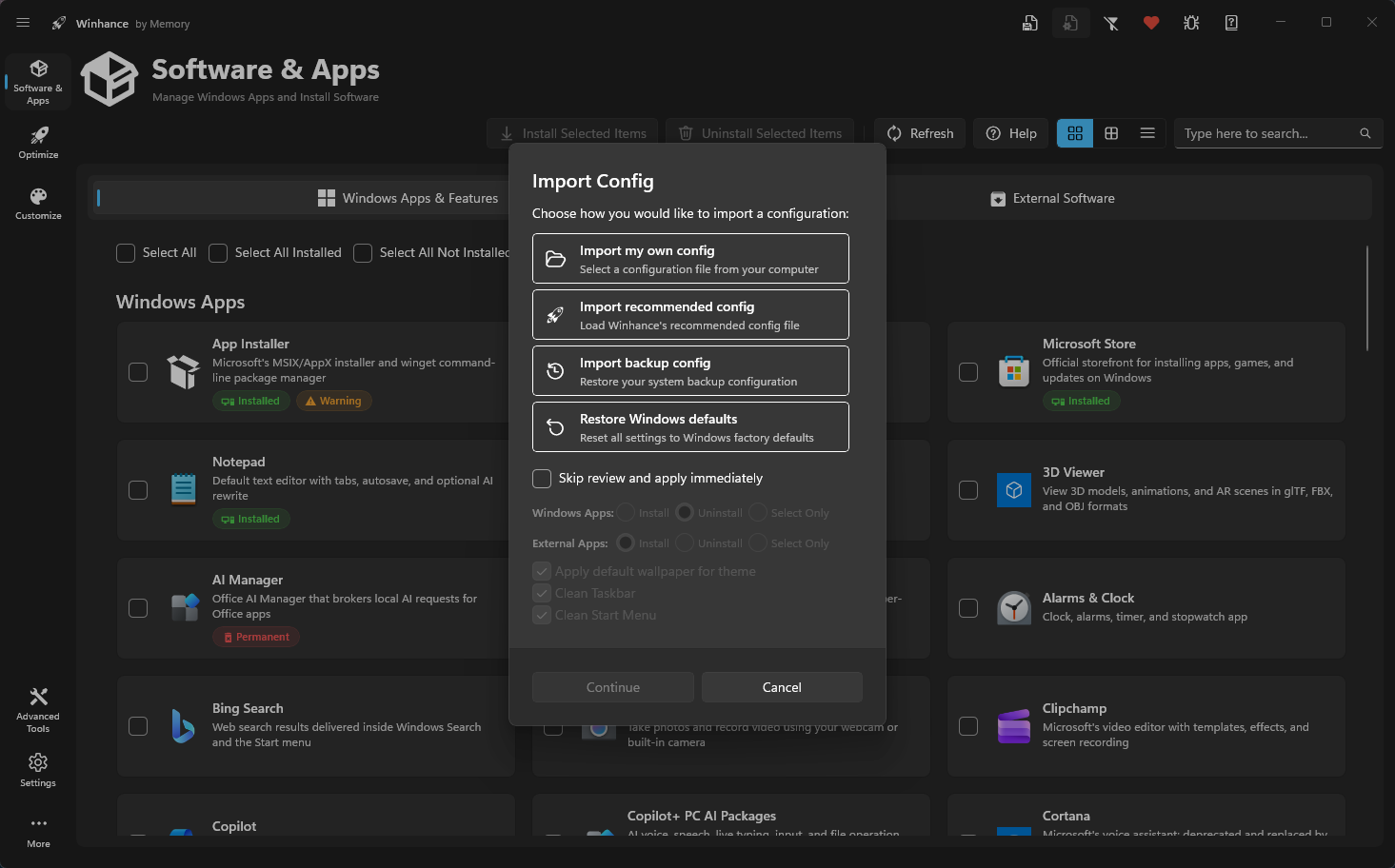
- Use the import choices. Winhance provides options to import a saved backup configuration or restore Windows defaults. Review the list before applying it; “Windows defaults” may not recreate an app that was removed.
- Restore security and updates manually. Re-enable Windows Update, Smart App Control where Windows permits it, and VBS/Memory Integrity if you disabled them. Reboot and recheck Windows Security.
- Use System Restore. Choose the confirmed pre-change restore point when services, drivers, programs, or system settings remain broken.
- Escalate to Windows recovery. If Windows cannot boot or core components remain damaged, use Startup Repair, an in-place repair install, Reset, or installation media according to the failure. Protect personal files and recovery keys first.
After recovery, use our Windows security audit checklist to verify protections, updates, startup items, network settings, and account access. The checklist is useful after a risky optimization batch even when malware was not involved.
If you ran an unofficial Winhance download
Administrator access is expected for the official utility and is not, by itself, evidence of malware. Investigate when the file came from an unrelated mirror, lacked the expected signature, installed extra software, asked you to disable protection, created unexplained startup entries, or made network/security changes outside the options you selected.
- Disconnect the questionable installer from further use and keep its original path and download URL for investigation.
- Re-download the current stable version only from the project links and compare the publisher, size, and release information.
- Run a security scan and review detections by file path and behavior. Do not restore a detected file merely because it uses the Winhance name.
- Re-enable Windows Security, Windows Update, firewall, and browser protections; then review startup items and installed applications.
- Change important passwords from a known-clean device if the copy showed credential theft, browser injection, or remote-control behavior.
If the process path is wrong, the name imitates a Windows component, or high CPU started after an unknown installer, scan for hidden miners, services, startup entries, and bundled components.
Scan an unofficial Winhance downloadChoosing between different approaches? Compare Windows 11 debloat and customization tools by security impact and rollback before combining utilities or moving to a modified Windows installation.
Winhance safety FAQ
Is Winhance malware?
The official open-source project is not automatically malware. Verify that the file came from winhance.net or memstechtips/Winhance. A file from another source can be old, modified, or unrelated, so evaluate that exact copy rather than trusting its name.
Why does Winhance need administrator access?
It changes machine-wide registry values, services, policies, applications, and Windows components. Those operations require elevated rights. The privilege is expected, but it also means a mistaken or overly broad configuration can affect the whole system.
Does Winhance disable Microsoft Defender?
Do not assume that it does or does not based on the preset name. Review the exact security options shown by your current build. Pay particular attention to Smart App Control, VBS, Memory Integrity/HVCI, firewall, update, and Defender-related settings before applying them.
Can Winhance break Windows Update or Store installs?
Yes. Completely disabling Windows Update can leave the system vulnerable and may interfere with Microsoft Store installation. Other service or component changes can also affect dependencies. Keep updates enabled and test Store installation after each relevant batch.
Can a restore point undo everything?
No. System Restore can reverse many system, registry, driver, and program changes, but it is not a personal-file backup and may not recreate every removed package or component. Keep Winhance configuration/registry backups plus a separate copy of important files.
References
- memstechtips. “Winhance – Windows Enhancement Utility.” GitHub, accessed September 9, 2026. github.com/memstechtips/Winhance
- Winhance. “Quick Start Guide.” Winhance Docs, accessed September 9, 2026. winhance.net
- Microsoft. “App & browser control in the Windows Security App.” Microsoft Support, updated June 24, 2026; accessed September 9, 2026. support.microsoft.com
- Microsoft. “Enable virtualization-based protection of code integrity.” Microsoft Learn, updated August 20, 2026; accessed September 9, 2026. learn.microsoft.com
- Microsoft. “System Restore.” Microsoft Support, updated July 7, 2026; accessed September 9, 2026. support.microsoft.com