
A fake invitation or PDF download can leave a Windows PC with two separate remote-access tools. In a September 29 report on July phishing campaigns, Microsoft describes attackers disguising a legitimate MSP360 installer, then using it to install ScreenConnect. The second connection matters: removing the first program is not the same as closing every route back into the computer.
The document was really an installer
The lures included meeting invitations, document portals and software-update prompts. Behind the changing filenames was a digitally signed MSP360 RMM package, version 2.5.0.67. RMM means remote monitoring and management: software designed to let administrators manage a device from elsewhere. Here, the person obtaining that access was not the technician the recipient intended to authorize.
A valid signature answers a narrow question about a file’s publisher. It does not establish that the email is genuine, that an invitation needs an installer, or that the account controlling the installed agent belongs to your IT provider. A document-themed filename cannot change what the program does.
Example
From: Event Desk — events [at] invitation [dot] example
Subject: Your meeting invitation
Hello,
Your invitation is ready. Download the file to view the meeting details.
Button: VIEW INVITATION
Downloaded file: Invitation.exe
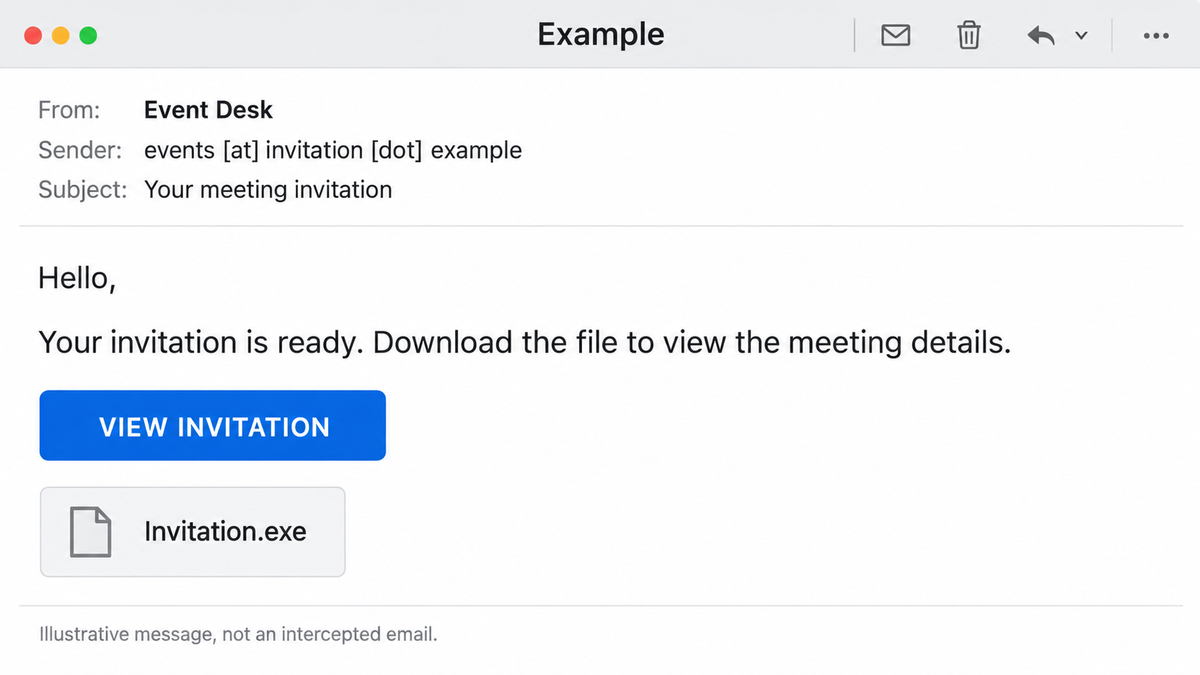
The mismatch to notice is the requested action: reading meeting details has become permission to install software. Confirm an unexpected invitation through a contact method you already trust; do not use the message itself to verify its sender.
The permission prompt changed the outcome
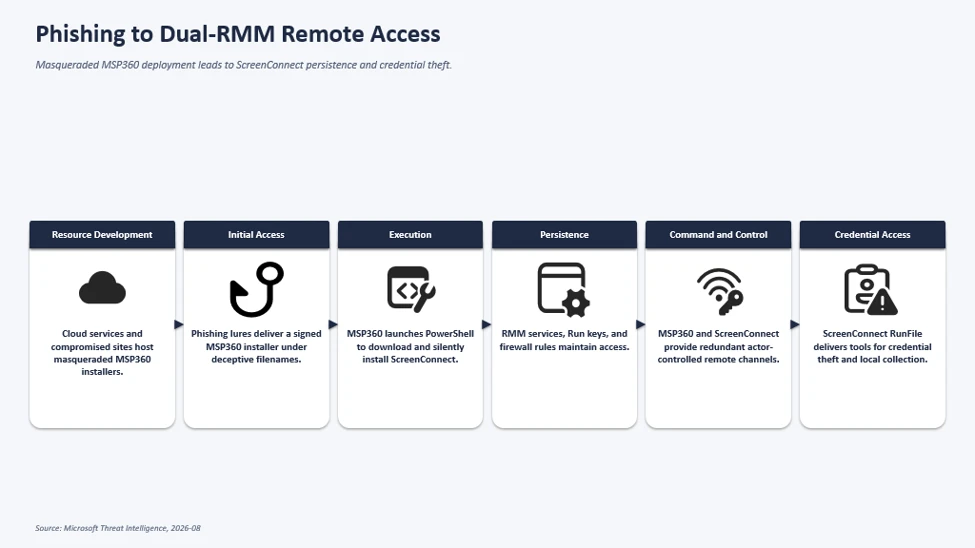
Microsoft observed installations terminate when users denied or abandoned the User Account Control elevation request. Successful installations established background MSP360 components. Its agent then launched PowerShell to fetch and silently install a ScreenConnect client.
That observation gives readers a useful distinction. A downloaded file, a started installer and a completed elevated installation are different exposure states. Refusing the observed UAC request interrupted this installation path; it is not a universal promise that rejecting one prompt makes every suspicious download harmless.
One remote tool installed another
ScreenConnect gave the attackers an independent connection. They used it to deliver utilities for credential access and data collection, including files with reassuring Windows-themed names. Microsoft did not attribute the campaigns to a named group and did not observe exploitation of ScreenConnect itself.
This was a misuse of administrative capability: the first tool could install software, so the attacker used that capability to establish another way in. The installation boundary shifted from a visible decision by the recipient to a background action by a remotely controlled agent. A familiar program name in the installed-app list therefore needs context: who deployed it, which service account or organization controls it, and whether that deployment was approved.
Likewise, filenames resembling Windows security or update components are not sufficient evidence that a file belongs to Windows. For an investigator, the useful relationship is the unapproved remote client delivering and launching that file. Renaming tools means a filename-only search can miss the same behavior.
A separate Action1 phishing investigation shows the same document-to-installation switch: a readable receipt appears while a remote agent is installed in parallel. Different software and packaging can conceal the same authorization problem.
Blocking an account does not finish cleanup
MSP360 says it has blocked close to 2,000 fraudulent accounts and introduced stronger verification requirements. Its statement also draws a clear limit: blocking an account stops access through MSP360, but does not confirm that the device is free of other unauthorized software. The vendor’s notice predates Microsoft’s new report; it is context, not evidence that every reported device has been cleaned.
For someone who only received the message, the response is to report it and avoid its download. If you downloaded the file but did not run it, do not launch it to investigate. If you completed an unexpected installation, disconnect the affected computer from the network and contact your IT team through a known channel. On a managed work PC, let IT establish which remote tools are approved before removing them.
For a personal Windows PC, follow the unexpected ScreenConnect removal guide and account for MSP360 as well. Deleting the original download, or having a security tool remove one visible payload, can leave an installed service or second remote client behind. After removing unauthorized access software, use Gridinsoft Anti-Malware, update it, run a Full Scan, review detections, apply cleanup, restart and check again if symptoms persist. A scan does not recover stolen information or prove that no access occurred. Change exposed account credentials and revoke sessions from a clean device, separately from PC cleanup.
If the page or email made you download an invoice, coupon, tracking app, browser extension, or support tool, scan the PC before opening it again or logging into sensitive accounts.
Check this PC for leftover threatsThe important question is not simply whether MSP360 or ScreenConnect is installed. It is whether each access channel was authorized—and whether the response has accounted for everything installed through it.
References
- Microsoft Security Research and Microsoft Defender Experts. “Phishing Abuses RMM Tools for Persistent Access.” Microsoft Security Blog, September 29, 2026. Investigation and observed attack chain.
- MSP360. “Code Signing Certificate Update: RMM and Connect.” Published August 14, updated September 22, 2026; accessed September 30, 2026. Account-abuse response and cleanup limitations.