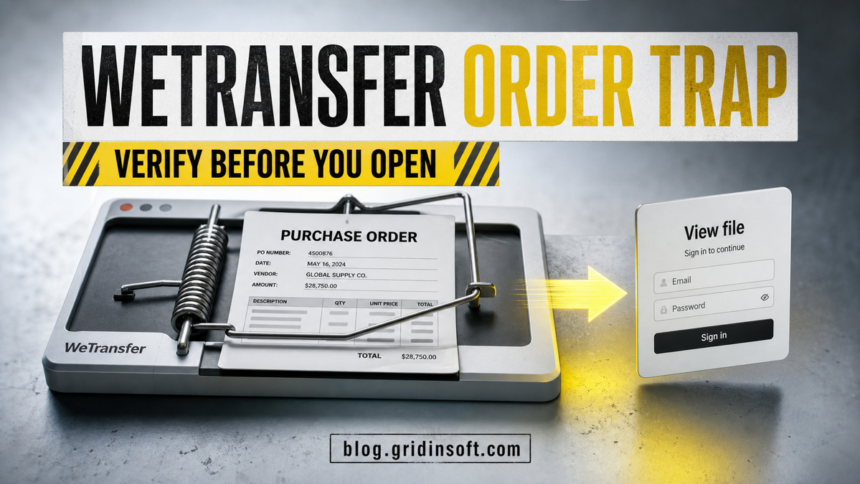
The “Purchase Order Sent To You Via WeTransfer” message is a phishing email when it arrives unexpectedly and the View document button leads to a sign-in page. Do not enter a Google, Microsoft, or company-mail password there. Verify the supposed sender through a phone number or earlier conversation you already trust, and check the transfer from a known route instead of the email button. If you entered credentials, change the password from the real provider, end unfamiliar sessions, review mailbox forwarding rules, and alert your company before the mailbox is used for invoice fraud.
The legitimate WeTransfer service is not the problem. The lure borrows its file-sharing language to make an unexpected purchase order feel routine. A polished footer, an expiry warning, or links labeled About, Help, and Unsubscribe do not prove the message is genuine.
Is the Purchase Order Sent via WeTransfer email real?
Treat the observed purchase-order version as a scam. Its main goal is to move the reader from a business document story to a credential form. The page may change its appearance after it sees the email address or company domain, showing a Google, Microsoft, or generic webmail skin that looks familiar. Familiar branding is not authentication: the domain in the address bar and the way you reached it matter more than the logo.
WeTransfer’s current guidance says service-related mail comes from @wetransfer.com, the download button should lead to wetransfer.com, and a transfer should not ask for an email password. It also warns that Bcc delivery, “undisclosed recipients,” or a message saying only “someone” sent files are phishing signs.[1]
| Check | Risk and what to do |
|---|---|
| Unexpected purchase order | Pause. Confirm the buyer, order number, products, and delivery terms through a known contact. |
Sender is not @wetransfer.com |
Do not use the button. A display name such as “WeTransfer Documents” is easy to fake. |
| Button opens another domain | Close the page. Do not type an email address, password, or one-time code. |
| Page asks for a mailbox password | This is credential phishing, not a document download step. |
| Real transfer from a known supplier | Confirm the sender separately and inspect the file name/type before downloading. A real WeTransfer link does not guarantee the file itself is safe. |
What the fake email looks like
The lure uses a procurement task that can plausibly reach sales, finance, purchasing, or a shared company inbox. It says a purchase order is ready for review and approval, names a PDF, adds an expiry warning, and makes View document the obvious action. The footer links are trust decoration: they can point to the same phishing infrastructure or do nothing useful.
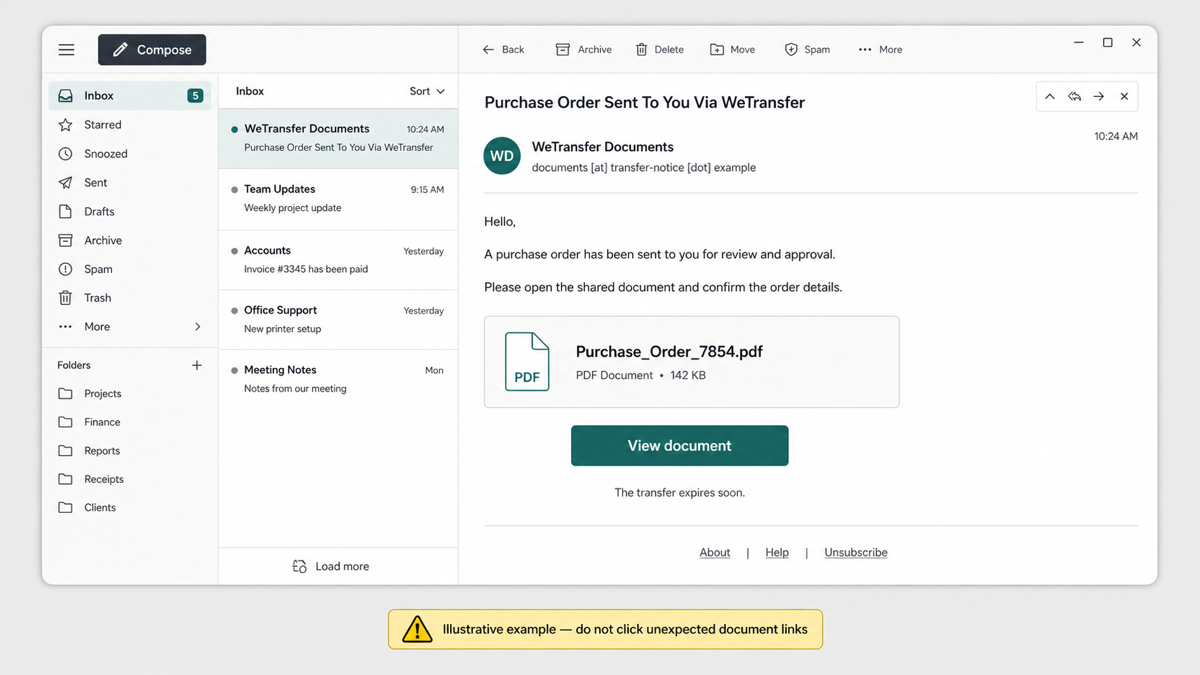
A common version can be reconstructed like this for recognition:
Subject: Purchase Order Sent To You Via WeTransfer
Display name: WeTransfer Documents
Sender: documents [at] transfer-notice [dot] example
Hello,
A purchase order has been sent to you for review and approval. Please open the shared document and confirm the order details.
Document: Purchase_Order_7854.pdf
Button: View document
The transfer expires soon.
About | Help | Unsubscribe
The wording, sender, file name, and deadline change between campaigns. Use the pattern, not a single phrase, to make the decision: an unexpected business document, a button that leaves the claimed service, and a login prompt that should not be there.
How to verify a WeTransfer purchase order safely
- Do not reply to the suspicious message. The reply address may belong to the attacker or to a compromised mailbox.
- Contact the buyer through a known route. Use a saved phone number, a previous verified email thread, or the vendor portal your company already uses. Do not use contact details inside the new message.
- Ask for business details. A real buyer should be able to confirm the purchase-order number, product, quantity, delivery location, and internal contact without asking for your mailbox password.
- Inspect the sender and destination. Expand the full sender address. On desktop, preview the button destination without opening it. If you already copied the URL, check the domain with the Gridinsoft Website Reputation Checker without submitting credentials.
- Use a known portal or a newly issued transfer. Ask the verified contact to resend the file through the agreed channel. Do not rely on a link forwarded from the suspicious message.
- Inspect the file before opening it. A PDF name can hide an HTML page, shortcut, archive, or executable. Save the file only after verifying the sender, then check its real extension and scan it before opening.
This process also applies to fake secure-document notices. The SecureDocs document-delivery phishing guide shows the same change from a document card to a mailbox login, while our phishing email checklist covers sender, link, attachment, QR-code, and urgency checks.
Why the login page matches your email provider
A phishing page can read the email address included in a link or entered on its first screen, extract the part after @, and select a matching visual template. A Gmail address may lead to a Google-like page; a Microsoft 365 address may lead to a Microsoft-like page; a company domain may produce a generic “corporate webmail” screen.
This personalization does not mean the provider sent the message or that single sign-on is working. Check the hostname before entering anything. A real provider login should be opened from the provider’s app, a saved bookmark, or an address you type yourself—not from an unexpected purchase-order email.
What to do if you clicked or entered credentials
You clicked but did not enter anything
Close the page. Do not use its back button, download prompt, notification request, or support chat. Save the message as evidence for your IT or security team, report it as phishing, and check whether the browser downloaded a file. A simple page visit is not the same as giving away credentials, but any download or extension request changes the response.
You entered a password or MFA code
- Open the real mail provider from a clean bookmark or its official app and change the password immediately.
- Sign out unfamiliar or all sessions where the provider supports it. Review recent sign-ins, devices, recovery methods, connected apps, and MFA methods.
- Inspect forwarding, inbox, deletion, and auto-reply rules. Attackers can hide security alerts or copy supplier and invoice conversations.
- Change the password anywhere else it was reused. Do not approve a push notification or share another code to “finish” recovery.
- Tell your IT team and anyone responsible for payments. Warn vendors if the mailbox could send purchase orders, bank-detail changes, invoices, or payment instructions.
Google’s compromised-account guidance specifically calls for reviewing devices, security events, recovery details, connected apps, Gmail delegation, forwarding, filters, and sent messages.[2] Microsoft’s recovery guidance likewise recommends scanning the device before changing the password and checking connected accounts, forwarding, and automatic replies.[3]
If the account belongs to an employer, the organization’s administrator may need to revoke sessions or tokens centrally. A password change alone may not remove an attacker’s active session, malicious mailbox rule, OAuth grant, or newly registered MFA method.
What to do if the email downloaded a file
Do not open the file again. Disconnect the affected computer from sensitive company systems if the file ran, an extension was installed, or a remote-support tool opened. Tell IT what happened and preserve the email, URL, file name, and approximate time for investigation.
Account recovery does not check the computer for a downloaded payload. If the lure caused a file or program to run, perform a full Gridinsoft Anti-Malware scan and review detections, browser changes, startup entries, scheduled tasks, and other persistence. Remove confirmed threats, reboot, and scan again before returning to payment or mailbox work. A malware scan cannot recover a stolen password or prove that no data was accessed, so complete the account and vendor-warning steps as well.
If the page or email made you download an invoice, coupon, tracking app, browser extension, or support tool, scan the PC before opening it again or logging into sensitive accounts.
Scan the device after a suspicious downloadHow procurement teams can prevent vendor-payment fraud
A stolen mailbox can turn one document phish into business email compromise. Attackers may read existing order threads, wait for an invoice, then send a believable bank-detail change from a trusted account. The safest control is a process that the email cannot override.
- Require a known-channel callback for new suppliers, urgent purchase orders, and any payment-detail change.
- Use dual approval for bank changes and high-value transfers.
- Keep supplier contact records outside the message being verified.
- Alert on new external forwarding rules, suspicious OAuth grants, impossible travel, and unusual bulk mail.
- Train users that a real file-sharing brand and a real transfer link do not automatically make an unexpected file safe.
Dropbox uses the same purchase-order pretext but needs a different verification step: our Dropbox purchase order email scam guide shows how to check the share from a bookmarked Dropbox page before opening the document.
FAQ
Does WeTransfer ask for my email password to download a file?
No. An unexpected transfer page that asks for a Google, Microsoft, or company-mail password should be treated as phishing. Close it and verify the sender through a separate trusted channel.
Can a real WeTransfer link still contain a dangerous file?
Yes. A legitimate hosting or file-transfer service does not guarantee that every sender or file is safe. Verify who sent it, confirm the business context, check the real extension, and scan the file before opening it.
Is the Unsubscribe link safe to click?
Not in a suspicious message. Footer links can be copied as decoration, lead to the same phishing site, or confirm that your address is active. Use the mail provider’s report-phishing control instead.
Should I warn a vendor after my work mailbox password was stolen?
Yes, when the mailbox can access purchase orders, invoices, or payment conversations. Contact vendors through known details and tell them to reject unexpected bank changes or urgent payment requests while your organization investigates.
References
- WeTransfer. “Phishing attempts and other WeTransfer imitations.” WeTransfer Help Center, updated May 29, 2026; accessed July 9, 2026. wetransfer.com/help-center/security-privacy/phishing-imitations.
- Google. “Secure a hacked or compromised Google Account.” Google Account Help, accessed July 9, 2026. support.google.com/accounts/answer/6294825.
- Microsoft. “How to recover a hacked or compromised Microsoft account.” Microsoft Support, accessed July 9, 2026. support.microsoft.com/accounts-billing/manage/how-to-recover-a-hacked-or-compromised-microsoft-account.