You cannot prove that a crypto wallet is legitimate from its address alone. A public address can have the right format, show normal transactions, and still belong to a scammer. Before sending money, confirm who controls the wallet through a second channel, select the exact asset and network, copy the address from the recipient’s trusted source, compare the entire address on a trusted screen, check its history for warnings, and send a small test amount. A clean address check means “not currently flagged,” not “guaranteed safe.”
The safest verification process checks three different things: the person or organization asking for payment, the address and blockchain network, and the wallet app or website that will sign the transaction. Skipping any one of those checks can turn a technically valid transfer into an irreversible loss.
What a crypto wallet check can — and cannot — prove
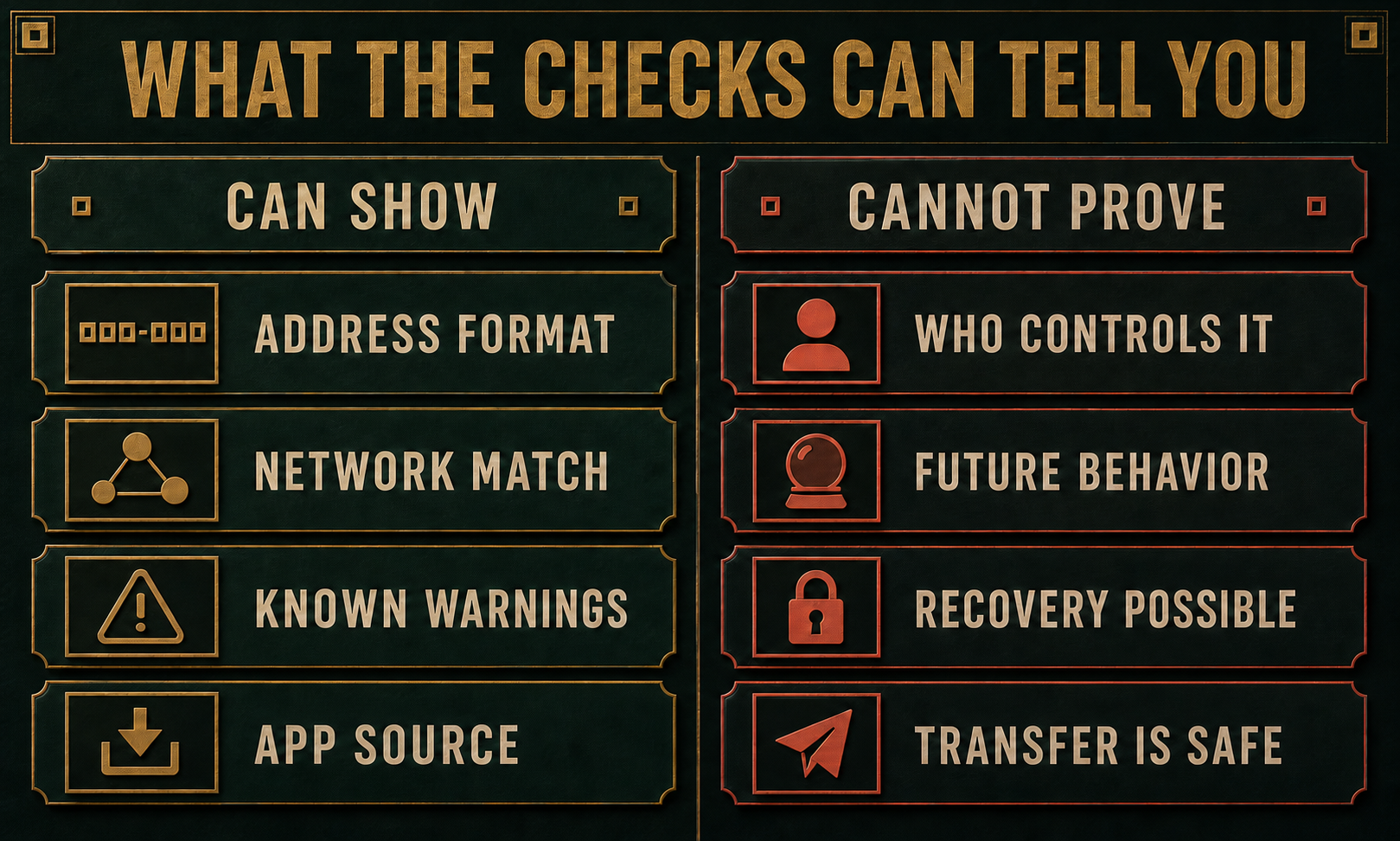
A blockchain explorer can confirm that an address exists on the selected network, show its public transaction history, and sometimes display a label for an exchange, contract, or reported scam. It usually cannot prove the real-world identity of the person who sent you the address. New scam wallets may also have no reports yet.
| Check result | What it actually tells you |
|---|---|
| The address format is valid | Your wallet recognizes the string for that network. It does not prove the recipient is honest. |
| The explorer shows transactions | The address has on-chain activity. Activity alone does not identify its owner or purpose. |
| No scam report appears | The service has no matching report in its current data. A new or unreported scam can still look clean. |
| A small test arrives | The address, asset, network, and any tag or memo worked for that transfer. It does not prove a seller or investment is legitimate. |
| The wallet app is genuine | The software came from the expected developer. You must still verify the recipient and read every transaction request. |
How to verify a crypto wallet before sending money
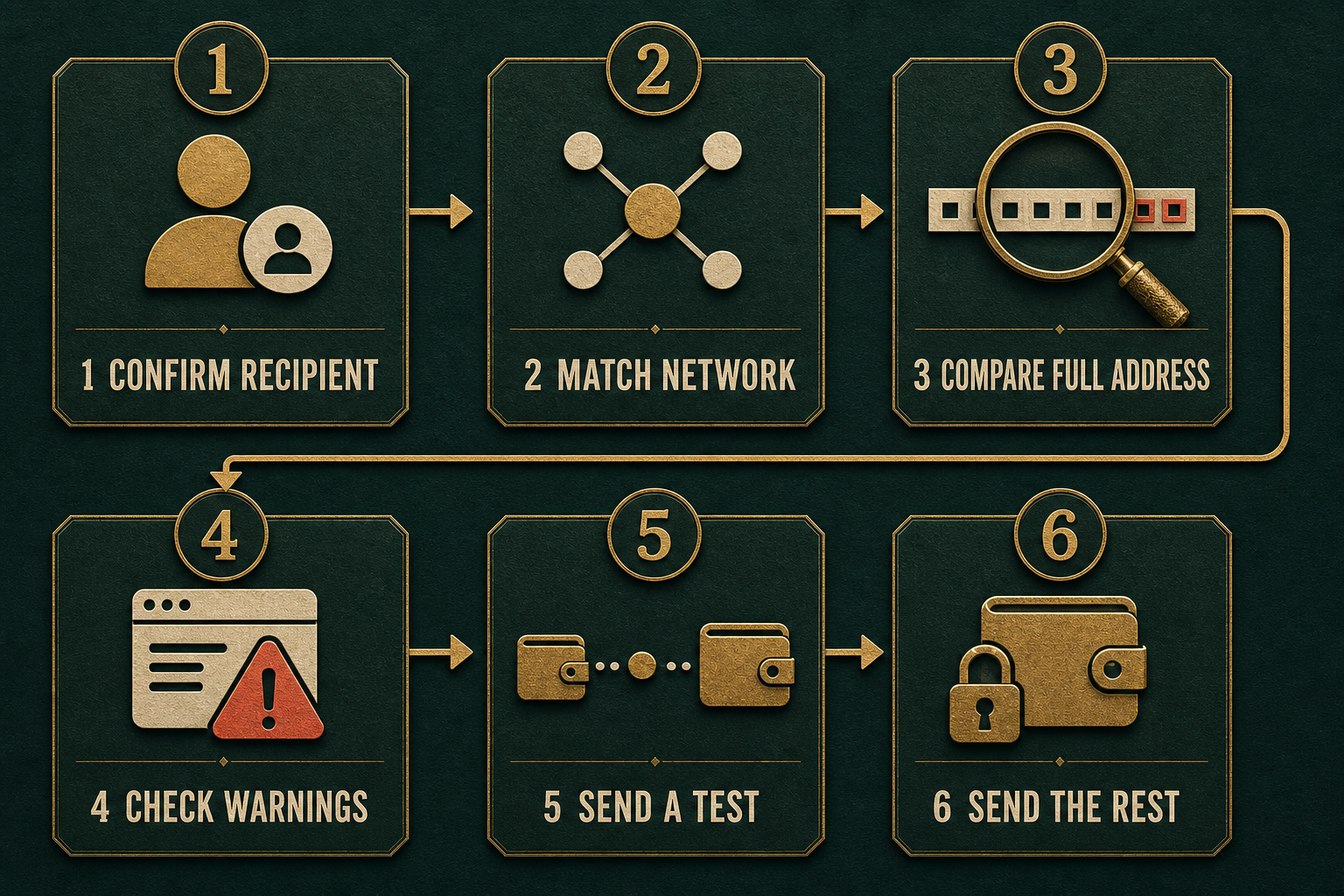
- Confirm the recipient outside the original conversation. If the address arrived by email, text, Telegram, Discord, or a support chat, contact the person or business using a phone number, account, or website you already trust. A compromised account can send a real-looking request from a familiar name.
- Ask for the asset, network, and destination details together. “Send USDT” is incomplete because the same token can exist on several networks. Confirm whether the recipient expects Ethereum, Tron, Solana, BNB Chain, or another network, and whether an exchange requires a destination tag or memo.
- Get the address from the trusted source, not transaction history. Ask the recipient to open the receive screen again or use a saved address that was verified earlier. Do not copy a similar-looking entry from recent activity; address-poisoning scams are designed to place a fake address there.
- Compare the whole address. Check more than the first and last four characters. Compare the middle, too, and review the final destination on the hardware wallet or signing device if one is used. If a QR code and text address are both provided, confirm they decode to the same destination.
- Inspect the address on the correct block explorer. Look for a known exchange or contract label, public scam warnings, unusual zero-value transfers, and whether the history makes sense for the recipient’s explanation. Treat labels and risk scores as evidence, not identity proof.
- Pause if the payment story is suspicious. A legitimate-looking address does not make an investment, emergency, job, giveaway, tax, recovery, or “safe wallet” request real. Review the broader crypto scam red flags before paying someone who contacted you unexpectedly.
- Send a small test amount when fees make that practical. Wait for the recipient to confirm the exact amount arrived, then compare the confirmed transaction hash and destination before sending the rest. Repeat the address check if the recipient changes the network, account, or address.
A test transfer belongs at the end of verification, not the beginning. Sending a small amount to a scammer only proves that the scammer can receive it. Confirm the identity, payment reason, network, and full address first.
The September 2026 Prague crypto-investment fraud investigation illustrates the distinction: police say money promised as passive-income investments reached wallets controlled by the suspect. A valid destination address did not establish an investment under the sender’s control.
The September 2026 sentence in the Coinbase impersonation case illustrates why exclusive wallet control matters: victims transferred funds to wallets they believed were theirs alone, but the person posing as support could access them.
Watch for address poisoning and clipboard replacement
Address poisoning exploits shortened wallet displays. An attacker creates an address with a familiar beginning and ending, then sends a zero-value or tiny transaction so the lookalike appears in your history. The middle characters are different, but a hurried sender may copy the poisoned entry because the visible edges look right.
Always return to the recipient’s trusted receive screen or a verified address book entry. Compare the full destination, including the middle characters, immediately before approval. A new-wallet warning or lookalike-address warning is a reason to stop and re-confirm, not a routine alert to dismiss.
Clipboard malware is a separate risk. It can replace a copied wallet address before you paste it. If the pasted address differs from the source, stop all transfers, disconnect the device from the network, and do not log back into exchange or wallet accounts from that machine. The Silent Swap crypto clipper guide explains one browser-extension version of this attack. If you do not know which component is responsible, follow the checks for an address that changes when pasted to separate a browser symptom from a Windows cleanup problem.
If the change followed a supposed exchange bonus, use the SimpleSwap bonus userscript removal checklist. It covers untrusted code added to a legitimate userscript manager, including checks before reopening the exchange.
The newly advertised WARDEN Stealer also claims clipboard replacement alongside browser-data theft and payload loading. Those features are not independently verified, but the response guide separates a wrong pasted address, an executed file, exposed sessions, and wallet-secret risk.
A separate browser-side case, the Adform script wallet-address swap, could alter Bitcoin, Ethereum, and Tron destinations while an affected website page was open without installing a persistent extension. The response begins with closing the page, clearing cached code, and reviewing completed transfers.
How to verify a wallet app or browser extension
Sometimes “Is this wallet legitimate?” means the app rather than a recipient address. Start from the wallet project’s official website, not a search ad, social-media reply, direct message, or video description. Follow its store link and compare the developer name, domain, download history, permissions, update date, and support links.
- Do not install wallet software sent as an attachment or compressed archive.
- Do not type a recovery phrase into a website to “validate,” “sync,” or “unlock” a wallet.
- Reject an extension whose developer, homepage, or requested permissions do not match the official project.
- Check an unfamiliar download or domain with the Gridinsoft Online Virus Scanner before opening it, while remembering that a clean result is one signal rather than a guarantee.
- For meaningful holdings, compare the transaction on a separate hardware-wallet screen before signing.
For the storage decision behind this workflow, see hot wallet vs cold wallet security. Cold storage reduces remote key theft, but it cannot correct a wrong destination or a malicious approval that the owner confirms.
A wallet signature is not the same as a payment
A site may ask you to connect a wallet, sign a message, approve a token allowance, or confirm a transfer. Those actions are not interchangeable. A plain login signature may prove control of an address without moving funds, while a token approval can give a smart contract permission to spend assets later. A transaction can move assets immediately.
Read the action, destination, asset, amount, network fee, and spending limit on the final confirmation screen. Reject blind or unreadable requests, unlimited allowances you did not intend, and any prompt that appeared after an unexpected link. A verified website domain does not make every contract request safe.
What to do if you already sent, signed, or installed something
- You sent to the wrong or suspicious address: save the transaction hash, destination, amount, network, messages, and screenshots. Contact the receiving exchange or service immediately if it can be identified. Report the fraud through the appropriate authority and ignore recovery agents who promise to reverse a blockchain transaction for an upfront fee.
- You signed an unknown token approval: stop using the site, review approvals through the wallet’s official help path or the network’s established explorer, and revoke the unwanted allowance. Move remaining assets to a fresh wallet if the seed phrase or signing environment may also be compromised.
- You exposed a seed phrase or private key: treat that wallet as permanently compromised. On a clean device, create a wallet with a new recovery phrase and move remaining assets before the attacker does. Never reuse the exposed phrase.
- You installed a suspicious wallet or the pasted address changed: disconnect the device, remove the suspect app or extension, and run a full Gridinsoft Anti-Malware scan for clippers, infostealers, browser changes, startup entries, and persistence. Change exchange passwords and revoke sessions from a clean device before logging in again.
During a real exchange incident, a promise to bypass a withdrawal pause deserves the same independent verification. Our report on the September 2026 Bitget wallet incident separates the exchange’s statements from personal-account checks and explains how to verify support channels.
FAQ
Can someone steal crypto with only my public wallet address?
A public address does not give someone the private key needed to spend your funds. It can reveal public transaction activity, however, and scammers may use that information for targeted phishing, fake support, address poisoning, or privacy analysis.
Is a small test transfer enough to verify a wallet?
No. It confirms that a small transfer reached that address on that network. It does not prove who controls the address, whether the payment request is honest, or whether a later wallet signature is safe.
Can a blockchain explorer identify the owner of a wallet?
Sometimes an explorer labels a known exchange, project, or contract, but most addresses are pseudonymous. Transaction history and labels can support a decision; they are not reliable proof of a person’s identity.
Why should I check the middle of a wallet address?
Address-poisoning attackers create lookalikes that share the beginning and ending of a familiar address. Comparing only the shortened edges can miss the mismatch in the middle.
References
- MetaMask. “Address poisoning scams.” MetaMask Help Center, accessed July 22, 2026. https://support.metamask.io/stay-safe/protect-yourself/wallet-and-hardware/address-poisoning-scams
- Trezor. “How to choose the correct blockchain network when withdrawing from or sending to Trezor.” Trezor Learn, accessed July 22, 2026. https://trezor.io/guides/sending-receiving-staking-funds/moving-funds-from-exchanges/how-to-choose-the-right-network-when-withdrawing-from-or-sending-to-trezor
- ethereum.org. “Ethereum security and scam prevention.” Ethereum Foundation, updated July 16, 2026, accessed July 22, 2026. https://ethereum.org/security/