

A USPS scam text is a fake delivery message that tries to make you open a link, confirm an address, pay a small fee, or enter card details. Real USPS tracking texts are tied to services you requested, while scam texts usually arrive from a random number or email address and push you to a lookalike website. If the message says your package is on hold, your address is incomplete, or a tiny delivery fee is due, do not use the link in the text. Open USPS.com or the USPS mobile app yourself and check the tracking number there.
Fast check before you tap
- USPS does not ask for card details, login credentials, or personal data through an unsolicited SMS link.
- Official USPS tracking texts are normally connected to a tracking request or opt-in service, not a surprise message from a random sender.
- A link that is not on
usps.comis a serious red flag, even if the page uses postal wording. - Do not reply with “Y” or “1” to activate a link. That instruction is common in USPS smishing campaigns.
- If you already entered card details, call the bank or card issuer immediately and treat the card as exposed.
What are USPS scam text messages?
USPS scam text messages are smishing messages that impersonate the United States Postal Service. The lure usually says a package cannot be delivered because the address is incomplete, a delivery fee is unpaid, or the parcel is waiting in a warehouse. The link then leads to a fake postal page that asks for personal information, card details, or a “redelivery” payment.
The same delivery trick also appears in email and other courier-themed campaigns. If a message includes an attachment instead of a link, use our FedEx e-Order Notification email virus guide as the safer cleanup path.
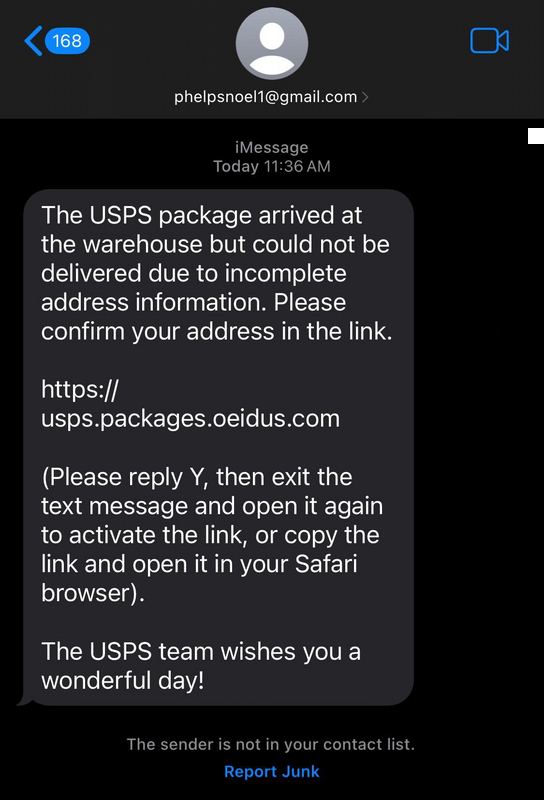
Examples of USPS scam text wording
Wording changes often, but most messages follow the same pattern: a package problem, a short deadline, a link, and an instruction that makes the link clickable on mobile.
The USPS package arrived at the warehouse but could not be delivered due to incomplete address information. Please confirm your address in the link. Please reply Y, then exit the text message and open it again to activate the link.
USPS – The package has arrived at the warehouse and cannot be delivered due to incomplete address information. Please confirm your address in the link. The USPS team wishes you a great day.
Do not treat the exact words as the only test. Scammers rotate phrases such as “delivery failure notice,” “package on hold,” “address update,” “redelivery fee,” “customs fee,” and “your package could not be delivered.”
How the USPS text scam works
The link usually opens a fake postal website. Some pages copy colors, navigation labels, and a tracking-style form well enough to look convincing on a phone. The goal is not to help you receive a parcel; it is to collect information that can be sold, used for identity theft, or used to make unauthorized card charges.
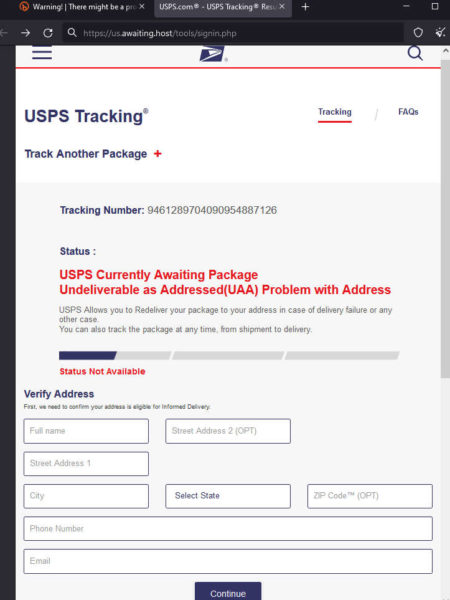
Typical fake forms ask for name, address, ZIP code, phone number, email address, date of birth, and card details. A small “redelivery” payment can be the real trap: it verifies the card and gives the attacker enough information to attempt fraud later. If the page asks you to install an app, download a file, allow notifications, or scan a QR code, close it and scan the device before using sensitive accounts.
Real USPS text or scam?
| What you see | How to treat it |
|---|---|
| The text comes from a random phone number, iCloud/Gmail-style sender, or unknown email address. | Assume scam. Do not reply or open the link. |
| The message asks you to confirm an address, pay a small fee, or enter card details through a link. | Assume scam. Verify through USPS.com or the USPS app instead. |
The URL is not on usps.com, or it uses words like usps inside a longer unrelated domain. |
Do not open it. Check the domain with the Gridinsoft Website Reputation Checker. |
| The message tells you to reply “Y” or “1” and reopen the conversation to activate the link. | This is a common smishing tactic. Delete and report the message. |
| You requested USPS tracking alerts and the text only provides tracking status without asking for payment or personal data. | It may be legitimate, but still verify by opening USPS.com or the official app yourself. |
Signs of a USPS scam text
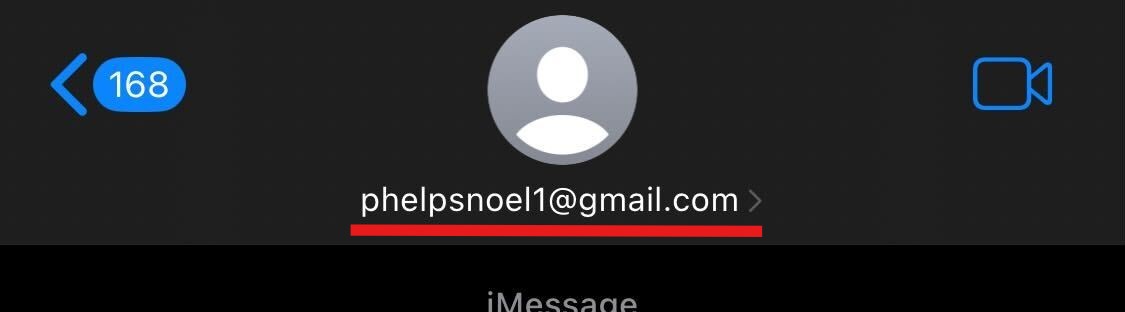
Random sender or email address
Scam messages often come from an unrelated phone number, an Apple/iCloud-style address, a free mailbox, or a sender name that does not match USPS. A sender label can be spoofed, so do not rely on the display name alone.
Suspicious URL
Look at the registered domain, not the first familiar word. A fake URL may look like usps-delivery-update.example, www-uspost.example, or track-usps.example. The word “usps” in a subdomain, path, or page title does not make the site official.
No real package context
Most scam texts do not include a useful tracking number, sender, route, or normal account context. They stay generic because the attacker does not know which package you are actually waiting for.
Pressure and tiny payments
Small fees are meant to feel harmless. The risk is not only the amount requested; the real damage starts when card details, billing address, and phone number are sent to the fake site.
What to do if you clicked a USPS scam text
- If you only opened the link, close the page, do not enter anything, and clear site data for the domain if your browser keeps redirecting.
- If you entered an address or phone number, watch for follow-up scams. Attackers may reuse the information in delivery, bank, or account-verification messages.
- If you entered card details, call the bank or card issuer immediately, request a block or replacement when needed, and review recent transactions.
- If you entered a USPS, email, Apple, Google, or banking password, change it from the official website on a clean device and sign out other sessions.
- If you installed an app or downloaded a file, remove it, review browser notifications and permissions, then run a full security scan.
- If you reused the same password elsewhere, change it on every important account and enable multi-factor authentication.
If the scam led to identity-theft signs, use our identity theft protection checklist. If the message arrived as part of a broader SMS flood or suspicious mobile behavior, review our MMS and message scam guide.
How to report a USPS scam text
Forward the suspicious message to 7726 if your mobile carrier supports spam reporting. The U.S. Postal Inspection Service also asks users to report USPS smishing to [email protected] with the sender information, message text, and any suspicious link. If you lost money, entered card details, or shared personal data, also report the fraud through the FTC.
How to avoid USPS delivery text scams
- Do not open delivery links from surprise texts. Type
usps.comyourself or use the official app. - Compare the tracking number with an order confirmation from the merchant.
- Ignore requests to reply “Y” or “1” to activate a link.
- Check suspicious domains before opening them with the Gridinsoft Website Reputation Checker.
- Use a virtual card or card controls for online shopping when possible.
- Keep browser, phone, and security tools updated in case a scam page attempts notifications, downloads, or redirects.
Should the 2024 URL be changed?
The current URL still contains 2024, while the article now targets current USPS scam text searches. That mismatch can lower trust in the snippet because the page looks dated before a reader opens it. The safer SEO move is to monitor this refresh first, then change the slug only with a clean 301 redirect from /usps-scam-text-2024/ to a stable URL such as /usps-scam-text/. Do not remove the date without preserving the old URL, because the old URL already has history, internal links, sitemap entries, and redirects from the former gridinsoft.com/blogs path.
FAQ
Will USPS text me about a package?
USPS can send tracking texts when you request or opt in to tracking alerts, but a surprise text that asks for payment, address confirmation, or card details through a link should be treated as a scam.
Is a USPS incomplete address text real?
Usually no. “Incomplete address” is one of the most common USPS smishing lures. Verify the tracking number on USPS.com or through the merchant instead of using the link in the text.
What if I replied Y to a USPS scam text?
Replying may confirm that your number is active. Do not open the link afterward. Delete the message, report it as spam, and watch for more scam texts.
Can a USPS scam text steal my card?
Yes. If the fake page asks for a redelivery fee or postage charge, the payment form may steal card number, billing address, and contact details. Call your card issuer quickly if you entered them.
How do I check a suspicious USPS link?
Do not open it on your main device. Copy the domain carefully and check it with a reputable URL scanner, or go directly to USPS.com and enter the tracking number there.
Related guides
- Smishing vs vishing: differences and examples
- How to spot a phishing email
- Signs of online scams
- FedEx e-Order Notification email virus
References
- United States Postal Inspection Service. “Smishing: Package Tracking Text Scams.” USPIS, accessed June 7, 2026. https://www.uspis.gov/news/scam-article/smishing-package-tracking-text-scams
- United States Postal Service. “Text Tracking FAQs.” USPS, accessed June 7, 2026. https://faq.usps.com/s/article/USPS-Text-Tracking-FAQs
- Federal Trade Commission. “Think that text message is from USPS? It could be a scam.” Consumer Advice, April 16, 2025, accessed June 7, 2026. https://consumer.ftc.gov/consumer-alerts/2025/04/think-text-message-usps-it-could-be-scam


What happens if i gave out my information like address and phone number but not credit card info?
Hello, Leslie!
Even having your address/personal number or similar “less critical” personal information, threat actors can impersonate you. Alternatively, you may start receiving numerous spam SMS. They will not be targeted, as crooks who phish such data usually sell it off in bundles to other rascals, but still unpleasant and annoying. And the more data crooks have – the higher are chances to receive a very convincing phishing mail, which will be extremely hard to distinguish from a legit one.
What happens if I did involve my credit card info but the purchase did not go through
There could be 2 different cases with different results.
When hackers offer you to pay for a fabricated invoice and send you a link to a legit payment system (e.g. PayPal) which contains invoice, only your money are at risk. In this case, crooks just try to make you pay for a thing you should not to. Once such a payment has failed, you are not losing anything. But I’d recommend you to block the sender and delete the message anyways.
The other situation involves a fake payment system page. It is relatively easy to make a copy of a legit payment system, and then make the victim visiting it “to pay off the bill”. Same as in the first case, bill is non-existent, but this time hackers also put their hands on your credit card info. As this copy is made and maintained by hackers, there’s no problem for them to extract what did you type in the fields on the site. If that is the case, you should reach your bank and ask to block and re-issue the card, so the info hackers have collected through such a phishing will be useless.