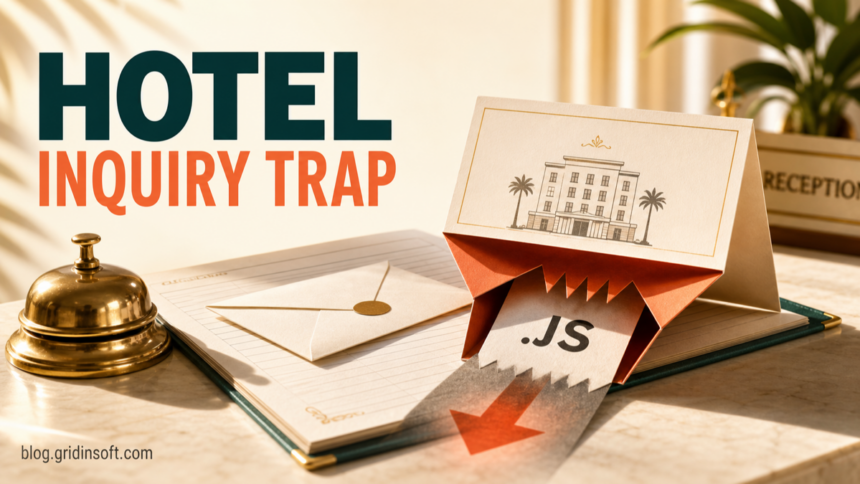
The “Company’s Annual Dinner” email virus is a malicious hotel-booking inquiry that hides a JavaScript download behind a small purchase-order or invoice image. Merely reading the message does not run the script. Clicking the image can download a .js file, but the critical transition is opening that downloaded file: Windows may then execute its commands. If you only read the email, report and delete it. If you downloaded the file, remove it without opening it and scan the device. If you ran it, disconnect the computer from sensitive hotel systems and start incident response.
What to do now
- Only read the email: do not reply, click the image, or use its phone numbers. Report the message and delete it.
- Clicked the image: close the page and check the browser’s download history. A click may have saved a file even if nothing appeared to happen.
- Downloaded the JavaScript: do not preview or double-click it. Record its name and path if your IT team needs evidence, then quarantine or remove it and run a security scan.
- Opened or ran the file: disconnect the PC from hotel, booking, payment, and shared-drive networks; tell IT or the incident owner; and use a clean device for password changes.
How to recognize the Annual Dinner email
The lure looks like a normal sales lead for a hotel or events team. The observed subject is Enquiry – Annual Dinner and rooms availabilty in your hotel, including the misspelling availabilty. The sender asks for a quotation for 19 rooms and 33 guests and asks whether the restaurant can provide vegan and halal options. These concrete details make the request feel worth answering before staff verify it.
The message signs off as “Maggie Chong” and claims a travel-and-tour role associated with ATPI. A copied display name, signature, company name, or office address does not authenticate the sender. There is no evidence that the real company or any person with that name sent the malicious message. Check the full sender and reply-to domains, then verify a large booking through contact details obtained independently of the email.
The main trap is not a normal document attachment. A small purchase-order or invoice-style preview acts as a link. Clicking it causes a JavaScript file to download. That difference matters: a picture can look passive while its link destination performs an unexpected download.
What the fake hotel inquiry can look like
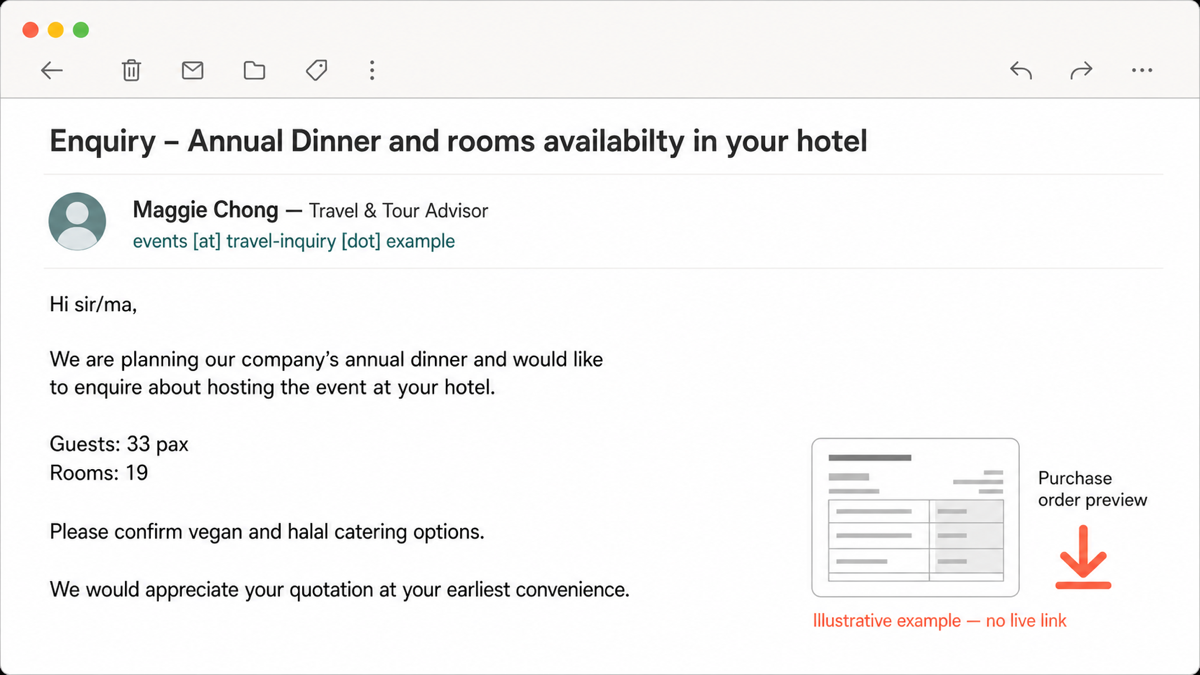
Example:
Subject: Enquiry – Annual Dinner and rooms availabilty in your hotel
Display name: Maggie Chong — Travel & Tour Advisor
Sender: events [at] travel-inquiry [dot] example
Hi sir/ma,
We are planning our company’s annual dinner and would like to enquire about hosting the event at your hotel.
Guests: 33 pax
Rooms: 19
Please confirm vegan and halal catering options.
We would appreciate your quotation at your earliest convenience.
Image/link: Purchase order preview
The sender address above is deliberately non-live. Criminals can change the mailbox, phone number, preview image, guest count, or company name while keeping the same workflow. Use the request, the unexpected image link, and the downloaded file type together rather than relying on one spelling mistake.
How the image-to-JavaScript chain works
- The email creates a plausible business task. A hotel employee is expected to open quotation requests, so the room and catering details lower suspicion.
- The document image hides a link. The thumbnail looks like a purchase order or invoice, but selecting it starts a download rather than opening a normal document.
- The browser saves a JavaScript file. The file may appear in
%USERPROFILE%\Downloadsor another browser download folder. Downloading it does not automatically prove that its code executed. - The user opens the file. On Windows, JavaScript outside a webpage can be interpreted by scripting components. A malicious script can then fetch or launch additional content.
- The next payload can change. The available evidence identifies a malicious or suspicious script/downloader, not a confirmed final malware family. Do not assume ransomware, a stealer, a RAT, or a miner unless endpoint evidence identifies it.
Multi-engine labels associated with the sample include JS:Trojan.Cryxos.16417, JS/TrojanDownloader.Agent.AEQQ, and HEUR:Trojan.Script.SAgent.gen. These are vendor and heuristic detection names. They support treating the JavaScript as unsafe, but they do not all describe one precise family or prove what every later stage does.
Did clicking the image infect the computer?
Reading the email is not the same as running the download. If you opened the message but did not select the preview, there is no evidence from this chain that malicious code ran. Use the mail app’s phishing-report control and remove the message.
Clicking the preview may have downloaded a file. Open the browser’s downloads panel without opening the item. Look for an unexpected .js file at the time of the click. If you are unsure whether another page, extension, or permission changed, follow the post-phishing-link browser checks.
Downloading the file still differs from executing it. Leave it closed. In a managed hotel environment, let IT capture the filename, hash, download URL, email headers, and message before deletion. On a personal or standalone workstation, quarantine or remove the file and scan the device. Do not upload customer records or an unredacted email to a public scanner.
Opening the .js file should be treated as a compromise event. The script may have launched and then disappeared without a visible installer. Do not wait for pop-ups or slow performance before acting.
What to check if the JavaScript file ran
- Isolate the device. Disconnect Wi-Fi and Ethernet. Do not use the workstation for reservations, payment portals, email, or remote support while it is being checked.
- Preserve useful evidence. Note the sender, subject, time, browser, downloaded filename, path, and any security alert. In a business, preserve the email and endpoint timeline according to the incident-response process.
- Check the execution window. Review endpoint or security logs around the click for
wscript.exe,cscript.exe,powershell.exe,cmd.exe, ormshta.exestarting from the browser or download folder. A process name alone is not proof; the parent process, command line, time, and path provide context. - Look for persistence. Check Startup, scheduled tasks, services, browser extensions, new local users, and Run keys for entries created after the script ran. Use the Windows post-malware audit for a structured checklist.
- Run updated scans. Use the installed endpoint protection’s full or offline scan. Then run Gridinsoft Anti-Malware to check for detections, hidden files, scheduled tasks, startup entries, browser changes, bundled components, and persistence that may remain after the visible script is deleted.
- Secure accounts from a clean device. Change the employee’s email and booking-platform passwords, revoke active sessions, review mailbox forwarding rules, and confirm MFA methods. Rotate shared credentials that were accessible on the affected PC.
- Escalate when trust cannot be restored. If alerts return, security settings changed, unknown remote tools or administrator accounts appear, or logs are incomplete, a clean reinstall and professional incident review can be safer than repeated manual cleanup.
Removing the visible .js file does not prove that nothing else ran. A downloader can leave a second-stage file, scheduled task, service, startup item, or browser change behind. A clean scan is useful evidence, but it cannot recover a stolen password or prove that no account session was exposed.
If the page or email made you download an invoice, coupon, tracking app, browser extension, or support tool, scan the PC before opening it again or logging into sensitive accounts.
Scan after running the downloadHotel and reservations-team response
Hospitality inboxes receive legitimate inquiries from first-time senders, so “unknown sender” alone is not a workable rule. Build a verification step around the risky action: staff should never need to run a script to quote rooms or catering. A genuine prospect can send requirements as plain text or through an approved booking channel.
- Route unexpected downloads from sales and reservations mailboxes to IT or security review.
- Show full file extensions on Windows and block or quarantine script types that arrive through email workflows.
- Use separate accounts and least privilege for booking, payment, and general email tasks.
- Enable MFA and review mailbox forwarding rules and booking-platform sessions after any executed attachment or script.
- Consider Microsoft’s attack-surface-reduction rule that blocks JavaScript or VBScript from launching downloaded executable content, testing it first against legitimate business scripts.
- Train staff with specific hospitality examples. Microsoft’s research has documented separate campaigns that also use plausible booking or guest requests to target hotel employees.
For the broader checklist—sender domain, reply-to, link destination, request, pressure, and attachment type—use our guide on how to spot a phishing email. For the different Booking.com-style fake-CAPTCHA chain, see the report on malware targeting hospitality staff.
FAQ
Can opening the Annual Dinner email infect my computer?
Reading the message alone does not execute the observed JavaScript chain. The risk rises when the purchase-order image is clicked, a file is downloaded, and that file is opened. Still report and delete the email because its sender and link are malicious.
I clicked the image but did not open the download. What should I do?
Close the page, check the browser’s download history, and remove or quarantine the unexpected file without opening it. Run an updated scan. If this happened on a work device, preserve the message and tell IT so they can check the download URL and endpoint logs.
Do the Cryxos, Agent, and SAgent detections identify the final malware?
No. They are vendor or heuristic labels for the script/downloader behavior. They are a reason to treat the file as unsafe, but they do not prove which final payload was installed. Endpoint evidence is required for a precise attribution.
Should hotel staff reply to verify the booking?
Do not reply using the suspicious message’s address or phone numbers. Verify the request through an independently found company contact or an approved booking channel. A legitimate customer does not need hotel staff to execute JavaScript to receive event requirements.
References
- VirusTotal. “File analysis report for SHA-256 0041f09a1e206f91f44355e9ef1cbd16d517007fdf74b45681de227e1ac3a776.” VirusTotal, accessed July 16, 2026. https://www.virustotal.com/gui/file/0041f09a1e206f91f44355e9ef1cbd16d517007fdf74b45681de227e1ac3a776/detection
- Microsoft Threat Intelligence and Microsoft Defender Experts. “Phishing campaign impersonates Booking.com, delivers a suite of credential-stealing malware.” Microsoft Security Blog, March 13, 2025; accessed July 16, 2026. https://www.microsoft.com/en-us/security/blog/2025/03/13/phishing-campaign-impersonates-booking-com-delivers-a-suite-of-credential-stealing-malware/
- Microsoft. “Attack surface reduction rules reference: Block JavaScript or VBScript from launching downloaded executable content.” Microsoft Learn, accessed July 16, 2026. https://learn.microsoft.com/en-us/defender-endpoint/attack-surface-reduction-rules-reference