A Windows installer can look like Exodus, contain a working copy of the wallet, and still be a remote access trojan. Huntress found this setup at four unrelated organizations between July 24 and August 18. The malicious package launched a mostly genuine Exodus 24.33.4 build without showing its window, then activated a modular RAT in the background.
This is not evidence that Exodus itself or its official download channel was breached. The risk is a counterfeit installer delivered through misleading JavaScript files and ZIP archives. If you ran one, the important question is not whether the wallet opened. It is whether the PC now contains the ExdBackupTool folder and its hourly scheduled task.
The real Exodus app was not the problem
The malicious MSI was about 201 MB and consisted largely of authentic Exodus files. Huntress found only three modified files among 1,973. That camouflage explains why a quick visual check or a clean-looking icon is weak evidence. The package was unsigned, however, and the copied application was configured to start invisibly.
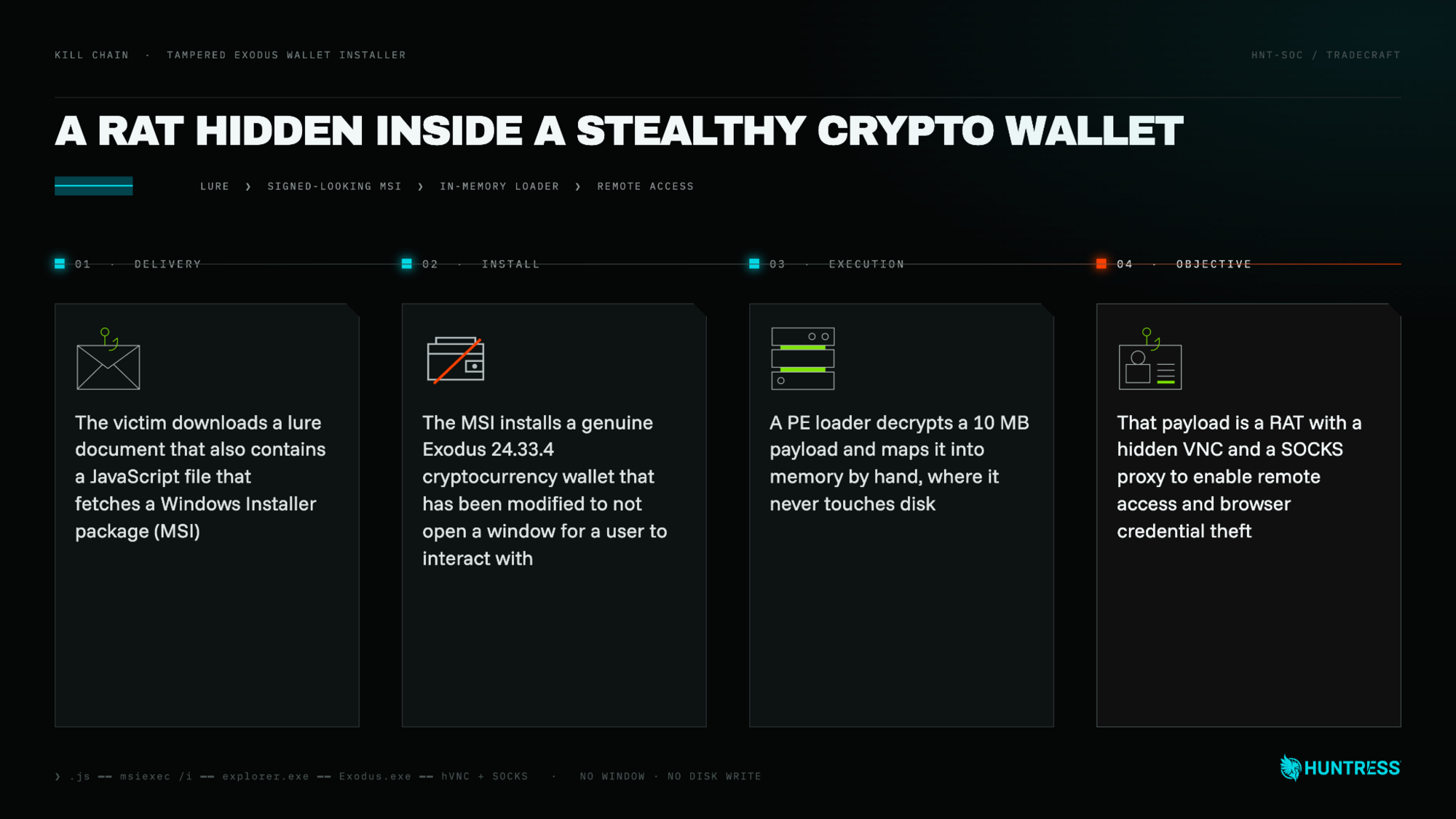
In the four investigated incidents, victims received a file ending in .pdf.js or a ZIP containing JavaScript. Running it displayed a decoy PDF and retrieved the MSI. The researchers also documented a WebDAV and Windows Search capability in the loader, but did not observe that route in these four executions.
How to tell the counterfeit build from real Exodus
| Check | What it means |
|---|---|
| Download source | An installer obtained from an unexpected script, ZIP, document link, or third-party page is not trustworthy. Use the vendor’s official site and verify the file before running it. |
| Installation path | The legitimate Windows app normally uses %LOCALAPPDATA%\exodus. Huntress found the malicious copy under %APPDATA%\ExdBackupTool. |
| Digital signature | The analyzed MSI was unsigned even though it presented itself as a familiar application. |
| Visible behavior | The counterfeit build started Exodus with a hidden interface. “Nothing happened” after double-clicking is a warning, not reassurance. |
| Persistence | An hourly scheduled task named ExdBackupTool relaunched the payload. Huntress also observed the mutex name ExodusHelper. |
| Installer identity | Samples used labels such as “Background Service” and “Apple Inc.” that did not match the purported Windows wallet. |
These are investigation clues, not a do-it-yourself proof that a PC is clean. A different build can change names and paths. If the suspicious file ran, keep a copy or hash for your security team before cleanup, and avoid opening it again.
What the RAT can do
The RAT contacted Azure Table Storage for command-and-control data and loaded separate modules as needed. Huntress documented browser credential and cookie theft, hidden VNC remote desktop access, file management, command and script execution, and SOCKS proxying. Together, those functions allow an operator to use the victim’s own browser sessions, inspect local files, install more malware, or route activity through the infected PC.
The report did not show the payload extracting an Exodus seed phrase or directly moving cryptocurrency. That limitation matters, but it does not make the incident minor. Browser cookies, email access, saved passwords, and remote control can expose exchanges, financial services, work accounts, and recovery channels. This is a full remote-access compromise, not merely a broken wallet installation.
What to do after a suspicious Exodus download
| What happened | Next action |
|---|---|
| You downloaded the file but did not run it | Delete or quarantine it, empty the download from any shared location, and obtain a fresh installer directly from the official Exodus site. Do not use the same link again. |
| You opened the JavaScript or MSI | Disconnect the PC from Wi-Fi and Ethernet. Do not sign in to email, a wallet, banking, or work services from that device. Preserve the lure, download URL, MSI, and time of execution for analysis. |
You find ExdBackupTool, its scheduled task, or an invisible Exodus process |
Treat the system as fully compromised. Organizations should isolate it and begin incident response. Home users should perform an offline or trusted-environment malware scan and strongly consider a clean Windows reinstall. |
| The PC was shared | Check every Windows profile independently. Huntress noted that users in the same organization could have separate malicious copies and persistence. |
| You used accounts after execution | From a clean device, revoke active sessions, change unique passwords, review recovery settings, and enable phishing-resistant MFA. Prioritize email, work identity, password manager, exchanges, and financial accounts. |
Deleting the counterfeit Exodus folder alone is insufficient. The scheduled task can relaunch what remains, stolen session cookies may continue working after a password change, and the operator may have installed additional tools. Follow a broader post-malware Windows audit, including startup points, remote-access software, new users, browser extensions, and outbound connections.
Gridinsoft Anti-Malware can check a Windows PC for the hidden RAT components and related payloads. Run the scan only after isolating the device; account recovery should still be performed from a separate clean device.
How to avoid this installer trap
A real service outage can also become the pretext for a fake wallet update. During the Liquid Network recovery, the official team warned about fraudulent update sites and unsolicited messages; ordinary wallet holders were not asked to install a recovery tool.
- Download wallet software only by typing the vendor’s known address or using a verified bookmark. Search ads and forwarded links can lead to convincing clones.
- Keep file extensions visible. A name ending in
.pdf.jsis JavaScript, not a PDF document. - Stop when Windows shows an unsigned or mismatched publisher. A large installer containing legitimate files can still be malicious.
- For organizations, restrict script execution from download and temporary folders, and alert on hourly tasks that launch software from user roaming-profile paths.
- If an installer apparently does nothing, do not retry it. Check the process list, recent downloads, scheduled tasks, and security alerts first.
References
- Huntress. “Cryptocurrency Wallet Installer Carries Hidden RAT in Multiple Incidents.” September 2, 2026. huntress.com
- Microsoft Support. “Virus and threat protection in the Windows Security app.” Checked September 3, 2026. support.microsoft.com