FapHouse appears low-risk at the recognized faphouse.com address in Gridinsoft’s latest recorded check, but that does not make every ad, redirect, related host, download, APK, payment prompt, or reused password safe. The right answer depends on what happened: viewing the page is different from installing a player, allowing notifications, entering card details, or running a sideloaded app.
As of July 9, 2026, the Gridinsoft Website Reputation Checker report for FapHouse showed a 100/100 trust score, no provider warnings, a 5.3-year domain history, and a public traffic rank. Those are useful signals for that domain at that time. They are not a guarantee about a typo address, an advertising destination, a third-party downloader, a future site change, or a file obtained elsewhere.
What the current FapHouse safety report means
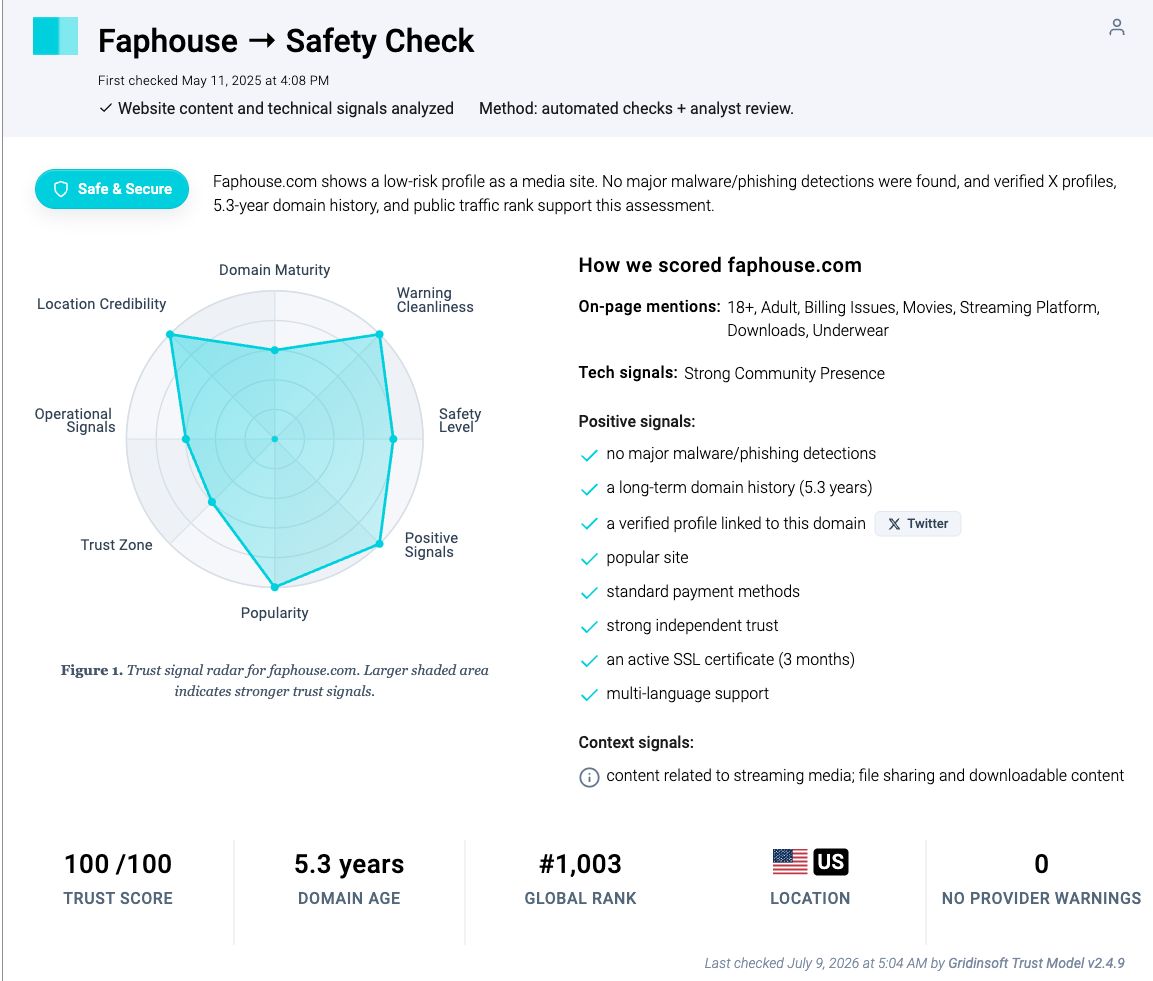
The report supports a qualified domain-level verdict: the checked address did not show major malware or phishing warnings, and its history and popularity were positive signals. It does not inspect every page a visitor may reach after clicking an advertisement, every content host used by the service, or every file offered by an unrelated download tool.
This distinction matters because search results for FapHouse combine official policy pages, customer reviews, forum claims, domain scanners, and third-party download tools. A complaint can identify a real issue worth checking, but it is not proof that every user will have the same billing or security experience. Use your own browser history, receipts, cancellation confirmation, bank statement, file hash, and security scan as evidence.
Choose the action that matches what happened
| What happened | Risk and next action |
|---|---|
| You only visited the recognized address | Close the page when finished. A normal visit does not by itself prove infection. Check the address and do not grant unnecessary permissions. |
| You clicked an ad or were redirected | Close the destination without entering information. Check browser history so you know which host opened; treat that host separately from faphouse.com. |
| You allowed notifications | Revoke the permission. Notifications can appear after the site is closed and can imitate antivirus, account, or payment warnings. |
| You downloaded a file but did not open it | Do not run it. Delete it or verify its source, signature, and hash first. A file sitting unopened is a different exposure from an executed installer. |
| You installed or ran a file, APK, extension, or “player” | Disconnect it from sensitive accounts, uninstall the item, inspect permissions and startup changes, then run a full security scan. |
| You entered a password or payment details | Save receipts and cancellation evidence, review sessions and statements, change reused passwords from a clean device, and contact the issuer promptly about an unrecognized charge. |
Check the address before trusting the page
Read the registered domain from right to left before the first slash. A page such as faphouse.com/pages/example belongs to faphouse.com; a name like faphouse.example.com belongs to example.com. Extra words, hyphens, unusual endings, or a look-alike character can indicate a different operator even when the page copies familiar colors or wording.
A padlock only means the connection is encrypted to the displayed host. It does not prove that the host is the intended company, that a payment will be easy to cancel, or that a download is harmless. Do not use a search advertisement, pop-up, private message, or “video codec required” prompt as proof of the official address.
If a click opens another host, stop and evaluate that destination on its own. Do not assume the FapHouse report covers an ad network, mirror, shortened link, payment processor page, or file-sharing host. For the broader risk model, see how adult-site malware and fake player prompts work.
Remove FapHouse pop-ups and notification spam
A pop-under that disappears when the tab closes is usually a website behavior. Alerts that continue after the browser is closed are often web push notifications, while redirects that return on every startup can also point to an extension, changed home page, synced setting, shortcut, or bundled app.
- Close the tab. Do not click a warning’s “Allow,” “Scan,” “Update,” or support-number button.
- Open the browser’s site settings and block notifications for unfamiliar senders.
- Remove extensions you did not deliberately install, especially download helpers, media players, search tools, and coupon utilities.
- Restore the search engine, startup pages, and new-tab settings.
- If the behavior returns after a reset, pause browser sync and check recently installed apps before syncing settings again.
If faphouse keeps showing unwanted pop-ups, you likely granted it permission to send notifications. To stop them, you need to revoke that permission in your browser settings.
- Copy and paste this into the address bar:
chrome://settings/content/notifications - Scroll down to the Allowed to send notifications list.
- Find faphouse.
- Click the three dots (...) next to it and select Remove (or Block).
- Open Safari and go to Settings (or Preferences).
- Click the Websites tab and select Notifications on the left.
- Find faphouse in the list on the right.
- Select it and click Remove (or change "Allow" to "Deny").
- Copy and paste this into the address bar:
about:preferences#privacy - Scroll down to Permissions and click Settings... next to Notifications.
- Type faphouse in the search bar or find it in the list.
- Select the site and click Remove Website.
- Copy and paste this into the address bar:
edge://settings/content/notifications - Look under the Allow section.
- Find faphouse.
- Click the three dots (...) next to it and select Remove (or Block).
- Copy and paste this into the address bar:
brave://settings/content/notifications - Scroll to the Allowed to send notifications list.
- Find faphouse.
- Click the three dots (...) and select Remove (or Block).
- Copy and paste this into the address bar:
opera://settings/content/notifications - Check the Allowed to send notifications list.
- Find faphouse.
- Click the three dots next to it and select Remove.
Google notes that persistent communications can come from a previously granted notification permission; continued pop-ups can also indicate unwanted software. Our browser notification removal guide shows the Chrome, Edge, Firefox, and Safari paths.
Are FapHouse downloads or APK files safe?
Do not treat a brand name in a filename as proof of origin. The current domain report does not certify a “FapHouse downloader,” cracked subscription tool, browser extension, Windows player, or Android APK from another host. Search results can surface third-party downloaders whose ownership, update process, and bundled components are unrelated to the recognized domain.
For a file you have not opened, keep it unopened. Check where it came from, whether the operating system shows a valid publisher signature, and whether the hash matches a source you independently trust. The safe executable checklist explains how to inspect a Windows file without launching it.
On Android, prefer software distributed through Google Play. Google Play Protect checks installed apps for harmful behavior and can scan apps from other sources, but a clean scan is still only one signal. A sideloaded APK can request accessibility, notification, storage, microphone, camera, or account permissions that do not fit its stated purpose.
If you installed or ran a download
Uninstall the app, extension, downloader, or player you added, but do not stop there if it already ran. On Windows, removing the visible file does not remove a bundled browser extension, startup entry, scheduled task, changed proxy, or credential-stealing component that may have arrived with it.
- Launch Chrome.
- Click the three dots (...) in the top right corner.
- Select Extensions > Manage Extensions.
- Click Remove next to the extension you want to delete.
Quick Access: Type chrome://extensions/ in the address bar.
- Open Safari.
- In the menu bar, click Safari and select Settings (or Preferences).
- Click on the Extensions tab.
- Select the extension and click Uninstall.
- Click the menu button, select Add-ons and themes.
- Go to the Extensions tab.
- Click the three dots (...) next to the extension and select Remove.
Quick Access: Type about:addons in the address bar.
- Launch Microsoft Edge.
- Click the three dots (...) in the top right corner.
- Select Extensions.
- Find the extension and click Remove.
Quick Access: Type edge://extensions/ in the address bar.
- Launch Brave browser.
- Click the menu icon > Extensions.
- Find the extension and click Remove.
Quick Access: Type brave://extensions/ in the address bar.
- Launch Opera.
- Click the Opera logo in the top left corner.
- Select Extensions > Extensions.
- Click the X or Remove button next to the extension.
Quick Access: Type opera://extensions/ in the address bar.
Open Extensions/Add-ons again and remove any entry linked to faphouse or clearly out of place.
If you see faphouse or other suspicious applications that you don't remember installing, you should remove them as well.
- Right-click the Start button and select Installed Apps (or Apps & Features).
- Scroll through the list to find faphouse or any other unfamiliar program.
- Click the three dots (...) next to it and select Uninstall.
- Open Finder and go to the Applications folder.
- Locate faphouse or any app you don't recognize.
- Drag it to the Trash.
- Empty the trash to remove it permanently.
- Go to Settings > Apps > See all apps.
- Find faphouse or any suspicious app in the list.
- Tap on it and select Uninstall.
An installed FapHouse-branded Android app needs a separate check from billing and website reputation. Use Trojan Scanner for Android to scan installed apps, review suspicious findings and confirm unwanted-app removal. Payments and compromised accounts still need the recovery steps below.
On Windows, run a full Gridinsoft Anti-Malware scan, remove confirmed detections, reboot, and scan again if the redirect or alert returns. If you entered a password after running the file, perform account recovery from a different trusted device; malware cleanup cannot restore a stolen session or password.
Billing, subscriptions, and cancellation evidence
A domain reputation score cannot tell you whether a particular subscription matches your expectations. Before paying, read the price, billing interval, renewal terms, trial end date, refund language, and the exact descriptor expected on your statement. Take a screenshot or save the terms and receipt before closing the page.
If you cancel, keep the confirmation page, email, date, time, and any support case number. Then monitor the card or bank statement. The FTC advises consumers to understand how a trial converts to a paid subscription, know how to cancel, and dispute a charge promptly when it was not authorized or a company will not correct it.
Do not label a different statement descriptor as fraud without checking the receipt or known billing processor first. If the amount, date, frequency, or merchant cannot be reconciled, contact the company through a verified route and contact the card issuer using the number on the card or statement. Do not use a phone number from a pop-up, unsolicited email, or text.
Protect the account and reused passwords
If you created an account with a password used anywhere else, change the other accounts first from a clean device. Prioritize the email account that can reset your passwords, then financial, social, cloud, and work accounts. Use a unique password and enable multi-factor authentication where available.
Review active sessions and sign out devices you do not recognize. If a suspicious download ran, also check saved browser passwords and payment methods after cleaning the device. Changing a password on a still-compromised computer can expose the replacement credential.
How to confirm the problem is gone
- The browser no longer opens an unfamiliar page at startup or on a new tab.
- No unknown site remains in the notification allow-list.
- Unwanted extensions, apps, startup items, and scheduled tasks do not return after reboot.
- A full scan finishes without active detections.
- Your account session list contains only recognized devices.
- Your statement matches the subscription terms or the issuer confirms the dispute process.
For comparison with the same state-based approach, see the Gridinsoft guides to XVideos safety and XNXX safety. Their domain verdicts are separate; the shared lesson is to respond to the action taken, not to a brand name alone.
FAQ
Can FapHouse give my phone or PC a virus just by visiting?
A normal visit does not automatically prove infection. Risk rises when a redirect exploits the browser, you allow notifications, or you download and run a file, APK, extension, or fake player.
Does a 100/100 report mean every FapHouse link is safe?
No. The score describes the recognized domain at the recorded check. It does not certify ads, redirects, mirrors, related hosts, future changes, or third-party downloads.
Should I install a FapHouse APK from a third-party site?
Do not assume it is official. A third-party APK can be repackaged or request unnecessary permissions. Prefer Google Play distribution and keep Play Protect enabled; if the source cannot be verified, do not install it.
What should I do if FapHouse notifications continue after closing the site?
Revoke the sender’s notification permission, remove unknown extensions, restore startup and new-tab settings, and inspect recently installed apps. Scan the device if the behavior returns after reboot.
What if a FapHouse-related charge appears after cancellation?
Compare it with the receipt and saved cancellation evidence. Contact the merchant through a verified route, monitor the statement, and promptly ask the card or bank issuer about its dispute process if the charge is unrecognized or unresolved.
References
- Google. “Block or allow pop-ups in Chrome.” Google Chrome Help, accessed July 23, 2026. support.google.com/chrome/answer/95472
- Google. “Use Google Play Protect to help keep your apps safe and your data private.” Google Play Help, accessed July 23, 2026. support.google.com/googleplay/answer/2812853
- Federal Trade Commission. “Getting In and Out of Free Trials, Auto-Renewals, and Negative Option Subscriptions.” Consumer Advice, accessed July 23, 2026. consumer.ftc.gov/articles/getting-and-out-free-trials-auto-renewals-and-negative-option-subscriptions