A Social Security Administration Contact Information email that says a new phone number or home address was requested is a scam when it tells you to download an Attached Report. Do not use the email button. Type ssa.gov/myaccount yourself and check your profile. The observed destination for this current variant is no longer active, so its payload must be treated as unknown—not labeled as malware or a credential page without evidence.
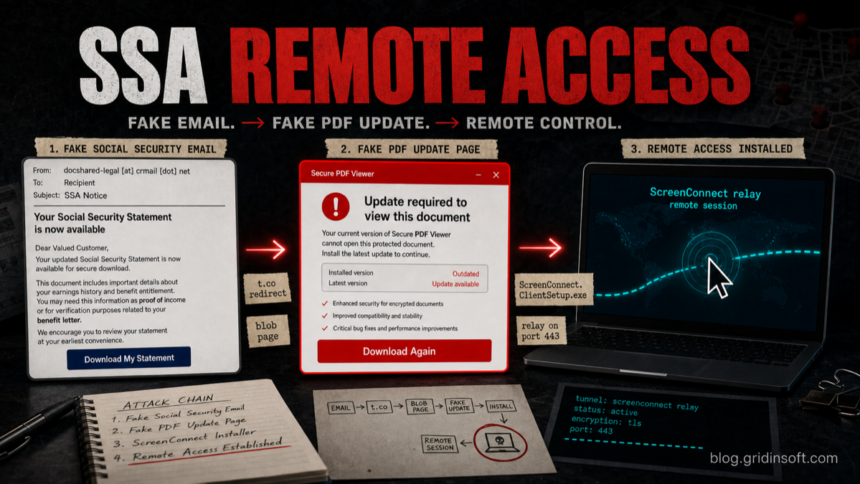
A separate fake Social Security Statement email we analyzed did deliver ScreenConnect.ClientSetup.exe, a remote-access client that can give an outside operator control of the affected PC. In that June 2026 sample, the lure used the subject SSA Notice: Updated Social Security Administration Statement, a t.co download button, a blob: page under sochicap.cl, and a final download from apparelsitegear.com.
ScreenConnect is legitimate remote-support software when your company or technician deploys it with consent. In this chain, the problem is the delivery method: an unsolicited Social Security document email and a fake PDF update page. Treat that as unauthorized remote access until proven otherwise.
Contact Information Security Alert: What the Email Claims
The newer message uses the subject Security Alert: Changes to Your SSA Account. It claims that requests were made to replace the phone number and home address on the recipient’s Social Security record, then presents an Attached Report button as the way to review the activity. Do not call, reply, or use contact details from that message.
SSA has a direct account workflow for contact details: type ssa.gov/myaccount, sign in, open My Profile, and review the Security/contact settings there. If you cannot sign in or a change appears that you did not make, start from ssa.gov and use its published contact options. An email attachment or download button is not required to inspect your profile.
What to Do Based on What You Did
- Read only: do not reply, click, download, or call a number in the email. Report it as phishing, then delete it after preserving a screenshot if you need evidence.
- Clicked but did not download or enter data: close the page, do not retry the inactive link, and check the browser download list. If nothing downloaded and no information was submitted, password changes are not automatically required.
- Downloaded but did not run a file: do not open it. Remove or quarantine it and run a security scan if the browser launched anything else or the file type is unclear.
- Ran a file or approved a prompt: disconnect the affected PC if remote access may be active, use the detailed cleanup steps below, and change sensitive passwords from a different clean device.
- Entered credentials or personal data: secure the affected account and email first, review the real SSA profile, and follow the identity-protection steps below.
What Gridinsoft Observed
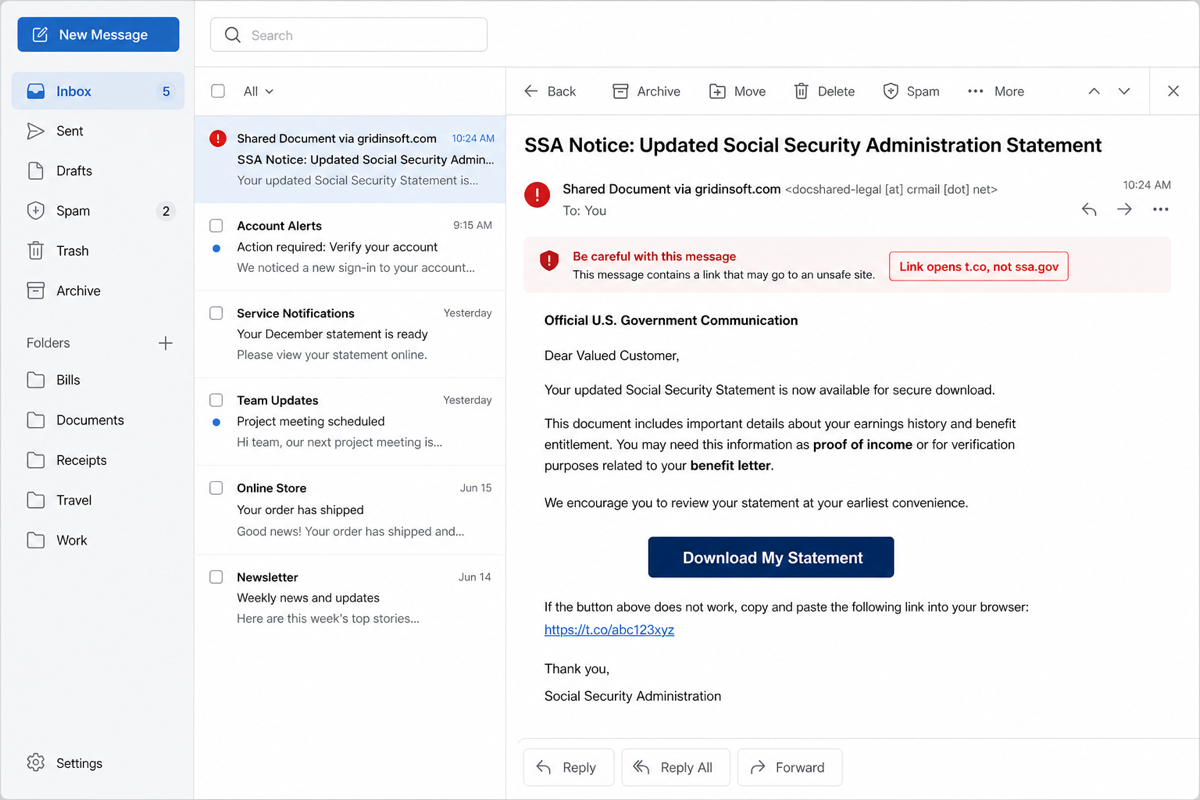
The email pretends to be an official U.S. government communication about an updated Social Security Statement, proof of income, benefit letter, SSI, and Medicare status. The sender was not an SSA address: docshared-legal [at] crmail [dot] net. The only real-looking government link in the email was a plain ssa.gov footer link; the action button used a shortened t.co URL.
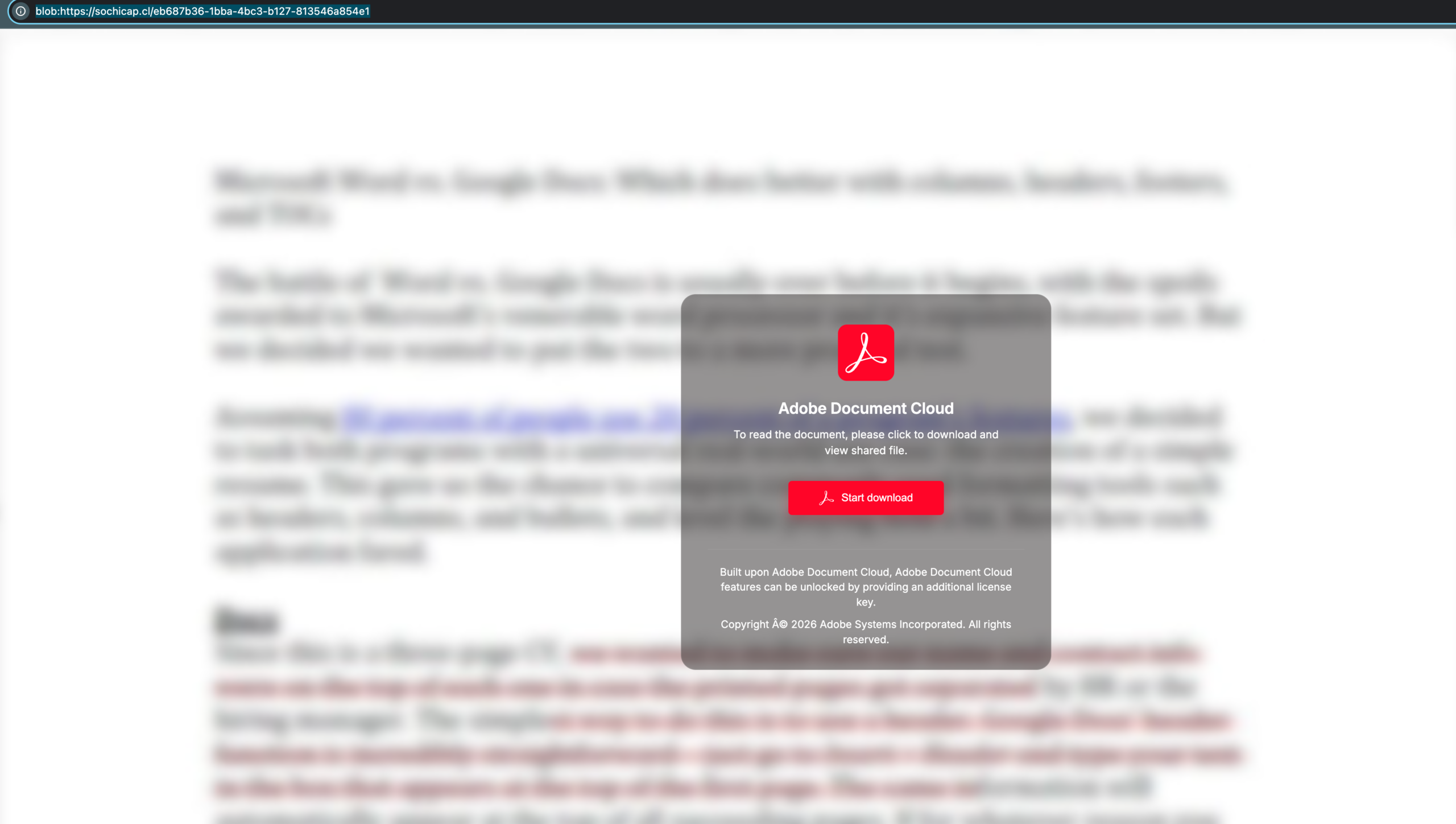
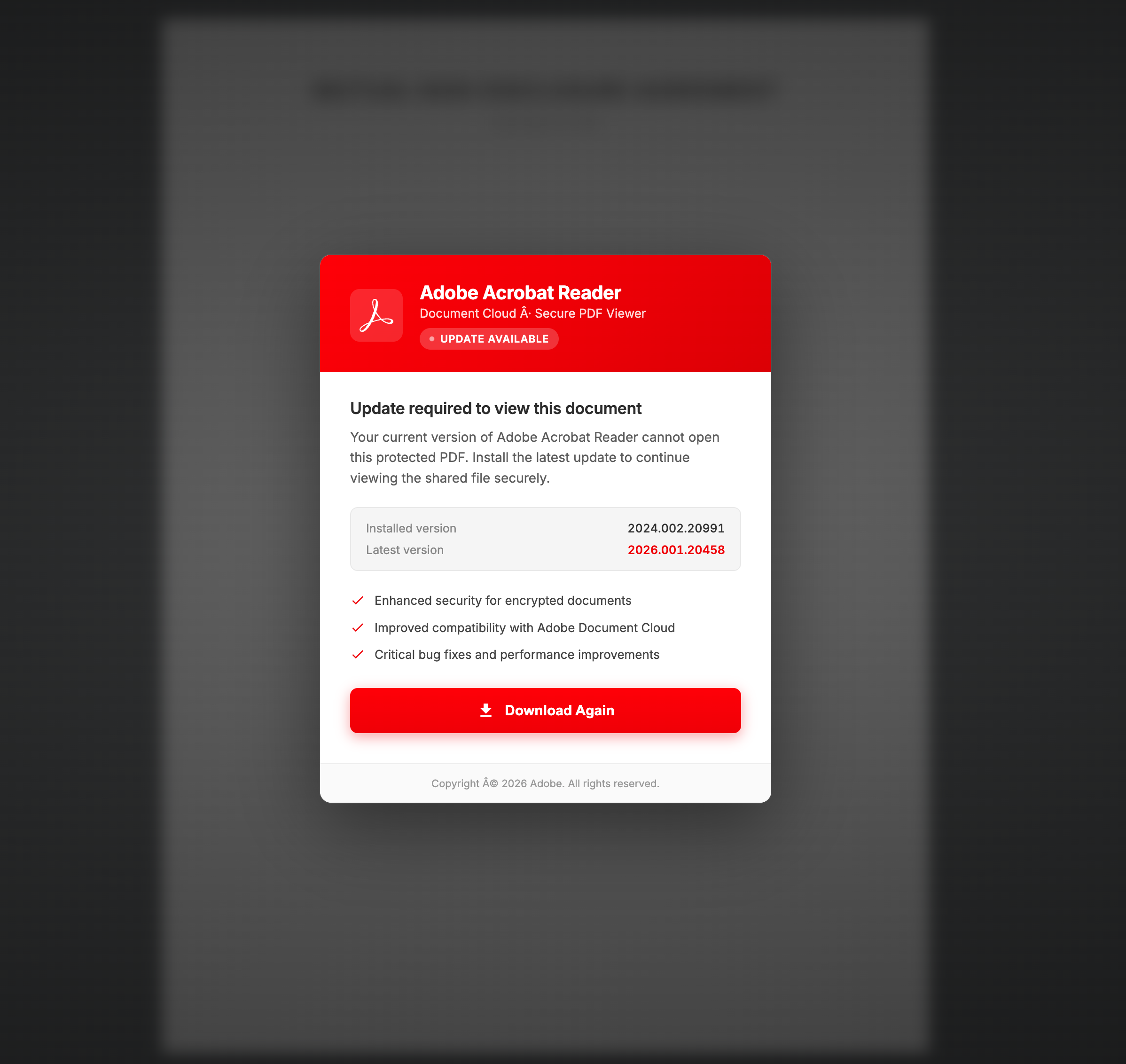
The browser flow then showed a fake document page instead of a real PDF. One observed page used a blob:https://sochicap.cl/... address and presented a blurred document background with an “Adobe Document Cloud” download prompt. A second page claimed an Adobe Acrobat Reader update was required to view the protected PDF.
Attack Chain
| Stage | Observed detail | Why it matters |
|---|---|---|
| Email lure | SSA Notice: Updated Social Security Administration Statement |
Uses a high-trust government benefit theme to push an urgent document download. |
| Sender | docshared-legal [at] crmail [dot] net |
Not a government mailbox. SPF passing only proves the sending infrastructure was allowed for that domain, not that the message is legitimate. |
| CTA link | https://t.co/BwARfJqBWN |
A shortened link hides the true destination from the reader. |
| Landing page | blob:https://sochicap.cl/eb687b36-1bba-4bc3-b127-813546a854e1 |
A blob URL can make the page look like a document viewer while the page is generated by the current site script. |
| Downloaded file | ScreenConnect.ClientSetup.exe from apparelsitegear.com |
The downloaded file is a remote-access client, not a Social Security statement or Adobe update. |
| Remote relay | instance-yel1gk-relay.screenconnect.com, port 443 |
The installer contains launch parameters for a ScreenConnect relay connection. |
File Indicators
We did not execute the file. The following indicators come from local metadata and static inspection of the downloaded installer:
| File name | ScreenConnect.ClientSetup.exe |
|---|---|
| Size | 12,803,128 bytes |
| Type | PE32 executable (GUI) Intel 80386, for MS Windows |
| SHA-256 | 45c6a6c6335bad9a85cb5fd18fb1d0cd2dcb7a88c371ff02aff56b2f6b01bba7 |
| SHA-1 | a670d4f52f7b90debe8b815a749a6fcee116b188 |
| MD5 | b795e7415058e3e99029adc9f9f73e25 |
| macOS download source | https://apparelsitegear.com/ScreenConnect.ClientSetup.exe |
| ScreenConnect version strings | 26.3.11.9650 |
| Client label | ScreenConnect Client (c021740a1fbfcb94) |
| Relay host | instance-yel1gk-relay.screenconnect.com |
| Relay port | 443 |
The hash was uploaded to VirusTotal for public tracking during this investigation. Detection names and vendor verdicts can change as scanners reprocess the file, so use the hash and the delivery chain together rather than relying on one detection count.
Why This Is Dangerous
A fake PDF update is a strong red flag by itself, but this case is more serious because the file is a remote-access client. If the user runs it and grants the prompts, an attacker may be able to view the desktop, move files, open a backstage shell, install follow-on tools, or guide the victim into banking, tax, or identity-theft steps. The Social Security theme also raises the risk of identity fraud because victims may expect to handle income, benefit, Medicare, or SSN-related information.
This page is not saying every ScreenConnect installer is malicious. The same software is widely used for legitimate support. The malicious signal is the combination: unexpected government-benefit email, shortened link, fake Adobe update, unrelated download domain, and an installer configured to connect to a remote relay.
If You Downloaded a File but Did Not Run It
- Do not open
ScreenConnect.ClientSetup.exe. - Delete the downloaded file and empty the browser download shelf/history entry if it encourages a retry.
- Run a security scan if the browser automatically opened anything, if another file downloaded, or if you clicked through Windows prompts.
- Report the email as phishing in your mail provider and forward scam details to the appropriate government reporting channel.
- Go to
ssa.govby typing the address directly if you need to check your real Social Security account.
If You Ran the Installer or Another File
- Disconnect the PC from the network if you suspect a live remote session.
- On a different clean device, change passwords for email, banking, tax, Microsoft/Google/Apple, and any account opened during the session.
- Check installed apps for ScreenConnect, ConnectWise Control, or unfamiliar remote-support clients.
- Open Services and look for entries such as
ScreenConnect Client Serviceor a client label similar toScreenConnect Client (c021740a1fbfcb94). - Remove unauthorized remote-access software only after preserving enough evidence for your IT team or bank if money or identity data was involved.
- Scan the machine for loaders, startup tasks, browser changes, and additional payloads. Remote-access scams often use a legitimate tool as the first foothold and then add other components.
Gridinsoft Anti-Malware is useful here because the visible ScreenConnect client may not be the only change. After a fake document download, check for leftover launchers, suspicious startup entries, browser changes, and additional malware before logging back into sensitive accounts.
If the page or email made you download an invoice, coupon, tracking app, browser extension, or support tool, scan the PC before opening it again or logging into sensitive accounts.
Scan the affected PCIf You Entered Credentials or Personal Data
- From a clean device, change the password for the account you entered and for your email if the same or a similar password was reused. Revoke unfamiliar sessions and enable multi-factor authentication where available.
- Type
ssa.gov/myaccountdirectly and inspect your profile, messages, address, phone number, email, and direct-deposit details. Use SSA’s official contact path if you see a change you did not make. - If you disclosed a Social Security number, identity documents, bank details, or other high-risk data, use
IdentityTheft.govfor a recovery plan and consider a fraud alert or credit freeze with the credit bureaus. - Contact the relevant financial institution immediately if payment or bank information was exposed. Save the email, headers, screenshots, filenames, and transaction records before deleting anything needed as evidence.
- Report the Social Security-related scam through the SSA OIG reporting route. Do not use a phone number or form linked by the suspicious message.
How to Tell a Real SSA Message From This Scam
- A real Social Security action should be verified by typing
ssa.govdirectly, not by following a shortened link from an email. - The real SSA does not need an Adobe update from a random site to show your statement.
- A sender such as
docshared-legal [at] crmail [dot] netis not a government sender. - Generic greetings such as “Dear Valued Customer” are weak for a sensitive government account notice.
- A document viewer that turns into an
.exedownload is not a PDF statement. - Any request to install remote support after an email link should be treated as a compromise attempt unless you started a verified support session yourself.
Related Gridinsoft Guidance
If you are comparing this with other phishing flows, start with our guide on how to spot a phishing email. If you clicked or downloaded before realizing it was fake, use the triage steps in Is Spam Email Dangerous?. For another fake document-signing lure with ScreenConnect.ClientSetup.msi, see the Adobe Acrobat Secure Document email virus guide. For broader remote-control risk, see the RAT malware and remote access trojan guide. This campaign is also separate from the earlier sysupdate.jpeg ScreenConnect cleanup and the Tiflux RMM malspam cleanup lanes.
FAQ
Is ScreenConnect.ClientSetup.exe always malware?
No. ScreenConnect is legitimate remote-support software when installed by a trusted technician or IT team. In this case, the delivery path is malicious: a fake Social Security Statement email and a fake PDF update page pushed the installer without a legitimate support reason.
Can a blob URL be a phishing page?
Yes. A blob: URL can display content generated by the current page. It is not automatically malicious, but a blob document viewer that asks for an executable download should be treated as unsafe.
What should I do if I gave remote access?
Disconnect the computer, preserve screenshots or logs, contact your bank if payment or identity data was exposed, change passwords from a clean device, revoke active sessions, and scan the affected PC before using it again for sensitive accounts.
Should I check my Social Security account?
Yes, but do it by typing ssa.gov directly into the browser or using an existing trusted bookmark. Do not use the link from the suspicious email.
Why did SPF pass if the email was fake?
SPF passing only means the sending server was allowed to send for the envelope domain shown in the mail headers. It does not prove that the message came from SSA or that the link is safe.
References
- Social Security Administration Office of the Inspector General. “SSA Office of the Inspector General Warns Public of Surge in Fraudulent Social Security Statement Emails.” SSA OIG, February 20, 2026, accessed June 18, 2026. https://oig.ssa.gov/scam-alerts/2026-02-20-ssa-office-of-the-inspector-general-warns-public-of-surge-in-fraudulent-social-security-statement-emails/
- Social Security Administration. “Update contact information.” SSA.gov, accessed August 11, 2026. https://www.ssa.gov/life-events/update-contact-information
- ConnectWise. “ScreenConnect.” ConnectWise, accessed June 18, 2026. https://www.screenconnect.com/
- VirusTotal. “File analysis for SHA-256 45c6a6c6335bad9a85cb5fd18fb1d0cd2dcb7a88c371ff02aff56b2f6b01bba7.” VirusTotal, accessed June 18, 2026. https://www.virustotal.com/gui/file/45c6a6c6335bad9a85cb5fd18fb1d0cd2dcb7a88c371ff02aff56b2f6b01bba7
If the ScreenConnect installer already ran, use our ScreenConnect Client scam cleanup guide for the broader post-install checks: service removal, reboot verification, Gridinsoft scanning, and account recovery after remote access.