If your phone is behaving strangely, treat it as a possible compromise until you separate three different problems: a hacked account, a malicious or unwanted app, and a fake browser warning. Real warning signs include unknown apps, outgoing texts or calls you did not make, unfamiliar account logins, sudden verification codes, camera or microphone indicators that appear at odd times, and data or battery spikes that continue after a restart. A single hot battery or slow app is not proof of hacking, but several signs together deserve immediate action.
If the pattern points to unknown apps, sideloaded APKs, fake virus pop-ups, or risky Android permissions, use our Android malware removal guide to separate fake alerts from real app malware and clean the phone safely.
Fast Check: Hacked Phone, Phone Virus, or Fake Warning?
| What you see | Most likely meaning and first move |
|---|---|
| Unknown logins, password reset emails, verification codes, or account lockouts | Start with account recovery. Change passwords from a clean device, remove unfamiliar sessions, and turn on stronger multi-factor authentication. |
| Unfamiliar apps, new device-admin permissions, high mobile data use, or persistent pop-ups outside the browser | Suspect unwanted software. Review installed apps, app permissions, Play Protect warnings, and remove anything you do not recognize. |
| A web page says “your phone is hacked” or “virus detected” and demands a tap, call, or app install | Usually scareware. Close the tab, clear browser data, and follow our fake virus alert removal guide. |
| iPhone Calendar events, spam notifications, or subscription-like alerts appear | This is commonly calendar spam or browser notification abuse, not a full device hack. See the iPhone calendar virus cleanup guide. |
| Battery drain, heat, lag, or random crashes only after a recent update or with one heavy app | Check normal causes first: storage, battery health, app updates, and background activity. Keep investigating if the symptoms continue with suspicious account or app activity. |
Signs Your Phone May Be Hacked
The strongest signs are the ones that connect device behavior to unauthorized access. Look for patterns, not one isolated symptom.
- Unfamiliar apps or profiles. An app you did not install, an unknown VPN/profile, or a suspicious device-admin permission can give an attacker persistence.
- Outgoing calls, texts, or messages you did not send. This can point to account compromise, SMS abuse, or malware using your phone number.
- Unexpected login alerts and verification codes. These may mean attackers have your password and are trying to pass the final login step.
- Contacts receive strange messages from you. A hacked messaging account can spread phishing links even when the phone itself is not fully compromised.
- Persistent pop-ups outside the browser. Browser pop-ups can be a scam page; system-wide ads often indicate an unwanted app.
- Camera, microphone, or location indicators appear unexpectedly. Check which app used the sensor and whether that access makes sense.
- Data usage spikes from an app you do not recognize. Spyware, adware, and trojans often communicate with remote servers in the background.
- Your phone number suddenly stops working. “No service” plus account lockouts can indicate SIM swap or number-port fraud. Contact your carrier immediately.
- Banking, email, or social accounts show unfamiliar changes. Treat financial and email access as urgent, because email often controls password resets for other services.
What to Do First If You Think Your Phone Is Hacked
- Disconnect risky connections. Turn off Wi-Fi and mobile data if you see active abuse, then use a trusted second device for account recovery.
- Secure your email account first. Change the password, remove unknown sessions, remove forwarding rules you did not create, and turn on multi-factor authentication.
- Change passwords for banking, Apple Account, Google Account, social media, and messaging apps. Do this from a clean device, not from the suspicious phone.
- Check payment activity. Review cards, mobile wallets, carrier billing, app-store subscriptions, and bank transfers. Freeze or replace cards if you see unauthorized activity.
- Review installed apps and permissions. Remove apps you do not recognize, especially apps installed from websites, message links, unofficial stores, or APK files.
- Update the operating system and apps. Security updates close known vulnerabilities that mobile malware and account-takeover flows abuse.
- Scan suspicious files and links before moving them to a computer. You can use the Gridinsoft Online Virus Scanner for files and the URL scanner for suspicious links.
- Tell close contacts not to trust unusual messages from you. This reduces the chance that a hacked messaging account spreads the attack further.
Android Checks That Matter
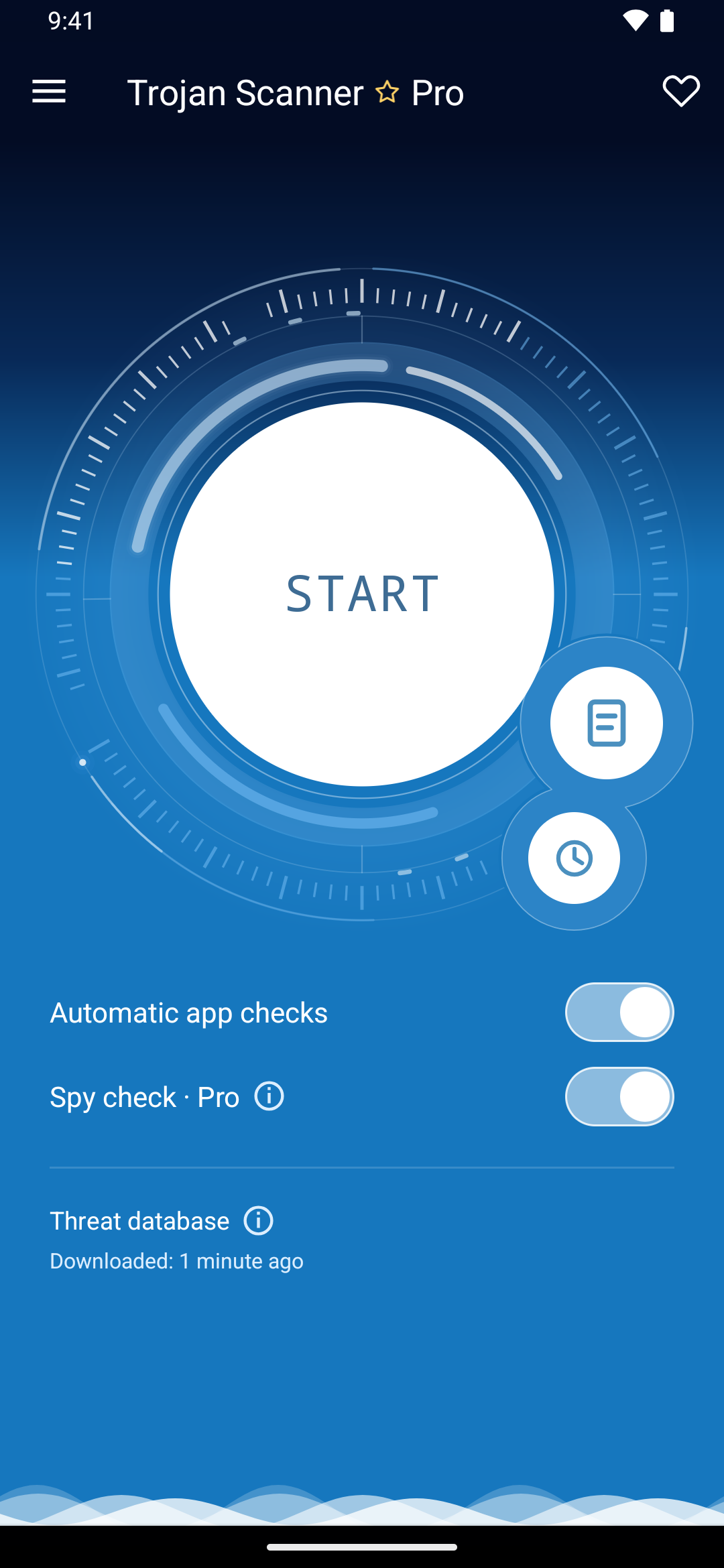
If the signs point to a suspicious Android app rather than only a stolen account, check the phone with Trojan Scanner for Android. Scan installed apps, open each finding, and remove unwanted items with Android’s confirmation. Anti Spy helps highlight hidden apps with suspicious access, so an absent home-screen icon is not your only way to spot a problem.
Open Trojan Scanner, update its threat database, tap Start, and review the result. After removal, restart and scan again. If the phone is actively controlling the screen or making unauthorized transactions, contain that access first and use another trusted device for urgent account recovery.
Then use Android’s settings to check the access and accounts involved:
- Open Google Play Store, tap your profile picture, then open Play Protect and run a scan.
- Open Settings and review Apps. Sort by recently installed if your phone supports it, then remove apps you do not remember installing.
- Check Settings for “Install unknown apps” or “Unknown sources” and turn it off for browsers, file managers, and messaging apps unless you intentionally need it.
- Review Accessibility, Notification access, SMS permissions, VPN, Device admin apps, and Battery optimization exceptions. These are common hiding places for intrusive apps.
- Look at mobile data usage by app. A simple flashlight, wallpaper, PDF reader, or “cleaner” app should not be sending large amounts of data.
- If an APK came from a text, Telegram/WhatsApp message, fake update prompt, or cracked-app site, assume the file is risky until proven otherwise. Our phone virus signs guide covers malware-focused triage in more detail.
iPhone Checks That Matter
A normal iPhone is harder to infect with traditional malware, but iPhone users still get hit by account compromise, phishing, malicious profiles, calendar spam, fake support pop-ups, and stolen Apple Account access.
- Open Settings, tap your name, and review devices connected to your Apple Account. Remove anything you do not recognize.
- Change your Apple Account password if you see unfamiliar devices, purchases, recovery details, or sign-in alerts. Our Apple ID hacked recovery guide walks through the account side.
- Use Settings > Privacy & Security > Safety Check if you need to review people, apps, shared location, and connected devices.
- Check Settings > General > VPN & Device Management for profiles or VPNs you did not install.
- Remove suspicious Safari notifications, clear browser data, and do not install configuration profiles from web pages claiming your iPhone is infected.
- If the exact problem is a “Your iPhone has been hacked” web page or notification, use the dedicated iPhone hacked pop-up scam guide instead of treating it as confirmed spyware.
Account and SIM-Swap Warning Signs
Many “phone hacked” incidents are really account or phone-number takeovers. The device may look normal while the attacker controls your email, cloud account, bank login, or SIM.
- Your phone loses service while your carrier account shows changes you did not request.
- You receive password reset emails or one-time codes for accounts you did not try to access.
- Your email has new forwarding rules, filters, recovery email addresses, or connected apps.
- Your social media or messaging apps send links to contacts without your action.
- Your mobile wallet, app store, or carrier bill shows unknown charges.
If you suspect SIM swap, call your carrier from another phone, ask them to lock the account, set a port-out PIN, and verify recent SIM or number-transfer changes. Then reset passwords for accounts that used SMS codes.
When a Factory Reset Makes Sense
A reset is reasonable when you cannot remove a suspicious app, device-admin permission, profile, or recurring pop-up; when Play Protect or another trusted scanner keeps warning about the same app; when the phone stays unstable after updates and app cleanup; or when you are dealing with high-risk stalking, domestic abuse, or targeted surveillance. Back up photos and essential files first, but avoid restoring every old app automatically if you do not know which app caused the problem.
For iPhone, reset through the official Settings flow and keep control of your Apple Account during the process. For Android, use the manufacturer’s reset option, then update the system before reinstalling apps. After any reset, change important passwords again if you previously typed them on the suspicious phone.
What Not to Do
- Do not tap “remove virus,” “clean now,” or phone-number buttons inside scary pop-ups.
- Do not install an APK, VPN, profile, or “security certificate” from a text message or random website.
- Do not pay someone who claims they can remotely “unhack” your phone after contacting you first.
- Do not keep using SMS as your only account recovery method after a SIM-swap scare.
- Do not ignore friends who say they received strange messages from you. That is often the first visible account-takeover clue.
If your main concern is location privacy rather than general hacking symptoms, read our guide to whether a phone can still be tracked when Location Services are off.
Related Gridinsoft Guides
- Does my phone have a virus? Use this when the main problem is malware, adware, unknown apps, or suspicious APKs.
- Fake virus alert removal Use this when a browser page claims the phone is infected and tries to force a tap or call.
- Your iPhone has been hacked pop-up Use this for the common iPhone scareware message.
- Calendar virus on iPhone Use this for spam events, fake subscription alerts, and calendar cleanup.
- Smartphone security tips Use this after cleanup to reduce the chance of a repeat incident.
FAQ
Can someone hack my phone without touching it?
Yes, but common cases are less dramatic than spyware headlines suggest. Most victims are hit through phishing links, stolen passwords, malicious apps, fake support pages, account recovery abuse, or SIM-swap fraud. Fully remote device compromise is possible, but it is rarer and usually targets high-value people.
Is a hot battery proof that my phone is hacked?
No. Heat and battery drain can come from updates, weak signal, navigation, gaming, video, old batteries, or a buggy app. Treat it as suspicious when it appears together with unknown apps, pop-ups, account alerts, data spikes, or outgoing messages you did not send.
Can an iPhone get hacked?
Yes, but many iPhone “hacked” cases are actually phishing, Apple Account compromise, malicious profiles, calendar spam, or fake browser warnings. Check connected Apple Account devices, Safety Check, VPN/profile settings, and Safari notifications before assuming the phone has full spyware.
What number do I dial to check if my phone is hacked?
There is no universal number that proves a phone is hacked. Some carrier or USSD codes can show forwarding settings, but they do not detect malware, account compromise, or spyware. Use them only as one small check, not as a final verdict.
Should I reset my phone if I clicked a suspicious link?
Not always. If you only opened a web page, close it, clear browser data, check accounts, and avoid entering passwords. Reset becomes more reasonable if you installed an app/profile, granted permissions, entered account credentials, or still see persistent suspicious behavior after cleanup.
References
- Google Android Help. “Use Google Play Protect to help keep your apps safe & your data private.” Google, accessed June 7, 2026. https://support.google.com/android/answer/2812853
- Apple Support. “Safety Check for an iPhone with iOS 16 or later.” Apple, accessed June 7, 2026. https://support.apple.com/guide/personal-safety/safety-check-iphone-ios-16-ips2aad835e1/web
- Federal Trade Commission. “How To Recognize and Avoid Phishing Scams.” FTC Consumer Advice, September 2022, accessed June 7, 2026. https://consumer.ftc.gov/articles/how-recognize-avoid-phishing-scams