Trojan:Win32/Commando.A!ml is a Microsoft Defender detection label, not enough by itself to identify one malware family. Treat it as a real infection when the affected item shows hidden PowerShell, ExecutionPolicy Bypass, an encoded command, an unknown network destination, or alerts that return after removal. A legitimate script can trigger the same label, but only when its source, signature, purpose, and behavior are independently verified. If Defender says Status: Removed and the alert appears again, assume another task, startup entry, script, or dropper is relaunching the detected command until you prove otherwise.
Quick answer
- High-risk alert:
powershell.exeruns hidden with an encoded command, sends system data to an unknown server, or returns every few seconds. - Possible false positive: the alert appears while using a known administrative tool or script from its official source, with a valid signature or reproducible clean build, and no suspicious persistence or network behavior.
- “Removed” is not the same as “clean”: Defender may stop one command while the component that launches it remains.
- Do first: disconnect the PC from the network, preserve the affected-item details, update Defender, and run full and offline scans.
What Trojan:Win32/Commando.A!ml means
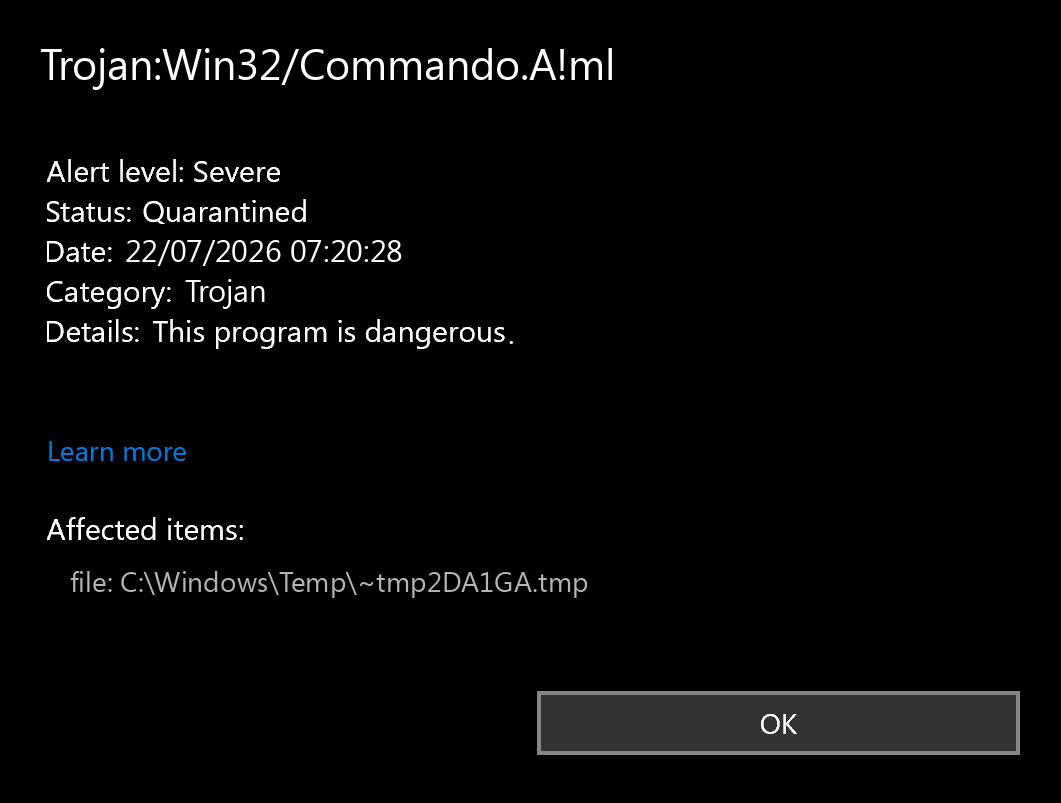
Microsoft classifies the alert as a Windows trojan and says the threat can perform actions selected by a malicious actor. Its public encyclopedia entry does not provide aliases or technical behavior for this exact name [1]. That means the alert name is a starting point, not a complete incident report.
Read the name in parts:
| Name part | Useful interpretation |
|---|---|
Trojan |
Defender considers the detected behavior or object malicious and deceptive rather than a self-spreading virus. |
Win32 |
The detection applies to the Windows platform. It does not prove that the affected process itself is a malicious Windows system file. |
Commando.A |
Microsoft’s assigned detection family or variant label. Public technical details for this label are not available. |
!ml |
A suffix beginning with an exclamation mark is an internal Microsoft indicator. It should not be used alone to infer one payload, campaign, or set of capabilities [2]. |
The Affected items field is more useful than the label alone. If it shows a random executable in Downloads or Temp, investigate that file and its source. If it shows the legitimate Windows powershell.exe, do not delete PowerShell: inspect the complete command line and find what launched it.
Why the alert returns after Defender says Removed
Defender can remove or quarantine the object it sees at one moment while a separate persistence mechanism survives. The next scheduled launch creates the same behavior again, so Protection History records a new event. Alerts every few seconds are therefore stronger evidence of an active launcher than of one file that Defender “failed to delete.”
- A scheduled task, startup item, service, browser-triggered script, or original dropper launches a command.
- Defender blocks that execution and reports Removed or Quarantined.
- The persistence mechanism reaches its next trigger.
- The command is rebuilt or launched again, producing another alert.
Repeated detection does not automatically identify the persistence location. It tells you to look beyond the item Defender just removed. The trigger may be in Task Scheduler, a Run key, a startup folder, a service, a WMI subscription, a malicious browser notification chain, or the application that originally delivered the script.
When the affected item is hidden, encoded PowerShell
In the incident that prompted this guide, Defender showed the normal Windows PowerShell path but also displayed command-line flags that hid the window, bypassed the current script policy, and supplied a Base64-encoded command. Safe decoding for analysis showed that the command built a JSON profile of the Windows host, sent it to a remote endpoint, and was designed to execute the server response.
That combination is high-confidence malicious behavior. None of these details should be judged in isolation—administrators can legitimately encode or hide scripts—but an unknown callback, host profiling, direct execution of a response, and rapid recurrence remove the normal administrative context.
C:\Windows\System32\WindowsPowerShell\v1.0\powershell.exe is a legitimate Microsoft binary. In this case, the malicious identity is the command line, its network behavior, and the component that keeps launching it. Deleting or blocking the Windows binary can damage the system without removing the infection.The sanitized callback and later artifacts match the TookPS/OkoBot execution pattern documented in our OkoBot/TookPS technical analysis. That Labs report holds the campaign-level indicators. This page focuses on what an affected Windows user should do with the Defender alert.
Commando.B!ml, fake CAPTCHA prompts, and trusted scripts
You may see Trojan:Win32/Commando.B!ml in a similar situation instead of the A!ml label. Do not decide from the letter alone. Use the affected item, full command line, trigger, and recurrence: a hidden or pasted PowerShell command from an unknown site is a different risk from a command you deliberately ran from a verified software vendor.
If a website claiming to verify that you are human told you to press Windows + R, Windows + X, open Terminal, paste a command, or run PowerShell, treat the command as executed malware. This is a ClickFix-style infection path, not a real CAPTCHA. Keep Defender detections quarantined, disconnect the PC, scan for persistence, and change exposed passwords from a clean device. Follow our fake CAPTCHA and ClickFix cleanup guide for the browser and account-recovery steps.
If the alert appeared immediately after installing a legitimate administration, security, driver, or automation tool from its official site, keep the item quarantined while you verify the exact download URL, publisher signature, version, hash, and vendor notice. A trusted tool can produce a false positive, but an official-looking PowerShell command is not proof of safety; attackers use the same download-and-run pattern. Do not create a broad PowerShell or folder exclusion.
Real infection or false positive?
Use the whole event context. Do not restore the item or add an exclusion just because someone else saw the same name on a clean tool.
| Check | More consistent with malware | More consistent with a false positive |
|---|---|---|
| Source | Crack, fake update, unknown ZIP, ad redirect, Discord/Telegram file, or command copied from a website | Official vendor or repository, with a version that can be verified |
| Affected path | Temp, random AppData folder, startup location, or a script you did not create |
Expected application folder or a script under your control |
| Command line | Hidden window, policy bypass, encoded content, download-and-execute behavior, or unknown domain | Readable, expected arguments that match documented tool behavior |
| Signature/build | Unsigned unknown file, mismatched publisher, or modified package | Valid expected publisher or a reproducible clean build |
| Recurrence | Returns after removal, at logon, or on a repeating schedule | Occurs once during a specific legitimate operation and does not persist |
| Other symptoms | New tasks, unknown connections, browser changes, account alerts, stolen sessions, or wallet prompts | No persistence, unknown connections, or unrelated system changes |
If the evidence points to a known clean program, keep the original quarantined while you verify it. Submit the file, its hash, or Defender diagnostic package to Microsoft and select the clean/false-positive classification; Microsoft documents both file and fileless submission routes [3]. Do not solve uncertainty with a folder-wide antivirus exclusion.
What to do immediately
- Disconnect the computer from Wi-Fi and Ethernet. This interrupts further callbacks and limits session or wallet theft while you investigate.
- Do not restore or allow the detection. Leave the item quarantined unless Microsoft or the verified software vendor confirms a false positive.
- Save the useful evidence. Photograph or write down the detection name, time, affected item, full path, and visible command-line flags. Do not paste an encoded command into a decoder website because it can contain usernames, device identifiers, or tokens.
- Update security intelligence. Open Windows Security → Virus & threat protection → Protection updates. If you disconnected because suspicious commands were still running, use the Offline scan below before reconnecting for updates or downloads; avoid signing in to accounts on this PC during cleanup.
- Run a Full scan. A Quick scan is not enough when the alert is recurring or a script may have installed persistence.
- Run Microsoft Defender Offline scan. It restarts Windows and scans before ordinary startup components can hide or relaunch. If it does not restart or produces no result, use our Defender Offline Scan troubleshooting guide.
If the alert keeps coming back
Use Gridinsoft Anti-Malware to scan for the files and startup components behind recurring Commando alerts. Follow the scan with cleanup and a restart; finding a threat is only the first step.
Use Gridinsoft Anti-Malware for a second-opinion scan to check for malware and startup items that may be launching the suspicious command again. Keep the detected item quarantined while you investigate.
6-day full trial for eligible new users, including cleanup. Email activation; no credit card.
Download Anti-Malware for Windows- Install and update. Download using the button above, run the installer, and open the app. Under Update, check that the Threat List is current. Activate the available trial or your license if prompted for cleanup.
- Choose Scan → Full. Let the scan finish. For a recurring alert, checking only the file named by Defender can miss other components.
- Review the findings and click Apply. Check each detection’s path and proposed action. Keep Move to quarantine for suspected threats; do not choose Ignore just to silence a warning. The illustrated scan-results guide shows these controls.
- Restart Windows and scan again. Save your work, complete any requested reboot, then run another Full scan. Open Tools → Scan logs to check the cleanup result, including any items that could not be processed.
Check for a new event. Open Windows Security → Virus & threat protection → Protection history. Compare the time, status, and affected item with your saved alert. An old Removed or Quarantined entry alone does not mean the threat returned. Look for a clean follow-up scan and no new alerts after restart and beyond the previous repeat interval.
Still getting new alerts after cleanup?
Keep the detected items quarantined. Contact Gridinsoft Support with the scan log and the new Defender event’s time, path, and command line. Do not delete the Windows PowerShell executable.
Further checks may involve Task Scheduler, startup apps and folders, installed downloaders or remote-access tools, browser extensions and notifications, services, SSH settings, or unknown user accounts. Inspect entries connected to the alert; remove only confirmed malicious components. You do not need to edit these areas manually before running the scan.
Protect passwords, sessions, and cryptocurrency wallets
If the suspicious command ran before Defender stopped it, assume browser sessions and credentials may have been exposed. Use a different, known-clean device to:
- change the email password first, then passwords for banking, exchanges, password managers, social accounts, and work services;
- sign out other sessions and revoke browser, application, and API tokens;
- enable multifactor authentication with an authenticator or security key where possible;
- check mail-forwarding rules, recovery addresses, extensions, new devices, and account security logs;
- contact the relevant financial service immediately if you see an unauthorized transaction.
For cryptocurrency, changing an exchange password does not protect a recovery phrase that was viewed or entered on the infected computer. Create a new wallet seed on a clean hardware device and move assets to new addresses. Never reuse the exposed seed.
When to reinstall Windows
A clean Windows installation is the safest recovery when the infection gained administrator access, enabled unknown remote access, modified protected system components, stole wallet recovery words, returns after repeated cleanup, or cannot be fully scoped. Build the installer on a clean computer, back up documents rather than executables or scripts, erase the Windows system partition during setup, and restore only after scanning the backup.
If scans stay clean but you want to verify the system methodically, follow the post-malware Windows security audit. The goal is not simply an empty Protection History screen; it is restored trust in startup, accounts, browsers, and network behavior.
FAQ
Is Trojan:Win32/Commando.A!ml definitely malware?
No detection name is enough to judge every event without context. It is high-confidence malicious when the affected item includes hidden encoded PowerShell, an unknown callback, host profiling, direct execution of downloaded content, or repeated launches. A verified legitimate script can be a false positive.
Why does Defender detect powershell.exe?
PowerShell is a legitimate Windows tool that attackers can misuse. Defender may show the signed system binary because that process executed the suspicious command. Investigate the arguments and the parent task or program; do not delete PowerShell itself.
Does Status: Removed mean the computer is clean?
Not necessarily. It confirms an action against that detected instance. If a scheduled task, startup entry, script, or dropper remains, it can launch the command again and create another alert.
Should I allow the file if I think it is a false positive?
Keep it quarantined while you verify the official source, signature, hash, expected behavior, and absence of persistence. Submit the sample to Microsoft. Restore it only after independent confirmation, and avoid broad exclusions.
Can I decode the EncodedCommand myself?
Do not execute it, and do not upload it to a random web decoder. Encoded content can contain personal identifiers or active infrastructure. Preserve the command for a trusted analyst or decode it only in an isolated analysis environment.
How do I know the recurring alert is gone?
Update and rerun the scans after reboot, confirm the suspicious task or startup source does not return, reconnect carefully, and watch for new Protection History events or unknown connections. One quiet minute is not enough when the previous trigger was scheduled.
References
- Microsoft Security Intelligence. “Trojan:Win32/Commando.A!ml threat description.” Updated page accessed July 22, 2026. Microsoft threat encyclopedia.
- Microsoft Learn. “Malware naming.” Updated July 16, 2026; accessed July 22, 2026. Microsoft malware naming guide.
- Microsoft Learn. “Submit files for analysis.” Accessed July 22, 2026. Microsoft sample submission guide.