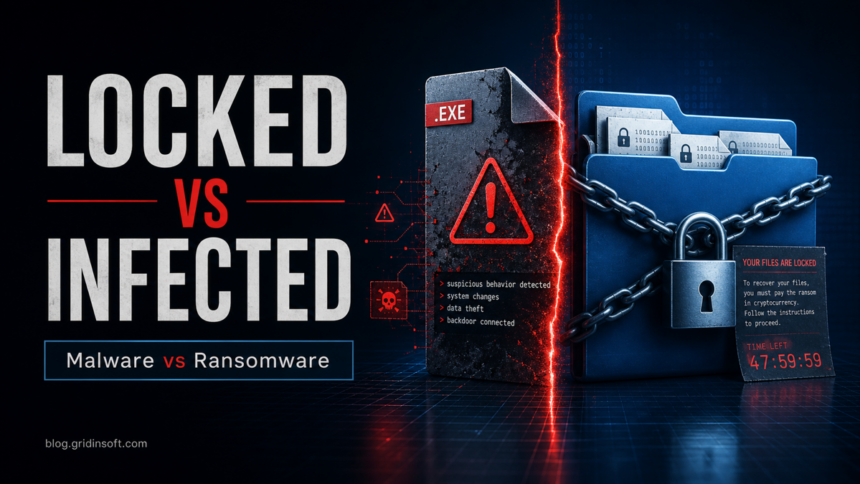
Malware and ransomware are related, but they are not equal terms. Malware is the broad category of malicious software. Ransomware is one type of malware whose defining goal is extortion: it locks, encrypts, or steals data and demands payment.
If you need the current 2026 ransomware landscape before deciding how urgent the incident is, review the updated ransomware facts and trends summary.
Malware vs Ransomware: Key Difference
Malware means malicious software. It includes many threat types: Trojans, viruses, worms, stealers, spyware, adware, rootkits, loaders, and ransomware. Ransomware is narrower. It is malware designed to pressure the victim by making files, devices, or business systems unusable until a ransom is paid. Microsoft describes Windows Security as protecting against threats such as viruses, malware, and ransomware, while CISA treats ransomware response as a separate incident workflow because recovery and evidence handling are different [1] [2].
| Point | Malware vs ransomware |
| Scope | Malware: any malicious or unwanted software built to harm, steal, spy, disrupt, or abuse resources. Ransomware: one malware category focused on extortion. |
| Main goal | Malware: depends on the family: theft, access, surveillance, ads, persistence, damage, or delivery of another payload. Ransomware: make data inaccessible or threaten publication so the victim feels forced to pay. |
| Common entry points | Malware: fake installers, phishing, cracked software, malicious ads, browser extensions, exploits, USB drives. Ransomware: phishing attachments, exposed remote access, stolen credentials, vulnerable servers, malicious downloads, or a previous loader infection. |
| Immediate risk | Malware: data theft, account compromise, browser hijacking, backdoor access, unwanted activity. Ransomware: file loss, downtime, ransom demand, data leak threats, business interruption. |
| First response | Malware: identify the threat type, quarantine it, scan fully, remove persistence, protect accounts. Ransomware: isolate the device, preserve evidence, avoid quick payment decisions, check backups, scan before restoring. |
How to Tell Which One You Have
| What you see | Most likely meaning |
| Security tool reports a Trojan, stealer, spyware, adware, loader, or suspicious browser extension. | Malware infection. Remove it, check startup and browser persistence, then secure accounts that may have been exposed. |
| Files suddenly have strange extensions, will not open, or folders contain ransom notes. | Ransomware. Disconnect the device from networks and shared drives before trying normal cleanup. |
| Pop-ups claim the computer is infected and demand payment for fake support. | Often scareware or a tech-support scam. Do not call the number or install the offered tool; scan the system and remove browser abuse. |
| A previous malware alert was followed hours or days later by encrypted files. | A loader, Trojan, or stolen remote-access credential may have enabled the ransomware stage. Treat both the entry point and the encryption event. |
What Malware Does
Malware is an umbrella term. Two infections can both be malware and still behave completely differently. A downloader may only fetch another payload. A stealer may silently copy browser cookies and saved passwords. A fake browser extension may redirect search results. A rootkit may try to hide processes or drivers.
That is why a good malware cleanup is not only “delete the file.” You also need to check startup entries, scheduled tasks, browser settings, installed programs, network changes, and account exposure.
What Ransomware Does
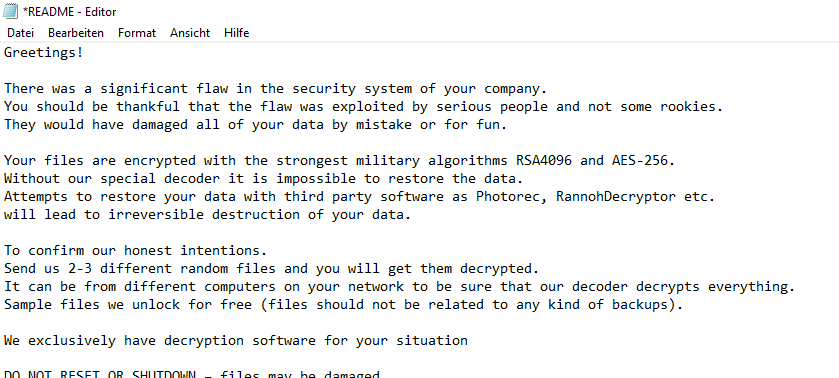
Ransomware is built around pressure. Traditional crypto-ransomware encrypts files and shows a ransom note. Locker ransomware blocks access to the device. Modern ransomware groups may also steal data first and threaten to publish it. In all cases, the victim is pushed toward payment because normal work or personal access is interrupted.
Ransomware can start as a normal malware infection. A Trojan, loader, or stolen remote access credential may be used first. The final ransomware payload appears later, after the attacker has explored the system or network.
Why the Difference Matters
The word “malware” tells you that something is malicious. The word “ransomware” tells you the likely impact and urgency. If a password stealer was installed, the priority is account protection. If ransomware is active, the priority is isolation and recovery.
- For a Trojan or stealer: keep the file quarantined, scan the system, remove persistence, and change passwords from a clean device.
- For adware or browser hijacking: remove suspicious programs, extensions, notification permissions, and search-policy changes.
- For ransomware: disconnect the device from the network, avoid writing new data to affected drives, check backups, and scan before restoring.
- For business systems: preserve logs and isolate affected machines before cleanup so the entry point can be found.
Can You Remove Malware and Ransomware the Same Way?
No. Security software can remove many malicious files, startup entries, and leftover components, but removing the ransomware program does not automatically decrypt files. That is why ransomware recovery should separate three jobs: stop the active threat, identify the ransomware family, and recover data from clean backups or a trusted decryptor when one exists.
If you have encrypted files, keep copies of the ransom note and a few encrypted files before wiping anything. A service such as No More Ransom’s Crypto Sheriff can sometimes identify the family and point to a free decryptor, but many modern ransomware cases do not have a public decryptor [3].
How Ransomware Usually Gets In
Ransomware rarely appears out of nowhere. Common entry points include:
- phishing emails with malicious attachments or links;
- stolen passwords for remote access services;
- unpatched VPN, server, or remote desktop vulnerabilities;
- malicious installers, cracks, keygens, and fake updates;
- previous malware that downloads the ransomware payload later.
For home users, cracked software and phishing are frequent sources. For organizations, exposed services and stolen credentials are often the weak point.
What to Do If You Suspect Malware
- Do not restore quarantined files unless you know exactly what they are.
- Disconnect suspicious downloads and remove the original installer or archive.
- Run a full scan with Microsoft Defender or another trusted scanner.
- Check persistence: startup apps, scheduled tasks, services, browser extensions, and notification permissions.
- Protect accounts if the malware may have accessed browsers, email, banking, gaming, or crypto wallets.
- Use a second opinion scanner if symptoms remain after the first cleanup.
You can use Gridinsoft Anti-Malware as a second opinion scan when you suspect leftover Trojans, stealers, adware, or unwanted startup entries.
What to Do If You Suspect Ransomware
Ransomware needs a more careful response than ordinary cleanup:
- Disconnect the affected computer from Wi-Fi, Ethernet, shared drives, and external storage.
- Do not delete ransom notes or logs before you understand what happened.
- Check whether files are still changing. If encryption is active, power down or isolate the machine.
- Identify the ransomware family using the ransom note, file extension, and detection name.
- Restore only from clean backups after the system is scanned and the entry point is closed.
- Change passwords if remote access, email, or browser accounts may have been exposed.

How to Reduce Both Risks
The same baseline habits reduce both malware and ransomware risk:
- Keep Windows, browsers, Office apps, VPN clients, and remote access tools updated.
- Use unique passwords and multi-factor authentication, especially for email and remote access.
- Keep at least one backup that is offline or protected from normal file writes.
- Block macros from untrusted documents and avoid unexpected attachments.
- Do not use cracked software, keygens, fake activators, or repacked installers.
- Limit administrator rights for daily work.
- In Windows Security, review ransomware protection and Controlled folder access if you want extra protection for important folders [1].
For a broader reference, read our guides to types of malware and common cyber attacks. If you are already looking at encrypted files with a ransom note, see our practical example guide to identifying .xyz ransomware files before restore.
FAQ
Is ransomware malware?
Yes. Ransomware is a type of malware. It is defined by extortion: encrypting, locking, or stealing data and demanding payment.
Is every malware infection ransomware?
No. Many malware infections do not encrypt files. Trojans, spyware, stealers, adware, worms, and rootkits can all be malware without being ransomware.
Can ransomware spread like a virus?
Some ransomware can spread across networks, but ransomware is not defined by replication. It is defined by the attempt to deny access and demand money.
Can antivirus remove ransomware?
Security software can remove the malicious program, but it usually cannot decrypt files unless a known decryptor exists. Backups are the most reliable recovery method.
Should I pay the ransom?
Do not make payment your first response. Payment does not guarantee a working decryptor or deletion of stolen data. Isolate the device, preserve evidence, identify the family, and check clean backups or trusted decryptor resources first.
What is the first thing to do during a ransomware attack?
Isolate the affected device from the network and shared storage. Then preserve evidence, identify the ransomware family, close the entry point, and restore from clean backups.
References
- Microsoft Support. “Virus and Threat Protection in the Windows Security App.” Microsoft, accessed June 1, 2026. support.microsoft.com
- Cybersecurity and Infrastructure Security Agency. “#StopRansomware Guide.” CISA, September 2023, accessed June 1, 2026. cisa.gov
- The No More Ransom Project. “Crypto Sheriff.” No More Ransom, accessed June 1, 2026. nomoreransom.org
- Enigma LRJ. “LockerGoga – Ransom note.png.” Wikimedia Commons, September 4, 2020, accessed June 1, 2026. commons.wikimedia.org