If your Discord account sends crypto, MrBeast, Andrew Tate, casino, Nitro, Steam, or “try my game” messages by itself, treat it as account compromise. This is usually not a normal Discord bug. The attacker may be using a stolen session token, a malicious authorized app, or an infostealer that ran on the PC where you use Discord.
Why is Discord sending DMs by itself?
- Your account or session is likely compromised. Change the Discord and email passwords from a clean device.
- Remove unknown authorized apps and revoke active sessions where Discord allows it.
- If Instagram also posts the same scam, secure the account directly. Check active sessions, connected apps, recovery email, phone, and MFA before logging back in on the affected PC.
- Scan the PC that downloaded the game, crack, mod, installer, or fake verification file.
- Warn friends quickly. Tell them not to open the link, connect a wallet, scan a QR code, or run a file.
| Common symptom | Discord account sends DMs, server messages, crypto images, or giveaway links without your action. |
| Common lure | MrBeast or Andrew Tate crypto giveaway, casino bonus, free Nitro, Steam gift, fake game test, vote link, wallet reward. |
| Main risk | Stolen Discord session, stolen email account, browser cookie theft, wallet phishing, malware spread to friends. |
| Best first action | Secure email and Discord from a clean device, then clean the PC that ran the suspicious file. |
A click alone does not establish compromise. If your account sent messages, or you entered credentials, approved an app or scanned a login QR code, follow the account-recovery steps. If you downloaded a game, mod, crack, verification app, or browser extension before the spam started, scan the Windows PC before logging back into Discord, email, Steam, or wallets from it.
If a token stealer ran here, logging back in can hand the attacker your new Discord session, email cookie, Steam token, or wallet access. Scan this Windows PC first, then reset passwords from a clean device.
Scan before logging back inWhy your Discord account sends crypto spam
Attackers use Discord DMs because a message from a real friend feels trustworthy. A crypto giveaway, free Nitro link, “vote for my team” page, or “test my game” file is more convincing when it arrives from an account you already know.
In many incidents, the account owner recently ran a suspicious game, mod, fake installer, crack, ROM pack, or “verification” command. If malware steals a Discord token or browser session, the attacker can send messages before the victim notices. To Discord, that activity may look like it came from a previously trusted session.
Common auto-DM message patterns
| Message style | What it wants | What to do |
| MrBeast, Andrew Tate, Elon Musk, or celebrity crypto giveaway | Wallet connection, fake deposit, seed phrase, or payment | Do not connect a wallet or enter recovery words. |
| Instagram story or Discord DM repeats the same casino bonus | Stolen social session, malicious connected app, or fake casino deposit | Sign out other sessions and verify the account inside the official app. |
| Free Nitro, Steam gift, or giveaway link | Fake Discord login, QR login abuse, or phishing | Open Discord directly, not through the message link. |
| “Try my game”, “test my mod”, or “private build” | Malware execution | Do not run attachments or unknown installers from DMs. |
| “Vote for my team” or “verify your account” | OAuth abuse, fake login, or command-paste lure | Check authorized apps and never paste commands into Windows tools. |
Andrew Tate, Instagram, and casino-spam variants
Andrew Tate-themed Discord DMs, Instagram stories, and fake casino or crypto-bonus pages are usually a visible scam theme, not a separate “Andrew Tate virus” family. The same recovery logic applies: investigate a stolen session, review OAuth or connected-app approvals, and check for an infostealer that may have grabbed browser and Discord data after a game, emulator, crack, mod, or fake verification download.
- If Discord sent Andrew Tate or casino DMs, warn contacts and secure the email account first from a clean phone or computer.
- If Instagram posted the same crypto/casino image, use Instagram’s official security settings to sign out other sessions, remove unknown connected apps, and check recovery contacts. For broader social-media red flags, see our Instagram scams guide.
- If the lure asks for a deposit, promo code, QR login, wallet connection, or seed phrase, treat it as a scam even if it uses a celebrity screenshot or says a balance is waiting.
- If it began after a download, clean the original PC before using it for password resets, banking, crypto wallets, email, Discord, Instagram, Steam, or other saved-browser accounts.
Am I safe after resetting Windows?
A clean Windows reset or USB reinstall usually addresses the device risk if you do not run leftover executables, scripts, game folders, browser profiles, or installers from the old drive. It does not revoke stolen cookies, OAuth approvals, backup codes, or active sessions. After reinstalling, secure email first, then Discord, Instagram, Steam or other gaming accounts, wallets, and any reused passwords.
Was my Discord hacked?
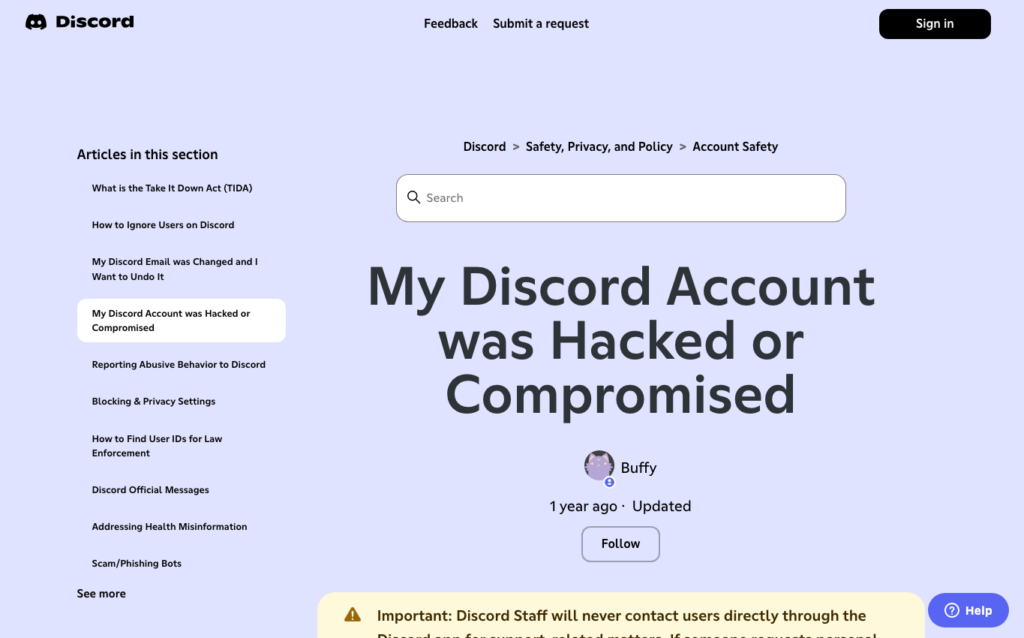
Assume yes if messages were sent while you were offline, if friends received links you did not write, if new servers appeared, if settings changed, or if Discord emailed you about suspicious access. Discord’s hacked-account guidance says compromised users should submit a ticket and review authorized apps; Discord also notes that staff will not contact users directly inside the app for support-related matters [1].
What to do in the first 10 minutes
- Warn people first. Send a clean warning from another channel if needed: “Do not click my last Discord link. My account may be compromised.”
- Use a clean device. Do password resets from a phone or computer that did not run the suspicious file.
- Secure the email account attached to Discord. Change the password and check recovery email, phone, MFA, and forwarding rules.
- Change the Discord password and enable MFA. Then review authorized apps and connected services.
- Clean the original PC. Scan the system, remove detected malware, reboot, and scan again.
Gaming account stolen too? If the same Discord compromise led to a lost Steam, Roblox, Epic, or game account, avoid private recovery helpers and follow our gaming account recovery scam checklist.
Check authorized apps and connected services
An authorized app can act within the permissions you granted; approval alone does not establish that it can send arbitrary DMs as you. Stolen credentials or sessions and deceptive QR-login flows are separate risks. Review authorized apps and remove anything you do not recognize. Also check connected services, browser extensions, and any recently installed desktop app related to a game, mod, launcher, wallet, or “verification” tool.
Discord’s safety guidance recommends caution around spam and account abuse, especially DMs and links that try to move users into unsafe actions [2].
When it started after a game, mod, ROM, or crack
If the Discord spam began after you downloaded a game, Ren’Py-looking project, Roblox tool, Minecraft modpack, ROM installer, crack, or private launcher, handle it as an infostealer incident. Use our infostealer after game or mod checklist. If the file looked like a Ren’Py game, use the RenPy fake game installer guide. If you ran the file and saw nothing visible, read Can Malware Activate Later?.
How to clean the PC that may have stolen the token
- Delete the original download, archive, installer, script, or command source.
- Run a full scan with GridinSoft Anti-Malware and remove detected threats.
- Check Startup Apps and Task Scheduler for unknown entries created around the same time.
- Remove unknown browser extensions and reset suspicious notification permissions.
- Review recently installed apps, especially launchers, emulators, “boosters”, cracks, and mod tools.
- Do not blindly restore old browser profiles, saved sessions, installers, game cracks, scripts, shortcuts, or mod folders from a data drive.
- After cleanup, reboot and scan again before using the PC for sensitive logins.
Can clicking the crypto image hack me?
Usually, simply viewing an image in Discord is not enough to install malware. The bigger risk is what the image or message asks you to do next: open a link, scan a QR code, connect a wallet, download a game, run a file, or paste a command. Many community cases involve a compromised account spreading a lure, not the image itself infecting viewers.
What not to do
- Do not pay a “recovery expert” who contacts you in DMs.
- Do not connect a crypto wallet to prove ownership or claim a prize.
- Do not enter a seed phrase, recovery phrase, or one-time code on a linked site.
- Do not paste commands into Windows Run, PowerShell, Terminal, or CMD from a “verification” page [3].
- Do not keep resetting passwords on the PC that may still contain the stealer.
Related: if a Discord auto-DM points to a casino or bonus-code site, compare it with the broader fake crypto casino scam pattern before registering or depositing.
FAQ
Is MrBeast running this Discord giveaway?
Assume no. Celebrity crypto and free-money messages in Discord DMs are common impersonation lures.
Is an Andrew Tate Discord message a virus?
The celebrity name is the lure, not the malware name. If your account sent the message by itself, handle it as account compromise and check for a stolen session, malicious authorized app, or infostealer.
Can changing my Discord password fix auto-DM spam?
It helps, but also secure the email account, remove suspicious authorized apps, enable MFA, and scan the PC that may have stolen the session.
Should I delete Discord?
No. Deleting the app does not revoke stolen sessions or remove malware. Secure the account and clean the device.
Can my friends get infected by clicking my message?
They are at risk if the link leads to a fake login, wallet drain, fake game download, QR login scam, or command-paste lure. Warn them quickly.
Why did the attacker not change my password?
Spam campaigns often use stolen sessions or tokens for speed. The attacker may send messages first because locking you out would alert you faster.
References
- Discord Support. “My Discord Account was Hacked or Compromised.” Discord, accessed June 1, 2026. Support
- Discord Safety. “Tips against spam and hacking.” Discord, accessed June 1, 2026. Safety
- Microsoft Security Blog, “Think before you Click(Fix),” August 21, 2025. Analysis
- Reddit community report. “Discord hacked and crypto message sent.” Reddit r/Scams, accessed June 1, 2026. Example discussion
Permission reference: Discord, OAuth2 scopes, accessed September 7, 2026.