RenPy Loader is malware that hides inside fake games, mods, cracks, and software installers; it is not the legitimate Ren’Py game engine. If you ran an unknown Setup.exe and saw a loading screen, antivirus alert, Discord spam, browser logout, or unfamiliar account activity, disconnect the PC, scan it before signing in again, and secure your accounts from a clean device. Recent campaigns used RenPy Loader (also called RenEngine Loader), MSBuild, and EtherHiding to deliver Amatera Stealer, but the final payload can change.
Choose the action that matches what happened
- Downloaded only: delete the archive without opening its executable, then scan the download location.
- Opened the archive but did not run anything: delete the extracted folder and scan; merely seeing Ren’Py files does not prove infection.
- Ran
Setup.exeor a launcher: treat the PC as potentially compromised, even if the installer stalled or closed with an error. - Accounts already show activity: isolate and clean the PC, then revoke sessions and change passwords from a different trusted device.
Ren’Py Is Legitimate; RenPy Loader Is Not
Ren’Py is a free, open-source engine used to build visual novels and story-driven games. A normal game may contain folders named renpy, game, or lib, so those names alone are not evidence of malware. The official project publishes its SDK at Ren’Py.org [1].
The malicious lookalike is a delivery chain. Attackers place harmful Python code and encrypted components inside a Ren’Py-style package, then give the victim a convincing installer screen while the payload runs in the background. The download source, the executable you launched, and the behavior that followed are more useful than the Ren’Py folder name.
How the RenPy Loader Infection Chain Works
Malwarebytes researchers documented a July 2026 campaign in which fake game and software downloads arrived through malicious sites, game portals, redirects, and public file-sharing services. The archive contained Setup.exe; launching it displayed an installation screen while a multi-stage chain ran silently [2].
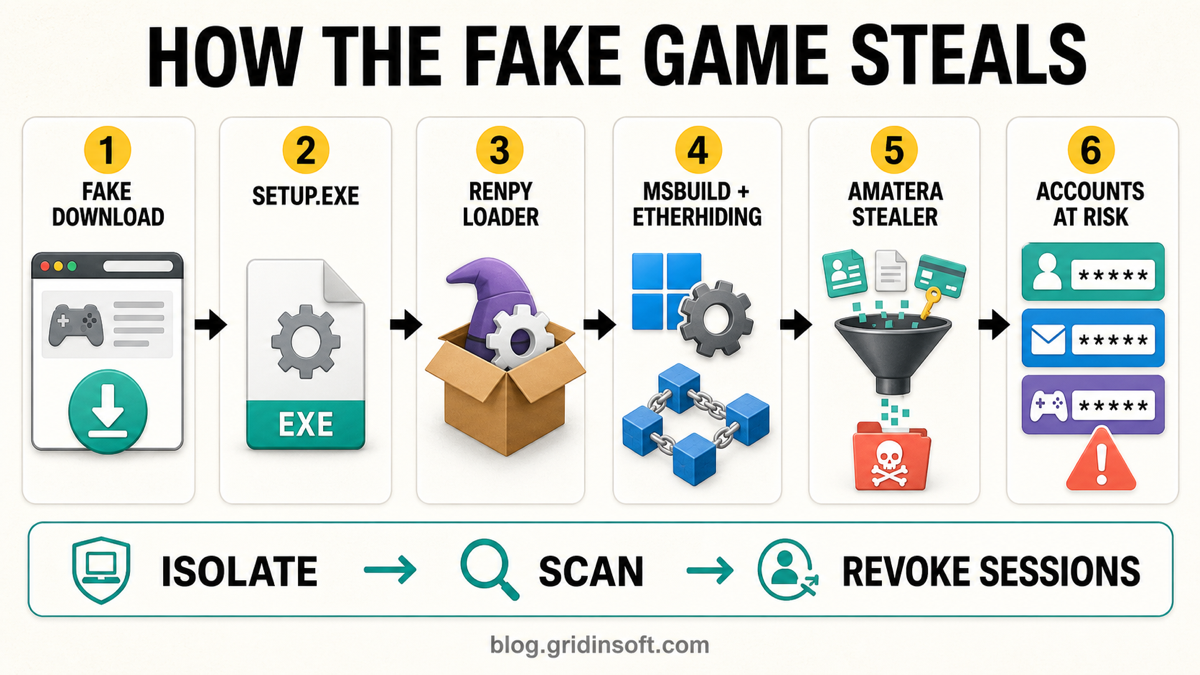
- Fake download: the victim expects a game, mod, crack, or useful application, often after passing through several download pages.
- RenPy Loader: malicious Python code inside the package decrypts an embedded archive and extracts it to a randomly named folder under
%TEMP%\tmp-{random}. - Trusted Windows tools: the chain uses
forfiles.exe, a BAT file, andMSBuild.exewith a malicious project to load the next .NET stage. Seeing MSBuild in the process tree is suspicious here because it follows an unknown game installer, not because MSBuild itself is malware. - EtherHiding: a downloader reads attacker-controlled data stored through a public blockchain call to discover its current command-and-control server. That makes a fixed domain block less reliable.
- Stealer payload: the analyzed chain delivered Amatera Stealer. Other observed RenPy Loader campaigns have delivered HijackLoader or Lumma Stealer, so do not assume every sample has the same files or final malware.
- Account theft: the stealer can target browser passwords, cookies, autofill data, crypto wallets, extensions, messaging apps, local files, and session tokens.
Signs That the Fake Game Actually Ran
An installer window is not proof that only a game was installed. Treat the following combination as a high-confidence warning:
- The archive came from an unknown website, a redirect chain, a chat attachment, a hacked friend’s account, or a file host instead of the verified developer or store.
- A small or supposedly portable game unexpectedly required
Setup.exe, administrator approval, a password-protected archive, or an updater. - The installer reached 100%, stalled, showed an error, or vanished without installing the promised game.
- Defender or another security tool reported a behavior, downloader, stealer, suspicious connection, BAT, Python, or .NET component.
forfiles.exe, headlessconhost.exe/cmd.exe, orMSBuild.exeappeared immediately after the unknown installer.- Discord sent messages by itself, browsers logged out, security settings changed, or email, Microsoft, Google, Steam, Epic, Roblox, banking, or crypto accounts showed unfamiliar activity.
Campaign-specific files are clues, not a universal checklist
The analyzed sample used data/python-packages/sys_config/, data/libwin32.rpa, data/.GEg, and data/j3lpTcg7kBRN.E3, then created randomly named files under the user’s Temp folder. These artifacts can confirm a match, but their absence does not prove the PC is safe: operators can rebuild the package, rotate infrastructure, or deliver a different payload.
How to Remove RenPy Loader Safely
- Disconnect the affected PC. Turn off Wi-Fi or unplug Ethernet if the installer is running, alerts are repeating, or account activity is still occurring. Do not reopen the game to test it.
- Record what happened. Save the download URL, archive and executable names, file path, time of execution, antivirus detection name, and any affected account alerts. Do not upload a private work file or personal archive to a public scanner.
- Quarantine the visible detection. Let Windows Security or your installed security tool contain what it found, then run a full scan. Do not restore the file because a forum post calls it a false positive.
- Run Gridinsoft Anti-Malware. Use a full scan to check dropped files, running components, startup entries, scheduled tasks, browser changes, and other persistence in one workflow. This is easier and safer than trying to identify every random Temp filename or every stage of the loader by hand.
- Remove detections, reboot, and scan again. Deleting only the original archive or
Setup.exeis not enough after execution; the RenPy stage may already have extracted BAT, project, or .NET components elsewhere. - Review persistence and browser state. Remove unknown startup items, scheduled tasks, extensions, proxy changes, and security exclusions tied to the incident. If an alert returns after reboot, investigate the path and parent task instead of repeatedly dismissing it.
The visible installer may be gone while a dropped loader, scheduled task, browser change, or bundled component remains. Gridinsoft Anti-Malware helps check those connected areas together and gives you a clearer removal list before you put new credentials back on the PC.
Use Gridinsoft Anti-Malware to scan for the malicious loader, dropped payloads and related threats, then remove what it detects. Secure passwords and revoke stolen sessions from a clean device as well.
Download Anti-Malware for WindowsSecure Passwords, Sessions, and Wallets After Cleanup
Malware removal and account recovery are separate jobs. A clean scan cannot invalidate cookies or session tokens that were already copied. Use a clean phone or another trusted computer for these steps:
- Change the primary email password first, then Microsoft or Google, password manager, banking, crypto, Discord, Steam, Epic, Roblox, and social accounts.
- Use each service’s sign out everywhere or session-management page. Remove unknown devices, OAuth apps, bot integrations, forwarding rules, recovery addresses, and app passwords.
- Replace reused passwords with unique ones and enable multi-factor authentication. Prefer a passkey or authenticator app where the service supports it.
- If a wallet seed phrase, private key, or unlocked wallet was present, move funds to a newly created wallet from a clean device. Changing an exchange password cannot protect an exposed self-custody seed phrase.
- Watch payment, email, gaming-marketplace, and account-recovery activity. Warn contacts if your Discord or social account sent malicious downloads.
Do you need to reinstall Windows?
A clean install is the safer choice when the stealer ran with administrator rights, security tools were disabled, remote-control behavior appeared, detections keep returning, high-value work or financial credentials were present, or you cannot establish what the loader changed. If the file never ran, or scans removed a contained attempt before any follow-on behavior, a reinstall may be unnecessary. No scanner can recover credentials already stolen, so complete the session and password response either way.
How to Check a Ren’Py Game Before Running It
- Verify the source: use the official store, the developer’s established page, or a link published by the verified project—not a mirror reached through several redirects.
- Question an unexpected installer: many Ren’Py games run from their extracted folder. A generic
Setup.exeis not automatically malicious, but it deserves extra scrutiny when the creator never documented an installer. - Inspect the package: unrelated BAT, project, script, or obfuscated files; a password-protected archive; and a mismatch between the promised title and included files are warning signs.
- Check the file without launching it: scan the archive and executable locally. For a non-sensitive file, the Gridinsoft Online Virus Scanner can provide a second file check.
- Do not rely on one clean result: new or heavily obfuscated samples may have low early detection. Source reputation and post-launch behavior still matter.
Related Recovery Guides
If an unknown game or mod caused a broader compromise, use the post-infostealer recovery guide. If the file ran but nothing visible happened, see whether malware can activate later. For automated Discord messages, follow the Discord token and auto-DM cleanup steps. If the suspicious process was Python-based, check the pythonw.exe path, command line, and startup source.
FAQ
Is RenPy Loader the same as Ren’Py?
No. Ren’Py is a legitimate game engine. RenPy Loader or RenEngine Loader is the name used for malicious packages that abuse Ren’Py components to start a malware chain.
What is Amatera Stealer?
Amatera is information-stealing malware that can collect browser data, saved credentials, session tokens, wallet information, messaging-app data, and local files. It was the final payload in the analyzed campaign, but other RenPy Loader campaigns can deliver different malware. Malwarebytes later connected the underlying loader pattern to ClickFix and fake-software campaigns under the name PavinLoader, so a Ren’Py package is now only one possible entry route.
If every scan is clean, are my accounts safe?
Not necessarily. A scan can confirm that it finds no current malware, but it cannot revoke data already copied. If the installer ran, sign out active sessions and change important passwords from a clean device.
Should I delete every Ren’Py folder?
No. Trusted games legitimately use Ren’Py folders. Delete the suspicious package connected to the untrusted download and follow the scan results; do not remove unrelated games only because they use the same engine.
Can I back up files before reinstalling Windows?
Back up documents, photos, videos, and project data. Avoid copying executables, cracks, mod launchers, browser profiles, scripts, and unknown archives from the incident unless they are required for professional analysis.
References
- Ren’Py project. “Ren’Py Visual Novel Engine.” Ren’Py, accessed August 5, 2026. https://www.renpy.org/
- Gabriele Orini. “Fake games spread stealers with RenPy Loader, MSBuild and EtherHiding.” Malwarebytes Threat Intelligence, July 20, 2026, accessed August 5, 2026. https://www.malwarebytes.com/blog/threat-intel/2026/07/fake-games-spread-stealers-with-renpy-loader-msbuild-and-etherhiding