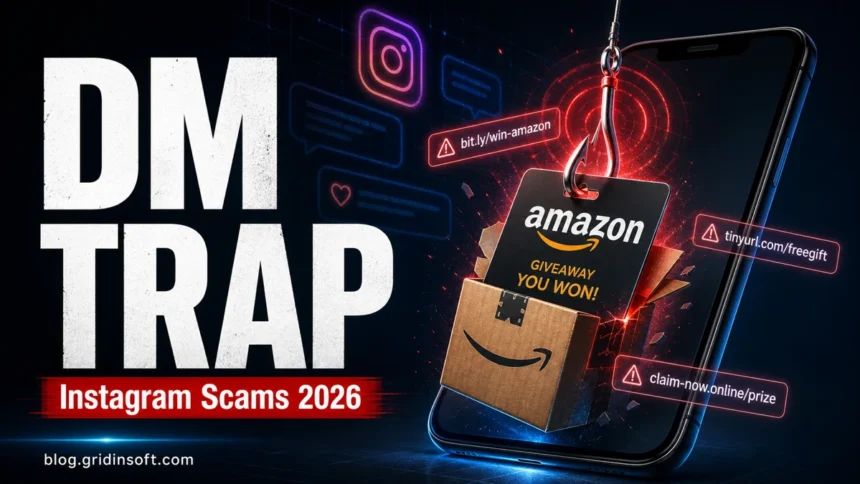
Instagram scams in 2026 rarely look like obvious spam. They often start with a normal-looking DM, a fake giveaway, a “copyright” or “verification” warning, a hacked friend’s request, or a shop account that looks active enough to trust. Treat any Instagram message that asks you to click a link, pay a fee, send a code, scan a QR code, install an app, or move the conversation to WhatsApp, Telegram, or email as suspicious until you verify it outside the message.
The risk is not only losing a small payment. A single scam can expose your Instagram login, email, payment card, identity details, private photos, or MFA codes. Meta says it removed more than 159 million scam ads in 2025 and took down 10.9 million Facebook and Instagram accounts linked to criminal scam centers, which is a good reminder that these scams are industrial, fast-moving, and not limited to one country or one type of victim. [1]
Instagram scam signs to check first
If you are looking at a suspicious Instagram DM, ad, profile, story, or shop right now, use this quick triage before replying.
| What you see | What to do first |
|---|---|
| “Your account will be suspended”, copyright warning, verification offer, or fake Meta support DM | Do not use the link. Open Instagram yourself, check Account Status and recent emails, then change your password if you typed it anywhere. |
| “You won” a brand box, Amazon prize, gift card, iPhone, trip, or influencer giveaway | Do not pay shipping, tax, or processing fees. Search for the brand manually and check whether the giveaway exists on its official website or verified account. |
| A friend asks you to vote, help recover their account, or send a code | Verify through another channel. Never forward one-time codes, reset links, backup codes, or screenshots of security prompts. |
| Crypto, forex, betting, “AI trading”, or investment profit screenshots | Assume the screenshots are staged. Do not send money, connect a wallet, or pay a “withdrawal” or “tax” fee. |
| Instagram shop with big discounts, disabled comments, no real complaints policy, or payment outside normal checkout | Search the shop name plus “scam”, use a credit card when possible, and do not enter card details on unknown domains. |
| Blackmail, sextortion, or threats to leak private photos | Stop replying, save evidence, block and report. Do not pay, because payment usually leads to more demands. |
| “Recovery hacker”, “unban support”, or someone promising to get a stolen account back | Do not pay. Use Instagram’s real hacked-account recovery flow and secure the email account connected to Instagram. |
The most common types of scams on Instagram
Scammers adapt the story, but most Instagram scams try to get one of five things: money, login access, personal data, private photos, or trust from your followers after your account is taken over. These are the Instagram scams worth watching most closely in 2026.
1. Influencer and impersonation scams
Not every account with polished photos, followers, and comments is legitimate. Scammers copy creators, buy aged accounts, reuse stolen photos, or hijack real profiles and suddenly change the topic to crypto, giveaways, travel deals, product promotions, or “exclusive” investment offers.
Watch for copied profile photos, sudden topic changes, generic comments, pressure to move the chat off Instagram, and a handle that does not match the creator’s official website or other social profiles. A real creator or brand should be verifiable outside one Instagram profile.
2. Phishing Instagram scams
Instagram phishing scams usually create panic. You may see a fake account warning, copyright complaint, blue-badge offer, “suspicious login” alert, brand partnership form, or message that claims your account will be disabled unless you act now. The link then sends you to a fake login page that steals your password and sometimes your two-factor authentication code too.
Open Instagram or instagram.com yourself instead of using links from a DM or email. Instagram says suspicious messages and accounts can be reported from inside the app, and official safety guidance warns users not to click suspicious links or share personal information with accounts claiming to be Instagram or Meta support. [2]
When a Real Copyright Notice Is Used for Extortion
A genuine Instagram removal notice can come from an abusive copyright report. That differs from the fake login link above: the platform has actually acted on a complaint, and the person behind it may demand money to withdraw it. Two-factor authentication protects login access; it does not prevent someone from filing a report against your posts.
In its September 8, 2026 investigation, the BBC described the Lost in Time History account’s experience. Its creator, Olly, said he paid an extorter $50 after his account was temporarily taken down, then received more copyright strikes immediately afterward. The BBC had seen messages demanding money or threatening further strikes. Meta told the BBC that it had restored affected content and added protections after reviewing the examples. Those interventions do not establish a guaranteed outcome for every account. [4]
Open Instagram independently and check the actual removal notice. Meta says an intellectual-property notification may include the reporting rights owner’s details; if an appeal is available, the notice includes instructions. Follow that offered route for the specific removal instead of a claimant’s payment link or an unsolicited “unban” service. [5]
- Keep a record for each complaint: the affected post URL, report identifier, notification timestamp, original content or permission records, and messages demanding money.
- Explain the disputed report: match your evidence to the removed post and include the extortion messages in the official review process where attachments or explanation are supported. Do not assume every complaint is false or send a legal counter-notice you do not understand.
- Separate recovery from payment: paying did not stop repeat strikes in the BBC’s example. If you also entered credentials on a fake page, follow the account-security steps below; a copyright appeal alone will not secure a stolen login.
3. Fake job scams
Fake recruiters use Instagram to advertise remote jobs, modeling offers, creator assistant roles, brand representative work, and paid product-testing tasks. The application may ask for your full name, address, phone, ID image, tax details, banking information, or a payment for training, equipment, or background checks.
Real employers do not need your Instagram password, one-time code, or payment app transfer to interview you. If a job offer began in DMs and quickly asks for identity documents or money, treat it as an identity-theft risk and verify the company through its official website.
4. Music promotion scams
Musicians and creators often receive DMs from accounts promising playlist placement, reposts, label attention, or guaranteed streams. The account may show inflated follower counts, fake testimonials, and screenshots of “results”. After payment, the promotion either never happens or comes from bots that do not create real listeners.
Be careful with any promoter that cannot show a public business identity, real creator references, clear refund terms, and realistic performance claims. Bot streams and fake engagement can also hurt your reputation with platforms and fans.
5. Instagram ambassador scams
Fake sponsorship scams, often called Instagram ambassador scams, pretend to come from clothing, beauty, travel, fitness, or gadget brands. The message may say you were selected as an ambassador, but first you must pay for a sample, cover shipping, buy a discounted starter kit, or submit personal information.
Many of these are just overpriced dropshipping schemes or data-harvesting funnels. If the brand is real, contact it through its official website, not through the account that messaged you.
6. Lottery, prize, and giveaway scams
Giveaway scams are one of the easiest traps to miss because they imitate normal Instagram behavior: follow, like, tag friends, share a story, then wait for a winner DM. The scam begins when the “winner” message asks you to pay shipping, taxes, verification fees, or account-confirmation fees, or sends a link to a fake login page.
Fake Amazon prize boxes, free phones, gift cards, concert tickets, sneakers, and beauty bundles are common lures. A legitimate giveaway should not require your password, authentication code, recovery link, or a surprise fee to release the prize.
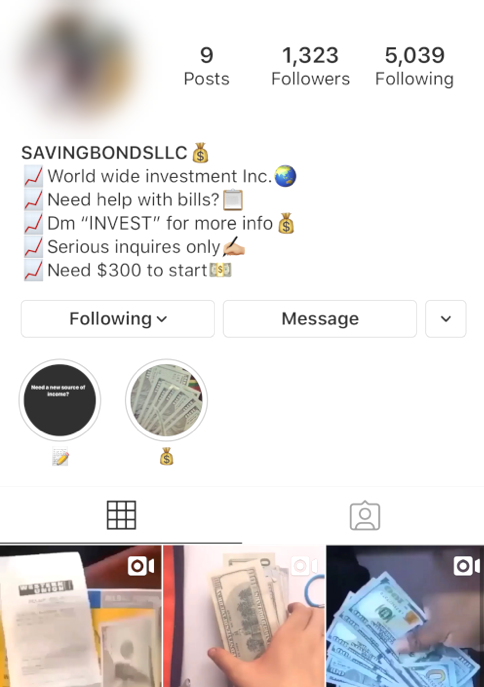
7. Crypto and investment scams
Crypto and investment scams often use screenshots of luxury lifestyles, fake dashboards, copied celebrity clips, and “proof” of withdrawals. Some start with a stranger; others come from a hijacked friend’s account, which makes the pitch feel more believable.
The common pattern is simple: a small deposit appears to grow, then you are asked to pay tax, gas, verification, anti-money-laundering, or withdrawal fees. If the message claims a stranger left you a large USDT balance on a fake exchange, compare it with our 7 Million USDT Instagram scam breakdown before logging in or paying. If you already sent crypto and someone now offers to recover it for a fee, read our guide to crypto recovery scams before paying anyone else.
8. Romance scams
Romance scams can start with compliments, story replies, photo likes, or a friendly DM. The scammer builds a relationship, asks to move to another app, and eventually introduces an emergency, investment, travel cost, customs fee, medical issue, or crypto opportunity.
Do not send money, gift cards, crypto, private photos, or identity documents to someone you have not verified offline. If they avoid video calls, create urgent emergencies, or isolate you from friends and family, step back and ask someone you trust to review the situation.
9. Fake product and Instagram shop scams
Instagram shops can look convincing because scammers buy promoted posts, followers, and comments. Watch for unrealistic discounts, copied product photos, disabled comments, no physical business details, payment through friends-and-family transfers, and domains that were created recently.
Before buying, search the shop name with “scam”, “reviews”, and “not delivered”. For broader red flags, see our online shopping scams checklist.
10. Paid subscription scams
Subscription scams offer cheap or lifetime access to Netflix, Spotify, gaming accounts, design tools, adult content, or creator communities. The seller may ask for payment through a method that is hard to reverse, then send a stolen login, stop replying, or use the checkout page to collect your card details.
Use the official service or a legitimate reseller. If the offer requires shared credentials, a “family slot” from a stranger, or an unknown checkout domain, it is not worth the risk.
11. Blackmail and sextortion scams
Blackmail scams may claim the attacker has private photos, messages, browsing history, or access to your files. Some are bluff emails or DMs; others begin after a real private exchange. Either way, paying often proves you are frightened and willing to send more.
Save screenshots, stop replying, block, report, and use trusted support resources. If the threat involves minors, immediate local law-enforcement or child-safety reporting is important.
12. Account recovery and fake hacking-service scams
After an Instagram account is stolen, victims are often targeted again by “recovery experts”, “Meta insiders”, Telegram hackers, or unban services. These accounts promise fast recovery for a fee, ask for ID photos, or request more codes. In reality, they usually cannot recover the account and may steal more information.
Use Instagram’s official recovery flow, secure the connected email account first, and be skeptical of anyone who says they need payment, a code, or a new login link to help. Our fake Instagram hacking services guide explains why these offers usually create a second scam.
What to do if you were scammed on Instagram
Act in the order that limits damage first. Arguing with the scammer is less important than protecting money, accounts, and evidence.
- Stop replying and save evidence. Take screenshots of the profile, handle, URL, messages, payment request, product page, shipping claim, wallet address, email, or phone number before you block or report.
- If you paid, contact the payment provider quickly. The FTC advises contacting the company you used to send money, such as your card issuer, bank, gift-card issuer, wire-transfer company, or payment app, and asking whether the transaction can be reversed. [3]
- If you shared a password, reset it from the real app or by typing instagram.com yourself. Change reused passwords anywhere else, then secure the email account connected to Instagram.
- If your account may be exposed, review sessions and recovery details. Check login activity, email, phone number, linked accounts, two-factor settings, bio links, posts, stories, ads, and DMs. Warn close contacts through another channel if your account sent scam messages.
- If you installed an app, browser extension, or file, scan the device. Remove suspicious extensions and apps, then run a security scan. Gridinsoft Anti-Malware can help check a Windows PC for stealers, adware, browser hijackers, and other threats that may follow a scam link or fake download.
- If you shared identity information, watch for identity theft. Monitor credit, bank, phone, and email accounts. Use the FTC’s identity-theft recovery guidance if SSN, ID images, or sensitive personal details were exposed.
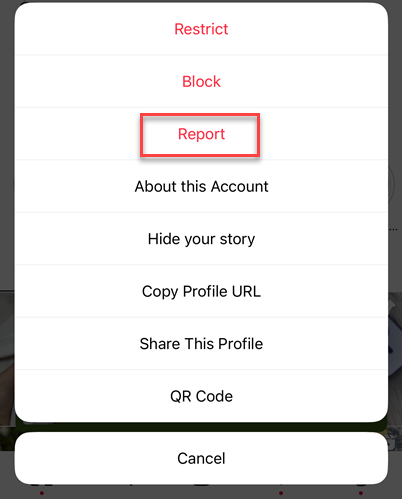
- Report the account, message, ad, product, or seller inside Instagram. Reporting helps the platform connect the profile, message, and product evidence to the right enforcement route.
How to avoid Instagram scams
Most Instagram scams become dangerous when they make you hurry. Build habits that slow the conversation down and move verification away from the scammer’s link.
- Open Instagram yourself. Do not log in from a DM, story, ad, QR code, or email link. Type the address or use the official app.
- Do not send codes or reset links. One-time codes, backup codes, login approvals, and password-reset links are account access.
- Secure your email first. If your email is weak, the attacker can keep resetting Instagram even after you change the Instagram password.
- Use two-factor authentication. Prefer an authenticator app over SMS when possible, and store backup codes somewhere private.
- Check profile history, not only follower count. Sudden topic changes, copied photos, disabled comments, fake engagement, and mismatched handles are stronger red flags than a missing or present badge alone.
- Verify shops and brands outside Instagram. Search the brand manually, check the official website, and avoid unusual payment requests.
- Review connected apps and permissions. Remove apps, games, analytics tools, and browser extensions you no longer trust.
- Keep devices clean. Scam links can lead to fake apps, malicious browser extensions, or downloads. A current security tool is useful when a scam involved a file, remote-access prompt, or suspicious browser behavior.
FAQ
How do I know if an Instagram giveaway is real?
A real giveaway should be visible on the official brand or creator account, have clear rules, and never ask for your password, authentication code, reset link, or surprise shipping fee. If the “winner” DM sends you to a login page or asks for payment, treat it as a scam.
What should I do if I clicked an Instagram scam link?
Do not enter more information. Open Instagram yourself, change your password if you typed it, secure the connected email account, review login activity and linked accounts, remove suspicious apps or extensions, and scan the device if you downloaded anything.
Can Instagram recover money lost to a scam?
Instagram can take action on accounts, messages, ads, or sellers, but payment recovery depends on how you paid. Contact your card issuer, bank, payment app, gift-card issuer, or wire-transfer company as soon as possible and ask about reversal or fraud procedures.
Is a verified Instagram account always safe?
No. Verification can help, but accounts can still be impersonated, hacked, rented, or abused. Check the handle, profile history, official website, comments, payment method, and whether the account is pushing you toward links, fees, codes, or off-platform chat.
Should I pay an Instagram recovery hacker?
No. Recovery-hacker and unban-service offers are usually follow-up scams. Use Instagram’s real hacked-account recovery route, secure your email, and do not send money, codes, or identity documents to strangers in DMs or Telegram chats.
References
- Meta. “Fighting Scammers and Protecting People With New Technology and Partnerships.” Meta, March 11, 2026, updated March 30, 2026, accessed June 8, 2026. https://about.fb.com/news/2026/03/fighting-scammers-protecting-people-with-new-technology-and-partnerships/
- Instagram Help Center. “Avoid scams on Instagram.” Meta, accessed June 8, 2026. https://www.facebook.com/help/514187739359208/
- Federal Trade Commission. “What To Do if You Were Scammed.” Consumer Advice, July 2022, accessed June 8, 2026. https://consumer.ftc.gov/articles/what-do-if-you-were-scammed
- Imran Rahman-Jones. “Scammers demand ransoms from Instagram users over fake copyright claims.” BBC News, September 8, 2026. Instagram copyright extortion investigation
- Meta. “Intellectual property across Meta platforms.” Meta Help Center, accessed September 13, 2026. Intellectual-property notifications and appeals