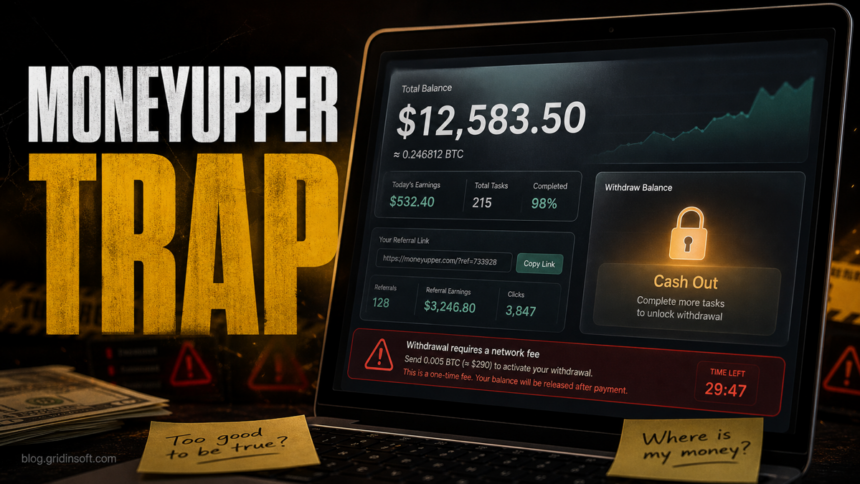
MoneyUpper.com looks like a make-money-online platform, but its public pitch has the same warning signs seen in task scams and fake earning dashboards: easy money, referral pressure, instant-looking balances, and cash-out promises that depend on more steps. Treat hxxps://moneyupper[.]com as unsafe unless you can independently verify a real company, clear payout history, and a legitimate reason for every task or fee.
If you only visited the page, close it and avoid signing in again. If you created an account, shared personal details, promoted your referral link, paid a fee, connected payment information, or installed anything from an offer wall, use the steps below to limit the damage.
What is MoneyUpper.com?
MoneyUpper presents itself as a site where users can earn cash, gift cards, or cryptocurrency by completing surveys, offers, and tasks. The pitch is designed to feel familiar: work from anywhere, no experience required, free signup, fast payouts through well-known payment methods, and a dashboard that appears to show earnings.
That combination is the problem. Real earning platforms explain who operates the business, how tasks are sourced, why advertisers pay, what payout thresholds apply, and what verification is required. Scam-like task platforms usually reverse that order: they show the reward first, then push the user to share links, complete more offers, or pay something before a withdrawal can happen.
Red flags that point to a task scam
- Large earnings before real work. A dashboard balance can be invented instantly. Do not treat an on-screen balance as proof that money exists.
- Referral pressure. If the platform pays more attention to inviting friends than to verifiable work, the user becomes the distribution channel.
- Cash-out friction. Extra verification, more tasks, more referrals, or a “network fee” before withdrawal are classic advance-fee warning signs.
- Payment-brand name dropping. PayPal, Cash App, Venmo, Zelle, crypto, and gift cards can be mentioned to build trust even when no real payout relationship exists.
- Offer-wall downloads. If an “earning task” asks you to install apps, browser extensions, VPNs, games, or survey tools, treat the device as exposed until checked.
- Social media testimonials with referral links. A link posted by a real person is not proof the platform pays; victims often promote referral links before discovering they cannot withdraw.
The FTC describes task scams as fake jobs where a site or app shows supposed earnings for simple online actions, while the money exists only inside the scammer-controlled interface. That pattern fits the risk here better than a normal remote-work or survey platform.
What to do if you signed up
- Stop completing tasks and do not pay any fee. A legitimate job or side gig should not make you pay to get paid.
- Do not share the referral link again. Delete social posts, stories, comments, or messages that promoted the link so friends do not follow it from your account.
- Change reused passwords. If the MoneyUpper password was used anywhere else, change it on those accounts first and enable two-factor authentication.
- Watch payment accounts. Review PayPal, Cash App, Venmo, Zelle, bank, card, and crypto activity if you entered related details or sent a payment.
- Preserve evidence. Save screenshots of the dashboard, referral messages, payment requests, account emails, and support chats before blocking the site or deleting messages.
- Report the link where you found it. Use the report tools on Facebook, Instagram, TikTok, X, Telegram, WhatsApp, Discord, email, or the ad network that showed the link.
If you paid a withdrawal or verification fee
Do not send a second payment to “release” the first one. Contact the payment provider immediately, explain that the payment was tied to a fake earning or withdrawal promise, and ask what dispute or reversal options exist. Crypto payments are especially hard to recover, so focus on preserving wallet addresses, transaction hashes, chat logs, and the exact page that requested the fee.
Be careful with anyone who contacts you later claiming they can recover the money. Recovery scams often target people after the first scam, then ask for another upfront fee, a wallet connection, or remote access to the device.
If you installed an app, extension, or file
A scam page is not always malware by itself, but offer tasks can route users to risky downloads, browser extensions, notification prompts, or bundled apps. Remove anything you installed for the “task,” revoke suspicious browser notifications, and check startup items if the device started showing pop-ups, redirects, or security warnings.
If an offer required a download or browser extension, run a full scan with Gridinsoft Anti-Malware after uninstalling the visible app. A scan can help find bundled components, startup entries, browser changes, hidden files, and persistence that may remain after the visible offer is removed.
If the page or email made you download an invoice, coupon, tracking app, browser extension, or support tool, scan the PC before opening it again or logging into sensitive accounts.
Scan after a scam downloadIs MoneyUpper.com safe?
Gridinsoft’s URL scanner currently flags MoneyUpper.com with a blacklist warning and a low trust score. That does not prove every visitor is infected, but it is enough to treat the site as high-risk and avoid entering personal, payment, or account information.
The safer decision is simple: do not rely on the displayed balance, do not pay a cash-out fee, and do not complete download-based tasks. If you are evaluating any similar “earn cash instantly” site, check the domain reputation, search the exact domain plus “scam” or “review,” and look for independent evidence that real users receive withdrawals without recruiting others or paying first.
Why this scam keeps coming back under new names
Fake earning dashboards are easy to rebuild. Operators can change the domain, replace the logo, adjust the signup bonus, and keep the same core funnel: social referral links, fake balances, offer tasks, and blocked withdrawals. That is why exact-domain warnings matter. A broad “online scam” guide helps with the pattern, but users searching for MoneyUpper need a direct answer before they share the link or pay a fee.
\n\n
A newer localized example is LipaTask: the KES 100 activation-fee and M-Pesa safety guide separates the platform’s advertised task flow from unverified payout claims and gives payment, password, identity, and device response steps.
For related decision paths, the Reddit Whisperer paid-task and payout-risk case shows why even a claimed tiny SOL withdrawal does not establish a safe long-term payout model. Also read Gridinsoft’s guide to signs that you got scammed and the guide to fake crypto casino withdrawal traps. The branding changes, but the pressure to pay before withdrawal is the same red flag.
FAQ
Can MoneyUpper really pay the balance shown in my account?
Do not trust the dashboard balance by itself. Scam platforms can show any number they want, then block withdrawal behind referrals, tasks, fees, or extra verification.
Should I pay a fee to withdraw from MoneyUpper?
No. Paying to unlock earnings is a major scam warning sign. Contact your payment provider instead of sending more money.
I shared my referral link. What should I do?
Delete the posts or messages, warn anyone who clicked, and report the link on the platform where you shared it. If you reused a password, change it on other accounts.
Does visiting MoneyUpper.com mean my device has malware?
A visit alone does not prove infection. The risk rises if you allowed notifications, installed an app or extension, downloaded a file, or entered credentials or payment details.
References
- Gridinsoft. “Moneyupper.com Scam Check: Blacklist Warning (36/100 Trust Score).” Gridinsoft URL Scanner, accessed July 2, 2026. https://gridinsoft.com/online-virus-scanner/url/moneyupper-com
- Federal Trade Commission. “How to spot and avoid task scams.” FTC Consumer Advice, August 2025, accessed July 2, 2026. https://consumer.ftc.gov/consumer-alerts/2025/08/how-spot-avoid-task-scams