LipaTask.com should not be trusted with money, identity documents, or a reused password until its operator, task buyers, and withdrawal history can be verified independently. In an August 9, 2026 review, the site advertised a KES 100 activation payment, simple digital tasks, referral commissions, high daily earnings, and withdrawals through M-Pesa, Airtel Money, or a bank. Those claims overlap with warning signs seen in task scams, but they do not by themselves prove that a specific person lost money or that every LipaTask withdrawal will fail.
The safest decision is not to pay merely to unlock work. A balance shown inside a task dashboard is only a number controlled by the platform until money actually reaches an account without another deposit, tax, verification charge, or upgrade fee. If you already paid or shared information, use the response branch below that matches your exposure.
Is LipaTask.com legit?
There is not enough independent evidence to treat LipaTask as a verified employer or dependable earning platform. Its own pages and promotional material make the positive claims, while the public search results are dominated by the platform, promotional social posts, discussions, and automated reputation pages. A company saying that it is legitimate or displaying testimonials is not independent verification.
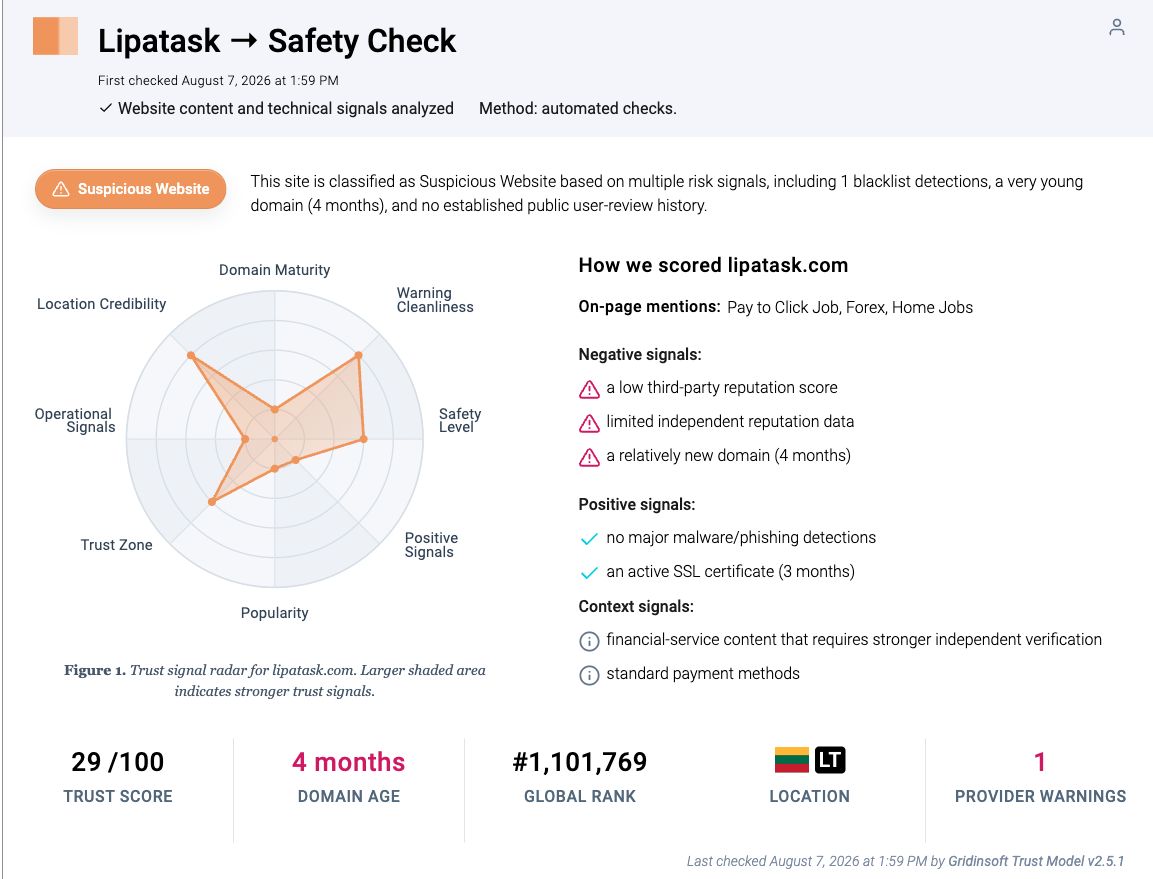
The dated Gridinsoft Website Reputation Checker report for LipaTask flags a very young domain, limited independent reputation data, and a provider warning. It also records positive context: an active SSL certificate and no major malware or phishing detections at the time of the check. That distinction matters. A low reputation result is a reason for caution and further verification, not proof that visiting the page infected a device or that one named operator committed fraud.
What LipaTask claims and what still needs proof
When reviewed, LipaTask described online work involving surveys, videos, social tasks, chatting, and other simple activities. It also promoted referral earnings and fast withdrawals. Before relying on any of those claims, ask for evidence that does not come from the same website or the person who referred you.
| Observed claim | What to verify independently |
|---|---|
| KES 100 activates access to tasks | Why a worker must pay before earning, who receives the payment, the legal company name, and a written refund policy. |
| Simple tasks can produce high daily earnings | Which real businesses buy the work, the rate for each task, and whether the economics make sense without referral fees. |
| A dashboard shows earnings immediately | Whether unrelated users can withdraw the displayed amount without paying another fee or recruiting someone. |
| M-Pesa, Airtel Money, and bank withdrawals are available | The receiving company details, payout records from sources you can authenticate, minimums, delays, fees, and dispute process. |
| Referral commissions are paid after activation | Whether revenue comes from genuine task buyers or mainly from new participants’ activation payments. |
Do not submit an ID merely because a support page calls it KYC. A real identity-verification process should identify the legal controller, explain why the data is needed, state how it is protected, and provide a usable privacy contact. A form and a lock icon do not establish those facts.
Why the KES 100 activation fee is a warning sign
The amount may look small enough to risk, which is precisely why the decision should be based on the business model rather than the price. Legitimate employers pay workers. They do not normally require a candidate to send money to unlock wages. The US Federal Trade Commission describes task scams as platforms that show supposed commissions and then demand the worker’s own money to continue tasks or release earnings.
LipaTask’s advertised activation payment resembles the first part of that pattern, but the evidence reviewed here does not establish every later step. The critical stop signal is any request for more money after the first payment: a withdrawal fee, tax, negative-balance deposit, account upgrade, verification charge, security deposit, or payment to correct a task. Do not send another amount to recover the first one.
A small successful payout would not settle the question either. Some task schemes use an early payment to build confidence before asking for more. Judge the platform by independently verifiable ownership, a sustainable source of task revenue, transparent contracts, and withdrawals that do not depend on deposits or recruitment. Our guide to the fake-earnings and withdrawal pattern explains why dashboard numbers and small initial payouts need separate verification.
What to do after using LipaTask
| Your exposure | What to do now |
|---|---|
| You only visited the public website | Close it and do not pay. A visit alone does not prove malware infection. Remove any notification permission only if you granted one, and investigate only if downloads, redirects, or new apps appeared. |
| You created an account with a unique password | Do not add money or identity data. Delete stored payment details if possible, keep copies of the terms and messages, and monitor the email address for follow-up scams. |
| You reused a password | Change it first on your email account, then everywhere else it was reused. Enable multi-factor authentication and review active sessions. Follow the account-recovery checklist if you see unfamiliar logins or password-reset messages. |
| You paid through M-Pesa, Airtel Money, a bank, or a card | Save the receipt, transaction code, recipient name or number, date, amount, chat, and page screenshots. Contact the payment provider immediately through its official app, website, or known support number and ask whether reversal or fraud review is still possible. |
| You shared an ID, phone number, or financial details | Ask the relevant provider how to flag the account, watch for SIM-swap or account-reset attempts, change exposed PINs, and keep identity documents out of further chats. Do not send a second photo or selfie to “unlock” a refund. |
| The conversation moved to WhatsApp or Telegram | Stop responding, preserve the username, number, invite link, and payment instructions, then block and report the contact. Do not install a “support,” “task,” or screen-sharing app they send. |
| You downloaded or installed an app, APK, extension, or file | Disconnect the device from sensitive accounts, remove the unknown item, review browser extensions and installed apps, and scan before signing back into email, banking, or mobile-money services. |
If you paid through M-Pesa
- Do not delete the M-Pesa confirmation message. Copy the transaction code and save a screenshot.
- Contact Safaricom immediately through an official channel and describe the transfer as suspected fraud. Ask whether the transaction can still be suspended, reversed, or reviewed; recovery is not guaranteed.
- If anyone asks for your PIN, balance, one-time code, or another transfer to process a reversal, stop. Safaricom advises customers not to disclose M-Pesa details or follow instructions from unknown callers.
- Report the recipient number and preserve every message. If money or identity data is at risk, use the broader online-scam recovery sequence for bank, account, and evidence steps.
Act quickly, but do not let urgency push you into another payment. “Recovery agents” who promise a guaranteed refund for an upfront fee are a second scam risk.
If you downloaded a task app or file
The public claims reviewed for this article do not prove that LipaTask distributes malware. A device scan becomes appropriate only if you downloaded an APK or executable, installed an extension or remote-support tool, allowed notifications that now redirect you, or noticed a new process, app, or persistent browser change. In that case, run a full Gridinsoft Anti-Malware scan and review the detections, installed apps, startup entries, browser extensions, and scheduled tasks before entering financial credentials again. A scan can find device-side threats; it cannot reverse a payment or prove that an earning balance is real.
If the page or email made you download an invoice, coupon, tracking app, browser extension, or support tool, scan the PC before opening it again or logging into sensitive accounts.
Check a downloaded task appHow to verify an online task job before paying
- Identify the legal business. Find a registered name, physical address, company number, and jurisdiction that match the website and payment recipient.
- Verify the work buyer. Ask which independent companies purchase the surveys, ratings, videos, or social actions and why the stated pay is sustainable.
- Check the hiring process. A genuine employer should explain duties, hours, pay, and supervision before requesting sensitive information. Use our job-offer verification checks even if the offer did not start on Facebook.
- Read the payment sequence. Stop if access, earnings, withdrawals, taxes, corrections, or higher-value tasks require deposits from the worker.
- Separate evidence from promotion. Referral screenshots, dashboard balances, social videos, and testimonials controlled by promoters are not independent payout evidence.
- Inspect privacy and dispute terms. Determine who stores IDs and payment data, how to request deletion, and where a complaint can be filed outside the platform.
- Wait before acting. Search the exact domain with terms such as review, complaint, withdrawal, and scam. A lack of complaints on a new domain is not the same as a good track record.
FAQ
Does a KES 100 activation fee prove LipaTask is a scam?
No single fee proves a specific fraud. It is still a serious warning sign because a worker is being asked to pay before earning. Do not rely on the amount being small; verify the legal company, source of task revenue, and independent withdrawal history first.
Should I pay a fee to withdraw a LipaTask balance?
No. Stop if a platform asks for a tax, verification charge, upgrade, deposit, negative-balance payment, or other transfer to release earnings. Sending more money does not make a dashboard balance independently real.
Can M-Pesa reverse an activation payment?
Contact Safaricom immediately through an official channel, provide the transaction code, and ask what options remain. A reversal may not be possible, especially after money has been withdrawn or transferred, so do not treat recovery as guaranteed.
Does visiting LipaTask.com mean my phone or PC has malware?
No. A visit or a low reputation score is not proof of infection. Scan or investigate when you downloaded or installed something, granted unusual permissions, enabled unwanted notifications, or see persistent redirects, apps, or processes.
What should I do if I reused my password?
Change the password on your email account first, then every account that used the same password. Enable multi-factor authentication, review active sessions, and watch for password-reset or login alerts.
References
- Federal Trade Commission. “How to spot and avoid task scams.” Consumer Advice, August 2025, accessed August 9, 2026. consumer.ftc.gov/consumer-alerts/2025/08/how-spot-avoid-task-scams
- Safaricom PLC. “M-PESA Fraud.” Safaricom Fraud Awareness, accessed August 9, 2026. safaricom.co.ke/fraud-awareness/m-pesa-fraud