Manic Android malware is a newly identified banking-trojan and spyware family that can capture passwords, authentication codes, banking PINs, messages, files, and on-screen activity after a malicious app gains powerful permissions. If you installed an unfamiliar app and granted Accessibility or notification access, stop using that phone for banking or identity services, isolate it, and recover affected accounts from a different trusted device. Removing the app is important, but it cannot undo credentials or sessions already stolen.
Choose the response that matches your exposure
| What happened | Risk and what to do |
| You only read about Manic and did not install an unknown app | There is no evidence that the name alone means your phone is infected. Keep Android and Play Protect updated, and avoid APKs from messages, ads, or unofficial download pages. |
| You downloaded an APK but did not install it | Delete the unwanted file without opening it. If you need to examine a retained download, use Trojan Scanner’s Menu → Check a file → Choose file; you do not need to install the APK to check it. Do not download the suspect app again to test it. |
| You installed an unfamiliar app but denied Accessibility, notification, overlay, and device-admin access | Uninstall it, run Play Protect, update Android, and review recently installed apps. The risk is lower, but an untrusted sideload still needs removal. |
| You granted Accessibility, notification, overlay, SMS, or device-admin access | Treat the phone as compromised. Disconnect its radios, revoke every special role, remove the app, and start account recovery from a clean device. |
| You opened banking, payment, eID, email, authenticator, or wallet apps after granting those permissions | Contact the bank or provider immediately from another device. Freeze affected payment methods when advised, revoke sessions, and replace exposed credentials and recovery codes. |
What is Manic Android malware?
ThreatFabric reported Manic on August 20, 2026 after tracing related activity to February. The researchers describe it as an Android fraud platform that combines banking-malware features with mobile spyware and remote device control. Its observed targeting is concentrated on Ukraine, including financial, government, identity, and messaging services, but also covers European financial apps and global fintech, cryptocurrency, email, browser, and authenticator apps.
The analyzed malware monitors 169 app package IDs. That number describes the research set, not 169 confirmed victim organizations or a claim that every user of those apps is infected. ThreatFabric’s public report does not establish a single consumer-facing app name or a confirmed delivery route, so a random app should not be called Manic from its icon or filename alone.
Once its implant has Accessibility and notification access, Manic can observe text entered on the device, classify likely passwords and authentication codes, capture notification and SMS content, collect files and location data, monitor the screen, and let an operator interact with the phone remotely. It can cover activity with black, fake, or update screens and may remove its launcher icon. Its banking PIN capture can intercept taps on the real keypad rather than showing a complete fake banking screen, which makes a normal-looking app session an unreliable sign of safety.
How Manic’s phone-to-phone relay works
Manic’s distinctive feature is a store-and-forward relay. If an infected phone cannot reach the attacker’s server directly, it can encrypt collected data, keep it in a local queue, and search for another infected phone nearby. The devices can communicate over Wi-Fi Direct, Bluetooth RFCOMM, or Bluetooth Low Energy. A peer with internet access can forward the package, and the research found support for multi-hop routes.
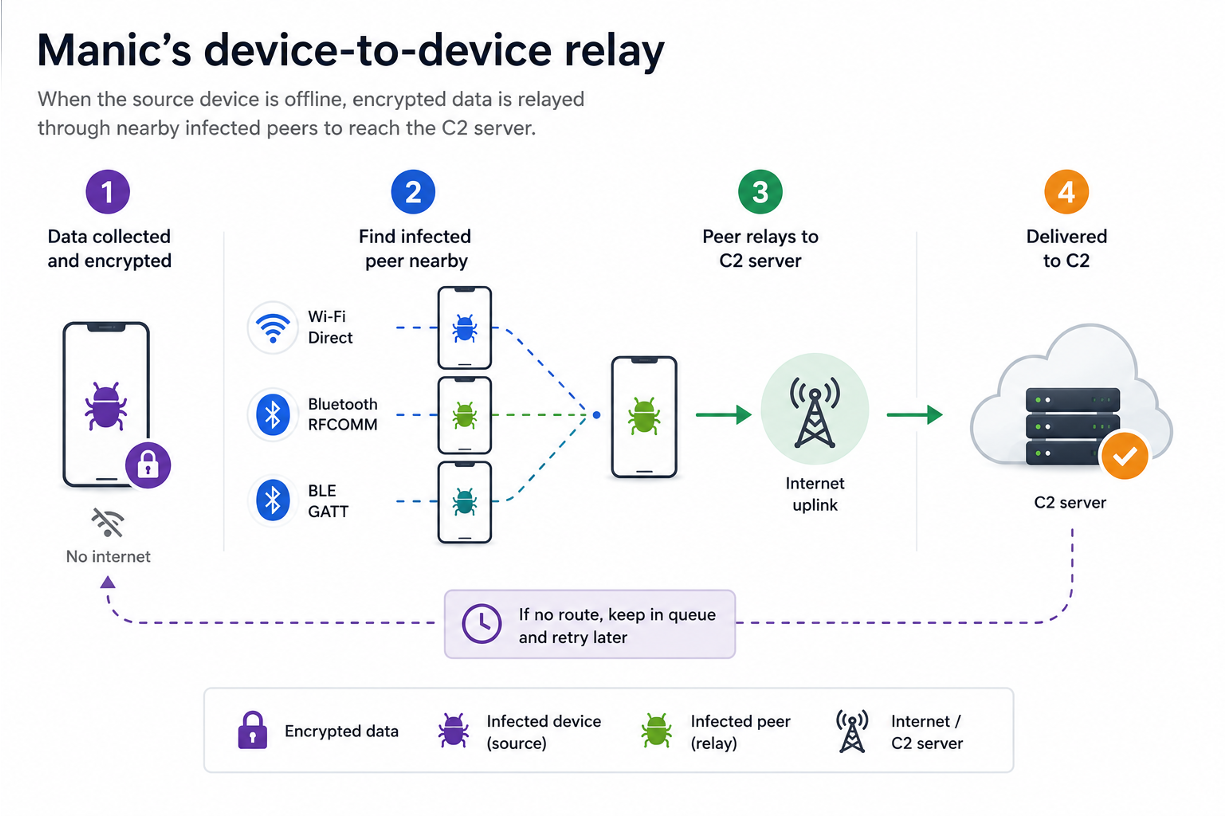
This does not mean an ordinary nearby phone becomes infected merely because Bluetooth is on. The relay requires another device already running compatible malware. It does mean that removing mobile data or disconnecting from one Wi-Fi network may not fully isolate a compromised phone. Turn off Wi-Fi and Bluetooth separately, keep the suspect device away from other phones when practical, or power it down until you can follow the response steps.
Warning signs and permissions to check
There is no single visible symptom that proves Manic is present. Battery drain, heat, or data use can have harmless causes. Stronger evidence is an unfamiliar recently installed app combined with security-sensitive permissions or unexplained behavior.
- An unknown service is enabled under Accessibility or Installed services.
- An unfamiliar app has notification access, display-over-other-apps permission, device-admin control, all-files access, or permission to install unknown apps.
- The app icon disappears, but the app remains listed in Settings.
- Permission prompts are hidden by a black screen, a fake update, or another full-screen overlay.
- Banking taps seem normal while unauthorized sessions, transfers, or credential-reset messages appear later.
- Play Protect is disabled, uninstall controls are blocked, or sensitive permissions return after reboot.
For a broader symptom and permission checklist, use the Android malware removal guide. If you do not know whether the problem is an app, a stolen account, or a fake warning, compare the evidence in How to Tell If Your Phone Is Hacked.
How to isolate and remove a suspicious Android app
- Stop sensitive activity. Do not open banking, payment, email, eID, authenticator, password-manager, or cryptocurrency apps on the suspect phone.
- Isolate every radio. Turn on airplane mode, then verify that Wi-Fi and Bluetooth are also off. Some phones let those radios remain active in airplane mode. If you cannot trust the screen or settings, power the phone down.
- Use another trusted device. Call the bank from a number on the physical card or official website. Do not trust a phone number, notification, or search result displayed on the suspect device.
- Review installed apps and findings. Once you have regained control of the phone, open Trojan Scanner for Android, update its threat database, and tap Start. It checks installed apps even when their icons are hidden. Review each app name and reason for concern, remove unwanted apps, and confirm Android’s uninstall prompt. Anti Spy can also help review suspicious combinations of hidden-app behavior and sensitive access; a risk warning is not by itself proof of spying.
- Resolve access that blocks removal. If the suspicious app interferes with the screen or uninstall controls, revoke its access under Accessibility, Notification access, Display over other apps, Device admin apps, Install unknown apps, VPN, Usage access, and default SMS or Phone roles. Change only the suspect app’s access. Menu names differ by phone maker.
- Use Settings or Safe Mode when needed. Open Settings → Apps to uninstall the identified app. Do not rely on the launcher because Manic can hide its icon. If Uninstall is unavailable, recheck device-admin and Accessibility roles, then use the manufacturer’s official Safe Mode procedure and try again.
- Restore Android protection. Enable Play Protect, run a scan, install Android and Google Play system updates, and remove any remaining unknown APKs from Downloads and messaging folders.
- Restart, scan again and verify. Review the findings and recheck every special-access list. If the app, permission, overlay, or suspicious activity returns, stop troubleshooting on the device and move to the reset branch below. Keep the bank, identity and account response separate: removing an app cannot cancel stolen credentials or reverse a payment.
Recover bank, identity, email, and crypto accounts from a clean device
Account recovery is required when you used a sensitive app after granting high-risk permissions, even if the suspicious Android app is now gone. Manic can observe the screen, notifications, authentication codes, and user input, so changing a password on the same phone can expose the replacement password.
- Banking and payment accounts: report a possible mobile-device compromise, review pending and completed transfers, and follow the provider’s instructions for freezing cards, replacing credentials, or disputing activity.
- Primary email and Google account: change the password, remove unknown sessions and recovery methods, inspect forwarding rules, and replace reused passwords. Email often controls resets for other accounts.
- Government and eID services: contact the official service when identity credentials or approvals were used on the phone. Follow its revocation and re-enrollment process rather than relying only on an app reinstall.
- Authenticator apps: rotate recovery codes and re-enroll affected accounts where the provider permits it. Do not assume app-based codes were safe if the screen and notifications were observable.
- Cryptocurrency wallets and exchanges: revoke sessions and API keys, contact the provider’s fraud team, and move assets only under trusted guidance. If a seed phrase was displayed or typed, treat that wallet as exposed and migrate it from a clean environment.
- Mobile carrier: verify account PINs, SIM/eSIM changes, and call forwarding. Replace anything altered or exposed during the incident.
Another current Android banking-trojan example is Rokarolla. The families differ technically, but the same recovery principle applies: removing the visible app does not cancel stolen credentials or transactions.
When should you factory-reset the phone?
A factory reset is the safer response when you cannot identify the installed payload, cannot revoke a permission, uninstall remains blocked, the app or special access returns after reboot, Play Protect keeps being disabled, or banking and identity apps were used while remote-control permissions were active. A reset can remove ordinary malicious apps and their local settings, but it cannot guarantee recovery from every possible compromise and cannot undo stolen data.
Back up only essential photos and documents, not APKs or a full app/settings restore. Use the phone manufacturer’s official erase procedure, set the phone up as new, update it before signing in, and reinstall apps only from official stores. Read what a factory reset removes and what it does not before restoring data.
How to reduce Android banking-malware risk
- Install apps from Google Play or the device maker’s official store, and verify the developer and download path.
- Reject Accessibility, notification, overlay, device-admin, or unknown-app permissions that are unrelated to the app’s stated purpose.
- Keep Play Protect, Android security updates, and Google Play system updates enabled.
- Use unique passwords and phishing-resistant multi-factor authentication where available.
- Never approve a bank transfer, wallet address, or identity request solely because the screen on one phone looks normal.
- Keep provider recovery codes offline and know how to contact banks and identity services without using the potentially infected device.
FAQ
Was Manic distributed through Google Play?
ThreatFabric’s August 20 report describes active distribution but does not establish a Google Play campaign or one confirmed consumer app name. Do not claim an app is Manic from its icon alone; investigate its source, permissions, and security detections.
Does turning off mobile data stop Manic?
Not necessarily. The analyzed malware can queue encrypted data and relay it through another infected phone over Wi-Fi Direct or Bluetooth. Turn off Wi-Fi and Bluetooth as well, or power the suspect phone down.
Is uninstalling the suspicious app enough?
Uninstalling is necessary, but it cannot revoke information already captured. If you used banking, email, eID, authenticator, or wallet apps after granting high-risk permissions, recover those accounts from a clean device.
Can a factory reset guarantee that Manic is gone?
No single step can guarantee that no compromise occurred. A clean setup after a factory reset is a strong response to ordinary malicious apps, but it does not reverse stolen credentials, sessions, recovery phrases, or financial transactions.
References
- ThreatFabric Mobile Threat Intelligence Team. “Manic: Blend between Banking Malware & Spyware.” ThreatFabric, August 20, 2026; accessed August 20, 2026. ThreatFabric research report.
- Bill Toulas. “New Manic Android malware can exfiltrate data through nearby devices.” BleepingComputer, August 20, 2026; accessed August 20, 2026. BleepingComputer report.