RedC2 4.0 hides a Linux backdoor inside working npm calendar utilities, and importing a package starts the payload. TrendAI’s August 20 analysis identifies 14 packages carrying RedShell. For a developer finding one in a project, the urgent question is which Linux environment loaded it—not simply whether installation scripts were disabled.
Why an ordinary build can cross the boundary
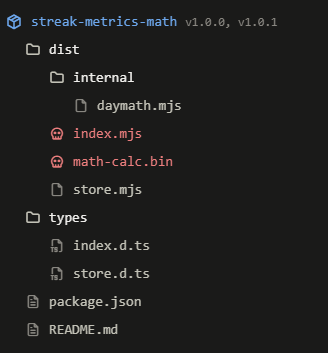
The package entry point, dist/index.mjs, launches a bundled ELF while still exposing functional date helpers. That makes a successful test a poor safety signal. npm’s ignore-scripts setting controls package scripts; it does not turn subsequently imported JavaScript into inert data.
A developer can install dependencies with scripts disabled and later start a test, development server, or build that loads the dependency. Review those later jobs as well as installation. This differs from the Packagist postinstall-hook incident, where the installation step was central.
Check the exact package and version
The confirmed versions are streak-metrics-math 1.0.0 and 1.0.1, plus version 1.0.0 of each package below:
kit-map-vimstreak-map-cachestreak-map-kitmap-streak-kitstreak-cache-mapstreak-calc-metricsstreak-calc-mathstreak-math-abzstreak-metricsazstreak-math-metricsstreak-metricazbdstreak-metricsazbstreak-kit-map
Search saved manifests and lockfiles as text first. Do not import a suspect dependency to find its version or test whether it works.
Turn a match into an exposure decision
Name only in documentation
Next decision: Find the actual dependency record. A mention alone does not identify an affected host.
Lockfile or cache match
Next decision: Preserve it and find which jobs used that version. A stored package does not establish execution.
Installed, with no known import
Next decision: Pause jobs using that workspace. Review test, build and server logs before deciding it never loaded.
Imported in a Linux runtime
Next decision: Contain that workstation, runner or container. Inventory credentials and mounted resources available to its account.
Unexpected child process or network activity
Next decision: Escalate as a suspected compromise and preserve runtime evidence before cleanup.
Record the job ID, time, host, user, package version and subsequent artifact for each match. On a Windows PC using WSL, identify the Linux environment that ran Node. For a container, include mounted directories and injected secrets; an ephemeral container does not make accessible credentials disposable.
Recover the environment and the release path
- Stop reuse. Remove the affected runner from scheduling and isolate the suspect runtime. Keep a copy of lockfiles, job logs and relevant process/network evidence for responders.
- Scope access. Make a list of repository, registry, cloud, SSH and database credentials reachable by that runtime. From a clean device, revoke exposed tokens and sessions and issue replacements. Avoid writing replacement secrets back to the old runner.
- Rebuild cleanly. Remove the dependency from a reviewed source tree and regenerate the dependency resolution in a trusted environment. Rebuild an affected disposable runner or container from a known-good base. Deleting
node_modulesalone is not a recovery verification. - Review persistence. For retained hosts, have responders inspect startup mechanisms and changes under the affected account. The analyzed implant supports cron, shell-startup, systemd and XDG persistence; capability does not establish which method ran on this host.
- Hold affected outputs. Identify packages, images or deployments produced after the suspected import. Review their provenance and contents before release, and rebuild questionable outputs. The separate Megalodon CI incident explains why the release path belongs in a dependency investigation.
The analyzed package payload is Linux-specific. The framework’s broader advertised features do not demonstrate Windows or macOS infection through these packages, nor prove every capability executed. Close the investigation with recorded host and release checks, rather than a successful dependency reinstall alone.
In the newer NEBULA fake AI SDK campaign, an npm installation hook delivers a Windows RAT before import. Compare the execution trigger when reviewing an exposed development machine or CI job.
References
- Aliakbar Zahravi. Prompting the Payload: How an npm Supply Chain Attack Delivers the RedC2 AI-Powered Linux Implant. TrendAI, August 20, 2026.
- npm. Configuration: ignore-scripts. npm CLI documentation, accessed September 7, 2026.