A familiar “Verify you are human” screen can become the first step in a much larger compromise. The StopAndProtect campaign places fake CAPTCHA instructions on hacked WordPress sites, convinces Windows visitors to run a copied command, then uses other compromised sites to deliver malware, receive commands, and store stolen data.
Check Point Research says it identified close to 2,000 compromised WordPress domains tied to the operation. The researchers also found screenshots and archives exposed by the attackers, but those totals should not be read as a precise victim count: some records included sandboxes and researcher systems. What is clear is the unusual reuse of legitimate sites across several attack roles.
The safety boundary is simple: a legitimate CAPTCHA stays in the browser. If a page asks for Win+R, Ctrl+V, PowerShell, Command Prompt, or Enter, close it. If you already ran the command, assume the Windows device and its signed-in sessions may be exposed.
How the StopAndProtect attack works
The campaign was first noticed in mid-May 2026. A visitor reaches a compromised WordPress page and sees a fake verification prompt. The prompt copies or supplies a command, then tells the visitor to open the Windows Run dialog and execute it. That human action starts a multi-stage chain: two PowerShell stages lead to a .NET loader/downloader, which can retrieve additional modules.
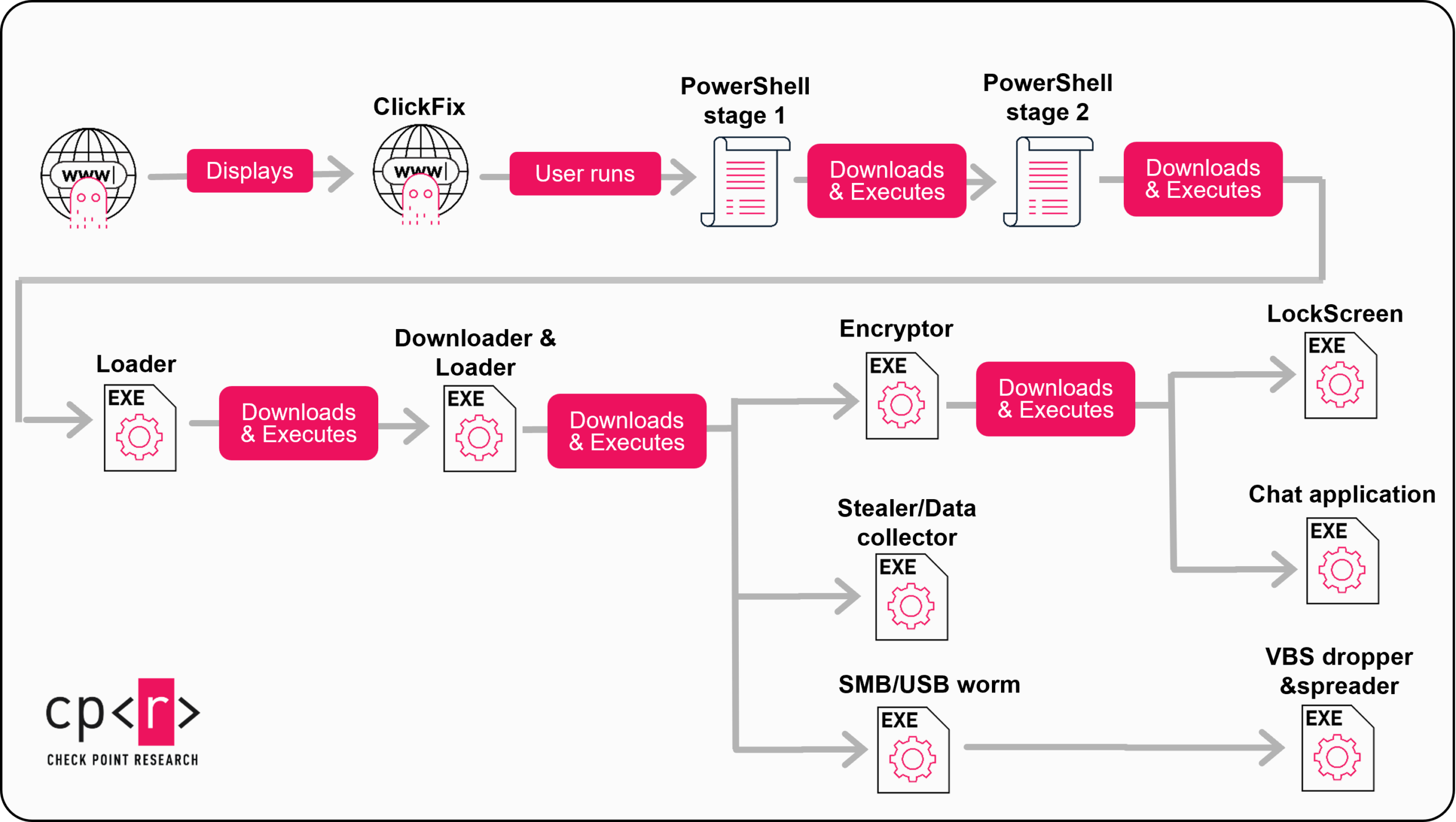
The reported modules cover several kinds of harm. They can steal credentials and files, encrypt files, show a lock screen, spread through SMB shares or USB drives, and load more components. Check Point stresses that ransomware was not delivered to every affected system; in many cases the quieter outcome was data theft. The campaign name therefore should not be treated as the name of one single, fixed payload.
Compromised WordPress sites do more than display the lure. In the observed infrastructure, hacked sites hosted attack stages, acted as command-and-control endpoints, and stored logs or exfiltrated data. That is why this incident has two response tracks: one for the person who encountered the fake CAPTCHA and another for the owner of a site that may have been abused.
What to do depends on what happened
You only saw the prompt
Close the tab. Do not return through the same ad, message, or redirect. Seeing the page alone does not prove Windows malware ran.
You clicked or copied, but did not run anything
Close Run, PowerShell, or Command Prompt without pressing Enter. Copy harmless text to replace the clipboard contents. Check browser downloads for an unexpected file.
You ran the command
Treat the PC as exposed. Disconnect it from the network, preserve the command or a photo for investigation, scan for malware and persistence, and recover accounts from a clean device.
A lock screen appeared or files changed
Do not keep testing files or reconnecting shares. Isolate the device and preserve an untouched copy of affected data before recovery work.
You own the WordPress site
Preserve logs, take the site out of rotation if it is serving the lure, and investigate the application, hosting account, credentials, and caches—not only the visible page.
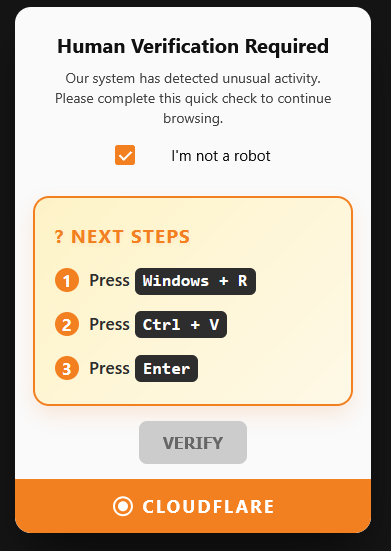
The screen may imitate Cloudflare or another familiar verification service, but the keyboard sequence is the giveaway. For a broader recognition checklist, see our Verify You Are Human scam guide. If you need a generic cleanup path rather than the details of this campaign, use the fake CAPTCHA ClickFix recovery guide.
If you ran the fake CAPTCHA command
- Disconnect the Windows device. Turn off Wi-Fi or unplug Ethernet. Avoid email, banking, work portals, crypto wallets, password managers, and browser synchronization on that PC.
- Preserve useful evidence. Photograph the page and command if they are still visible, or note the time and site. Do not run the command again. On a work device, contact the security team before deleting files or clearing logs.
- Run full security scans. Check downloads, Temp and AppData, startup entries, scheduled tasks, services, browser extensions, and security exclusions. A visible payload can disappear while a loader, task, service, browser change, or Defender exclusion remains.
- Check nearby systems and removable drives. StopAndProtect modules include SMB and USB spreading functions. Do not reconnect shared drives or USB media until the original device has been assessed.
- Recover accounts from a clean device. Start with primary email and the password manager, then work, finance, shopping, social, and crypto accounts. Change passwords, revoke active sessions, remove unknown recovery methods, and review forwarding rules and connected apps.
- Handle encryption carefully. If files were encrypted, keep an untouched copy before attempting repairs. Do not assume paying will restore every file or prove that stolen data was deleted.
Removing the obvious file is not enough because the observed chain can install several stages and separate persistence from the final payload. A complete scan helps find loaders, malicious scripts, scheduled tasks, altered browser components, and other remnants that a manual file deletion can miss.
If your WordPress site may be part of StopAndProtect
Do not assume every affected site was breached through the same flaw. The primary report describes one observed site that was almost five years out of date and had many known vulnerabilities, but it does not establish a universal entry vulnerability for the entire campaign. Treat the initial access method as an investigation question.
- Contain without destroying evidence. Preserve access, error, application, hosting, and CDN logs. If the site is serving a lure or payload, place it in maintenance mode or route visitors to a clean holding page.
- Review privileged access. Check WordPress administrator accounts, hosting and SFTP users, deployment keys, database users, and recently issued API credentials. Remove unknown access and rotate secrets after the environment is controlled.
- Inspect beyond normal plugins. Check
wp-content/mu-plugins, uploads containing executable PHP, active themes, drop-ins, cron jobs, recently modified files, and unfamiliar code loaded before the normal page. The campaign report describes a malicious must-use plugin among the observed artifacts. - Compare against a known-clean source. Reinstall WordPress core, plugins, and themes from trusted packages or restore a verified clean backup. Update everything still in use and remove abandoned components rather than merely disabling them.
- Look for infrastructure abuse. Search outbound requests and web logs for unusual upload/download traffic, command polling, archive creation, or large transfers. A page that looks clean may still be hosting a stage or receiving stolen data.
- Purge every delivery layer. Clear WordPress, reverse-proxy, object, CDN, and browser-facing caches only after the origin is clean, then verify from an unrelated network and a logged-out browser.
WordPress compromise can also be used to hide instructions and command traffic without following the exact StopAndProtect chain. Our report on a Steam-based C2 WordPress backdoor explains that adjacent pattern. Do not copy indicators from one case into another and call the investigation complete.
What the numbers do—and do not—show
Check Point found close to 2,000 WordPress domains in actor-controlled data, about 31,000 screenshots collected from mid-May through the end of July, more than 700 archives, and over 6,000 unique IP addresses as of July 24. These figures demonstrate scale, but they are not interchangeable with confirmed human victims. Automated analysis environments and researchers appeared in the exposed data.
The practical conclusion is narrower and more useful: a trusted-looking WordPress page can be the delivery surface, and the same compromised web estate can support later stages. Visitors should judge the requested action, not the apparent reputation of the site. Site owners should investigate the server and account layer, not only remove the visible fake CAPTCHA.
References
- Jaromír Hořejší. “Thousands of Hacked WordPress Sites, One Operation: Unmasking StopAndProtect.” Check Point Research, August 18, 2026. Primary research report.