A streaming website can expose an unpatched iPhone to spyware even if its visitor never installs a Composer package. Socket’s August 31 report identifies 13 malicious Packagist themes whose browser scripts target older iPhones. Its analyzed exploit tables cover iOS 18.4–18.6.x; the payload collects device data and cryptocurrency-wallet secrets. This is not evidence that the same chain defeats a fully updated iPhone. [1]
For a visitor, the first decision is whether the phone is current and whether there is evidence of account misuse. For a website owner, it is whether an installed theme has already placed hostile code in pages served to other people. Those are separate investigations.
Check the phone before returning to the site
Open Settings → General → Software Update and install the latest version offered for your supported iPhone. Apple recommends backing up the device, connecting it to power and using Wi-Fi for a wireless update. If an update cannot complete, follow Apple’s troubleshooting path rather than installing a “security update” offered by the streaming page. [2]
Your situation — What to do next
- You only read the report: Check your installed iOS version. A news headline is not a diagnosis of your phone.
- You visited a suspect site on an old version: Stop using that site, record the address and approximate visit time, and update. Seek qualified incident help if there are account alerts or credible exposure evidence.
- You see an unfamiliar login or transaction: Use a separate trusted device to contact the affected service through its official app or site. Preserve alerts and transaction identifiers.
- You operate a site using a suspect theme: Stop serving the affected deployment and investigate its packages, published assets and settings before restoring service.
What a software update can and cannot establish
Socket says the observed chain uses previously fixed flaws and targets devices left behind on old releases. The relevant WebKit stages were addressed in iOS 18.7.3 and 26.2; those are historical fix boundaries, not recommendations to install an old release today. [1]
Updating reduces exposure to known fixed flaws. It does not tell you whether an earlier visit succeeded, revoke a stolen session, or retrieve information already copied. Conversely, a redirect or an unusual advertisement alone does not establish that the spyware ran. Keep the incident timeline separate from assumptions about the screen you saw.
A separate September report describes a fake iPhone Duo preorder that loads DarkSword before its form is submitted. It illustrates why declining a suspicious purchase is not the same as preventing a browser exploit attempt on an unpatched device.
Why wallet and account recovery need a trusted device
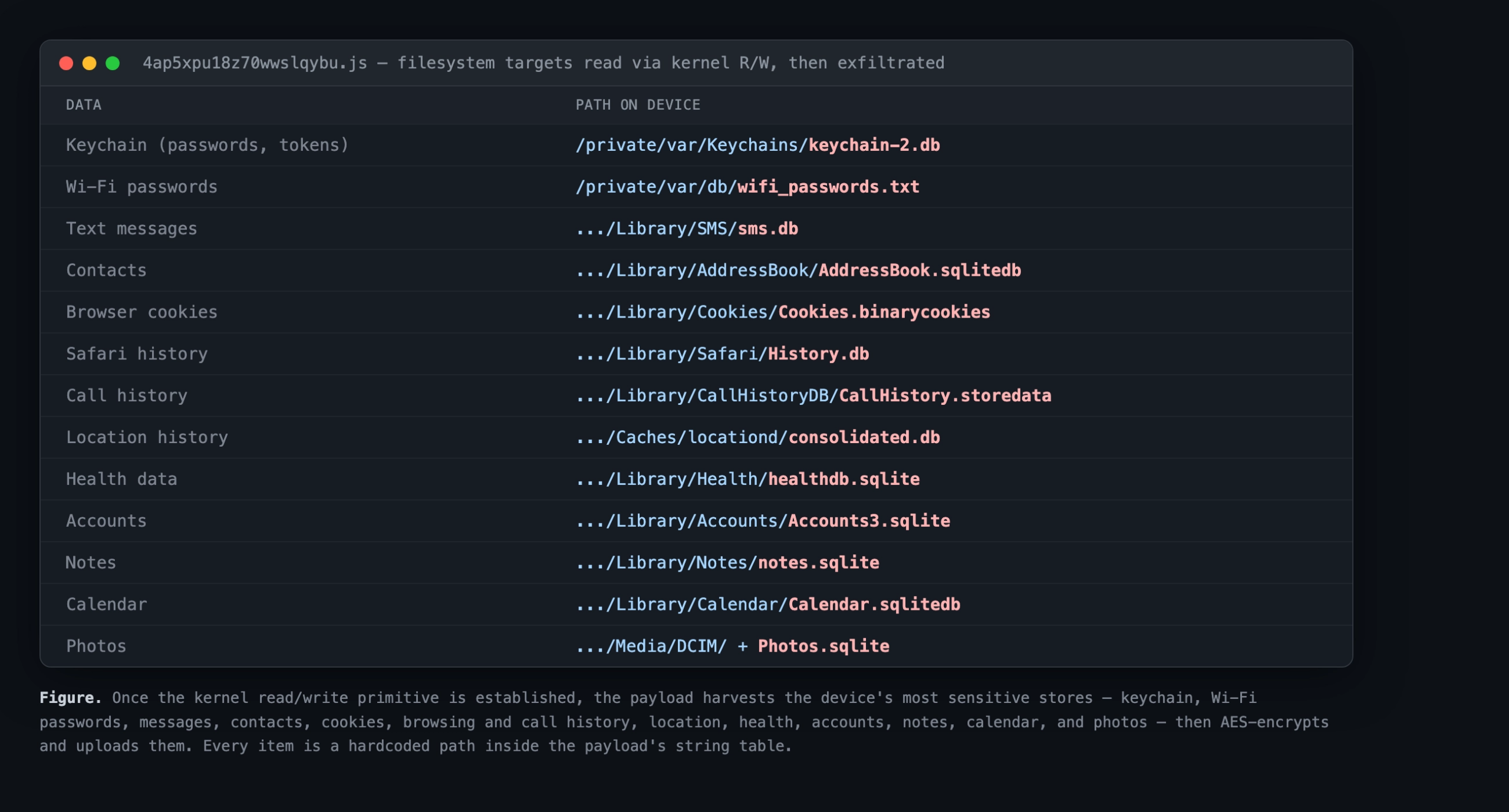
The research diagram identifies stores the payload seeks, including passwords, messages and cookies. It is evidence about malware capability, not a list of files confirmed stolen from every visitor.
If there is credible evidence that wallet recovery material was exposed, treat the wallet as a separate security incident. Use the wallet provider’s independently located support documentation from a clean device. Never paste a recovery phrase into a chat, a website “verification” form or a purported recovery service. Changing an app password should not be treated as proof that an exposed recovery phrase is safe again. No cleanup tool can promise to reverse a completed transfer.
Website owners must inspect the deployed site
Preserve your package lock file, deployment revision and relevant access logs before making changes. Compare the installed theme with the confirmed package list in the research, then review what actually reached the public server. Include built JavaScript, cached assets and administrator-controlled custom script settings in the scope. Replacing a dependency in source control is not sufficient evidence that every visitor now receives clean files.
This differs from the Packagist postinstall compromise of a developer machine. Here, the response must follow code into the visitor’s browser. A clean developer laptop does not establish that an already deployed website is clean.
Before reopening an affected deployment, document the trusted replacement revision, the assets removed, cache invalidation and the review of credentials handled by the compromised installation. Use controlled validation; do not ask visitors to reopen a suspect page as a test.
References
- Socket. Research on malicious Packagist themes and iOS spyware. August 31, 2026.
- Apple Support. Update your iPhone or iPad. Accessed September 7, 2026.