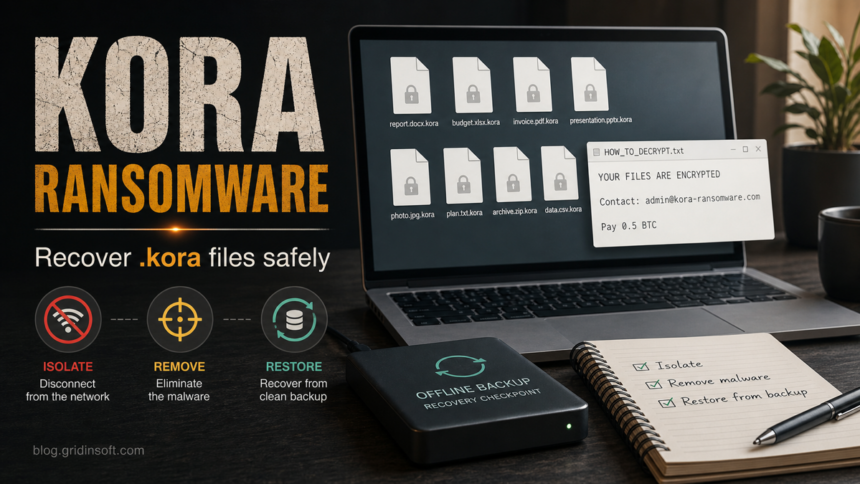
Kora ransomware is a file-locking threat reported with the .kora extension and a ransom note named HOW_TO_DECRYPT.txt. If files such as report.docx or photo.jpg now end in .kora, disconnect the affected computer first, keep copies of the encrypted files and note, and do not restore backups until the active malware is removed. Cleanup can stop more damage, but it does not decrypt files that were already locked.
The reported Kora note is short: it says the files are encrypted, points victims to [email protected], and demands 0.5 BTC. Treat those details as identification clues, not recovery instructions. Paying does not guarantee a working decryptor, and contacting the attacker can increase pressure or expose more information.
What Is Kora Ransomware?
Kora is ransomware: malware designed to encrypt files and then demand payment for a private key. Current public samples are described with the .kora file extension and the HOW_TO_DECRYPT.txt note. A file named invoice.pdf can become invoice.pdf.kora; simply renaming it back to invoice.pdf will not repair the encrypted content.
Some security reports also associate Kora samples with generic detections such as Trojan:Win32/Wacatac.B!ml. That does not mean every Wacatac alert is Kora ransomware. It means a Kora-related file may be detected through a broad trojan or machine-learning name, so the file path, ransom note, and extension are important context.
How To Recognize A .kora Infection
| Sign | What it means |
|---|---|
Files end with .kora |
The files were likely encrypted by Kora or a related build. Renaming the extension does not decrypt them. |
HOW_TO_DECRYPT.txt appears in affected folders |
Keep a copy of the note. It helps identify the ransomware and can be useful if a legitimate decryptor appears later. |
The note mentions [email protected] and 0.5 BTC |
These are attacker-controlled contact and payment details. Do not treat them as a safe support channel. |
| Security tools show Wacatac or generic ransomware names | The visible ransomware may have arrived through a loader, trojan, archive, or script. Cleanup must check for persistence, not only the ransom note. |
Kora Ransom Note Example
The known note is brief and direct.
HOW_TO_DECRYPT.txt

YOUR FILES ARE ENCRYPTED
Contact: [email protected]
Pay 0.5 BTC
If your note includes a different extension, wallet, deadline, leak threat, or contact address, do not assume it is the same build. Preserve the evidence and identify the ransomware before you make recovery decisions.
First Steps Before Recovery
- Isolate the system. Disconnect Ethernet, Wi-Fi, VPN, mapped drives, and external drives. Do not keep shared folders attached while encryption may still be active.
- Preserve evidence. Save the ransom note, several encrypted files, screenshots of alerts, and the detection path if your security tool shows one.
- Do not run random decryptors. A decryptor must match the ransomware family and build. Fake decryptors can install more malware.
- Do not restore over an infected system. Restoring clean files while a loader or scheduled task remains can encrypt the backup copy too.
- Use a clean device for accounts. If the infected PC was used for email, banking, cloud storage, or password managers, change passwords from a separate clean device.
How To Remove Kora Ransomware
Removal is necessary before recovery, but it is a different task from decryption. The goal is to stop active malware, loaders, startup entries, scheduled tasks, and additional payloads from running again.
- Boot the affected PC with networking disabled if possible.
- Check whether encryption is still changing file timestamps or creating new
.korafiles. If it is, keep the machine isolated. - Run a full security scan and remove detected ransomware, trojans, scripts, startup items, and bundled payloads.
- Reboot and run a second scan if the first scan removed anything from
Downloads,Temp,AppData, Startup, Task Scheduler, or a suspicious archive. - Only after scans are clean, reconnect backup media or cloud-sync folders and begin recovery.
Gridinsoft Anti-Malware can be used here as the cleanup check: scan the isolated Windows system, remove detected threats, reboot, and scan again if alerts or new .kora files return. It can help find malware leftovers and persistence, but it cannot decrypt files that Kora already encrypted.
After uninstalling the suspicious app or deleting the visible threat, use Gridinsoft Anti-Malware to check hidden files, startup entries, scheduled tasks, bundled apps, browser changes, and other persistence points that can restore malware.
Download Anti-MalwareCan You Decrypt Or Recover .kora Files?
As of this writing, there is no widely verified public decryptor specifically for Kora ransomware. That may change if researchers find a flaw or recover keys, so keep encrypted samples and the note. Do not delete encrypted files just because recovery is not available today.
Use this order:
- Check trusted decryptor projects. Search by the extension, ransom note name, and contact email on No More Ransom or a trusted incident-response source.
- Restore from offline backups. Use backups that were not connected during the attack. Test a few restored files before restoring the entire dataset.
- Check cloud version history. OneDrive, Google Drive, Dropbox, NAS snapshots, and backup software may retain earlier versions if sync did not overwrite everything.
- Recover local shadow copies only if present. Many ransomware families delete them, but it is still worth checking after malware is removed.
- Keep encrypted samples. If a decryptor appears later, you will need original encrypted files and the note for matching.
What Not To Do With .kora Files
- Do not rename
.korafiles in bulk unless you are working on copies. - Do not pay just because the note is short or the amount looks fixed.
- Do not upload private documents to unknown decryptor sites.
- Do not reconnect backup drives before the malware is removed.
- Do not ignore account risk if the ransomware came from a cracked installer, email attachment, fake update, or remote-access session.
After Cleanup: Accounts, Backups, And Rebuild Decisions
Ransomware often arrives through a wider compromise. After the machine is clean, review the source of the infection. If it followed a crack, unknown installer, fake browser update, email attachment, or remote-access tool, assume additional credential risk until proven otherwise.
Change passwords for email, banking, password managers, cloud storage, business apps, and remote-access accounts from a clean device. Revoke active sessions where the service allows it, turn on multi-factor authentication, and review recent login history. For business systems, preserve logs and escalate to IT or incident response before wiping machines.
If the computer handled sensitive work data and there is no reliable way to prove cleanup, a clean Windows reinstall from trusted media may be safer than continuing to use the same installation. Restore personal files only after confirming the backup copy predates the attack and the restored data opens normally.
Related Gridinsoft Guides
- Trojan:Script/Wacatac.B!ml – how to handle broad Wacatac detections without blindly restoring suspicious files.
- Developer ransomware recovery guide – another file-extension ransomware example with the same cleanup-before-restore logic.
- KalinkaCrypt ransomware recovery guide – backup and decryptor triage for a separate ransomware family.
- Are RAR and ZIP files safe? – useful if the infection started from an archive or attachment.
For another recent family-specific example, see the Jeckel ransomware recovery guide, which follows the same isolate, clean, and restore order for .jeckel-lock files.
FAQ
Is Kora ransomware the same as Wacatac?
No. Wacatac is a broad Microsoft Defender detection family. A Kora-related file may be detected as Wacatac, but the .kora extension and HOW_TO_DECRYPT.txt note are the stronger signs for this ransomware case.
Will removing Kora decrypt my files?
No. Removal stops active malware and helps protect backups, but it does not reverse encryption already applied to files. Decryption requires a matching key or a legitimate decryptor.
Should I pay the 0.5 BTC ransom?
Payment is risky and not recommended as a normal recovery plan. Attackers may ignore you, send a broken decryptor, demand more money, or keep stolen data if data theft happened.
Can I restore from cloud sync?
Only if the service has clean earlier versions or snapshots. If encrypted files already synced over the good copies, use version history or backup snapshots instead of restoring the latest synced files.
References
- CISA. “Stop Ransomware.” Cybersecurity and Infrastructure Security Agency, accessed July 3, 2026. https://www.cisa.gov/stopransomware
- No More Ransom Project. “Ransomware: Q&A and Decryption Tools.” No More Ransom, accessed July 3, 2026. https://www.nomoreransom.org/en/index.html