Is AggregatorHost.exe safe or malware in Task Manager?
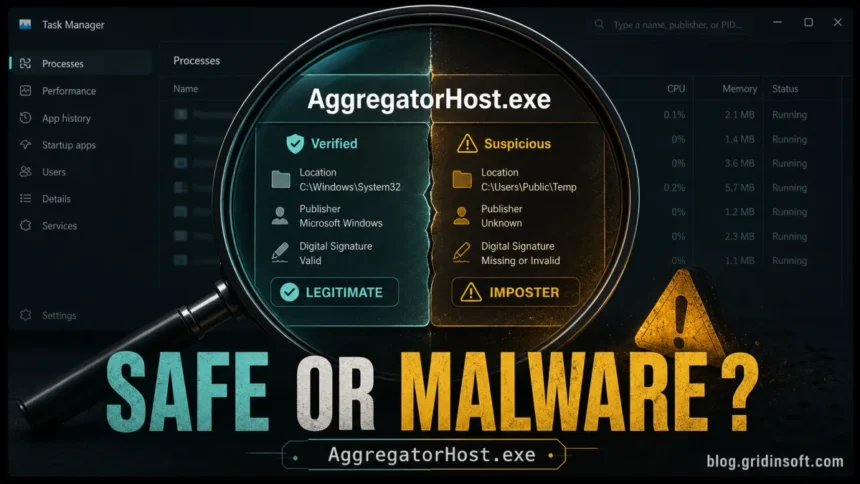
AggregatorHost.exe, sometimes searched as Microsoft Aggregator Host, is usually a legitimate Windows background process when it runs from C:\Windows\System32\AggregatorHost.exe and has a Microsoft signature. It can appear during diagnostics, telemetry, compatibility checks, updates, and other Windows background work.
If it keeps returning after End Task, uses constant high CPU, or blocks a file from being deleted, verify the running file before forcing changes. A normal System32 copy can restart; an unsigned copy in a user folder deserves a scan.
It becomes suspicious when the same name runs from Downloads, Temp, AppData, Desktop, a removable drive, or a folder with no trusted Microsoft signature. Do not delete the System32 copy; verify the path and scan suspicious copies instead.
| File name | AggregatorHost.exe |
| What it is | A Microsoft Windows background process for diagnostics, telemetry, and compatibility-related work. |
| Safe location | C:\ or a Windows component store path under C:\. |
| Safe publisher | Microsoft Windows or Microsoft Corporation. |
| Virus warning signs | The same name in AppData, Temp, Downloads, Desktop, or a folder with no valid Microsoft signature. |
| Best first action | Open file location, check Digital Signatures, and scan suspicious copies before deleting anything. |
What is AggregatorHost.exe?
AggregatorHost.exe is a Windows background executable that appears on Windows 10 and Windows 11 systems. It is commonly associated with diagnostic data aggregation, compatibility checks, and telemetry-related Windows components. In plain language, Windows may use it while collecting or processing system information that helps with updates, device compatibility, reliability checks, or feature testing.
That explanation is less dramatic than the process name looks. AggregatorHost.exe is not supposed to be a program you open yourself, and it may appear only briefly. Seeing it in Task Manager does not automatically mean your PC is infected.
What Microsoft says about AggregatorHost.exe
Microsoft does not appear to have a full standalone documentation page for AggregatorHost.exe, which is one reason the process creates confusion. However, Microsoft Q&A threads repeatedly treat AggregatorHost.exe in System32 as a legitimate Windows file, not malware. One Microsoft Q&A answer also describes it as related to Connected User Experiences and Telemetry, the Windows service that handles diagnostic and usage data when those privacy settings are enabled [1]. These are community answers hosted by Microsoft, not a technical specification or certification of the file running on your PC.
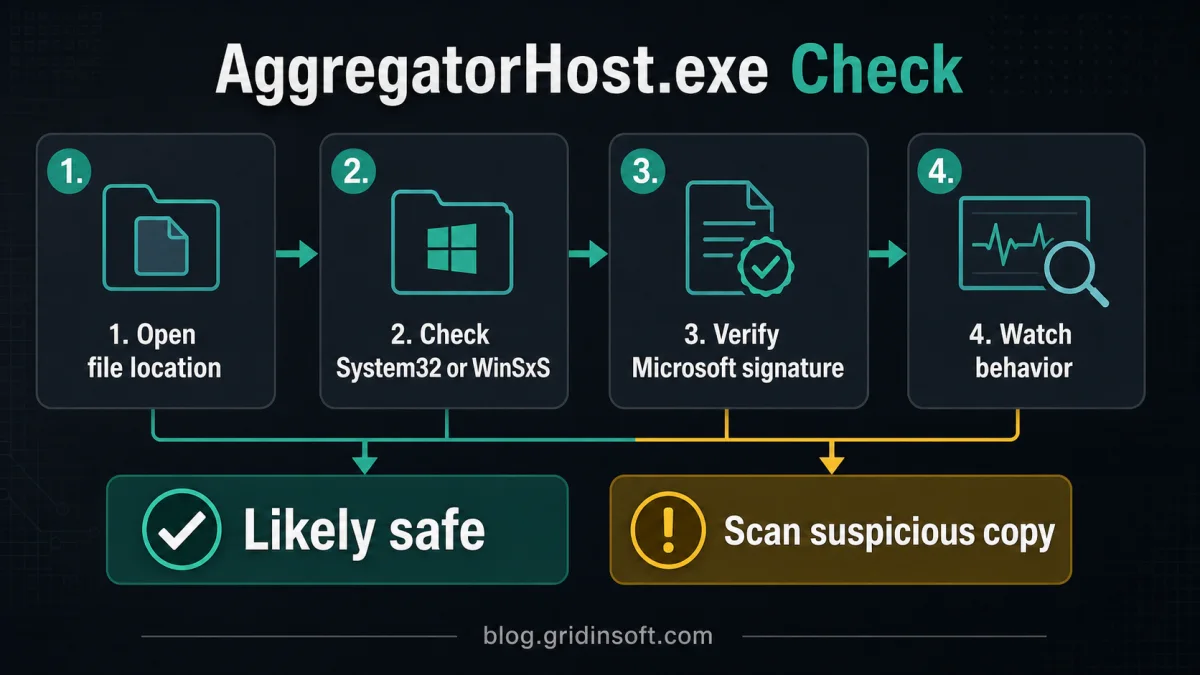
That is why the practical check is simple: if your copy is in C:\Windows\System32 or C:\Windows\WinSxS and has a Microsoft signature, it is usually normal. If the same name appears in a user folder or has no trusted signature, treat it as suspicious.
Is AggregatorHost.exe a virus?
Usually, no. A legitimate copy in C:\Windows\System32 with a Microsoft signature is a normal Windows file. However, malware can copy familiar Windows process names to look harmless, so you should verify the file that is actually running on your computer.
| What you see | What it usually means | What to do |
C:\, Microsoft-signed |
Normal Windows component. | Leave it alone. |
| AggregatorHost.exe in AppData, Temp, Downloads, Desktop, or a random folder | Possible impersonator. | Scan the file and the system. |
| Short CPU or disk activity after updates | Usually normal background work. | Wait, then recheck Task Manager. |
| Constant high CPU, repeated crashes, or unknown startup entry | Needs troubleshooting. | Check signature, run Windows repair commands, then scan. |
| “File is open in AggregatorHost.exe” | Windows or another app may still be touching that file. | Close related apps, restart Explorer or Windows, then scan suspicious files. |
“File is open in AggregatorHost.exe”: what to do
If Windows says an action cannot be completed because a file is open in AggregatorHost.exe, do not delete the Windows process. First, close the app that was using the file and wait a minute. If it still happens, restart File Explorer from Task Manager, or restart Windows and try again.
The important detail is which file is locked. If the locked item is a document, installer, archive, or download from the internet, scan that item before forcing deletion. If AggregatorHost.exe itself is running from C:\Windows\System32\AggregatorHost.exe and is Microsoft-signed, the process is usually a Windows component touching diagnostics or compatibility data rather than malware.
Common reasons people worry about AggregatorHost.exe
Most searches for this file come from uncertainty, not from a confirmed infection. These are the common cases:
- It appeared after Windows Update. That can happen with normal Windows components, especially after cumulative updates, compatibility checks, or diagnostic activity.
- It comes back after you end the task. That is usually normal. Windows can restart background components when it needs them.
- The Details tab is almost empty. Some Windows files show little product or copyright information. That is not enough to call it malware; check the location and signature instead.
- It is in System32 but still looks unfamiliar. Unfamiliar does not mean malicious. A System32 path plus a valid Microsoft signature is the strongest normal sign.
- It is on the Desktop, in Downloads, AppData, or Temp. That is different. A Windows-looking process name in a user folder deserves a scan.
How to verify AggregatorHost.exe
- Open Task Manager.
- Right-click AggregatorHost.exe and choose Open file location.
- Confirm the path is
C:\Windows\System32\AggregatorHost.exeor a Windows component store path underC:\Windows\WinSxS. - Right-click the file, open Properties, and check Digital Signatures.
- The signer should be Microsoft Windows or Microsoft Corporation.
For an optional PowerShell check, use the path reported by the running process. Checking a hard-coded System32 filename could examine a different copy. On 64-bit Windows, use 64-bit PowerShell; if access is denied, reopen it with Run as administrator and retry. The following read-only commands print each process ID and path, then inspect that same file on disk [2]:
$running = @(Get-Process -Name AggregatorHost -ErrorAction SilentlyContinue)
if ($running.Count -eq 0) {
    Write-Output "AggregatorHost is not running right now."
}
foreach ($item in $running) {
    $filePath = $item.Path
    $item | Select-Object Id, Path | Format-List
    if ([string]::IsNullOrWhiteSpace($filePath)) {
        Write-Warning "Path unavailable: no file was checked for this process."
        continue
    }
    try {
        Get-AuthenticodeSignature -LiteralPath $filePath -ErrorAction Stop |
            Format-List Path, Status, StatusMessage, SignerCertificate
        Get-FileHash -LiteralPath $filePath -Algorithm SHA256 -ErrorAction Stop |
            Format-List Path, Algorithm, Hash
    } catch {
        Write-Warning $_.Exception.Message
    }
}
- No process, blank Path, or access denied: the check is incomplete, not a clean or infected verdict. The process may have exited, access may be restricted, or 32-bit PowerShell may not expose a 64-bit process path. Retry while it is visible in Task Manager, using 64-bit PowerShell as administrator if needed. Alternatively, use Open file location on that exact Task Manager entry. Do not substitute the usual System32 path and assume you checked the running copy.
- Valid signature: check that the signer is Microsoft and that the displayed path matches the process you meant to inspect. A valid signature identifies the signed file; it does not explain every action of the running process.
- No Digital Signatures tab or another status: Windows files can use catalog signing, and a missing Properties tab alone is not a malware verdict. PowerShell checks Authenticode information, including Windows catalog signatures; read
StatusandStatusMessagebefore deciding what to investigate [3]. A wrong-folder copy, invalid signature, and suspicious startup behavior together warrant a system scan. - SHA-256 hash: this identifies the file you checked so you can compare the same sample or submit its hash for analysis. A hash by itself is not a safety rating [4]. These commands do not run, stop, or delete the examined file.
Why does AggregatorHost.exe have no clear description?
Some Windows background executables do not show a user-friendly description in Task Manager or file properties. That is annoying, but it is not proof of malware by itself. A missing or vague description should make you check the path and digital signature, not panic immediately.
What if AggregatorHost.exe uses CPU or memory?
Short bursts are normal, especially after Windows updates, Insider-related changes, diagnostics, or app compatibility events. Constant high CPU is less normal. Try this order:
- Restart Windows once.
- Install pending Windows updates.
- Run
sfc /scannow. - Run
DISM /Online /Cleanup-Image /RestoreHealth. - Check whether diagnostic or compatibility services are repeatedly restarting.
If diagnostic activity appears together with full-system freezes or 100% disk usage, use our computer keeps freezing guide to separate DiagTrack, Windows Search, SysMain, Delivery Optimization, disk health, and malware causes.
Can you delete AggregatorHost.exe?
No. Do not delete the legitimate file from System32. It is part of Windows, and deleting it can cause update, diagnostic, or component repair issues. If you want less diagnostic activity, use Windows privacy settings instead of removing system executables.
If Event Viewer names backgroundTaskHost.exe instead, use the backgroundTaskHost.exe error guide to read the faulting package and repair the owning app before running broad Windows fixes.
How to reduce diagnostic data collection
Open Settings -> Privacy & security -> Diagnostics & feedback. Turn off optional diagnostic data where Windows allows it. If you joined the Windows Insider Program, leaving Insider builds may also reduce related diagnostic activity.
When to scan for imposters
Scan the system if AggregatorHost.exe is outside a Windows folder, has no Microsoft signature, starts from a user profile folder, appears after installing suspicious software, or keeps returning after you remove a suspicious file. Also scan if the file lock points to something downloaded from an unknown website.
If the file is in Downloads, Temp, AppData, Desktop, or a removable drive, upload the suspicious file to an online scanner first or check the system with Gridinsoft Anti-Malware. Do not remove the legitimate System32 copy just because the process name looks strange.
After uninstalling the suspicious app or deleting the visible threat, use Gridinsoft Anti-Malware to check hidden files, startup entries, scheduled tasks, bundled apps, browser changes, and other persistence points that can restore malware.
Download Anti-MalwareFor another example of process-name triage, see our guide to Ckrfresh.exe and CrypKey License Service checks; it shows why a familiar-looking Windows file still needs parent-application, service, and hash context.
FAQ
Can I end AggregatorHost.exe in Task Manager?
Usually yes, but it may come back because Windows can start it again when needed. Ending the task is safer than deleting the file, but you should still verify the path and signature if the process looks unusual.
Why does Windows say a file is open in AggregatorHost.exe?
It usually means Windows or another component still has a handle on the file. Close related apps, restart File Explorer, or restart Windows. If the locked file came from Downloads, Temp, or an email attachment, scan it before opening or deleting it.
Is Microsoft Aggregator Host the same thing?
People often use “Microsoft Aggregator Host” when talking about AggregatorHost.exe. The safe version should still be verified by location and Microsoft signature.
Why did AggregatorHost.exe appear after a Windows update?
Windows updates can refresh system components, diagnostic tasks, and compatibility checks. If the file is in System32 and Microsoft-signed, appearing after an update is usually normal.
Why does AggregatorHost.exe have no company name or copyright?
Some users see an empty or incomplete Details tab. That alone is not a malware verdict. Use Open file location and Digital Signatures, or the PowerShell commands above, to verify the file.
Can malware use the AggregatorHost.exe name?
Yes. Malware can use almost any Windows-looking name. That is why checking the file location and digital signature is more reliable than trusting the process name.
The bottom line
AggregatorHost.exe is usually a legitimate Windows diagnostics and compatibility process. If it is Microsoft-signed and located in C:\Windows\System32, leave it alone. If the same name appears in a user folder, lacks a Microsoft signature, or locks suspicious downloads, scan before you trust it.
If Task Manager shows several Windows-looking processes, our sihost.exe safety guide explains how to separate a real System32 shell process from a suspicious user-folder copy. For a WMI-related process name, the Unsecapp.exe safety guide explains when a System32\wbem file is normal and when a user-folder copy deserves a scan.
References
- Microsoft Q&A contributors. “AggregatorHost. It comes with last Windows 10 update?” Community discussion hosted by Microsoft, accessed October 10, 2026. Discussion of the Windows process.
- Microsoft Learn. “Get-Process.” PowerShell documentation, accessed October 10, 2026. Process IDs, paths, and access limitations.
- Microsoft Learn. “Get-AuthenticodeSignature.” PowerShell documentation, accessed October 10, 2026. File signature and catalog checks.
- Microsoft Learn. “Get-FileHash.” PowerShell documentation, accessed October 10, 2026. SHA-256 file identification.