XCSSET v40 malware is spreading through trojanized Xcode projects and has been rebuilt around a more modular, memory-resident attack chain, Palo Alto Networks Unit 42 reported on July 31. The current version can steal browser and cryptocurrency data, tamper with security controls, persist through macOS preferences, and turn an infected developer workstation into a path for further software-supply-chain exposure.
The execution boundary matters: viewing a repository page or merely receiving a project was not identified as the trigger. The dangerous step is building or running a compromised Xcode project whose build configuration launches the embedded command. If that happened, deleting the project folder is not enough; the host and every credential available to it need incident-response review.
Who is exposed to XCSSET v40
| Situation | Risk and next decision |
|---|---|
| You viewed a repository but did not download or build it | The reported execution chain did not start. Preserve the URL if it looked suspicious, but do not treat the Mac as compromised on that fact alone. |
| You cloned or downloaded a project but never built or ran it | Keep it closed, record its source and commit, and compare it with a trusted version from a separate environment. |
| You built an untrusted project | Treat the Mac as potentially compromised. Disconnect it, preserve evidence, inspect the project and host, and rotate exposed secrets from a clean device. |
| A shared team project contains an unknown build script or modified Git hook | Stop builds and distribution. Identify when the change entered version control and which developers or CI runners executed it. |
Unit 42 began tracking the v40 wave in mid-April 2026 and saw a second wave in early May. The reported victim focus includes developers in South Asia, but the delivery mechanism is not geographically limited: any team that imports and builds an infected project can cross the same boundary.
What changed in XCSSET v40
The researchers identified 17 modules delivered through changing command infrastructure. The malware still uses AppleScript and shell tooling, but the new architecture complicates static detection and incident scoping:
- Memory-resident loaders: several stages decrypt or reconstruct the next component before execution, leaving fewer stable files to scan.
- Polymorphism and dual-key encryption: payloads and internal names change, while inbound and outbound traffic use separate cryptographic material.
- Fileless persistence: an encoded stager can be stored in a randomly named macOS preferences domain and relaunched by a trojanized application.
- Browser and wallet theft: modules support browser hijacking, data exfiltration, and cryptocurrency theft.
- Telegram tampering: a module added in May can trojanize Telegram Desktop; earlier XCSSET versions also targeted Telegram data.
- Defense evasion: v40 attempts to interfere with security updates and telemetry, resets AppleEvents consent decisions, and avoids delivering its main modules to systems that appear to be virtual machines.
A repeated permission prompt is therefore not harmless noise. Unit 42 observed XCSSET resetting the AppleEvents consent database and presenting the request again while masquerading as System Settings or Xcode. A user who already denied an unexpected request should not approve the second one without verifying the requesting application and bundle.
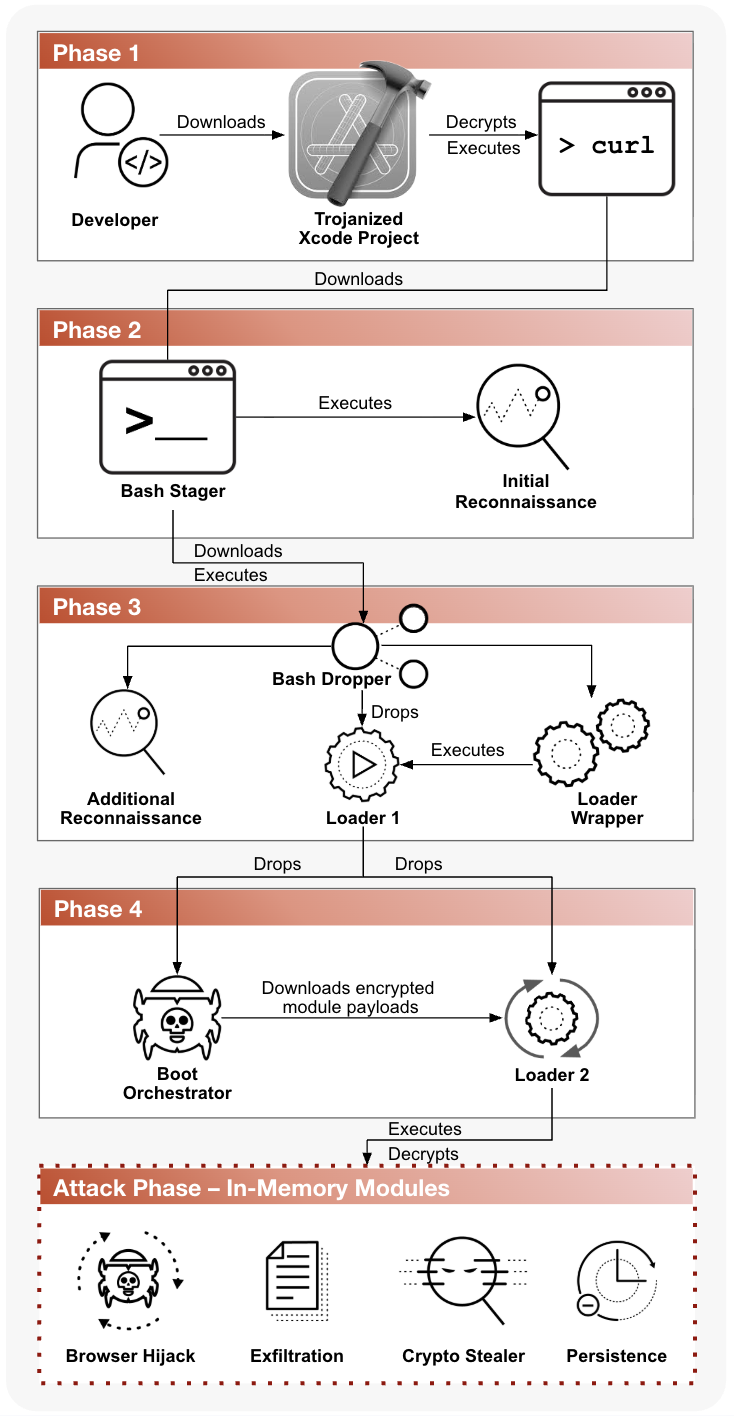
How the four-stage infection chain works
- The project supplies the first command. A trojanized Xcode project decrypts and executes a command that retrieves the next stage.
- A Bash stager profiles the Mac. Initial reconnaissance identifies the host and determines which payload path to use.
- Additional loaders arrive. A dropper and wrapper split the workflow, perform more reconnaissance, and prepare the boot component.
- In-memory modules perform the attack. The final layer supports browser hijacking, exfiltration, crypto theft, and persistence.
This is why the project and the workstation must be investigated together. Replacing one suspicious repository does not remove a preferences-based stager, altered application, malicious Git hook, stolen browser session, or credential that already left the machine.
What to do after building a suspicious Xcode project
- Disconnect the Mac from networks. Do not sign in to more services or approve new automation prompts. If the Mac is part of a company environment, contact the security team before shutting it down so volatile evidence can be handled correctly.
- Preserve the project identity. Record the repository URL, commit hash, branch, download time, build time, and who supplied it. Do not run a cleanup script found in the same repository.
- Inspect from a clean environment. Compare the project configuration, build phases, scripts, package references, and Git hooks with a known-good revision. The repository-opening safety checklist explains why project metadata deserves the same trust review as source files.
- Scope the host, not only the folder. Review unexpected applications, LaunchDaemons, shell startup changes, Git hooks, macOS preference domains, recent TCC/AppleEvents prompts, XProtect status, and the indicators in the Unit 42 report.
- Revoke access from a clean device. End browser, Apple, GitHub, Telegram, and cloud sessions. Rotate SSH keys, App Store Connect credentials, CI/CD secrets, signing or deployment keys, wallet credentials, and tokens that were present on the Mac.
- Decide between cleanup and rebuild. If execution is confirmed or host scope remains uncertain, preserve evidence and rebuild the Mac from trusted media rather than assuming that one deleted preference or project restored trust.
- Recreate projects from trusted history. Use a known-good commit and review every change introduced after the suspected compromise. Do not copy build caches, hooks, or unverified project metadata back to the clean system.
The same clean-device rotation principle applies to compromised package workflows. The Joyfill supply-chain response shows how a build-time incident can expose developer tokens and downstream artifacts even when the malicious component is removed quickly.
What XCSSET v40 does not mean
- There is no evidence that every Xcode project or GitHub repository is infected.
- Cloning a repository is not the same as executing its build phase.
- A normal XProtect status does not by itself clear a Mac after confirmed execution, especially when the malware attempts to impair updates and telemetry.
- Deleting the suspicious project does not revoke stolen tokens or remove host persistence.
- A credential reset performed on the suspected Mac may expose the replacement secret again.
Developers should treat a confirmed build as a potential account and software-integrity incident, not only as a local malware alert. If browser, wallet, or messaging data may have been exposed, the macOS account-recovery sequence provides a broader checklist for clean-device password changes and session revocation.
References
- Palo Alto Networks Unit 42. “The Xcode Assassin Returns: A Deep Dive Into the Latest XCSSET Version.” Unit 42, July 31, 2026. Primary technical report.
- Microsoft Threat Intelligence. “New XCSSET Malware Adds New Obfuscation, Persistence Techniques to Infect Xcode Projects.” Microsoft Security Blog, March 11, 2025. Earlier variant analysis and response guidance.
- MITRE ATT&CK. “XCSSET (S0658).” MITRE, accessed July 31, 2026. Technique and software reference.