Ivyof.com is not a normal destination website. In a passive check on August 31, 2026, it sent the browser through a bot-aware redirect service and then toward an adult-dating landing page. The final page can change by session, device, location, or anti-bot result, so one scanner may record Google while a person sees a dating or verification page. Avoid signing in, paying, allowing notifications, or downloading anything through this chain.
- Current behavior: Ivyof.com answered with an HTTP 302 redirect instead of serving a stable website.
- Main risk: the entry address and final page are controlled separately, so the destination can rotate without changing the Ivyof.com link.
- Lower-risk case: you only saw the page, closed it, and did not grant permission, enter data, or download a file.
- Act now: remove permissions, secure accounts, contact the card issuer, or scan the device according to what you actually did.
What Ivyof.com Does Right Now
The exact chain is time-sensitive, but the August 31 check showed a clear doorway pattern:
- Ivyof.com returned HTTP 302. The response sent the session to a subdomain of
light-meet.com. - The intermediate page ran an anti-fraud/anti-bot check. Its script sent failed checks to Google and moved passing sessions to a
/web/route. - The passing route returned another HTTP 302. That response pointed to a subdomain of
cuteboyfriend.top. - The last observed page was an adult-dating funnel. It was not a stable service page hosted on Ivyof.com.
This does not mean every visitor will see the same host or page. The observed domains are evidence from one dated session, not permanent official destinations. For that reason, this article does not link to the live campaign pages.
Why a Scanner May See Google While You See a Dating Page
Redirect campaigns often separate automated traffic from ordinary browser sessions. The intermediate script in the August 31 chain checked the session before choosing a route. A failed check went to Google; a passing session continued to the dating funnel.
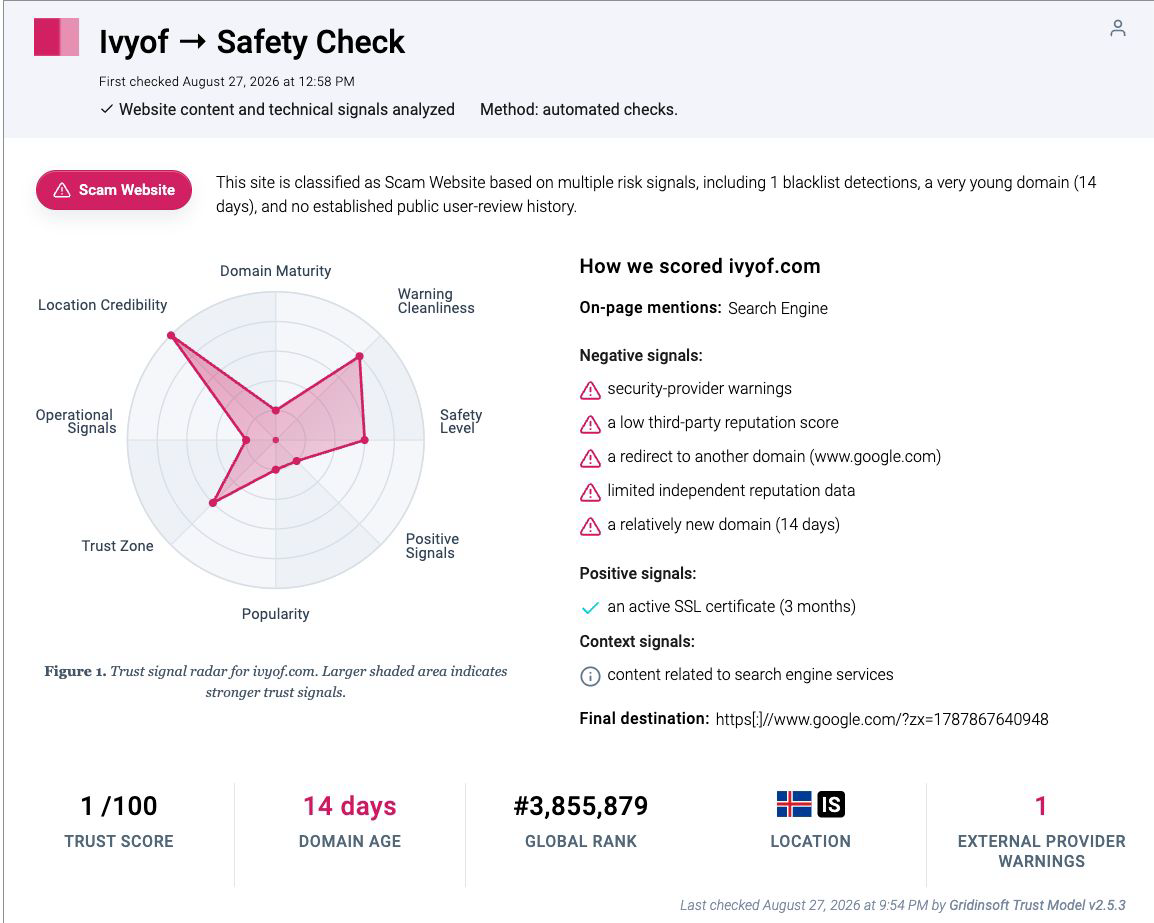
That branching explains an otherwise confusing result: the Gridinsoft Ivyof.com report captured Google as its final destination on August 27, while a later passive check reached a different chain. Neither snapshot guarantees what the next visitor will see. The reliable safety signal is that Ivyof.com does not disclose one stable destination and can hand the session to unrelated hosts.
Legitimate sites can use redirects, but a transparent migration normally sends everyone to one disclosed official domain. Ivyof.com instead combines a very young entry domain, bot-aware branching, and rotating third-party landing pages. That is not a trustworthy place to grant permissions or submit personal data.
Can Visiting Ivyof.com Infect a Device?
Opening and closing the page is not proof of infection. A view-only visit in an updated browser is lower risk than allowing a permission, installing an extension, downloading a file, or running an app. The August 31 observation proves a redirect chain; it does not prove that the page installed malware, stole a password, or charged a card.
Risk changes when the browser or device keeps behaving differently after the tab is closed. Persistent pop-ups, unfamiliar notification senders, new extensions, changed search settings, unexpected apps, or downloads you did not request all justify a deeper cleanup. Our guide to adult-site malware and redirect risks explains the common paths without assuming that every visit caused an infection.
What to Do Based on What Happened
| What happened | Risk and what to do |
|---|---|
| You saw the page and closed it | Usually the lowest-risk state. Do not reopen the chain. Clear the Ivyof.com site data if you want to remove its session cookie, then watch for unusual browser behavior. |
| You clicked through the dating or verification flow | Close every related tab. Do not continue to a signup, age check, chat, survey, or payment screen. Review browser history only to identify the unfamiliar domains; do not revisit them. |
| You allowed notifications | Remove permission for Ivyof.com and every unfamiliar domain opened in the same session. Also check the browser’s pop-up and redirect permissions. A fake “Allow to verify” prompt is not a real identity check. |
| A file downloaded, but you did not open it | Delete the file without previewing or running it, empty the download from quarantine or trash as appropriate, and scan it only through a trusted security tool if you need to identify it. Do not bypass a browser or antivirus warning. |
| You ran a file, installed an app, or added an extension | Disconnect from sensitive accounts, remove the new app or extension, run a full malware scan, reboot, and scan again if redirects return. Change important passwords from a known-clean device after the device check. |
| You entered a password or verification code | Open the real service from a saved bookmark or typed address. Change the password, sign out other sessions, enable multi-factor authentication, and review recovery email, phone, and passkey settings. Start with our hacked-account response checklist. |
| You entered card details or paid | Contact the card issuer using the number on the card or official banking app. Ask about freezing or replacing the card, dispute unrecognized charges, and monitor for recurring subscriptions. Do not pay a second party that promises to recover the money. |
If ivyof.com keeps showing unwanted pop-ups, you likely granted it permission to send notifications. To stop them, you need to revoke that permission in your browser settings.
- Copy and paste this into the address bar:
chrome://settings/content/notifications - Scroll down to the Allowed to send notifications list.
- Find ivyof.com.
- Click the three dots (...) next to it and select Remove (or Block).
- Open Safari and go to Settings (or Preferences).
- Click the Websites tab and select Notifications on the left.
- Find ivyof.com in the list on the right.
- Select it and click Remove (or change "Allow" to "Deny").
- Copy and paste this into the address bar:
about:preferences#privacy - Scroll down to Permissions and click Settings... next to Notifications.
- Type ivyof.com in the search bar or find it in the list.
- Select the site and click Remove Website.
- Copy and paste this into the address bar:
edge://settings/content/notifications - Look under the Allow section.
- Find ivyof.com.
- Click the three dots (...) next to it and select Remove (or Block).
- Copy and paste this into the address bar:
brave://settings/content/notifications - Scroll to the Allowed to send notifications list.
- Find ivyof.com.
- Click the three dots (...) and select Remove (or Block).
- Copy and paste this into the address bar:
opera://settings/content/notifications - Check the Allowed to send notifications list.
- Find ivyof.com.
- Click the three dots next to it and select Remove.
If Ivyof.com Keeps Opening
A page that reappears after you close the tab is a different problem from a one-time visit. Check the browser’s startup pages, notification permissions, extensions, search engine, and site settings. Remove unfamiliar entries added around the same time. If the redirects started after installing a free app, browser add-on, fake update, or video component, uninstall that item and check the rest of the system.
When redirects continue after a browser restart or return after reboot, a permission, extension, bundled app, scheduled task, or other persistence may remain even after the visible tab is gone. Gridinsoft Anti-Malware can check browser changes, suspicious downloads, installed apps, startup entries, and recurring activity; it cannot reverse a card charge or restore a stolen password, so complete the account and payment steps separately.
If redirects, notifications, extensions, homepage changes, or managed policies return after browser cleanup, the source is often outside the browser: an installed app, policy, scheduled task, or startup entry.
Scan this device for redirect leftoversFor a similar doorway pattern, compare the Ixtok.com redirect guide. If the main symptom is notification spam or fake security messages, use the browser notification and fake alert cleanup guide.
What the Evidence Proves—and What It Does Not
The evidence supports a narrow but useful conclusion: Ivyof.com is a redirect doorway, not a stable dating service. On August 31 it used bot-aware branching and sent a passing session through an unrelated intermediate host to an adult-dating landing domain. Verisign RDAP also shows that Ivyof.com was registered on August 15, 2026, leaving little public operating history.
The evidence does not prove that merely viewing the page infected the device. It also does not prove that every downstream form steals credentials, every payment becomes fraudulent, or every visitor receives the same page. Those outcomes depend on the route and the action taken. Base your response on the state table above instead of treating every exposure as identical.
How to Avoid Similar Redirect Traps
- Search the exact domain before entering data, but attach a date to every result because redirect destinations can change quickly.
- Check the address after each redirect. A familiar first domain does not make the final host trustworthy.
- Reject notification, extension, download, age-verification, and payment prompts on a page you did not intentionally seek.
- Use unique passwords so one fake signup cannot expose another account.
- Use a bank or card issuer’s official app and phone number for payment disputes; ignore recovery offers sent through the same funnel.
FAQ
Is Ivyof.com an adult dating site?
No. The observed Ivyof.com address acted as an entry doorway and redirected the browser to a separate adult-dating landing domain. The final host can change, so treat Ivyof.com as the campaign entry point rather than the disclosed home of one service.
Why did the Gridinsoft report show Google?
The August 31 intermediate page used an anti-bot check: failed checks went to Google, while a passing session continued through another route. A scanner and a person can therefore record different destinations at different times.
Should I reset passwords after visiting Ivyof.com?
Not for a view-only visit. Reset passwords if you entered one into a downstream form, reused the same password elsewhere, installed an untrusted extension or app, or have evidence that the device or session was compromised.
Should I scan the device?
Scan if a file downloaded and ran, an extension or app was installed, redirects continue, browser settings changed, or a security tool reports suspicious activity. A scan is less urgent when you only opened and closed the page without granting permission or running anything.
References
- Verisign. “RDAP Domain Record for IVYOF.COM.” Verisign Registry Services, accessed August 31, 2026. https://rdap.verisign.com/com/v1/domain/ivyof.com
- urlscan.io. “Public Scan Result 01a02093-3b13-725a-af92-0905344c0dec.” urlscan.io, August 20, 2026; accessed August 31, 2026. https://urlscan.io/result/01a02093-3b13-725a-af92-0905344c0dec/