A message that arrived after DEF CON did not begin with an attachment or a visibly fake login page. According to Huntress, the sender impersonated a CoinDesk executive in X direct messages, moved the conversation into a real Google Document, and asked the recipient to use a sidebar to “decrypt” it. The document was hosted on docs.google.com; the update instructions inside it were not trustworthy.
That distinction matters. Opening the document was not the same event as running the malware. The dangerous transition came when the recipient followed a fake update path: a copied macOS terminal command, a DMG installer, a Windows ClickOnce package presented as a Google API connector, or a separate fake DocSend installer. Huntress associated the observed macOS paths with an AMOS-like stealer and backdoor, and the Windows paths with NetSupport RAT and additional wallet-related persistence.
Who needs to act after the Google Doc lure
The fastest way to assess the incident is to identify the last action that actually happened. Do not run the file or command again to find out what it does.
| What happened | Likely exposure | What to do now |
|---|---|---|
| You received the X message but did not open its link | No malware execution from the reported chain | Block and report the account. Preserve the message if it targeted your workplace or conference identity. |
| You opened the Google Doc or its sidebar | The sender learned that the lure reached a real person; opening alone is not evidence that AMOS or NetSupport ran | Close it, report the document, and review your Google Account activity if you granted any unexpected permission. |
| You entered the supplied “decryption key,” but ran nothing | The failure screen was designed to move you toward the fake update | Stop there. Do not copy a command, bypass Gatekeeper, or install the offered connector. |
| You downloaded a DMG, ClickOnce package, or DocSend-branded installer but did not open it | The file may be malicious, but download alone does not prove execution | Delete or quarantine it, record its filename and download time, and run a trusted scan. |
| You ran the macOS command or DMG | High risk of credential, browser-session, crypto-wallet, and persistent backdoor theft | Disconnect the Mac, preserve evidence, scan it, and rotate exposed credentials from a clean device. |
| You installed the Windows connector or DocSend package | High risk of NetSupport remote access plus system and wallet tampering | Isolate the PC and have it checked for services, certificates, hosts-file edits, firewall rules, and persistence before reconnecting it. |
Why a real Google address did not make the document safe
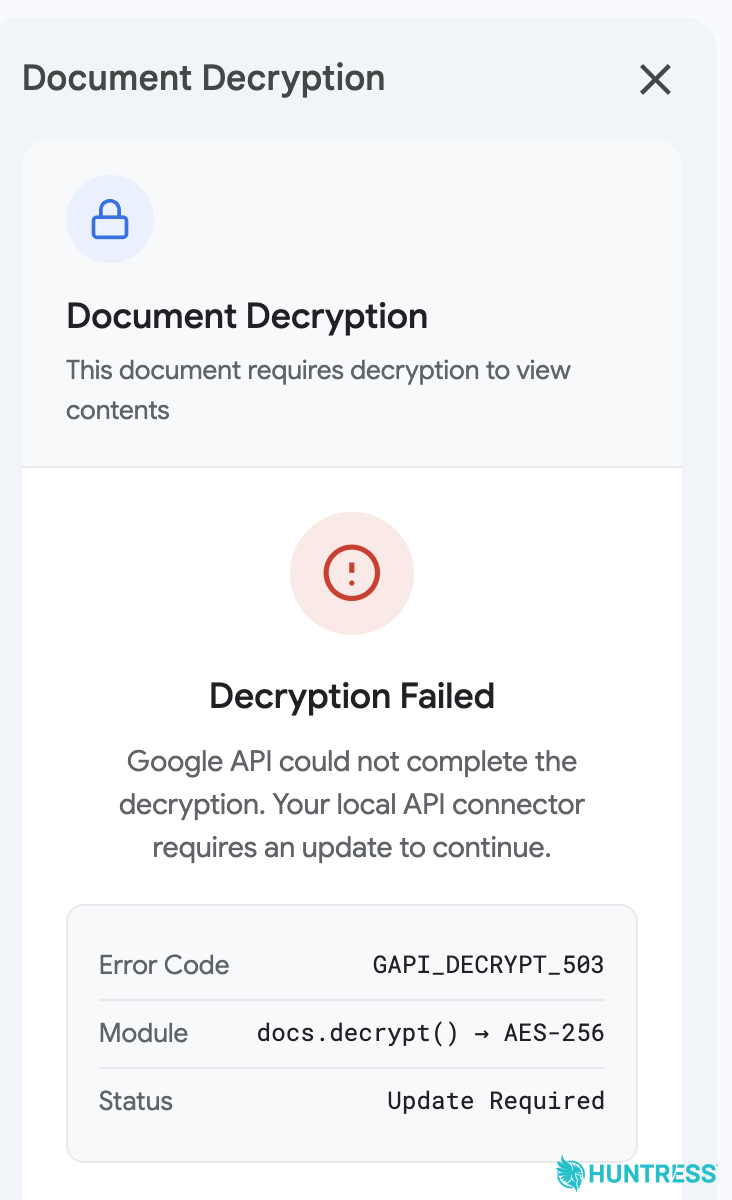
Google Apps Script lets a document owner build custom menus and sidebars. In this campaign, that legitimate feature became the presentation layer for the attacker. The victim saw a polished “Document Decryption” interface, entered a key from the message, and received a failure by design. The sidebar then claimed that Google API components needed an update.
The hosting domain only tells you where the page is served. It does not vouch for instructions written by an untrusted document owner. A document that asks you to leave the browser, paste a terminal command, disable a platform protection, or install an “API connector” has crossed the trust boundary. This is the same social-engineering pressure used by fake CAPTCHA and ClickFix campaigns: the user is persuaded to perform the step that ordinary browser protections would otherwise block.
What Huntress observed on macOS and Windows
On macOS, one route displayed a command for the target to copy into Terminal and another offered a disk image while instructing the user to bypass Gatekeeper. The resulting malware resembled Atomic macOS Stealer in its theft goals and also included backdoor behavior. That combination raises the stakes beyond one stolen password: browser cookies, saved credentials, wallet data, and continuing remote access may all need investigation. Our AmnesiaStealer recovery guide explains why browser sessions deserve attention even after the visible file is removed.
On Windows, the fake Google API connector used ClickOnce to install NetSupport Manager components that could give an operator remote control. Huntress also analyzed a second delivery route built around a convincing but fake DocSend page. Its installer added another NetSupport path and Ledger-related persistence, while making changes that could include a root certificate, the Windows hosts file, and a firewall rule.
NetSupport Manager and ClickOnce are legitimate technologies. Their presence is not automatically proof of compromise. Context is decisive: an unexpected installation immediately after this message, an unfamiliar service or remote-control component, and system changes clustered around the same time are reasons to investigate. Public reporting also says some observed payload locations were already dead or incomplete, so the exact result can differ between targets.
What to check if a fake update ran
- Isolate the device. Disconnect Wi-Fi, Ethernet, VPN, and removable storage. For a work device, contact the security team before deleting files; message history, download records, and process logs can establish the scope.
- Preserve the lure. Save the X account, conversation, Google Doc URL, the approximate time of each action, and the downloaded filename. Do not reopen a suspicious installer merely to calculate a hash.
- Scan for the complete chain. Run an up-to-date security scan and keep detections quarantined. On macOS, review login items, launch agents/daemons, unexpected profiles, browser extensions, and recent application access. On Windows, review installed programs, services, scheduled tasks, startup entries, certificates, hosts-file changes, firewall rules, and remote-access software.
- Protect accounts from a clean device. Revoke active sessions, change email and password-manager credentials, replace exposed developer tokens or API keys, and enable phishing-resistant MFA where possible. Changing a password on the suspected device can hand the new secret to the attacker.
- Review money-related access. Check crypto-wallet extensions, exchange accounts, recovery phrases, and recent transfers. If a seed phrase or private key was visible on the affected device, move assets using a clean device and a newly created wallet.
- Verify before reconnecting. A single removed file is not enough when the reported paths include persistence and remote access. Reboot, rescan, and confirm that suspicious services, certificates, rules, and login items do not return.
If you find an unfamiliar remote-control component on Windows, use the remote-access trojan checklist to separate legitimate support software from attacker-installed access. Organizations should consider the identity used in the lure too: conference attendance, employer, media role, and cryptocurrency work may explain why the person was selected.
Report the document without overcorrecting
Use Google Docs’ abuse-reporting flow for the malicious document and report the impersonating X account. If you granted a Google permission, revoke it and review recent security activity. Do not assume that every unsolicited collaboration request is malicious, but verify the sender through an independently obtained address or known colleague before opening follow-up files.
Likewise, blocking Google Docs or DocSend across an organization is a blunt response. The reusable control is behavioral: no document, recruiter, journalist, conference contact, or “support” agent should require a terminal command, security bypass, root certificate, or surprise remote-access installation to reveal ordinary content.
References
- Huntress. “Post-DEF CON Phishing Campaign Uses Google Docs to Deliver Multi-Platform Malware.” August 19, 2026. Huntress campaign analysis.
- Google Docs Editors Help. “Report a violation.” Accessed September 4, 2026. Google document-reporting instructions.
- Google Account Help. “Secure a hacked or compromised Google Account.” Accessed September 4, 2026. Google account recovery steps.